October 2025
Building a RAG System for
Customer Support - L1
Agentic AI
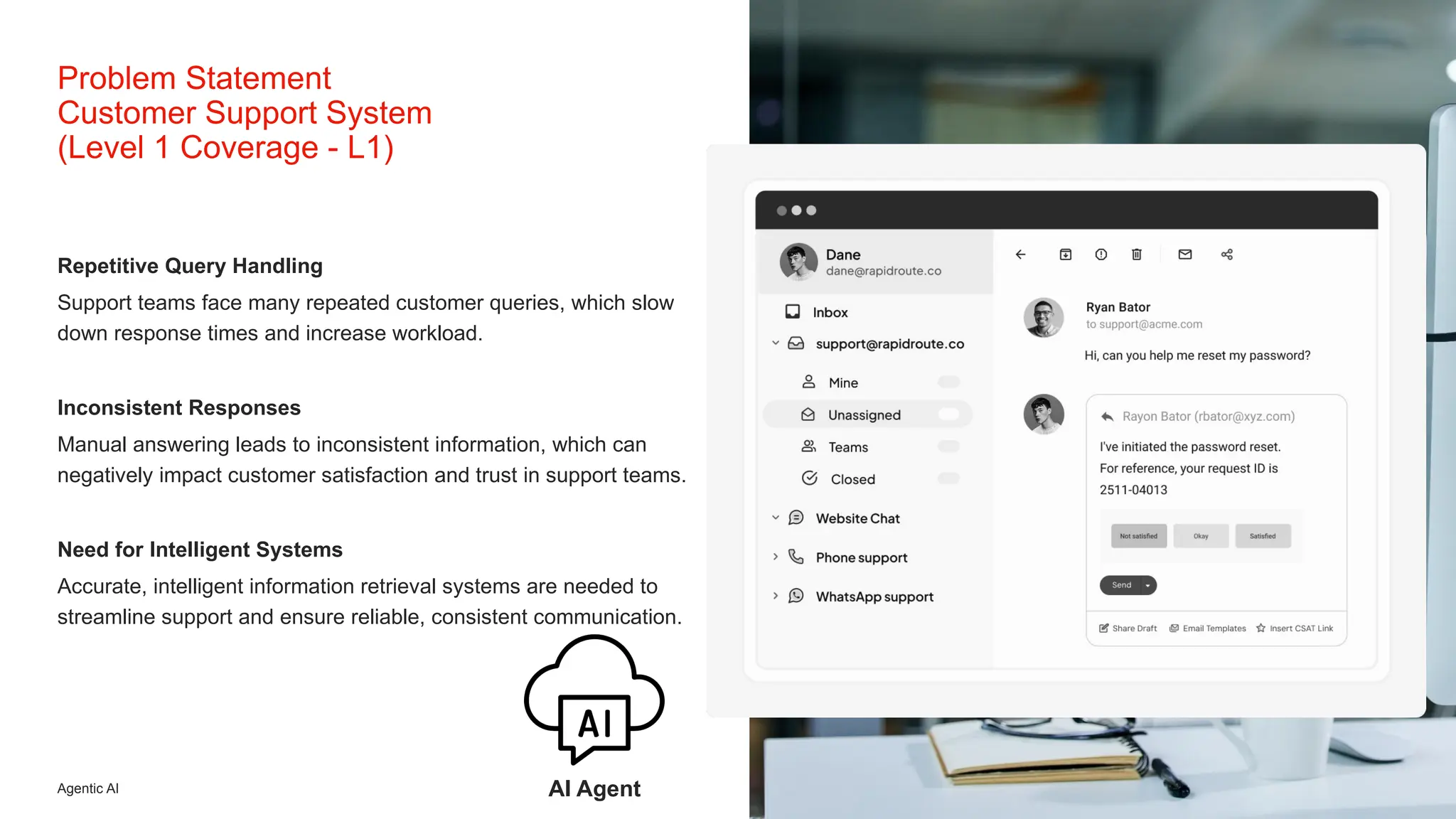
Repetitive Query Handling
Support teams face many repeated customer queries, which slow
down response times and increase workload.
Inconsistent Responses
Manual answering leads to inconsistent information, which can
negatively impact customer satisfaction and trust in support teams.
Need for Intelligent Systems
Accurate, intelligent information retrieval systems are needed to
streamline support and ensure reliable, consistent communication.
Problem Statement
Customer Support System
(Level 1 Coverage - L1)
AI Agent
Agentic AI 3
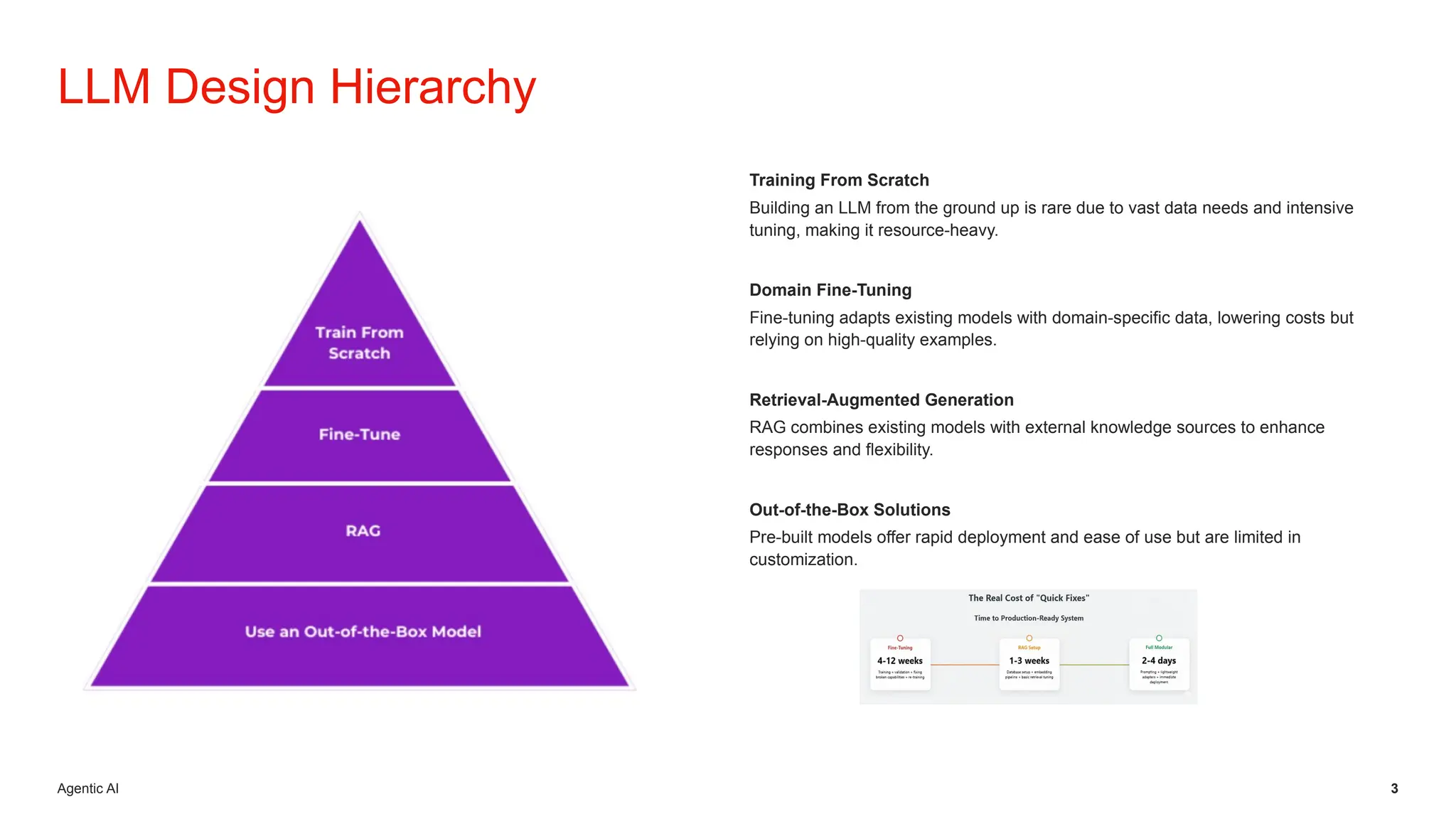
Training From Scratch
Building an LLM from the ground up is rare due to vast data needs and intensive
tuning, making it resource-heavy.
Domain Fine-Tuning
Fine-tuning adapts existing models with domain-specific data, lowering costs but
relying on high-quality examples.
Retrieval-Augmented Generation
RAG combines existing models with external knowledge sources to enhance
responses and flexibility.
Out-of-the-Box Solutions
Pre-built models offer rapid deployment and ease of use but are limited in
customization.
LLM Design Hierarchy
Agentic AI
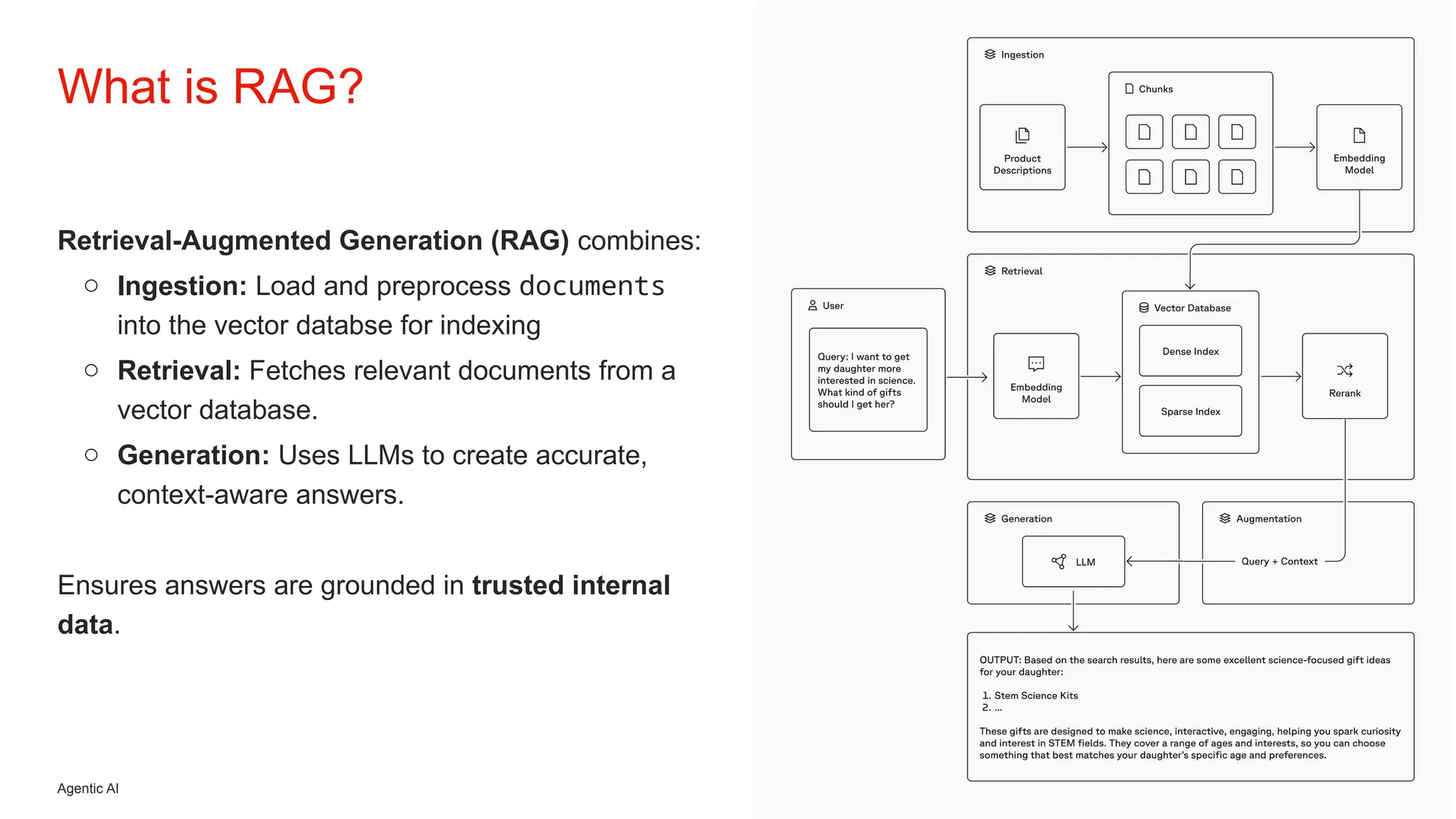
Retrieval-Augmented Generation (RAG) combines:
o Ingestion: Load and preprocess documents
into the vector databse for indexing
o Retrieval: Fetches relevant documents from a
vector database.
o Generation: Uses LLMs to create accurate,
context-aware answers.
Ensures answers are grounded in trusted internal
data.
What is RAG?
Agentic AI
Combining Retrieval and Generation
RAG merges document retrieval and text generation, allowing
language models (LLMs) to access and use relevant information on
demand.
Context from Vector Databases
RAG fetches relevant documents from a vector database, providing
valuable context for generating precise and informed answers.
Grounded and Trustworthy Output
By grounding answers in trusted internal data, RAG increases the
reliability and trustworthiness of language model outputs.
What is RAG?
Agentic AI 6
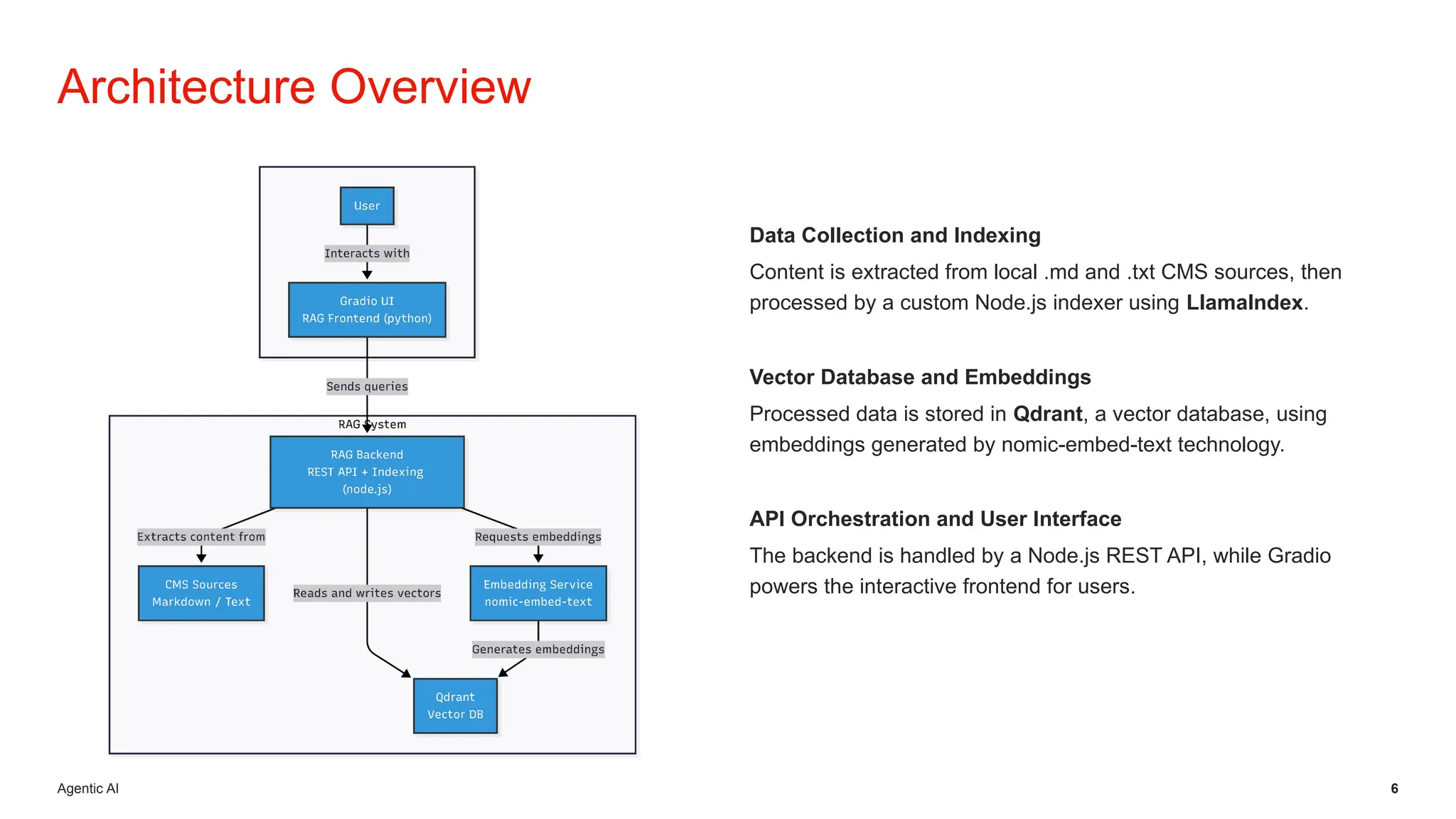
Data Collection and Indexing
Content is extracted from local .md and .txt CMS sources, then
processed by a custom Node.js indexer using LlamaIndex.
Vector Database and Embeddings
Processed data is stored in Qdrant, a vector database, using
embeddings generated by nomic-embed-text technology.
API Orchestration and User Interface
The backend is handled by a Node.js REST API, while Gradio
powers the interactive frontend for users.
Architecture Overview
Agentic AI 7
Architecture Overview
LLMs models
• Data Source: Local .md & .txt files (CMS extracts)
• Indexing: Custom Node.js indexer + LlamaIndex
• Vector Database: Qdrant
Ollama is a local runtime for large language models (LLMs) 🧠
that makes it easy to download, run, and manage open-source
LLMs directly on your machine — without needing cloud APIs.
• 🔒 Privacy & control — since everything runs locally, no data
leaves your system.
• Models (Ollama):
• Embeddings: nomic-embed-text (274MB)
• Default LLM: llama3.2
• Supported:
▪ llama3.1 (8b), llama3.2 (3b),
▪ gpt-oss (20b),
▪ gemma3 (4b, 12b),
• Backend: Node.js server (REST API + orchestration)
• Frontend/UI: Gradio
Agentic AI 8
All Models Run Locally
Running models locally removes API dependencies, providing users
with greater privacy and control over data processing.
Flexible Model Support
Ollama supports multiple LLM families, such as Llama, Gemma,
GPT-OSS, enhancing model flexibility.
GPT-5 variants used via the OpenAI platform.
Enhanced Privacy and Performance
Local execution delivers improved privacy, cost efficiency, and faster
response times compared to cloud-based solutions.
Local Model Execution with Ollama
Agentic AI 9
Chroma: Developer-Friendly Simplicity
Chroma is a lightweight, developer-focused vector database designed for rapid
prototyping and smaller-scale applications, with a simple API and quick setup.
Pinecone: Managed Scalability
Pinecone is a managed vector database offering high scalability and performance, but it
comes with a higher operational cost.
Weaviate: Feature-Rich and Modular
Weaviate provides a flexible and modular platform with rich features suited for various
vector search needs.
Milvus: Enterprise Clustering
Milvus supports enterprise-grade clustering, making it suitable for large-scale
deployments and robust performance requirements.
Qdrant: Efficient Open-Source
Qdrant is an open-source, efficient vector database ideal for self-hosted environments
and the preferred option for our needs.
Architecture Overview
Vector Database Choices
Agentic AI 10
Open Source and Cost-Effective
Qdrant provides an accessible solution for vector similarity search
with no licensing costs, making it budget-friendly for all users.
High Performance Search
It enables rapid and accurate searches even on massive datasets,
ensuring excellent performance for demanding applications.
Easy Integration and Scalability
Qdrant integrates seamlessly with popular languages like Node.js
and Python, and scales flexibly to support growing data and user
needs.
Architecture Overview
Why Choose Qdrant?
Agentic AI 11
Backend Architecture
Core of the system: Modular document search with Elasticsearch + Qdrant
Indexes .md & .txt documents for search and RAG
Provides a RESTful API to support search and RAG workflows
Key Features:
• Exact & fuzzy search via Elasticsearch
• Vector similarity search & RAG responses via Qdrant
• REST API endpoints for search, update, and response generation
• Optional Gradio UI for interactive access
Agentic AI
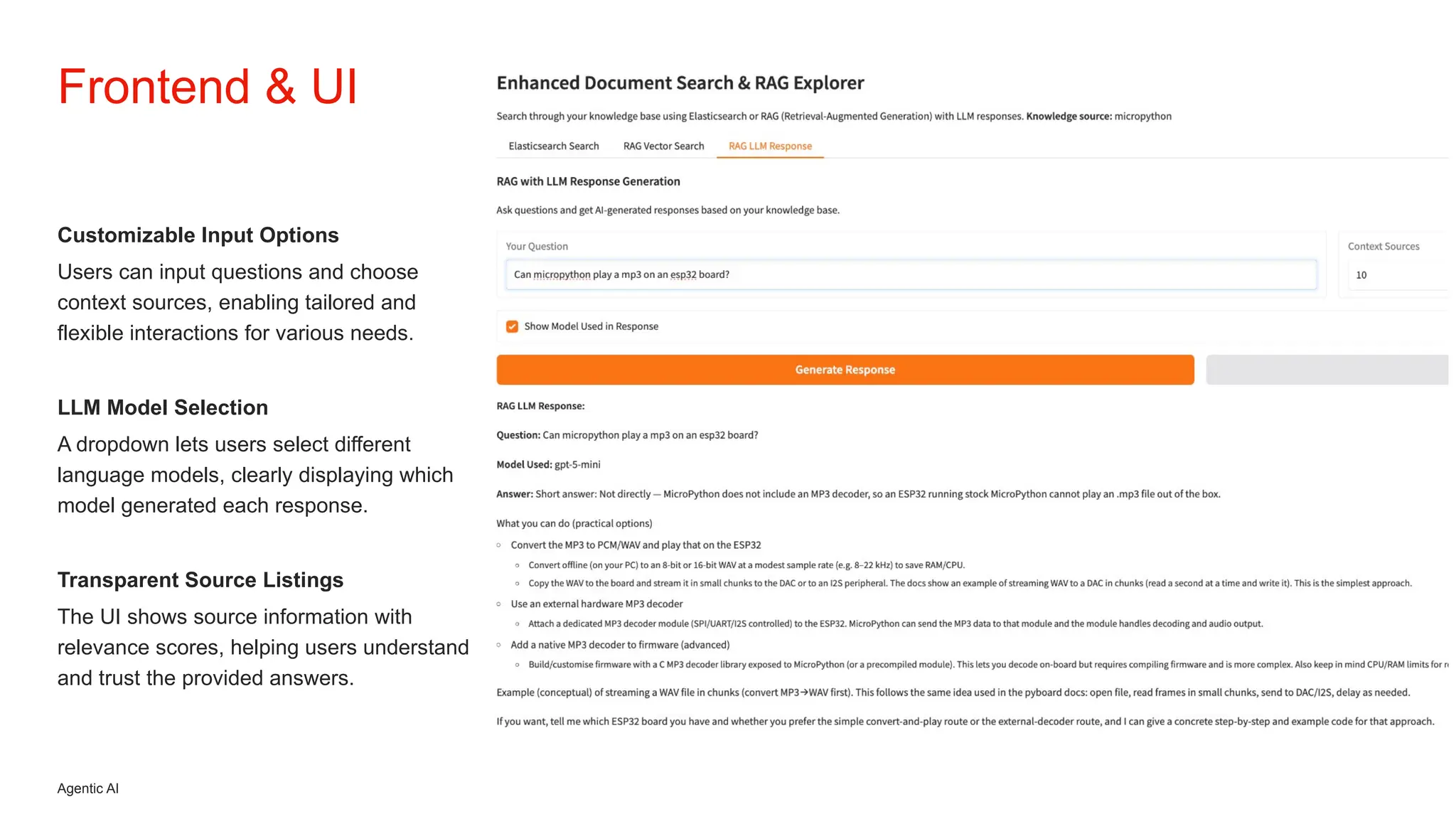
Customizable Input Options
Users can input questions and choose
context sources, enabling tailored and
flexible interactions for various needs.
LLM Model Selection
A dropdown lets users select different
language models, clearly displaying which
model generated each response.
Transparent Source Listings
The UI shows source information with
relevance scores, helping users understand
and trust the provided answers.
Frontend & UI
Agentic AI 13
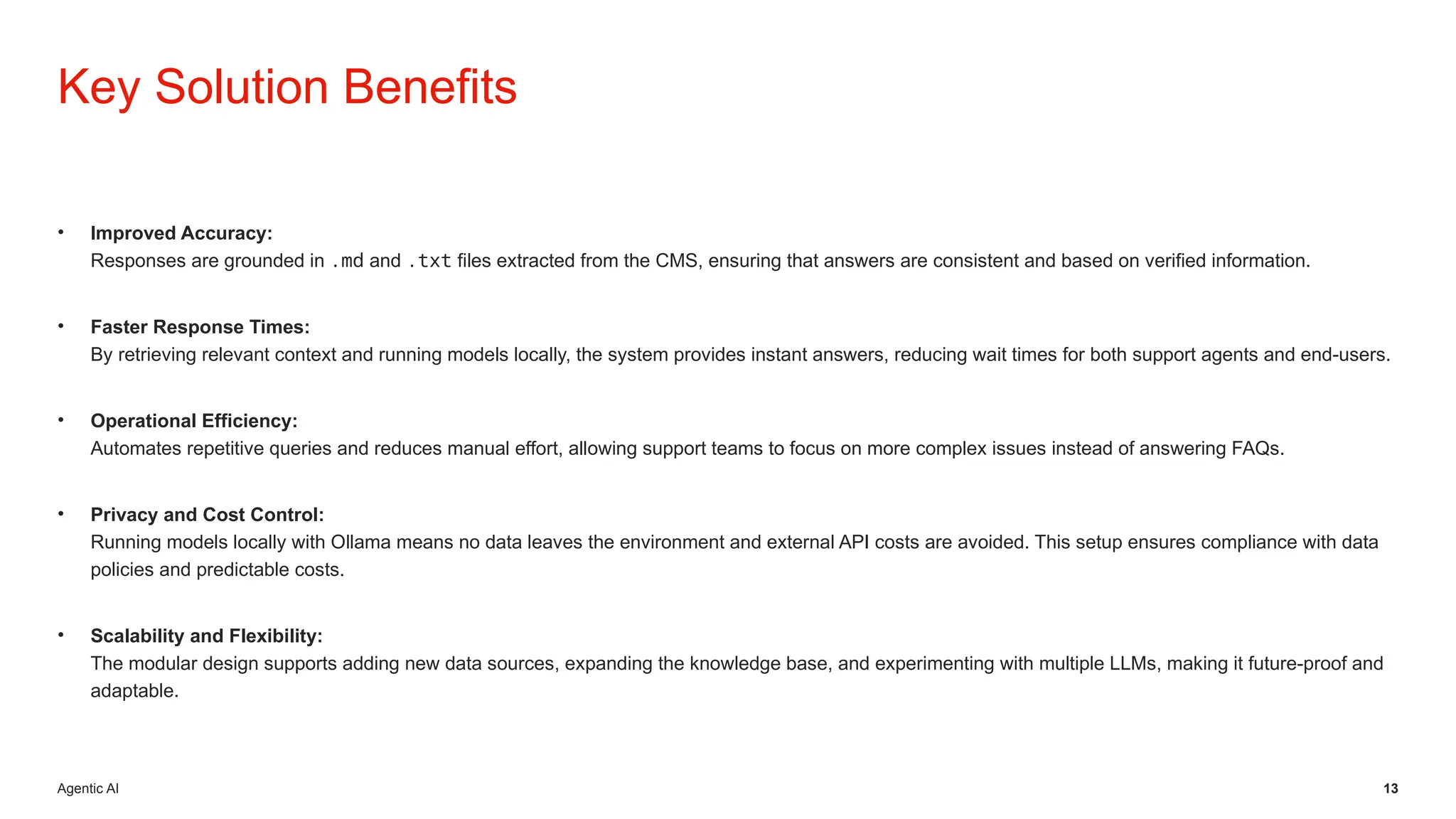
• Improved Accuracy:
Responses are grounded in .md and .txt files extracted from the CMS, ensuring that answers are consistent and based on verified information.
• Faster Response Times:
By retrieving relevant context and running models locally, the system provides instant answers, reducing wait times for both support agents and end-users.
• Operational Efficiency:
Automates repetitive queries and reduces manual effort, allowing support teams to focus on more complex issues instead of answering FAQs.
• Privacy and Cost Control:
Running models locally with Ollama means no data leaves the environment and external API costs are avoided. This setup ensures compliance with data
policies and predictable costs.
• Scalability and Flexibility:
The modular design supports adding new data sources, expanding the knowledge base, and experimenting with multiple LLMs, making it future-proof and
adaptable.
Key Solution Benefits
Agentic AI
Content / CMS Automated Content Synchronization
Daily sync ensures .md or .txt files are always up-to-date,
enhancing content reliability and workflow efficiency.
Multi-Language Accessibility
Supporting multiple languages increases accessibility,
allowing users worldwide to enjoy an improved experience.
Tailored Insights and Interactivity
Specific models deliver precise insights; chatbot and analytics
dashboard support interactive, data-driven decision-making.
• Chatbot Integration: Enables end-users or support
agents to interact with the knowledge base in real time,
asking follow-up questions and drilling deeper into topics.
• Analytics Dashboard: Provides visibility into query
trends, frequent issues, and system performance. This
makes the support workflow data-driven, helping teams
continuously improve processes and anticipate customer
needs.
Unlocking Future
Potential
Bogdan Mustata
Thank you for your presence.
15
Software Architect | Cloud & AI
bmustata@yahoo.com
Thank you
GitHub Repo
https://github.com/bmustata/rag_exploration
17
Extra
18
Extra
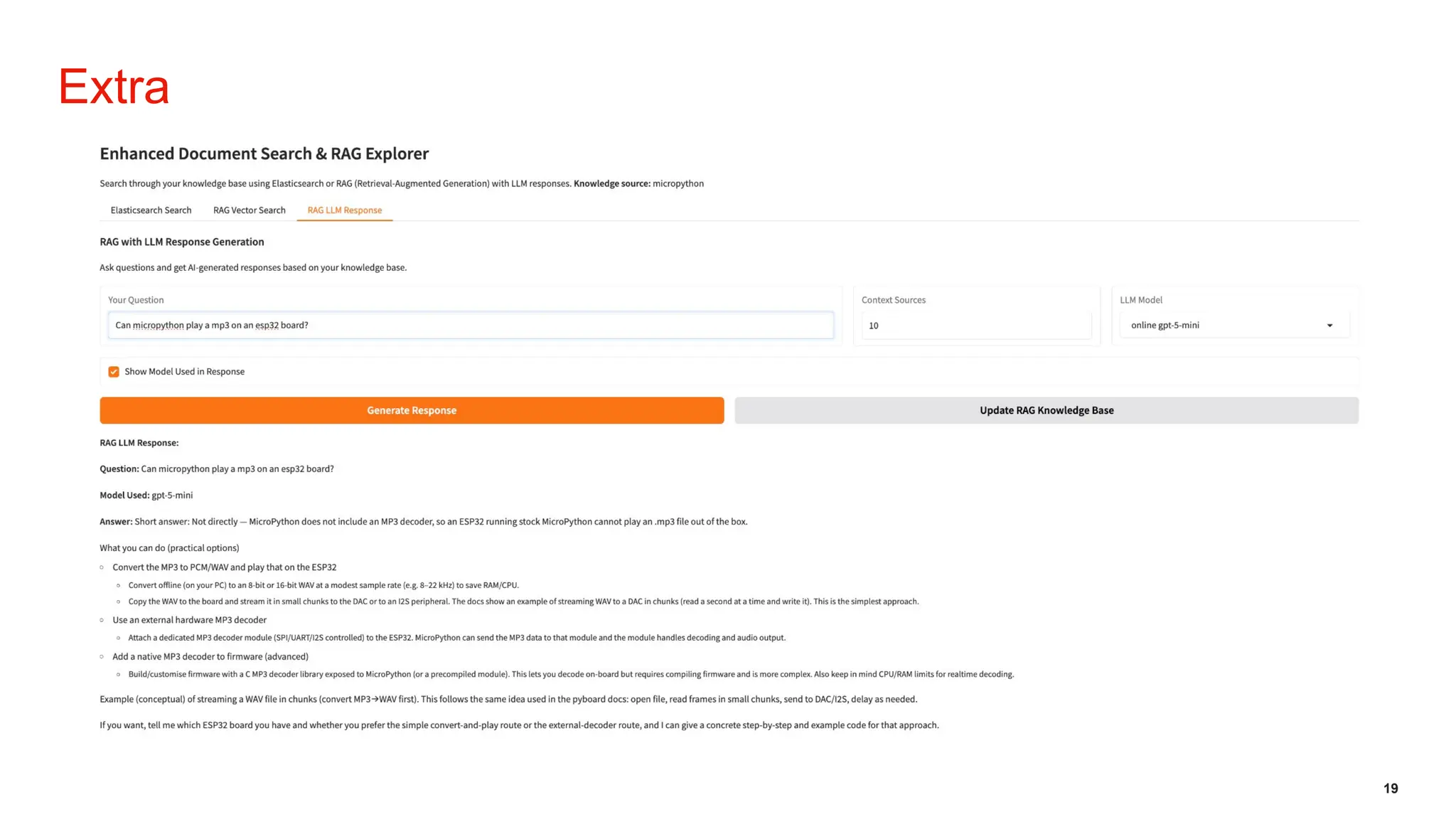
19
Extra

Building a RAG System for Customer Support - L1

  • 1.
    October 2025 Building aRAG System for Customer Support - L1
  • 2.
    Agentic AI Repetitive QueryHandling Support teams face many repeated customer queries, which slow down response times and increase workload. Inconsistent Responses Manual answering leads to inconsistent information, which can negatively impact customer satisfaction and trust in support teams. Need for Intelligent Systems Accurate, intelligent information retrieval systems are needed to streamline support and ensure reliable, consistent communication. Problem Statement Customer Support System (Level 1 Coverage - L1) AI Agent
  • 3.
    Agentic AI 3 TrainingFrom Scratch Building an LLM from the ground up is rare due to vast data needs and intensive tuning, making it resource-heavy. Domain Fine-Tuning Fine-tuning adapts existing models with domain-specific data, lowering costs but relying on high-quality examples. Retrieval-Augmented Generation RAG combines existing models with external knowledge sources to enhance responses and flexibility. Out-of-the-Box Solutions Pre-built models offer rapid deployment and ease of use but are limited in customization. LLM Design Hierarchy
  • 4.
    Agentic AI Retrieval-Augmented Generation(RAG) combines: o Ingestion: Load and preprocess documents into the vector databse for indexing o Retrieval: Fetches relevant documents from a vector database. o Generation: Uses LLMs to create accurate, context-aware answers. Ensures answers are grounded in trusted internal data. What is RAG?
  • 5.
    Agentic AI Combining Retrievaland Generation RAG merges document retrieval and text generation, allowing language models (LLMs) to access and use relevant information on demand. Context from Vector Databases RAG fetches relevant documents from a vector database, providing valuable context for generating precise and informed answers. Grounded and Trustworthy Output By grounding answers in trusted internal data, RAG increases the reliability and trustworthiness of language model outputs. What is RAG?
  • 6.
    Agentic AI 6 DataCollection and Indexing Content is extracted from local .md and .txt CMS sources, then processed by a custom Node.js indexer using LlamaIndex. Vector Database and Embeddings Processed data is stored in Qdrant, a vector database, using embeddings generated by nomic-embed-text technology. API Orchestration and User Interface The backend is handled by a Node.js REST API, while Gradio powers the interactive frontend for users. Architecture Overview
  • 7.
    Agentic AI 7 ArchitectureOverview LLMs models • Data Source: Local .md & .txt files (CMS extracts) • Indexing: Custom Node.js indexer + LlamaIndex • Vector Database: Qdrant Ollama is a local runtime for large language models (LLMs) 🧠 that makes it easy to download, run, and manage open-source LLMs directly on your machine — without needing cloud APIs. • 🔒 Privacy & control — since everything runs locally, no data leaves your system. • Models (Ollama): • Embeddings: nomic-embed-text (274MB) • Default LLM: llama3.2 • Supported: ▪ llama3.1 (8b), llama3.2 (3b), ▪ gpt-oss (20b), ▪ gemma3 (4b, 12b), • Backend: Node.js server (REST API + orchestration) • Frontend/UI: Gradio
  • 8.
    Agentic AI 8 AllModels Run Locally Running models locally removes API dependencies, providing users with greater privacy and control over data processing. Flexible Model Support Ollama supports multiple LLM families, such as Llama, Gemma, GPT-OSS, enhancing model flexibility. GPT-5 variants used via the OpenAI platform. Enhanced Privacy and Performance Local execution delivers improved privacy, cost efficiency, and faster response times compared to cloud-based solutions. Local Model Execution with Ollama
  • 9.
    Agentic AI 9 Chroma:Developer-Friendly Simplicity Chroma is a lightweight, developer-focused vector database designed for rapid prototyping and smaller-scale applications, with a simple API and quick setup. Pinecone: Managed Scalability Pinecone is a managed vector database offering high scalability and performance, but it comes with a higher operational cost. Weaviate: Feature-Rich and Modular Weaviate provides a flexible and modular platform with rich features suited for various vector search needs. Milvus: Enterprise Clustering Milvus supports enterprise-grade clustering, making it suitable for large-scale deployments and robust performance requirements. Qdrant: Efficient Open-Source Qdrant is an open-source, efficient vector database ideal for self-hosted environments and the preferred option for our needs. Architecture Overview Vector Database Choices
  • 10.
    Agentic AI 10 OpenSource and Cost-Effective Qdrant provides an accessible solution for vector similarity search with no licensing costs, making it budget-friendly for all users. High Performance Search It enables rapid and accurate searches even on massive datasets, ensuring excellent performance for demanding applications. Easy Integration and Scalability Qdrant integrates seamlessly with popular languages like Node.js and Python, and scales flexibly to support growing data and user needs. Architecture Overview Why Choose Qdrant?
  • 11.
    Agentic AI 11 BackendArchitecture Core of the system: Modular document search with Elasticsearch + Qdrant Indexes .md & .txt documents for search and RAG Provides a RESTful API to support search and RAG workflows Key Features: • Exact & fuzzy search via Elasticsearch • Vector similarity search & RAG responses via Qdrant • REST API endpoints for search, update, and response generation • Optional Gradio UI for interactive access
  • 12.
    Agentic AI Customizable InputOptions Users can input questions and choose context sources, enabling tailored and flexible interactions for various needs. LLM Model Selection A dropdown lets users select different language models, clearly displaying which model generated each response. Transparent Source Listings The UI shows source information with relevance scores, helping users understand and trust the provided answers. Frontend & UI
  • 13.
    Agentic AI 13 •Improved Accuracy: Responses are grounded in .md and .txt files extracted from the CMS, ensuring that answers are consistent and based on verified information. • Faster Response Times: By retrieving relevant context and running models locally, the system provides instant answers, reducing wait times for both support agents and end-users. • Operational Efficiency: Automates repetitive queries and reduces manual effort, allowing support teams to focus on more complex issues instead of answering FAQs. • Privacy and Cost Control: Running models locally with Ollama means no data leaves the environment and external API costs are avoided. This setup ensures compliance with data policies and predictable costs. • Scalability and Flexibility: The modular design supports adding new data sources, expanding the knowledge base, and experimenting with multiple LLMs, making it future-proof and adaptable. Key Solution Benefits
  • 14.
    Agentic AI Content /CMS Automated Content Synchronization Daily sync ensures .md or .txt files are always up-to-date, enhancing content reliability and workflow efficiency. Multi-Language Accessibility Supporting multiple languages increases accessibility, allowing users worldwide to enjoy an improved experience. Tailored Insights and Interactivity Specific models deliver precise insights; chatbot and analytics dashboard support interactive, data-driven decision-making. • Chatbot Integration: Enables end-users or support agents to interact with the knowledge base in real time, asking follow-up questions and drilling deeper into topics. • Analytics Dashboard: Provides visibility into query trends, frequent issues, and system performance. This makes the support workflow data-driven, helping teams continuously improve processes and anticipate customer needs. Unlocking Future Potential
  • 15.
    Bogdan Mustata Thank youfor your presence. 15 Software Architect | Cloud & AI bmustata@yahoo.com
  • 16.
  • 17.
  • 18.
  • 19.

Editor's Notes

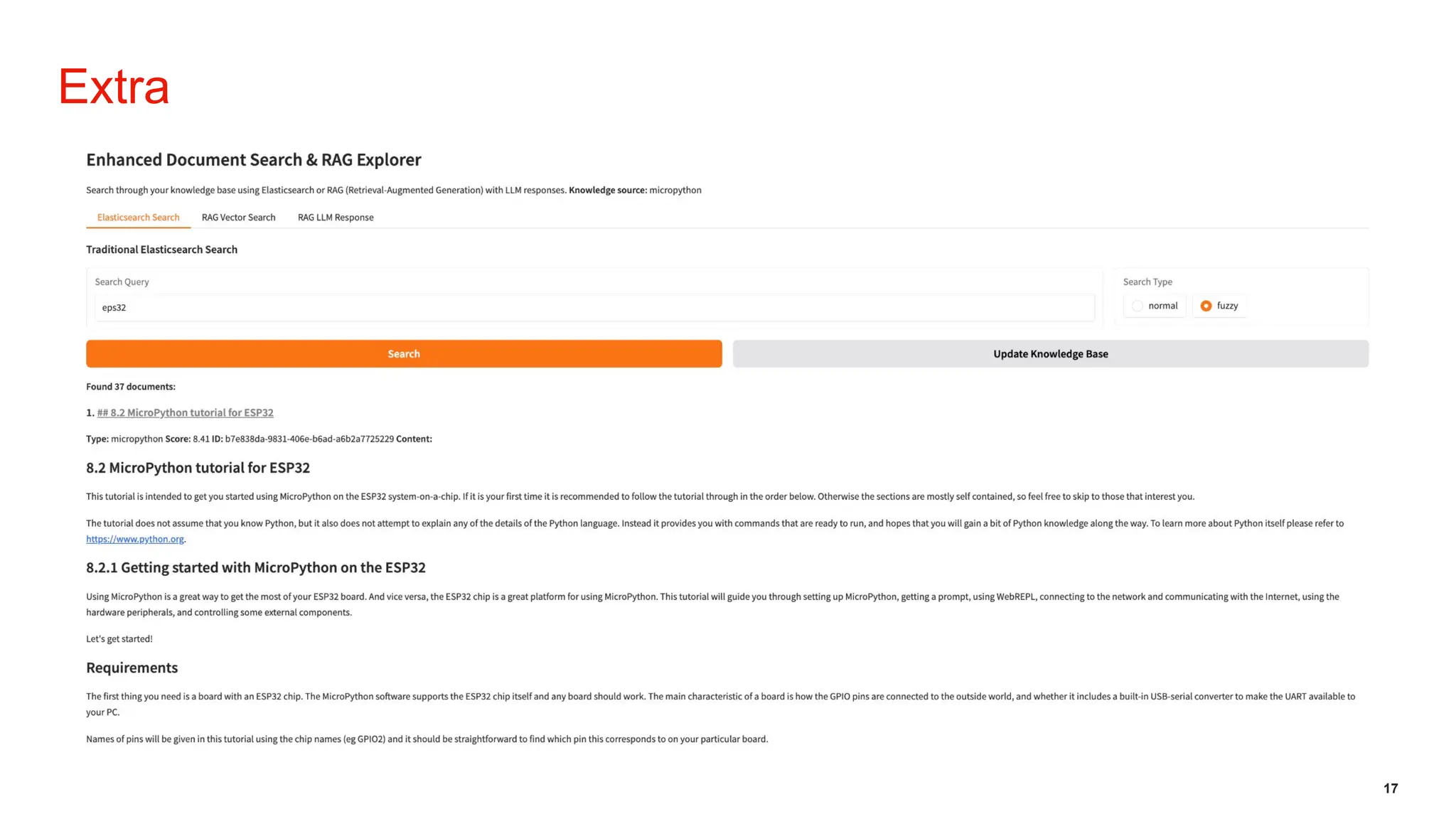
  • #17 # Screen Explanation The screen shows a web application called **“Enhanced Document Search & RAG Explorer”**, which is designed to search a knowledge base using multiple different retrieval methods. --- ## **1. Header** At the top, there's a large title: **Enhanced Document Search & RAG Explorer** Below it, a description explains the purpose of the tool: It allows you to search through a knowledge base using: - **Elasticsearch** - **RAG (Retrieval-Augmented Generation)** - **LLM responses** It also shows the **knowledge source**, which in this case is: **micropython**. --- ## **2. Navigation Tabs** Below the header, there are three tabs: - **Elasticsearch Search** (currently selected) - **RAG Vector Search** - **RAG LLM Response** These let the user choose which search method they want to use. --- ## **3. Search Controls** Inside the selected “Elasticsearch Search” tab, there is a section titled: ### **Traditional Elasticsearch Search** This section includes: - A **Search Query** input box with the text `esp32` inside. - A **Search Type** selector on the right with two options: - normal - fuzzy (selected) Below the search bar are two buttons: - **Search** (orange, prominent) - **Update Knowledge Base** (grey) --- ## **4. Search Results** A message shows that the system found **37 documents**. The first result is displayed with: - A header link: **8.2 MicroPython tutorial for ESP32** - Metadata: - Type: *micropython* - Score: *8.41* - ID: *b7e838da-9831-406e-b6ad-a6b2a7725229* - Content preview text below. --- ## **5. Document Content Preview** Below the result metadata, the interface shows an excerpt of the document, including: ### **8.2 MicroPython tutorial for ESP32** A description of the tutorial and what to expect. ### **8.2.1 Getting started with MicroPython on the ESP32** Some introductory text about using MicroPython on the ESP32. ### **Requirements** A section describing the hardware requirements, focusing on needing an ESP32 board and mentioning GPIO pins. --- ## **Summary** The screen is essentially a document search interface showing: - Input fields for performing searches - A fuzzy Elasticsearch search for the keyword “esp32” - A list of matched documents - The beginning of a MicroPython tutorial as the top search result All content is displayed in clean text sections resembling documentation or a knowledge-base browser.
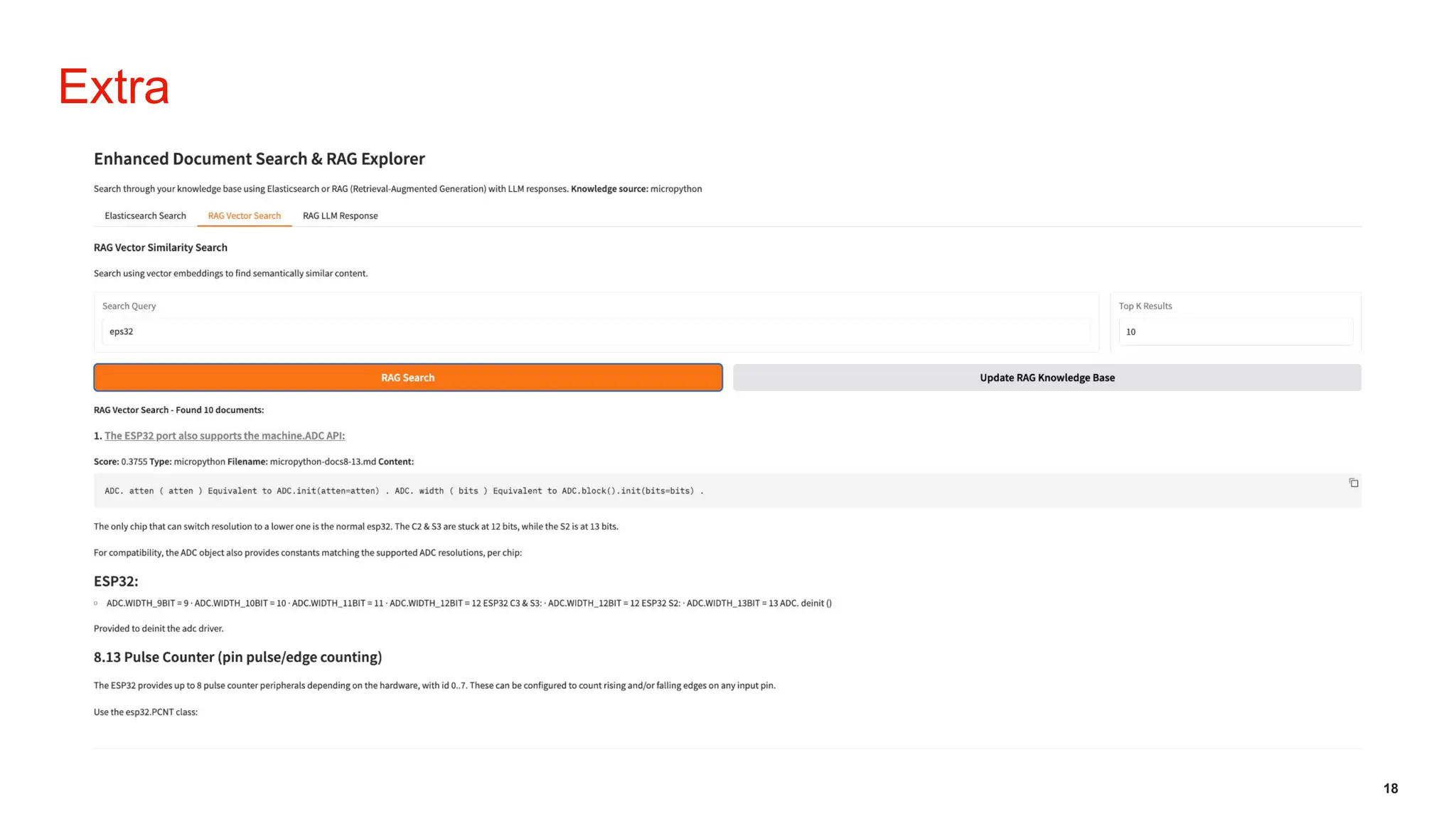
  • #18 # Screen Explanation – RAG Vector Search Page This screen displays the **RAG Vector Search** tab inside the **Enhanced Document Search & RAG Explorer** application. It is used to find semantically similar documents using vector embeddings. --- ## **1. Header** At the top, the title reads: **Enhanced Document Search & RAG Explorer** A short description explains that the tool supports: - Elasticsearch search - RAG (Retrieval-Augmented Generation) - LLM-based responses The **knowledge source** is shown as **micropython**. Below the header are three tabs: - Elasticsearch Search - **RAG Vector Search** (highlighted) - RAG LLM Response --- ## **2. RAG Vector Similarity Search Section** This section explains that the vector search retrieves semantically similar content based on embeddings. ### **Search Inputs** - A **Search Query** text box containing the term: `esp32` - A **Top K Results** input on the right, set to **10** ### **Action Buttons** - **RAG Search** (orange button) - **Update RAG Knowledge Base** (grey button) --- ## **3. Search Results** A label indicates: **RAG Vector Search - Found 10 documents** The first result is shown with: ### **Document Title (as a link)** **The ESP32 port also supports the machine.ADC API:** ### **Metadata** - **Score:** 0.3755 - **Type:** micropython - **Filename:** micropython-docs8-13.md ### **Content Preview** A code snippet related to the ADC API: ADC.atten(atten) Equivalent to ADC.init(atten=atten). ADC.width(bits) Equivalent to ADC.block().init(bits=bits). Additional explanation about: - ESP32 chip resolution details - Supported ADC widths - Notes about deinitializing the ADC driver --- ## **4. Additional Extracted Sections** The preview continues with more ESP32-related documentation, including: ### **ESP32:** A list of ADC width constants per chip. ### **8.13 Pulse Counter (pin pulse/edge counting)** Information explaining that the ESP32 provides up to 8 pulse counter peripherals and how they can detect rising/falling edges. --- ## **Summary** This screen shows: - A vector-based semantic search for the term **“esp32”** - The top 10 most similar documents - The first result, including code snippets and ESP32 documentation content - Options to update the vector knowledge base and refine search results This tab focuses on **meaning-based similarity**, not keyword matching.
  • #19 # Screen Explanation – RAG LLM Response Page This screen shows the **RAG LLM Response** tab inside the **Enhanced Document Search & RAG Explorer** tool. This tab allows you to ask questions and get AI-generated answers that use your knowledge base as context. --- ## **1. Header** At the top, the title reads: **Enhanced Document Search & RAG Explorer** A short description explains the purpose: You can search through a knowledge base using Elasticsearch or Retrieval-Augmented Generation (RAG). The **knowledge source** is listed as **micropython**. Below the header, there are three tabs: - Elasticsearch Search - RAG Vector Search - **RAG LLM Response** (selected) --- ## **2. Question Input Section** ### **Fields** - **Your Question**: A text input box containing the question: *“Can micropython play a mp3 on an esp32 board?”* - **Context Sources**: A numeric field set to **10**, which defines how many documents from RAG will be used as context. - **LLM Model**: A dropdown selection showing **online gpt-5-mini**. - A checkbox labeled **Show Model Used in Response** (enabled). ### **Buttons** - **Generate Response** (large orange button) - **Update RAG Knowledge Base** (grey button) --- ## **3. RAG LLM Response Section** This section presents the generated answer. It includes: ### **Question** Restates the user’s question: **“Can micropython play a mp3 on an esp32 board?”** ### **Model Used** Shows: **gpt-5-mini** ### **Answer Summary** The model explains: - **MicroPython cannot play MP3 files directly** because it does not include an MP3 decoder. - The ESP32 running standard MicroPython cannot decode MP3 “out of the box.” ### **Suggested Practical Options** The response lists three realistic ways to handle MP3 playback: 1. **Convert MP3 to PCM/WAV and play that** - Convert MP3 to 8–16-bit WAV on a computer. - Stream WAV frames from MicroPython to a DAC or I2S peripheral. 2. **Use an external hardware MP3 decoder** - Attach a dedicated MP3 chip via SPI/UART/I2S and let MicroPython send MP3 bytes to it. 3. **Add a native MP3 decoder to firmware** - Custom-compile MicroPython with an MP3 decoder module (advanced). ### **Example Description** A conceptual example is mentioned: - Stream WAV in small chunks → send data to DAC/I2S → play audio. --- ## **Summary** This page demonstrates: - Asking a question using RAG + LLM with **MicroPython** documentation as context. - Selecting how many context sources to use. - Choosing the LLM model. - Receiving a detailed model-generated explanation based on the knowledge base. The answer shown combines technical constraints of MicroPython with practical ways to achieve MP3 playback on ESP32 hardware.