BEHAVIOUR
INTERACTIVE
©2024 and BEHAVIOUR and other related trademarks and logos belong to Behaviour Interactive Inc.
All rights reserved. Other trademarks or copyrights are the property of their respective owners.
HIGHLY CONFIDENTIAL – DO NOT REDISTRIBUTE
Methodical GPU Profiling
2
B
E
H
A
V
I
O
U
R
I
N
T
E
R
A
C
T
I
V
E
Introduction
Leon Brands
Senior Graphics Programmer
Behaviour Interactive
Socials at the end
3
B
E
H
A
V
I
O
U
R
I
N
T
E
R
A
C
T
I
V
E
Who are we?
4
B
E
H
A
V
I
O
U
R
I
N
T
E
R
A
C
T
I
V
E
Agenda
• Motivation
• Strategy
• Investigate
• Planning
• Takeaways
Motivation
6
B
E
H
A
V
I
O
U
R
I
N
T
E
R
A
C
T
I
V
E
Motivation
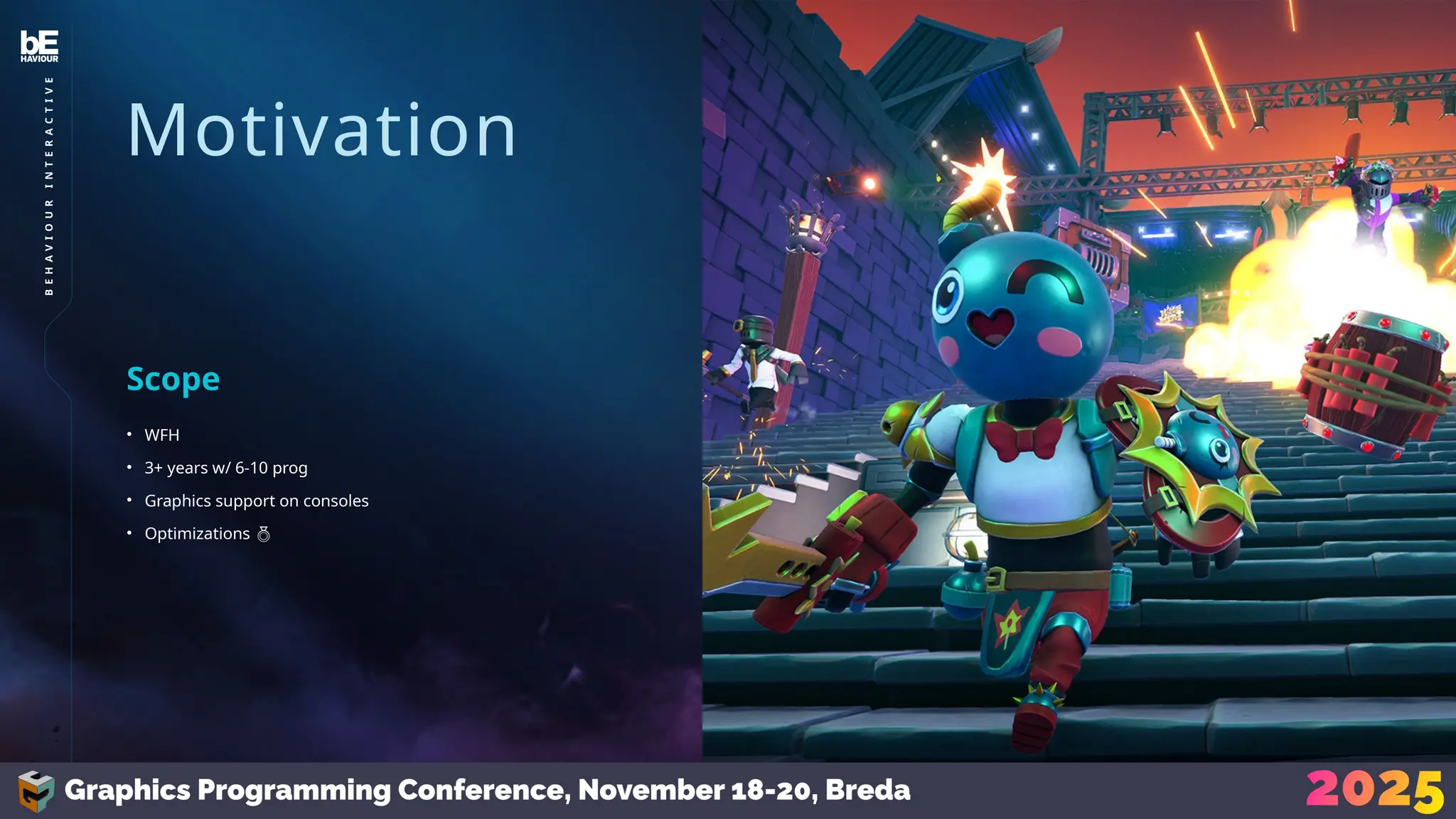
• WFH
• 3+ years w/ 6-10 prog
• Graphics support on consoles
• Optimizations 
Scope
Motivation
• Inherently undefined
• Bottlenecks are always changing
• Needed a strategy
Workload
7
B
E
H
A
V
I
O
U
R
I
N
T
E
R
A
C
T
I
V
E
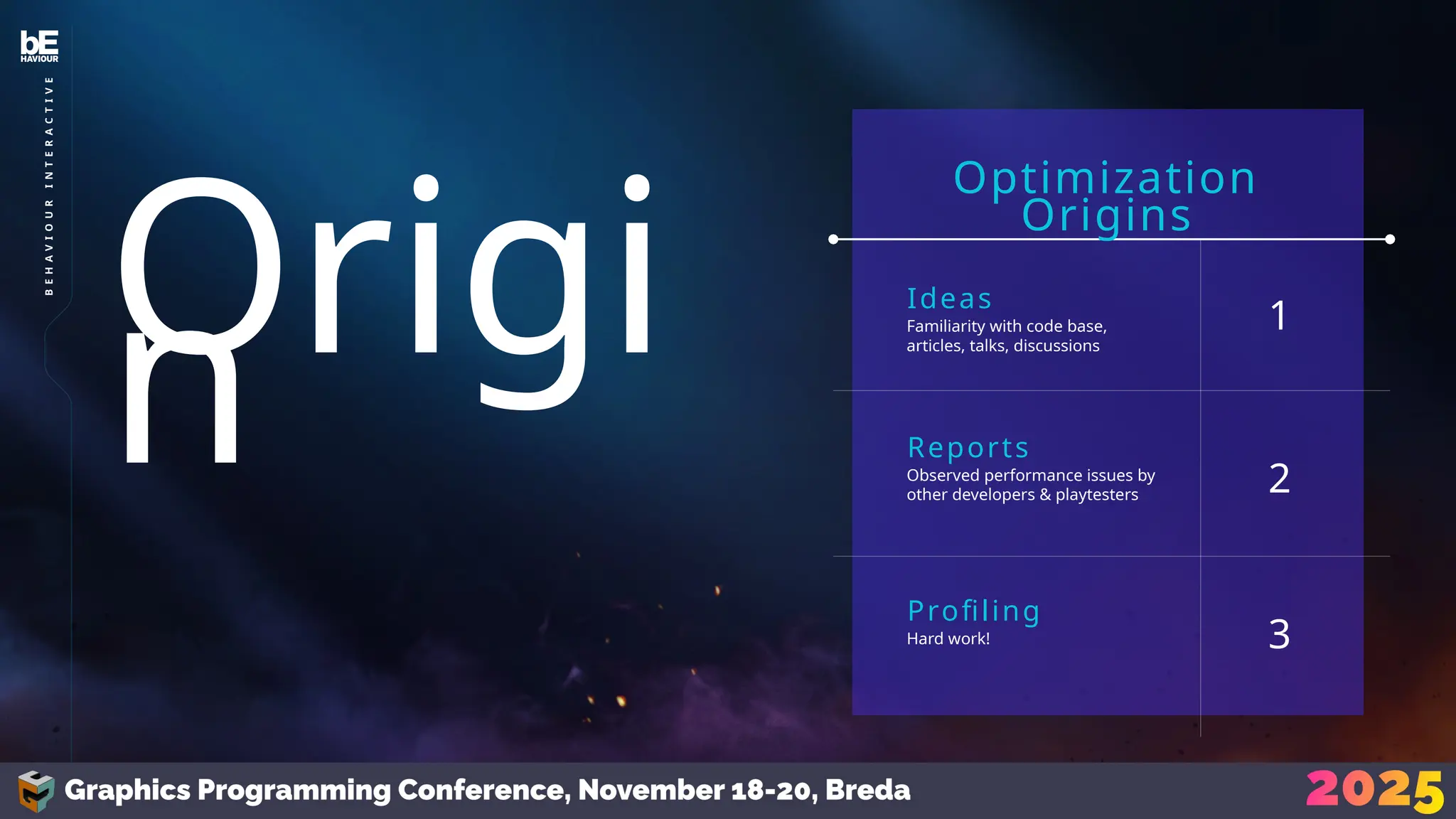
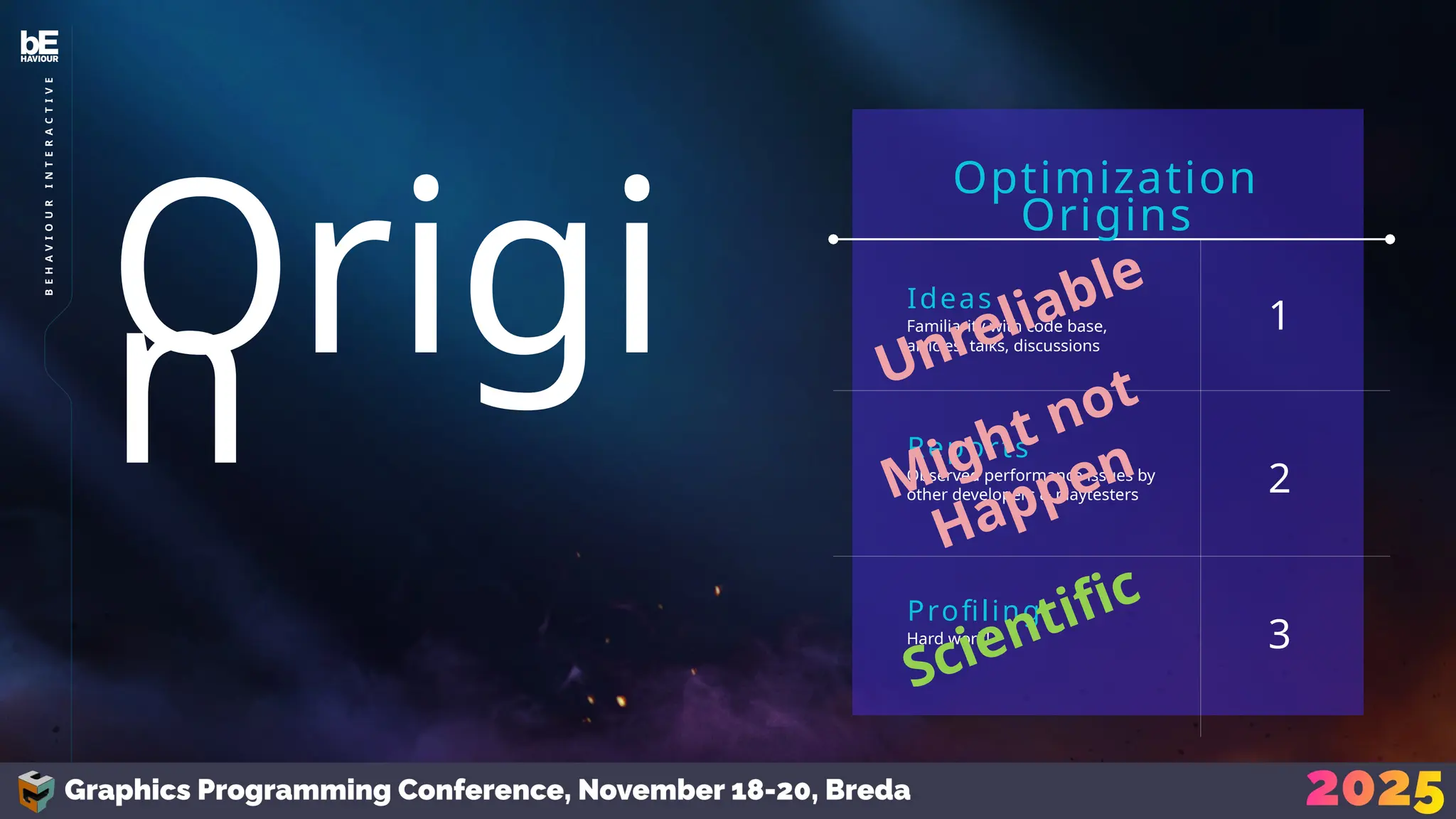
Familiarity with code base,
articles, talks, discussions
Ideas
Observed performance issues by
other developers & playtesters
Reports
Hard work!
Profiling
Optimization
Origins
1
2
3
Origi
n
8
B
E
H
A
V
I
O
U
R
I
N
T
E
R
A
C
T
I
V
E
Familiarity with code base,
articles, talks, discussions
Ideas
Observed performance issues by
other developers & playtesters
Reports
Hard work!
Profiling
Optimization
Origins
1
2
3
Origi
n Unreliable
Might not
Happen
Scientific
9
B
E
H
A
V
I
O
U
R
I
N
T
E
R
A
C
T
I
V
E
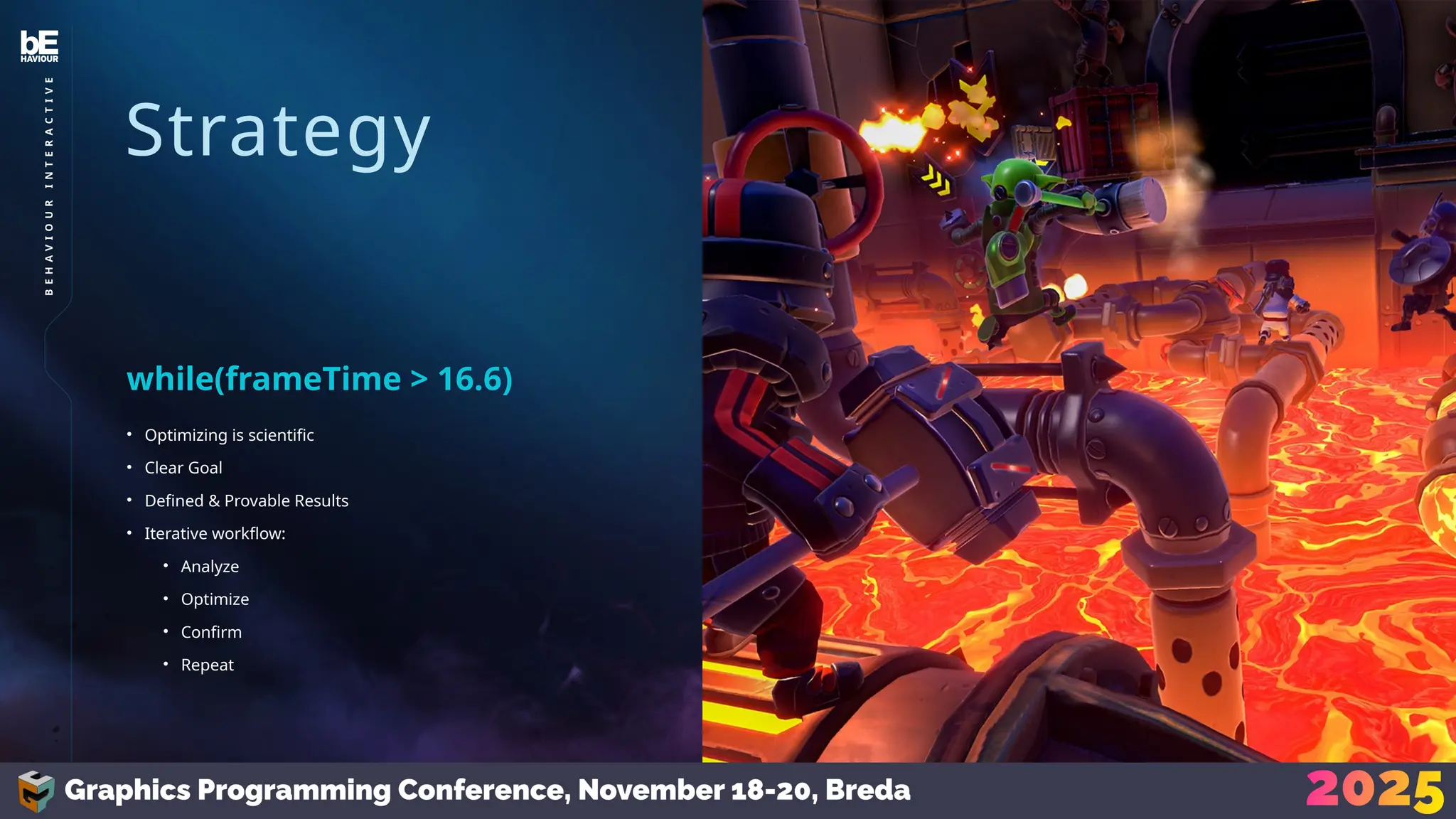
Strategy
Strategy
• Optimizing is scientific
• Clear Goal
• Defined & Provable Results
• Iterative workflow:
• Analyze
• Optimize
• Confirm
• Repeat
while(frameTime > 16.6)
11
B
E
H
A
V
I
O
U
R
I
N
T
E
R
A
C
T
I
V
E
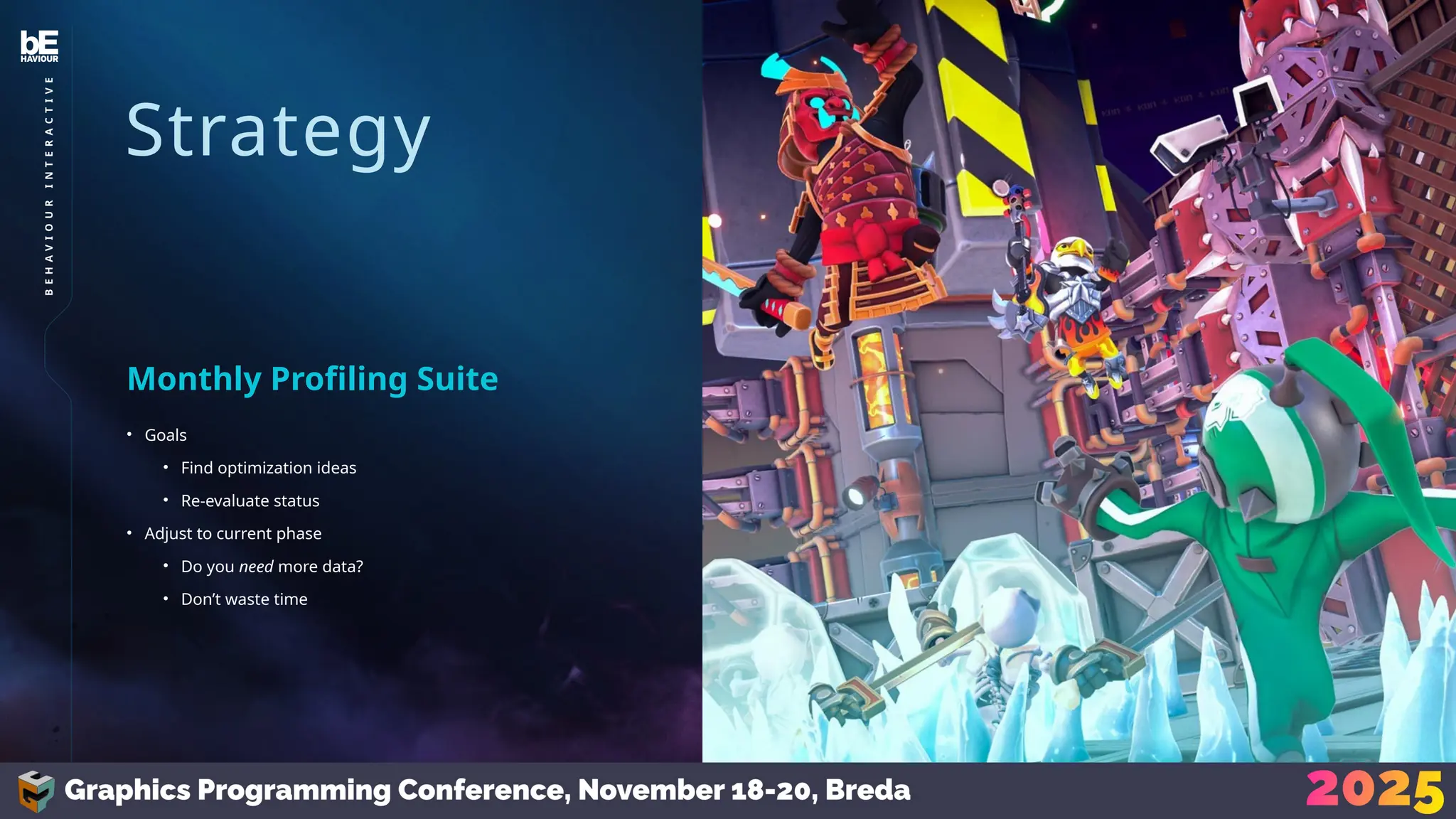
Strategy
• Goals
• Find optimization ideas
• Re-evaluate status
• Adjust to current phase
• Do you need more data?
• Don’t waste time
Monthly Profiling Suite
12
B
E
H
A
V
I
O
U
R
I
N
T
E
R
A
C
T
I
V
E
Strategy
• Our Profiling Suite
• Divide into steps
• Work our way downwards
• Scope 1: Game
• Scope 2: Level
• Scope 3: POI
• Scope 4: Investigate
Narrow it Down
13
B
E
H
A
V
I
O
U
R
I
N
T
E
R
A
C
T
I
V
E
Strategy
• 60 FPS
• Test all levels
Scope 1: Game
14
B
E
H
A
V
I
O
U
R
I
N
T
E
R
A
C
T
I
V
E
15
HIGHLY
CONFIDENTIAL
–
DO
NOT
REDISTRIBUTE
B
E
H
A
V
I
O
U
R
I
N
T
E
R
A
C
T
I
V
E
©2024
and
BEHAVIOUR
and
other
related
trademarks
and
logos
belong
to
Behaviour
Interactive
Inc.
All
rights
reserved.
Other
trademarks
or
copyrights
are
the
property
of
their
respective
owners.
Strategy
• 60 FPS
• Test all levels
• UGC…
Scope 1: Game
Strategy
• Fine, only official levels
• Still tons
• Quick tool for QA
Scope 1: Game
16
B
E
H
A
V
I
O
U
R
I
N
T
E
R
A
C
T
I
V
E
Strategy
• Selected some levels
• Look deeper
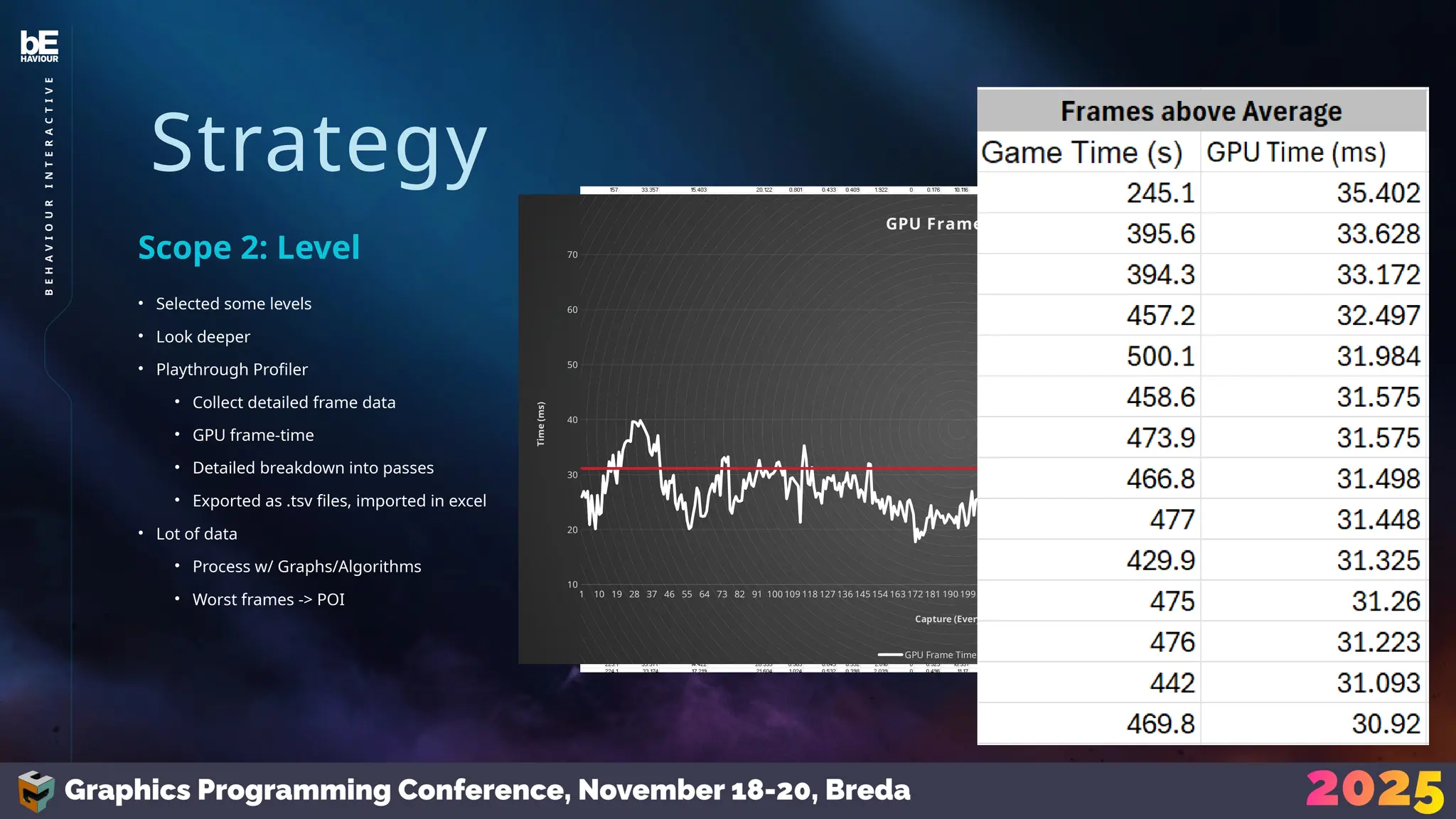
• Playthrough Profiler
• Collect detailed frame data
• GPU frame-time
• Detailed breakdown into passes
• Exported as .tsv files, imported in excel
• Lot of data
• Process w/ Graphs/Algorithms
• Worst frames -> POI
Scope 2: Level
17
B
E
H
A
V
I
O
U
R
I
N
T
E
R
A
C
T
I
V
E
1 10 19 28 37 46 55 64 73 82 91 100 109 118 127 136 145 154 163 172 181 190 199 208 217 226 235 244 253 262 271 280 289 298 307 316 325 334 343 352 361 370 379 388 397 406
10
20
30
40
50
60
70
GPU Frame Time
GPU Frame Time Target
Capture (Every 30 frames)
Time
(ms)
Strategy
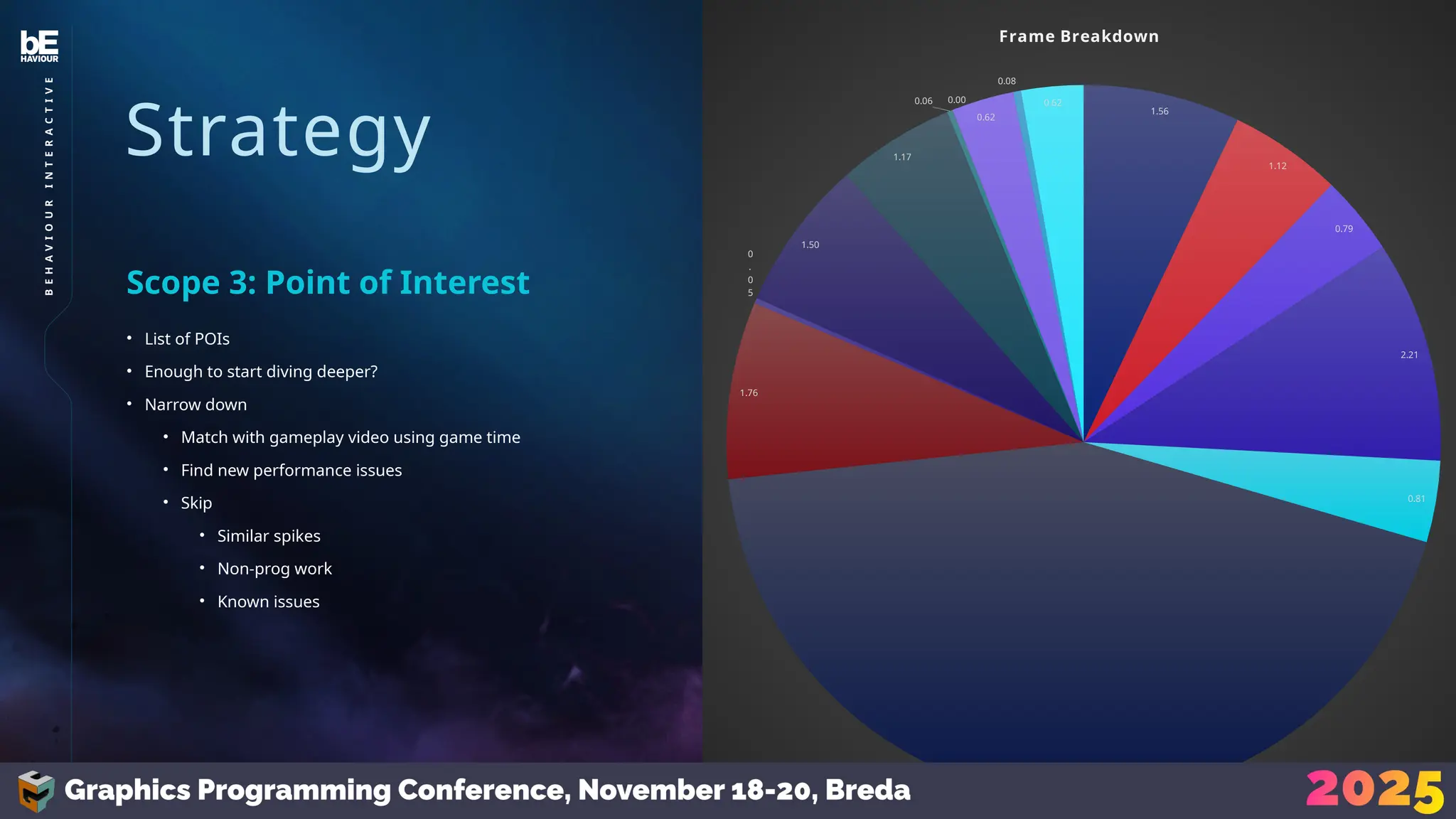
• List of POIs
• Enough to start diving deeper?
• Narrow down
• Match with gameplay video using game time
• Find new performance issues
• Skip
• Similar spikes
• Non-prog work
• Known issues
Scope 3: Point of Interest
1.56
1.12
0.79
2.21
0.81
9.64
1.76
0
.
0
5
1.50
1.17
0.06 0.00
0.62
0.08
0.62
Frame Breakdown
18
B
E
H
A
V
I
O
U
R
I
N
T
E
R
A
C
T
I
V
E
Strategy
• Look at POI
• Poor performance on a render pass?
• How to optimize?
Scope 4: Investigate
19
B
E
H
A
V
I
O
U
R
I
N
T
E
R
A
C
T
I
V
E
Investigate
Investigat
e
• How do you optimize something?
• Depends on what you’re optimizing
• Rasterized Meshes
• Full-screen Shader
• Compute Shader
How?
21
B
E
H
A
V
I
O
U
R
I
N
T
E
R
A
C
T
I
V
E
Investigate
• GPU deals with large quantities
• Draw call spawns vert shaders, spawns …
• Take a top-down approach
• What can you reduce?
Rasterized Meshes
22
B
E
H
A
V
I
O
U
R
I
N
T
E
R
A
C
T
I
V
E
Investigate
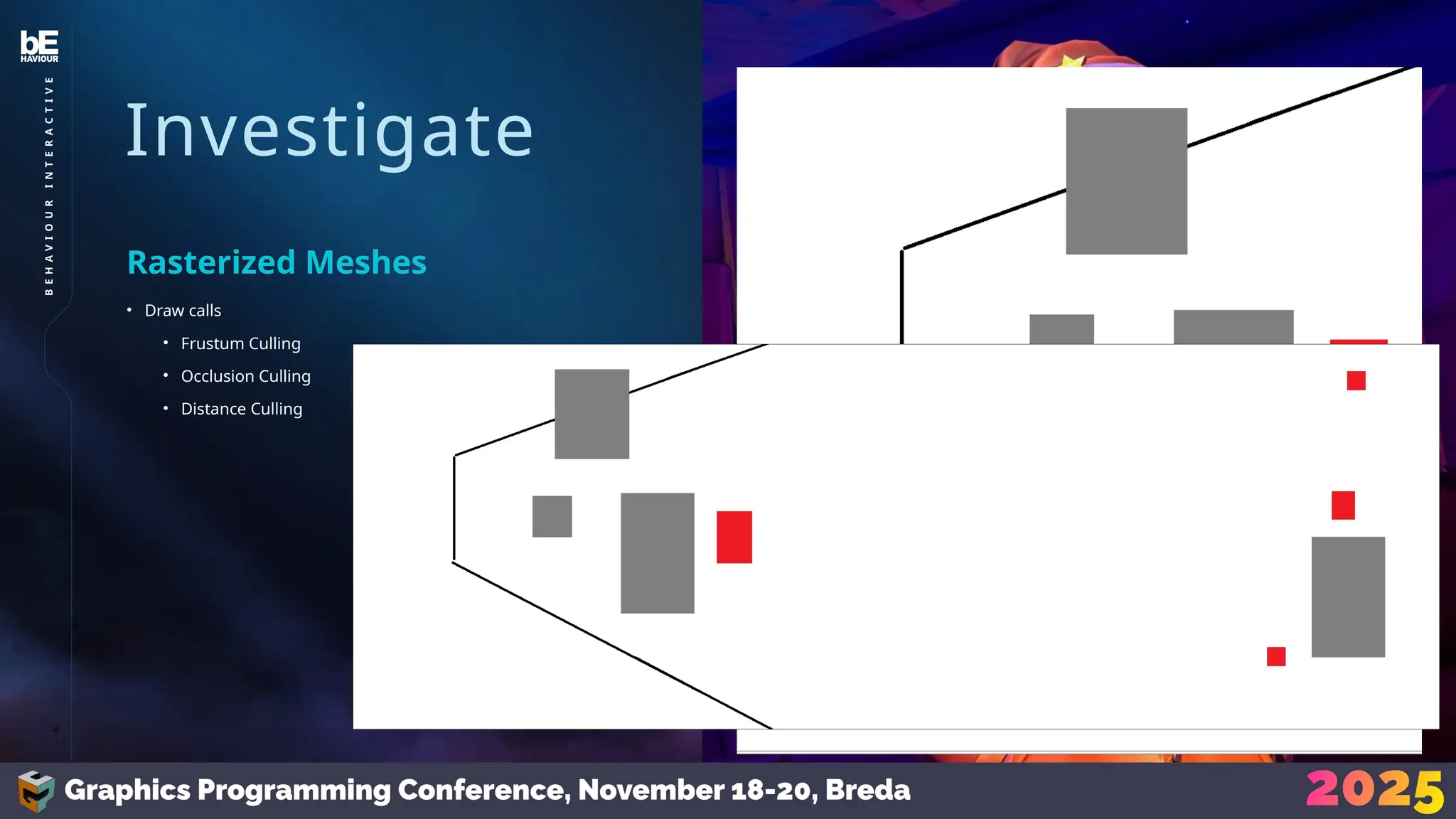
• Draw calls
• Frustum Culling
• Occlusion Culling
• Distance Culling
Rasterized Meshes
23
B
E
H
A
V
I
O
U
R
I
N
T
E
R
A
C
T
I
V
E
Investigate
• Draw calls
• Vertices
• Optimize Assets
• Create LODs (and implement)
• Mesh Clusters
• Triangle Culling
Rasterized Meshes
24
B
E
H
A
V
I
O
U
R
I
N
T
E
R
A
C
T
I
V
E
Investigate
• Draw calls
• Vertices
• Pixels
• Upscaling
• VRS
Rasterized Meshes
25
B
E
H
A
V
I
O
U
R
I
N
T
E
R
A
C
T
I
V
E
Investigate
• Draw calls
• Vertices
• Pixels
• Lights
• Spawns even more work!
• Lights, decals
• We use clustered rendering
• With a simple z-range filter
• (short sight-lines)
Rasterized Meshes
26
B
E
H
A
V
I
O
U
R
I
N
T
E
R
A
C
T
I
V
E
Investigate
• Draw calls
• Vertices
• Pixels
• Lights
• Don’t do everything blindly
Rasterized Meshes
27
B
E
H
A
V
I
O
U
R
I
N
T
E
R
A
C
T
I
V
E
Investigate
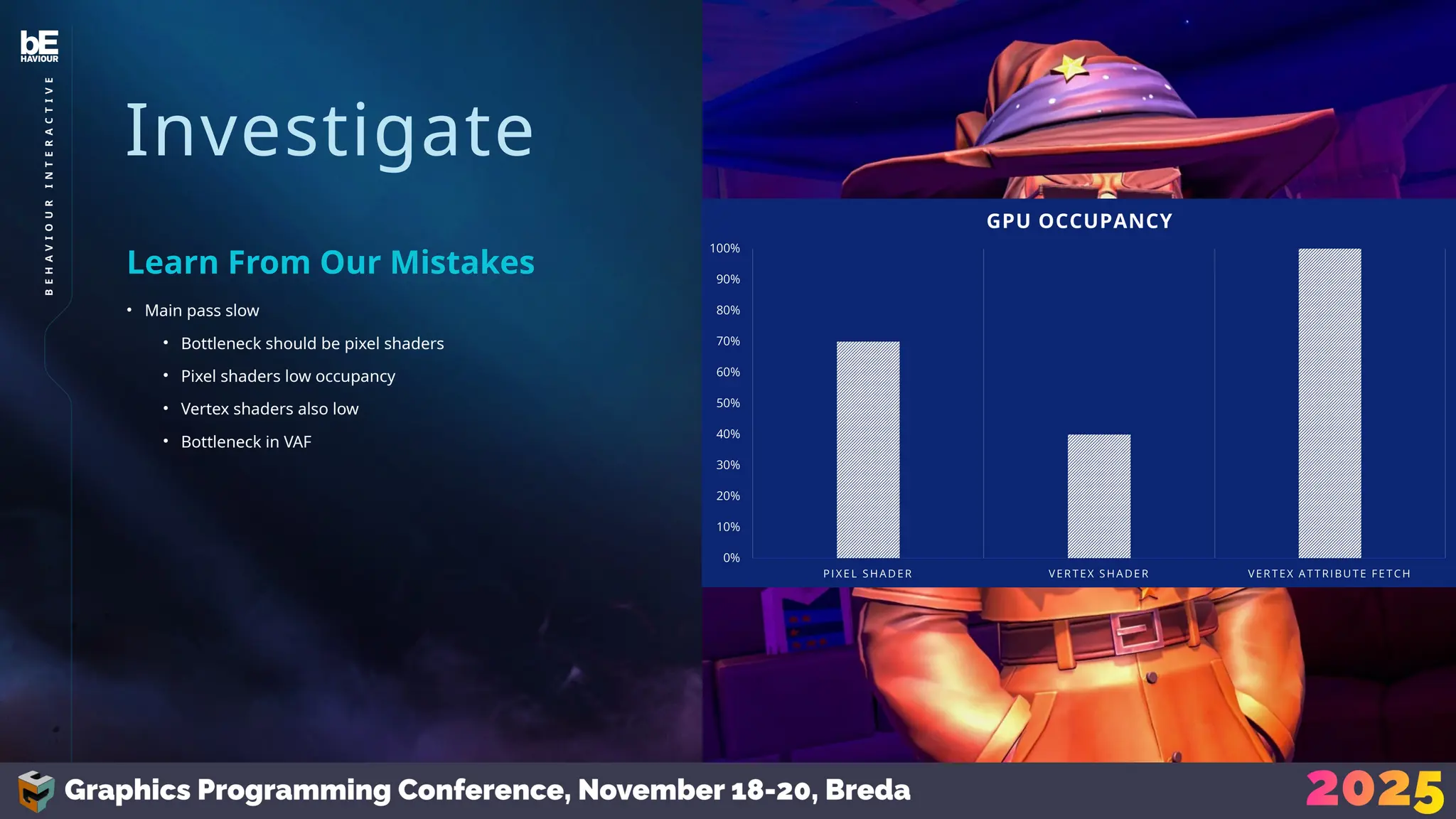
• Main pass slow
• Bottleneck should be pixel shaders
• Pixel shaders low occupancy
• Vertex shaders also low
• Bottleneck in VAF
Learn From Our Mistakes
28
B
E
H
A
V
I
O
U
R
I
N
T
E
R
A
C
T
I
V
E
Investigate
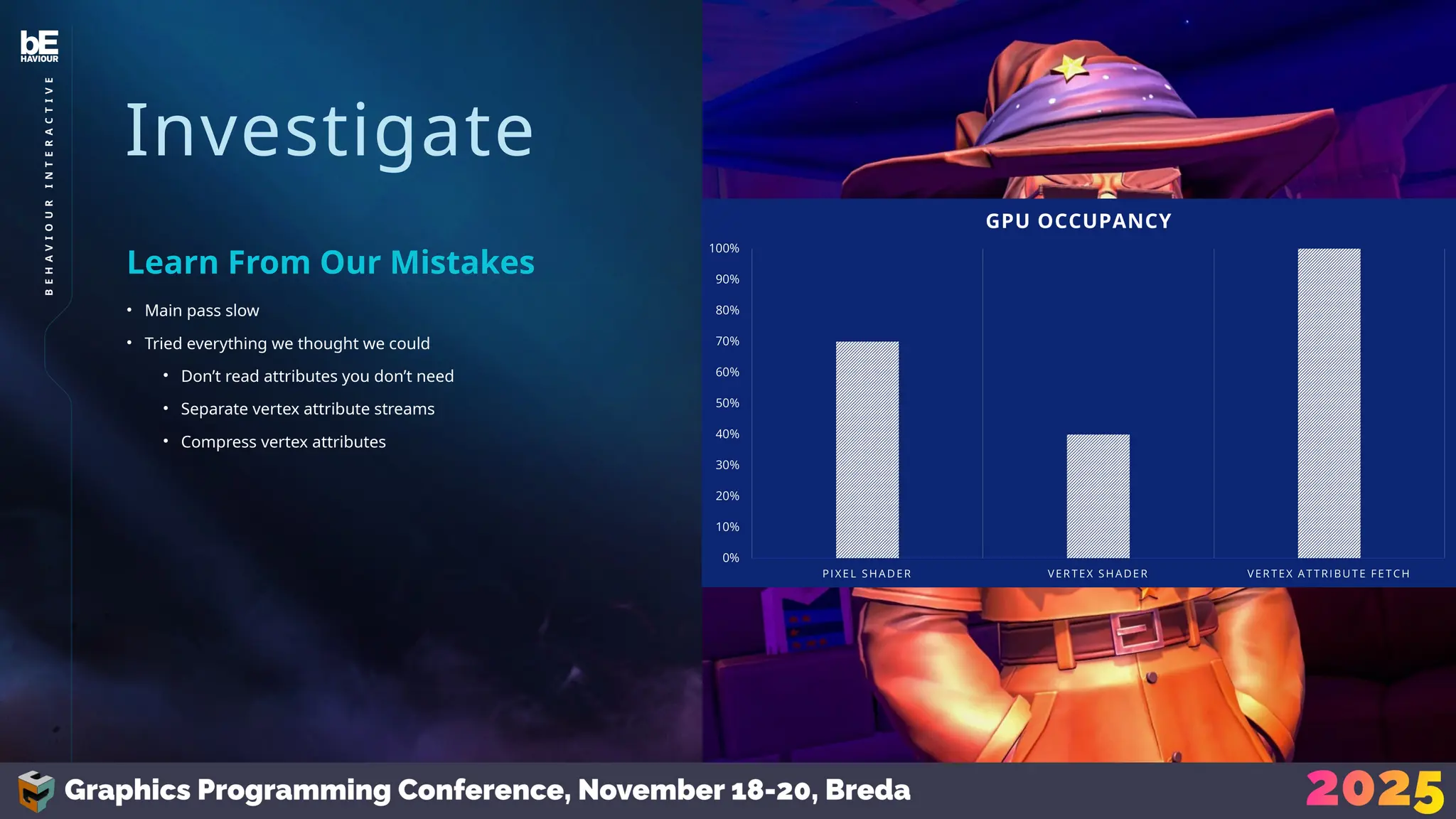
• Main pass slow
• Tried everything we thought we could
• Don’t read attributes you don’t need
• Separate vertex attribute streams
• Compress vertex attributes
Learn From Our Mistakes
29
B
E
H
A
V
I
O
U
R
I
N
T
E
R
A
C
T
I
V
E
Investigate
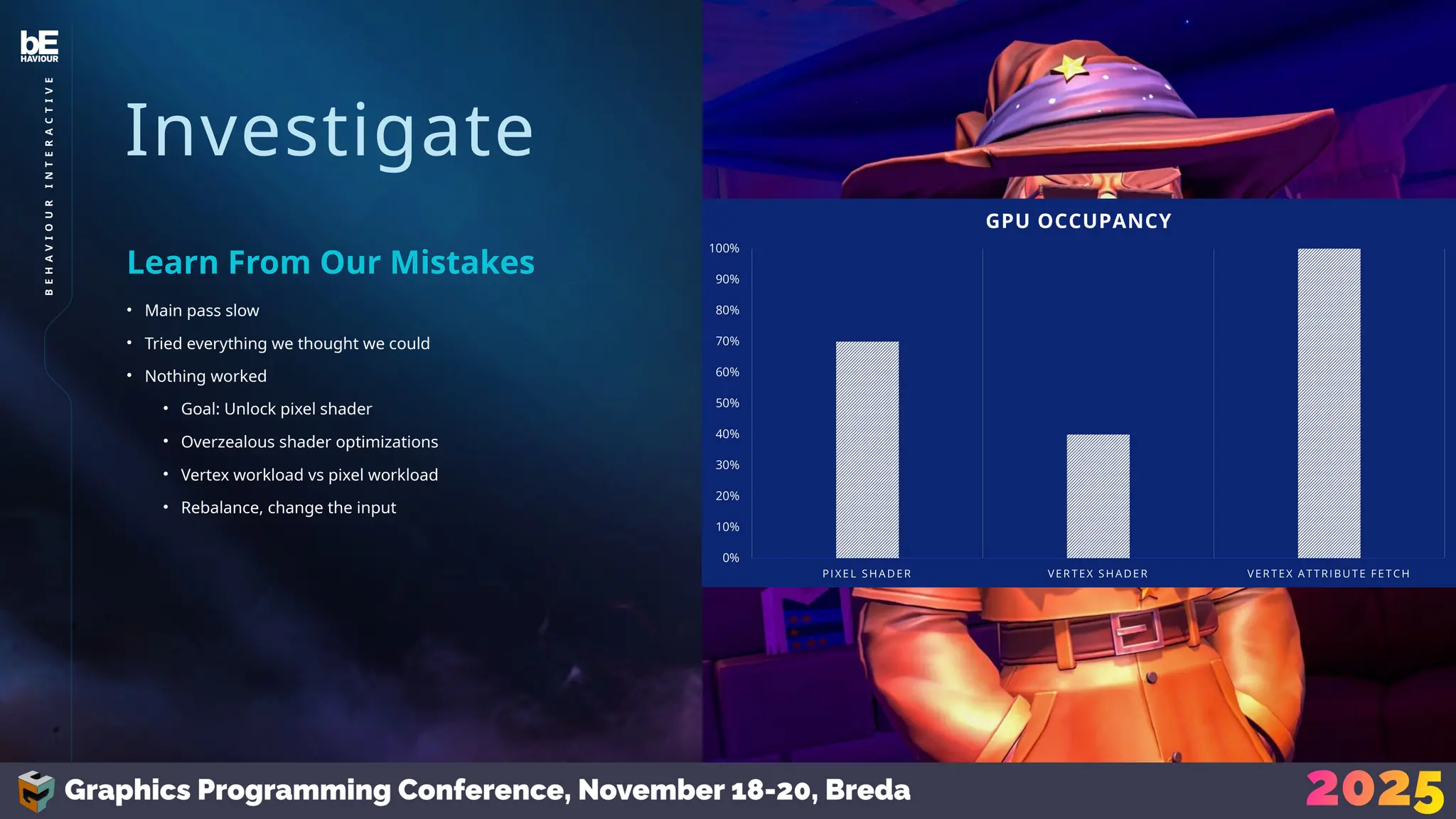
• Main pass slow
• Tried everything we thought we could
• Nothing worked
• Goal: Unlock pixel shader
• Overzealous shader optimizations
• Vertex workload vs pixel workload
• Rebalance, change the input
Learn From Our Mistakes
30
B
E
H
A
V
I
O
U
R
I
N
T
E
R
A
C
T
I
V
E
Investigate
• Can we optimize shaders now?
• After you’ve done everything else
• (usually)
• Optimize (pixel) shaders
• FS pass / Compute
• No larger pipeline
• 1 consideration
Shader Optimizations
31
B
E
H
A
V
I
O
U
R
I
N
T
E
R
A
C
T
I
V
E
Investigate
• Not entirely in the scope of this talk
• Quick Thoughts:
• Waste less!
• Reduce
• Reuse
• Recycle
Shader Optimizations
32
B
E
H
A
V
I
O
U
R
I
N
T
E
R
A
C
T
I
V
E
Investigate
• Consider this
• You know your project the best
• Optimizations are rarely without a sacrifice
• What are you willing to give up?
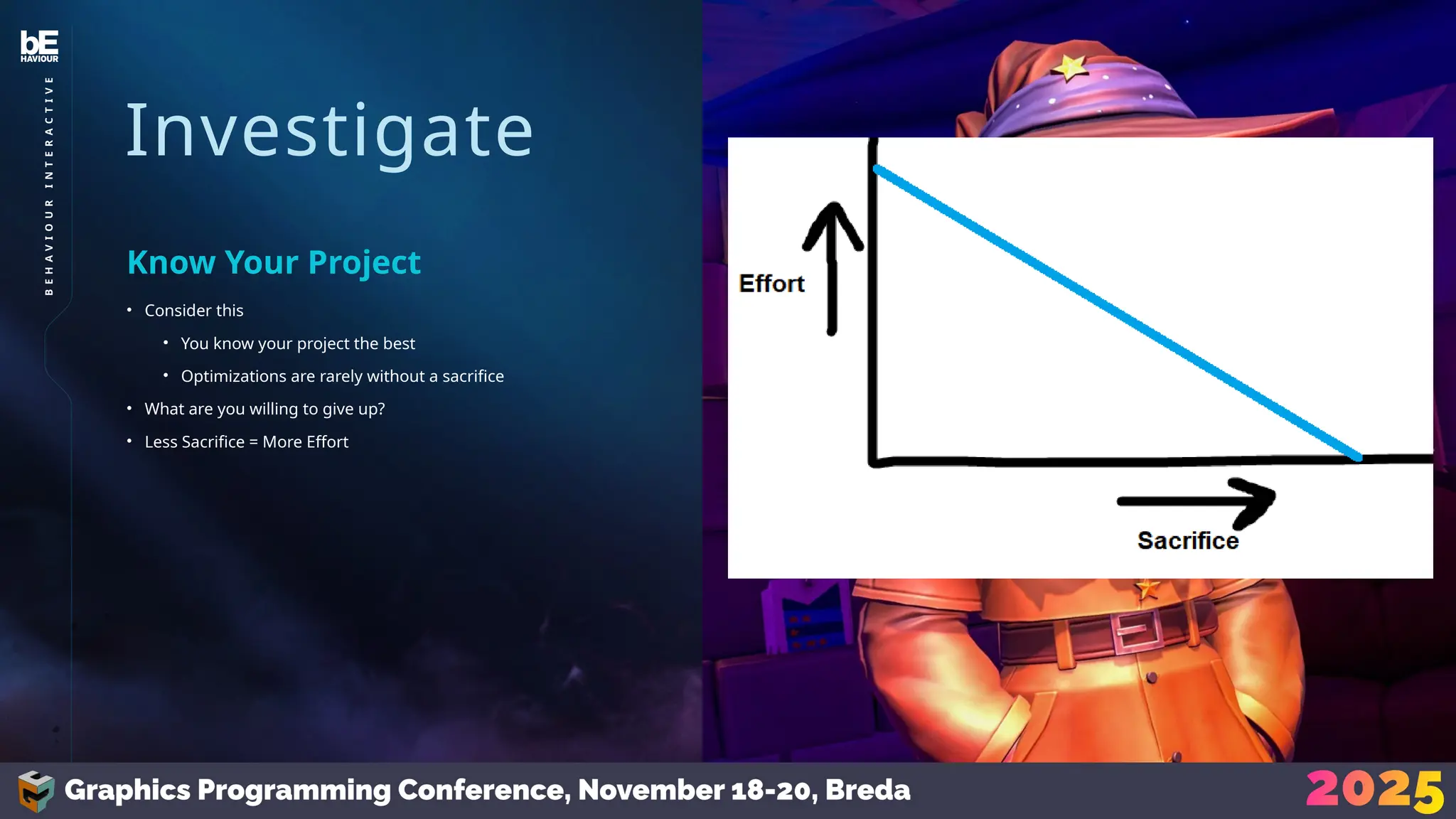
• Less Sacrifice = More Effort
Know Your Project
33
B
E
H
A
V
I
O
U
R
I
N
T
E
R
A
C
T
I
V
E
Investigate
• Sacrifices were made
• Don’t keep them blindly!
• Prove impact & stability:
• Profile before/after
• Screenshot before/after
Post-Optimization
34
B
E
H
A
V
I
O
U
R
I
N
T
E
R
A
C
T
I
V
E
Planning
Planning
• Very agile
• We had a lot of autonomy
• Status update
• Re-evaluate monthly
• Sprint-like planning
Agile
36
B
E
H
A
V
I
O
U
R
I
N
T
E
R
A
C
T
I
V
E
Planning
• How do you determine priority?
• Discuss:
• Impact
• Complexity
• Risk
• Sacrifice
• Every idea should be considered
Prioritize
37
B
E
H
A
V
I
O
U
R
I
N
T
E
R
A
C
T
I
V
E
Planning
• How to stay on track?
• Leave leeway
• Determine goal
• Set periodic targets
Longer Term
38
B
E
H
A
V
I
O
U
R
I
N
T
E
R
A
C
T
I
V
E
Planning
• Example
• 45ms -> 30ms in 4 months
• 5ms/month
• Profile, analyze, etc. as discussed
• Tasks with little visual impact
• Fallbacks with worse tradeoffs
• Only use fallbacks to hit targets
Longer Term
39
B
E
H
A
V
I
O
U
R
I
N
T
E
R
A
C
T
I
V
E
Takeaways
Takeaways
• Our decisions are backed by hard facts along the way
• This helps us make the best decisions we can
• Monthly results provided a record
Optimization is Scientific
41
B
E
H
A
V
I
O
U
R
I
N
T
E
R
A
C
T
I
V
E
Takeaways
• This workflow evolved over time
• You can’t force yourself into a single workflow and never
reconsider
• We constantly adjusted for our needs, the project’s state, etc.
Don’t Let It Get Stale
42
B
E
H
A
V
I
O
U
R
I
N
T
E
R
A
C
T
I
V
E
Takeaways
• This approach works for us
• Measurable results
• Backlog full of potential work
• Most valuable work is prioritized
• Consistent and significant performance improvements
It Worked
43
B
E
H
A
V
I
O
U
R
I
N
T
E
R
A
C
T
I
V
E
Sources
• Occlusion Culling:
https://blog.selfshadow.com/publications/practical-visibility/
• Practical Clustered Culling
https://www.humus.name/Articles/PracticalClusteredShading
.pdf
• Siggraph 2015: Advances in Real-Time Rendering in Games
https://advances.realtimerendering.com/s2015/aaltonenhaar
_siggraph2015_combined_final_footer_220dpi.pdf
• Octahedral Mapping
https://knarkowicz.wordpress.com/2014/04/16/octahedron-n
ormal-vector-encoding/
• Harnessing Wave Intrinsics For Good (And Evil)
https://youtu.be/U6t33RLa0XM?si=_KIA-EnzYVgS3ZxV
For Reading?
45
B
E
H
A
V
I
O
U
R
I
N
T
E
R
A
C
T
I
V
E
46
B
E
H
A
V
I
O
U
R
I
N
T
E
R
A
C
T
I
V
E
We’re Hiring
BHVR Rotterdam
https://www.bhvr.com/rotterdam/
• Senior Programmer
• Principal Programmer
47
B
E
H
A
V
I
O
U
R
I
N
T
E
R
A
C
T
I
V
E
Let’s Connect
Leon Brands
Scan QR code for LinkedIn

Leon Brands - Methodical GPU Profiling (Graphics Programming Conference 2025)

  • 1.
    BEHAVIOUR INTERACTIVE ©2024 and BEHAVIOURand other related trademarks and logos belong to Behaviour Interactive Inc. All rights reserved. Other trademarks or copyrights are the property of their respective owners. HIGHLY CONFIDENTIAL – DO NOT REDISTRIBUTE Methodical GPU Profiling
  • 2.
  • 3.
  • 4.
  • 5.
  • 6.
    6 B E H A V I O U R I N T E R A C T I V E Motivation • WFH • 3+years w/ 6-10 prog • Graphics support on consoles • Optimizations  Scope
  • 7.
    Motivation • Inherently undefined •Bottlenecks are always changing • Needed a strategy Workload 7 B E H A V I O U R I N T E R A C T I V E
  • 8.
    Familiarity with codebase, articles, talks, discussions Ideas Observed performance issues by other developers & playtesters Reports Hard work! Profiling Optimization Origins 1 2 3 Origi n 8 B E H A V I O U R I N T E R A C T I V E
  • 9.
    Familiarity with codebase, articles, talks, discussions Ideas Observed performance issues by other developers & playtesters Reports Hard work! Profiling Optimization Origins 1 2 3 Origi n Unreliable Might not Happen Scientific 9 B E H A V I O U R I N T E R A C T I V E
  • 10.
  • 11.
    Strategy • Optimizing isscientific • Clear Goal • Defined & Provable Results • Iterative workflow: • Analyze • Optimize • Confirm • Repeat while(frameTime > 16.6) 11 B E H A V I O U R I N T E R A C T I V E
  • 12.
    Strategy • Goals • Findoptimization ideas • Re-evaluate status • Adjust to current phase • Do you need more data? • Don’t waste time Monthly Profiling Suite 12 B E H A V I O U R I N T E R A C T I V E
  • 13.
    Strategy • Our ProfilingSuite • Divide into steps • Work our way downwards • Scope 1: Game • Scope 2: Level • Scope 3: POI • Scope 4: Investigate Narrow it Down 13 B E H A V I O U R I N T E R A C T I V E
  • 14.
    Strategy • 60 FPS •Test all levels Scope 1: Game 14 B E H A V I O U R I N T E R A C T I V E
  • 15.
  • 16.
    Strategy • Fine, onlyofficial levels • Still tons • Quick tool for QA Scope 1: Game 16 B E H A V I O U R I N T E R A C T I V E
  • 17.
    Strategy • Selected somelevels • Look deeper • Playthrough Profiler • Collect detailed frame data • GPU frame-time • Detailed breakdown into passes • Exported as .tsv files, imported in excel • Lot of data • Process w/ Graphs/Algorithms • Worst frames -> POI Scope 2: Level 17 B E H A V I O U R I N T E R A C T I V E 1 10 19 28 37 46 55 64 73 82 91 100 109 118 127 136 145 154 163 172 181 190 199 208 217 226 235 244 253 262 271 280 289 298 307 316 325 334 343 352 361 370 379 388 397 406 10 20 30 40 50 60 70 GPU Frame Time GPU Frame Time Target Capture (Every 30 frames) Time (ms)
  • 18.
    Strategy • List ofPOIs • Enough to start diving deeper? • Narrow down • Match with gameplay video using game time • Find new performance issues • Skip • Similar spikes • Non-prog work • Known issues Scope 3: Point of Interest 1.56 1.12 0.79 2.21 0.81 9.64 1.76 0 . 0 5 1.50 1.17 0.06 0.00 0.62 0.08 0.62 Frame Breakdown 18 B E H A V I O U R I N T E R A C T I V E
  • 19.
    Strategy • Look atPOI • Poor performance on a render pass? • How to optimize? Scope 4: Investigate 19 B E H A V I O U R I N T E R A C T I V E
  • 20.
  • 21.
    Investigat e • How doyou optimize something? • Depends on what you’re optimizing • Rasterized Meshes • Full-screen Shader • Compute Shader How? 21 B E H A V I O U R I N T E R A C T I V E
  • 22.
    Investigate • GPU dealswith large quantities • Draw call spawns vert shaders, spawns … • Take a top-down approach • What can you reduce? Rasterized Meshes 22 B E H A V I O U R I N T E R A C T I V E
  • 23.
    Investigate • Draw calls •Frustum Culling • Occlusion Culling • Distance Culling Rasterized Meshes 23 B E H A V I O U R I N T E R A C T I V E
  • 24.
    Investigate • Draw calls •Vertices • Optimize Assets • Create LODs (and implement) • Mesh Clusters • Triangle Culling Rasterized Meshes 24 B E H A V I O U R I N T E R A C T I V E
  • 25.
    Investigate • Draw calls •Vertices • Pixels • Upscaling • VRS Rasterized Meshes 25 B E H A V I O U R I N T E R A C T I V E
  • 26.
    Investigate • Draw calls •Vertices • Pixels • Lights • Spawns even more work! • Lights, decals • We use clustered rendering • With a simple z-range filter • (short sight-lines) Rasterized Meshes 26 B E H A V I O U R I N T E R A C T I V E
  • 27.
    Investigate • Draw calls •Vertices • Pixels • Lights • Don’t do everything blindly Rasterized Meshes 27 B E H A V I O U R I N T E R A C T I V E
  • 28.
    Investigate • Main passslow • Bottleneck should be pixel shaders • Pixel shaders low occupancy • Vertex shaders also low • Bottleneck in VAF Learn From Our Mistakes 28 B E H A V I O U R I N T E R A C T I V E
  • 29.
    Investigate • Main passslow • Tried everything we thought we could • Don’t read attributes you don’t need • Separate vertex attribute streams • Compress vertex attributes Learn From Our Mistakes 29 B E H A V I O U R I N T E R A C T I V E
  • 30.
    Investigate • Main passslow • Tried everything we thought we could • Nothing worked • Goal: Unlock pixel shader • Overzealous shader optimizations • Vertex workload vs pixel workload • Rebalance, change the input Learn From Our Mistakes 30 B E H A V I O U R I N T E R A C T I V E
  • 31.
    Investigate • Can weoptimize shaders now? • After you’ve done everything else • (usually) • Optimize (pixel) shaders • FS pass / Compute • No larger pipeline • 1 consideration Shader Optimizations 31 B E H A V I O U R I N T E R A C T I V E
  • 32.
    Investigate • Not entirelyin the scope of this talk • Quick Thoughts: • Waste less! • Reduce • Reuse • Recycle Shader Optimizations 32 B E H A V I O U R I N T E R A C T I V E
  • 33.
    Investigate • Consider this •You know your project the best • Optimizations are rarely without a sacrifice • What are you willing to give up? • Less Sacrifice = More Effort Know Your Project 33 B E H A V I O U R I N T E R A C T I V E
  • 34.
    Investigate • Sacrifices weremade • Don’t keep them blindly! • Prove impact & stability: • Profile before/after • Screenshot before/after Post-Optimization 34 B E H A V I O U R I N T E R A C T I V E
  • 35.
  • 36.
    Planning • Very agile •We had a lot of autonomy • Status update • Re-evaluate monthly • Sprint-like planning Agile 36 B E H A V I O U R I N T E R A C T I V E
  • 37.
    Planning • How doyou determine priority? • Discuss: • Impact • Complexity • Risk • Sacrifice • Every idea should be considered Prioritize 37 B E H A V I O U R I N T E R A C T I V E
  • 38.
    Planning • How tostay on track? • Leave leeway • Determine goal • Set periodic targets Longer Term 38 B E H A V I O U R I N T E R A C T I V E
  • 39.
    Planning • Example • 45ms-> 30ms in 4 months • 5ms/month • Profile, analyze, etc. as discussed • Tasks with little visual impact • Fallbacks with worse tradeoffs • Only use fallbacks to hit targets Longer Term 39 B E H A V I O U R I N T E R A C T I V E
  • 40.
  • 41.
    Takeaways • Our decisionsare backed by hard facts along the way • This helps us make the best decisions we can • Monthly results provided a record Optimization is Scientific 41 B E H A V I O U R I N T E R A C T I V E
  • 42.
    Takeaways • This workflowevolved over time • You can’t force yourself into a single workflow and never reconsider • We constantly adjusted for our needs, the project’s state, etc. Don’t Let It Get Stale 42 B E H A V I O U R I N T E R A C T I V E
  • 43.
    Takeaways • This approachworks for us • Measurable results • Backlog full of potential work • Most valuable work is prioritized • Consistent and significant performance improvements It Worked 43 B E H A V I O U R I N T E R A C T I V E
  • 45.
    Sources • Occlusion Culling: https://blog.selfshadow.com/publications/practical-visibility/ •Practical Clustered Culling https://www.humus.name/Articles/PracticalClusteredShading .pdf • Siggraph 2015: Advances in Real-Time Rendering in Games https://advances.realtimerendering.com/s2015/aaltonenhaar _siggraph2015_combined_final_footer_220dpi.pdf • Octahedral Mapping https://knarkowicz.wordpress.com/2014/04/16/octahedron-n ormal-vector-encoding/ • Harnessing Wave Intrinsics For Good (And Evil) https://youtu.be/U6t33RLa0XM?si=_KIA-EnzYVgS3ZxV For Reading? 45 B E H A V I O U R I N T E R A C T I V E
  • 46.
  • 47.

Editor's Notes

  • #3 Rotterdam studio of Behaviour Interactive Company best known for Dead By Daylight Also do a lot of work for hire and co-dev; which is what I’m a part of
  • #4 Here’s the plan for this talk
  • #5 This talk is about optimisation strategies. So let’s talk about why that’s a point of discussion for us
  • #6 Part of a Work For Hire team who’s been working on console support for King of Meat, a game by Glowmade and Amazon Games (out now!) We’ve been a part of this for 3+ years, with 6-10 programmers (depending on the phase of the project), 3 of which are graphics programmers, including me. The graphics group ports the graphics engine to various consoles and optimizes rendering workload, especially for some of the lower power platforms. Sometimes we also implement new features, but that doesn’t matter too much for this talk.
  • #7 Optimization workload is inherently undefined; when I joined this project I knew that some platforms weren’t performing well… No clue where the bottlenecks are Even if we did know them, bottlenecks are constantly changing; the game was still in active development, and optimizations may unveil previously hidden bottlenecks, or render previously notable bottlenecks irrelevant We have 2 years to fill with an empty backlog, we needed a strategy
  • #8 Before we talk about our approach, let’s talk about how you find things to optimize Where do optimizations come from? *click* You might have ideas; as programmers you familiarize yourself with the project and you eventually think of something, or maybe articles, other talks, discussions with others, etc. can lead to sudden ideas *click* Performance issues might be reported by other developers and playtesters *click* The last source is profiling; this is manual and takes the most amount of effort But here’s the thing *click*
  • #9 *click* Random ideas are not something you can rely on; they might not even come up *click* Reports of performance issues only happen if you’re trying to solve a current performance issue; if you’re trying to optimize to increase quality, other users may never run into it. It’s also very possible that most players won’t recognize a small performance hitch, but that’s still something we’d like to find and resolve. *click* But, profiling is scientific; it’s hard-fought but if you do it right it’s the only method that can guarantee you results Of course all three sources play a valuable part, but the 3rd is what we’ll talk about today, because that’s only one that we can control.
  • #11 Optimization is scientific; there’s a clear goal and there are defined and provable results. The only thing we can’t guarantee is how much we’ll safe in one go, so this naturally leans towards an iterative workflow: analyze, optimize, confirm results and repeat until we hit our target.
  • #13 What is our profiling suite like? Divided into 4 steps. Start at the largest overarching level, way downwards. From the game, to individual levels, to points of interests, to eventual investigation into individual render passes or shaders.
  • #14 Scope 1: Game We want to make sure we consistently hit 60fps across the entire game. In theory this means we would we need to test all potential levels… which brings up a bit of a problem: King of Meat is a dungeon delver with user-generated content, so uhhh *click*
  • #15 That’d be infinite levels to test *click*
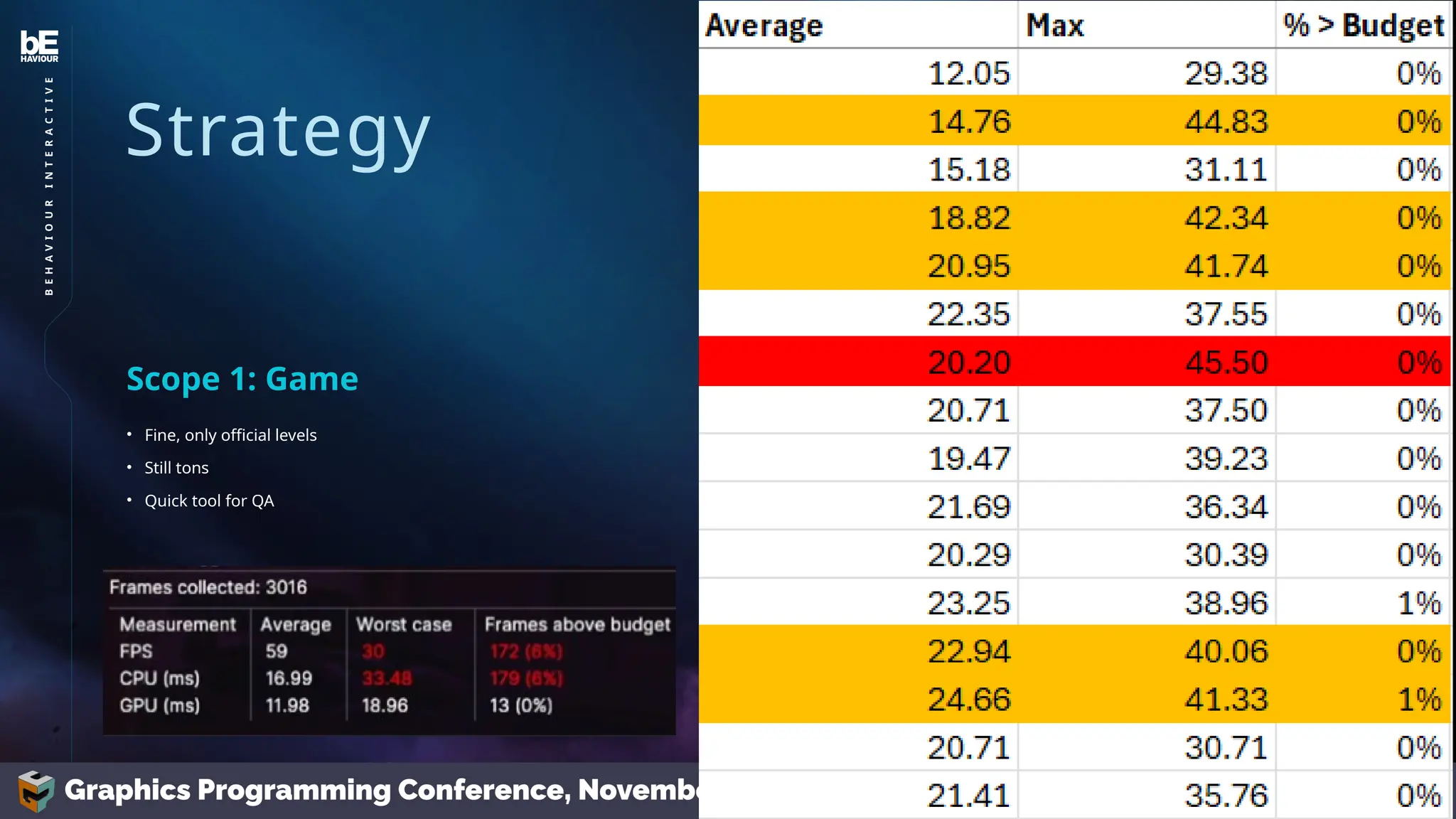
  • #16 Fine, we won’t test all levels, only the ones paired with the game’s release… That’s still tons of levels. We work together with our QA to collect simple averages and statistics from levels. *click* Not a lot of data, but enough to get a basic overview We list those stats in an excel sheet *click* and select the worst performing levels; either with frame-times regularly exceeding our budget, or with significant spikes
  • #18 We now have points of interest. This is often enough to start diving deeper. But, if we have too many, we might need to narrow them down: We match the data with videos of gameplay using the in-game clock. Our goal here is to select points in the playthrough that have performance issues that we are not aware of, or we think have potential for improving. So we use the data with the video to skip similar spikes, spikes caused by large particle systems that just need VFX work, or issues that we’re already aware of.
  • #19 Looking at each individual POI, they all likely have some render pass that isn’t performing well. Usually one stands out, but if there are multiple, they might have a shared cause How do you approach finding out what to optimize? That’s what we’ll talk about next
  • #22 The rasterization pipeline deals with large quantities of work. A single draw call starts thousands of workloads of vertex shaders, which then get followed by even more fragment shaders which then also iterate over dozens of lights. In searching for optimizations, we usually take a top-down approach, attempting to reduce work as early as possible, since it can result in the most significant cuts. What kind of things can you reduce? *click*
  • #23 You can reduce the # of draw calls For example, *click* By frustum culling to determine if a mesh is in view *click* And by occlusion culling to determine if a mesh is visible *click* You can also perform distance culling for small meshes that are far away
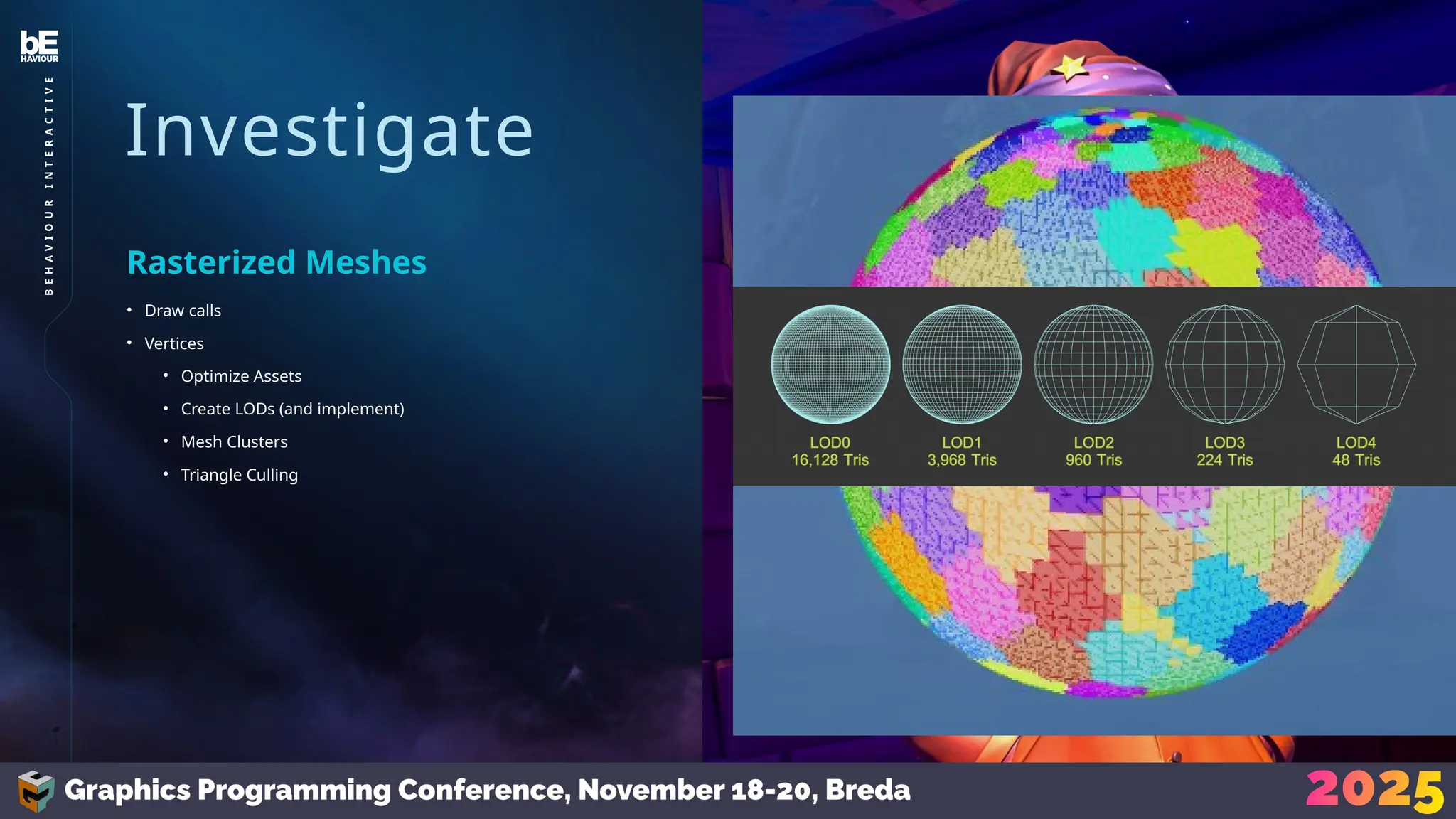
  • #24 *click* You can reduce the # of vertices, which is often a combined effort between the engine and art team; Your artists can optimize assets *click* And create LODs *click* (which you then have to implement) From your end you can implement things like mesh clusters *click* And perform triangle culling *click* for extra high density meshes But those last two are only worth it if your goal is high vertex density; if you’re targeting lower end platforms, lowering your vert count through artist help might be your only path.
  • #25 Or you can reduce the # of pixels - A common approach to this is upscaling like DLSS or FSR to reduce your render res, but that comes at a quality cost, which is something that you might not always be willing to sacrifice. For modern GPUs you can use Variable Rate Shading to squeeze out performance with lower visual losses.
  • #26 Inside the pixel shader, even more work may be spawned; iterations over point lights, spot lights, decals There are a lot of technologies available online to reduce this. For King of Meat we use clustered rendering (tiles) clamped by a per-tile z range, which proved enough for our use case given shorter sight-lines 
  • #27 I’m not saying implement all these techniques; I’m saying, look at your pipeline, look at what things are fundamentally spawning work, and consider how much of that work contributes to the screen the player gets to see.
  • #28 We identified that the main render pass was slow and needed work. This pass performs a lot of lighting calculations and should be heavily pixel-shader bottlenecked. But the pixel shader occupancy is low Look at the vertex shader… its occupancy is also low. We would normally expect this in the main pass given the pixel shader work, but in this case something must be bottlenecking even earlier Vertex shaders rely on data being pulled in from the vertex attribute fetch; this is where the bottleneck lies
  • #29 So, we’ll do everything in our power to optimize this: Modify shaders to reduce which attributes get read Create separate vertex attribute streams Compress vertex attributes (combine attributes, octahedral mapping)
  • #30 But none of these really had an impact. Let’s take a step back Our goal was to unlock pixel shader potential… We were too overzealous and immediately dove into vertex shader optimizations. Our first step should’ve been to move back up the pipeline by reducing vert count, because this was a problem of vertex density; the ratio of vertex workload vs pixel workload was simply off. Reducing the per-vertex cost wasn’t enough to have an impact, whereas optimising art, adjusting level of detail, etc. made all the difference we needed
  • #31 Now that I’ve discouraged you from optimizing shaders, let’s talk about optimizing shaders Usually you want to do this after you’ve looked at all the other steps in the pipeline But take that advice with a grain of salt; sometimes you know the exact bottleneck, or you know an easy/quick way to solve an issue. These directions are just guidelines. This is also where full-screen passes and compute shaders come in. They don’t follow the typical rasterization pipeline, so there are fewer steps we need to look at. But do consider adjusting the resolution for these passes; off-screen effects like reflections, SSR, and SSAO, can often get away with reducing the resolution by quite a bit since these passes don’t contribute to the final result as much as the main rasterized pass.
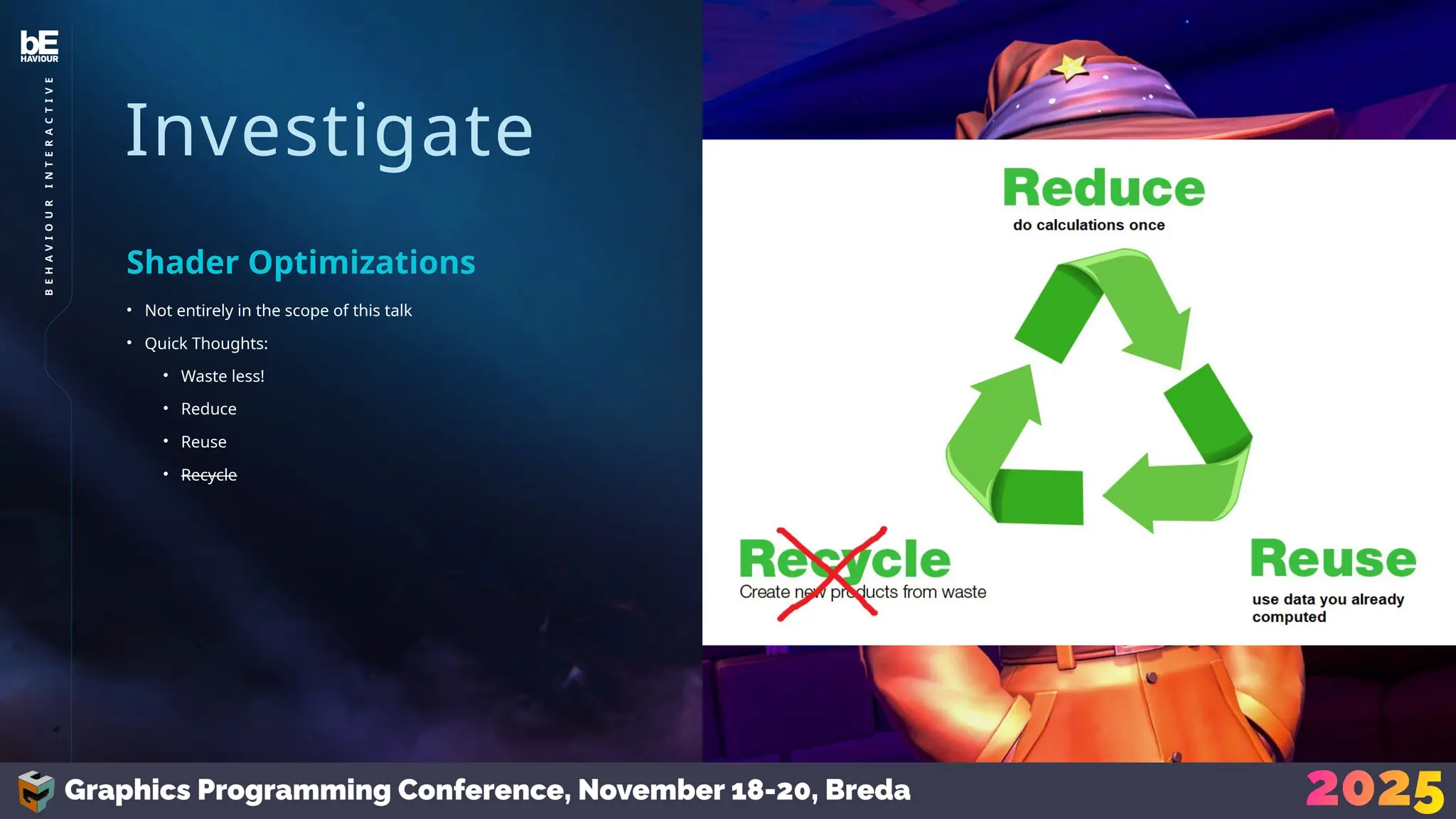
  • #32 Full shader optimization isn’t in the scope of this talk But I’ll give you some quick thoughts Apply the same concept as the rest of this talk: Waste less, do less work. Shaders have a lot of invocations Reduce: Don’t compute the same work in a shader if the result is always the same. Compute it in the earliest stage possible and pass it along. Reuse: Reusing data you’ve already calculated is great! For example, you can use your early depth buffer to also occlude objects, prevent lights from being considered, etc. In compute shaders you can often use wave operations to do less work per thread as well (there was a great talk on that last year by Alexandre Sabourin, I’ll link it at the end) Recycle: Yeah that’s where the analogy falls apart. Moving on
  • #33 Finally, in finding optimizations, consider this. You are the one who knows your project best.. Optimize = Sacrifice What are you willing to give up? Usually, the less you’re willing to sacrifice, the more effort you’re going to have to put in to make it happen, so the optimizations you decide to make will depend entirely on your project’s requirements, limitations, goals, and the time you have, to get it all done.
  • #34 Which brings me to my next point: Optimizations are a sacrifice; you shouldn’t add them blindly. You’re often trading off against visual quality loss and increased code complexity, so verify if your results are worth it. Every optimization we make is paired with profiling data where we measure the workload before/after to see if the optimization even had a positive effect, and screenshots / recordings of the before / after so we can judge the visual tradeoff and prevent regressions.
  • #35 How does this all fit into the usual planning structure of game dev?
  • #36 This approach is very agile and could easily slot into Scrum or anything alike. During our development, my team had a lot of trust from our producer, but if you have less autonomy, you’ll have to work more closely with whoever’s in charge The profiling suite doesn’t just provide us with new tasks; it also gives us a status update of our work. We re-evaluate our direction monthly after the profiling suite, and we plan our workload in a sprint-like manner on a bi-weekly basis.
  • #37 How do you determine what work’s most important? Well that’s somewhat subjective but you can determine some loose metrics. We usually discuss and rate the potential performance impact, complexity, risks, and visual sacrifices. Every idea should be considered and written down, even if it’s not worth it at the time, it’s something that may come to use / reconsideration later
  • #38 How do you stay on track on a longer-term basis? Optimization work isn’t always guaranteed to succeed; you might find yourself optimizing something only for it to perform the same or worse. Leave leeway in planning First, we must determine our goal; what is our current situation, what is our target performance, and when should we reach said target? Then we divide the timespan in reasonable chunks; for us we decided to work with monthly targets
  • #39 For example If our objective is to hit 30ms in 4 months, and our current frame-time is 45ms, Then we might set a 5ms per month budget; leaving 1 month leeway to catch up Every month, we profiled and analyzed like I’ve discussed. We found optimizations that had little to no visual impact, would likely improve performance, and would potentially bring us to our performance targets, but we also kept ideas around with worse tradeoffs; tasks that would result in visual quality losses but would result in known notable performance boosts. These fallback tasks would only have been implemented in the case that our planned workload didn’t help us hit our targets on time.
  • #41 Optimization is scientific. There’s a method to the madness and if you’re doing it for longer periods of time you shouldn’t be going in headless. The approach we used allowed us to make decisions backed by hard facts, which we were able to reference along the way Monthly results provided a record of our work; proving we were following a good trend, and catching regressions.
  • #42 Finally I’d like to press…
  • #45 Speaker’s notes on these sources: We used Practical Visibility as our reference for implementing Occlusion Culling Most of our view distances are relatively small, so the tile-range from Practical Clustered Culling was enough in this case, but we did play around with a z-binning approach based on https://www.activision.com/cdn/research/2017_Sig_Improved_Culling_final.pdf We didn’t end up having high enough vert counts to consider mesh clusters or triangle culling, but they’re discussed in these sources as well.