Introduction to Java
Programming Language
Junji Zhi
University of Toronto

1
Content
•
•
•
•
•
•

Java language Syntax
“Hello World” program example
Compiling, Running and Debugging Java code
Inheritance
Threading
Synchronization

2
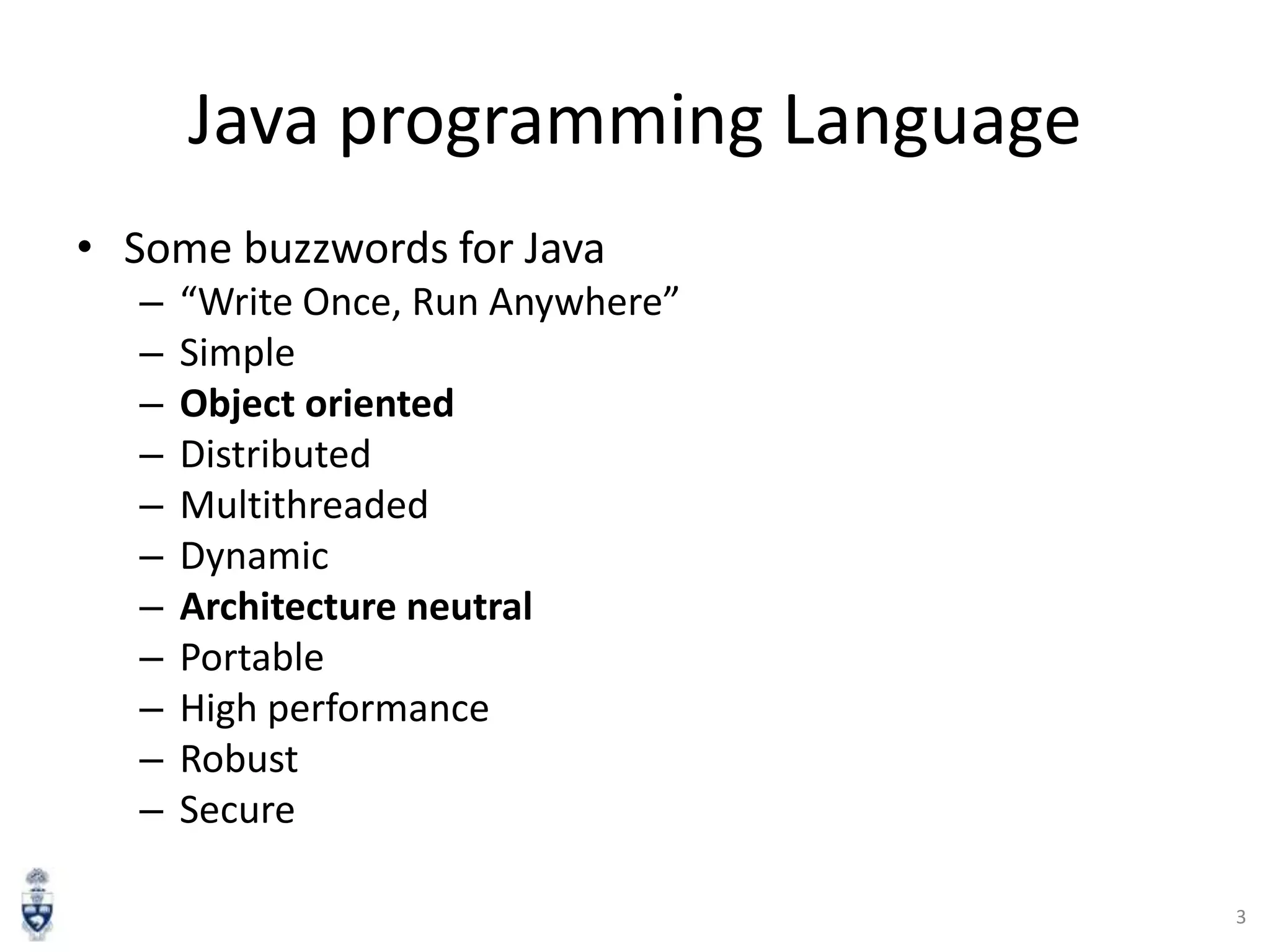
Java programming Language
• Some buzzwords for Java
–
–
–
–
–
–
–
–
–
–
–

“Write Once, Run Anywhere”
Simple
Object oriented
Distributed
Multithreaded
Dynamic
Architecture neutral
Portable
High performance
Robust
Secure
3
Example: Hello World Program

• Everything is in a class
• One file, one public class
• In the runnable public class:
– public static void main(String [] args)

4
Primitive Data Types
• Primitive Data Types: byte, short, int, long, float,
double, boolean, char
• Arrays are also a class
long [] a = new

long[5];

– You can get the length by visiting the length field of
array object a, like this: a.length

• String class is very commonly used to represents
character strings, for example
String s1 = “Hello ”, s2 = “Wolrd!”;
String s3 = s1 + s2;

5
Operators (same as C/C++) [3]
•
•
•
•
•

++,-- Auto increment/decrement
+,- Unary plus/minus
*,/ Multiplication/division
% Modulus
+,- Addition/subtraction

6
Declaring Variables [3]
int n = 1;
char ch = „A‟;
String s = “Hello”;
Long L = new Long(100000);
boolean done = false;
final double pi = 3.14159265358979323846;
Employee joe = new Employee();
char [] a = new char[3];
Vector v = new Vector();

7
Compared with C/C++ [3]
• Java has no:
–
–
–
–
–
–
–
–
–
–

pointers
typedef
preprocessor
struct
unions
multiple inheritance
goto
operator overloading
malloc
…
8
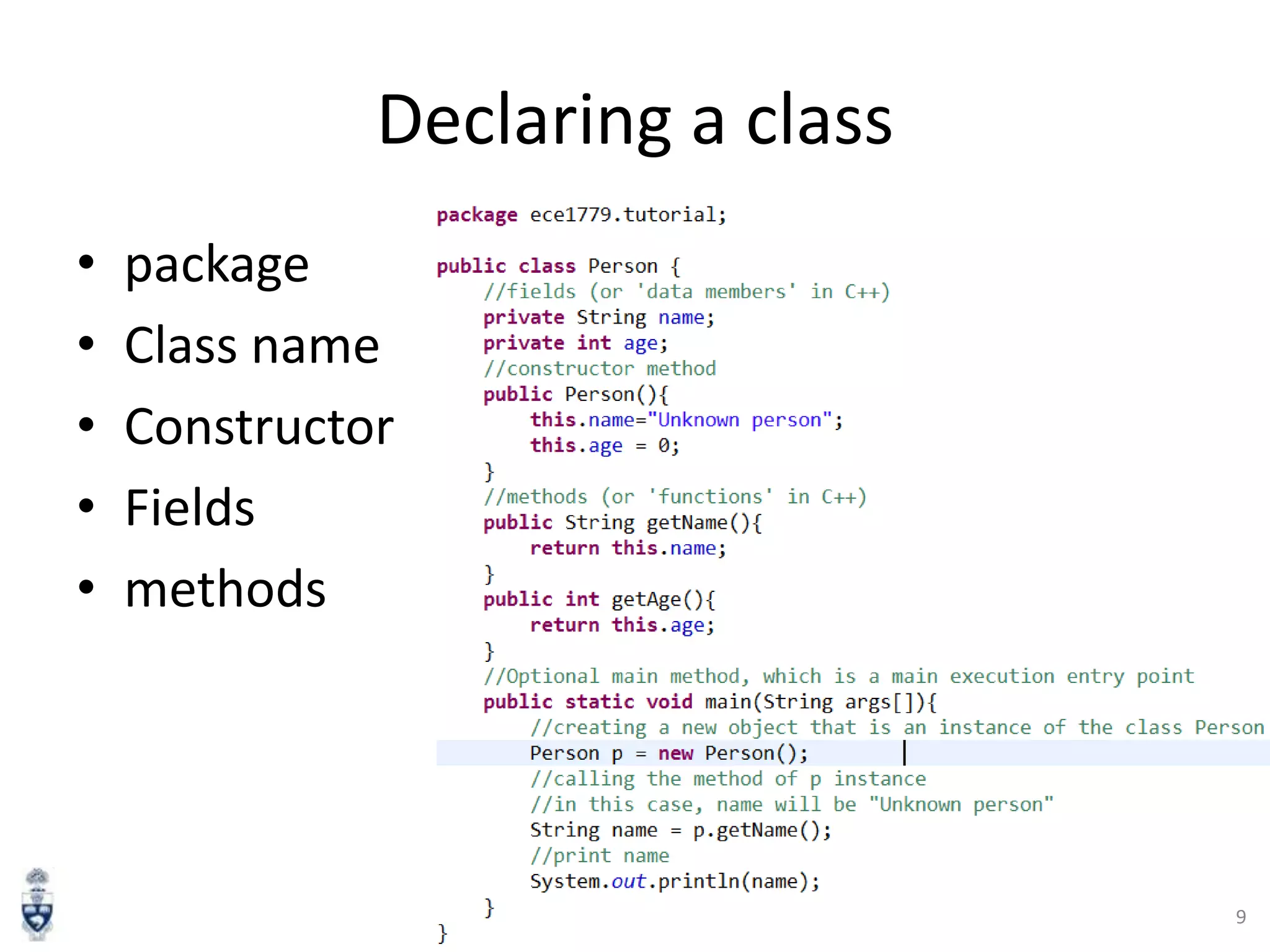
Declaring a class
•
•
•
•
•

package
Class name
Constructor
Fields
methods

9
Compiling, Running and
Debugging Java Programs

10
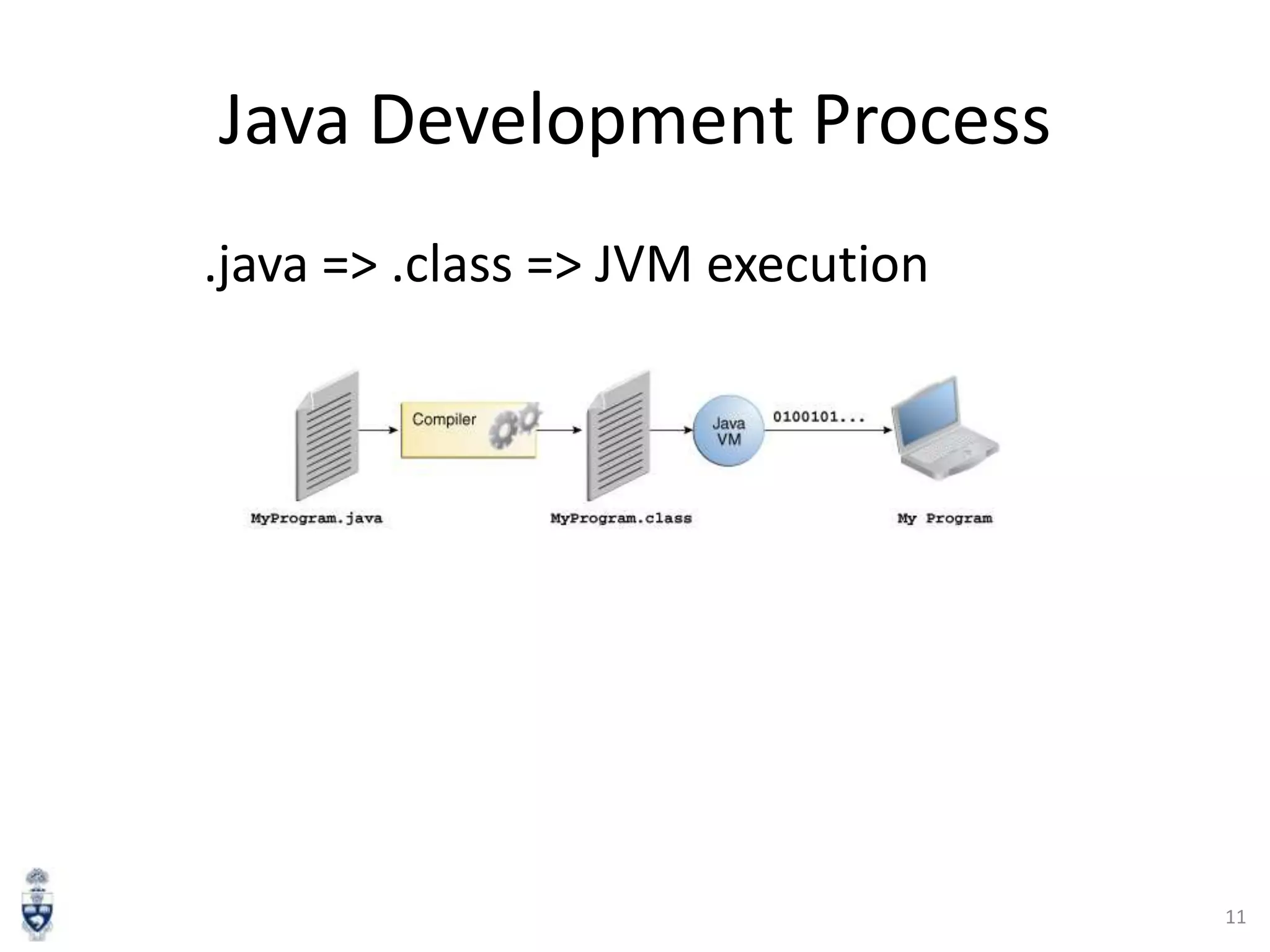
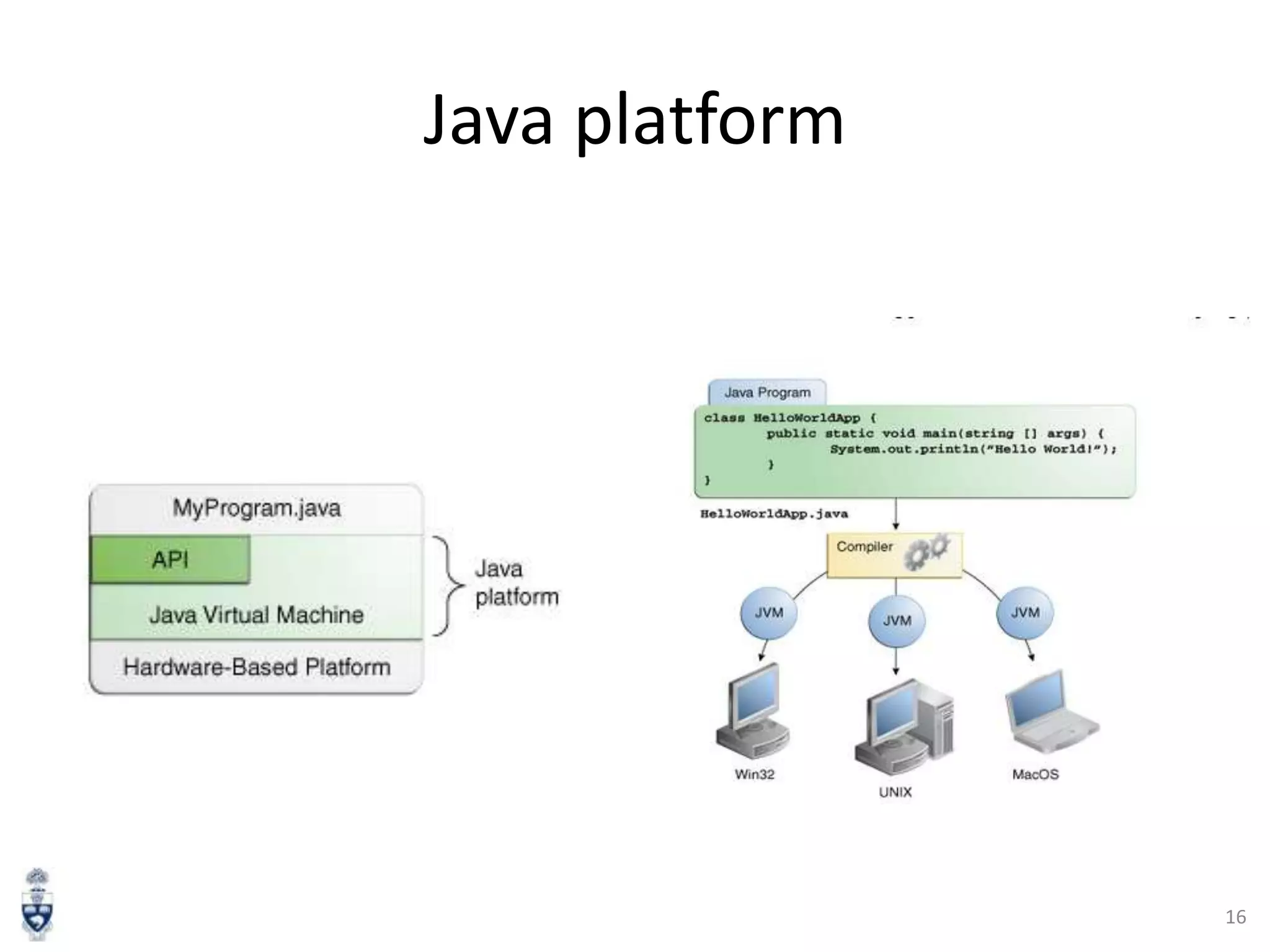
Java Development Process
.java => .class => JVM execution

11
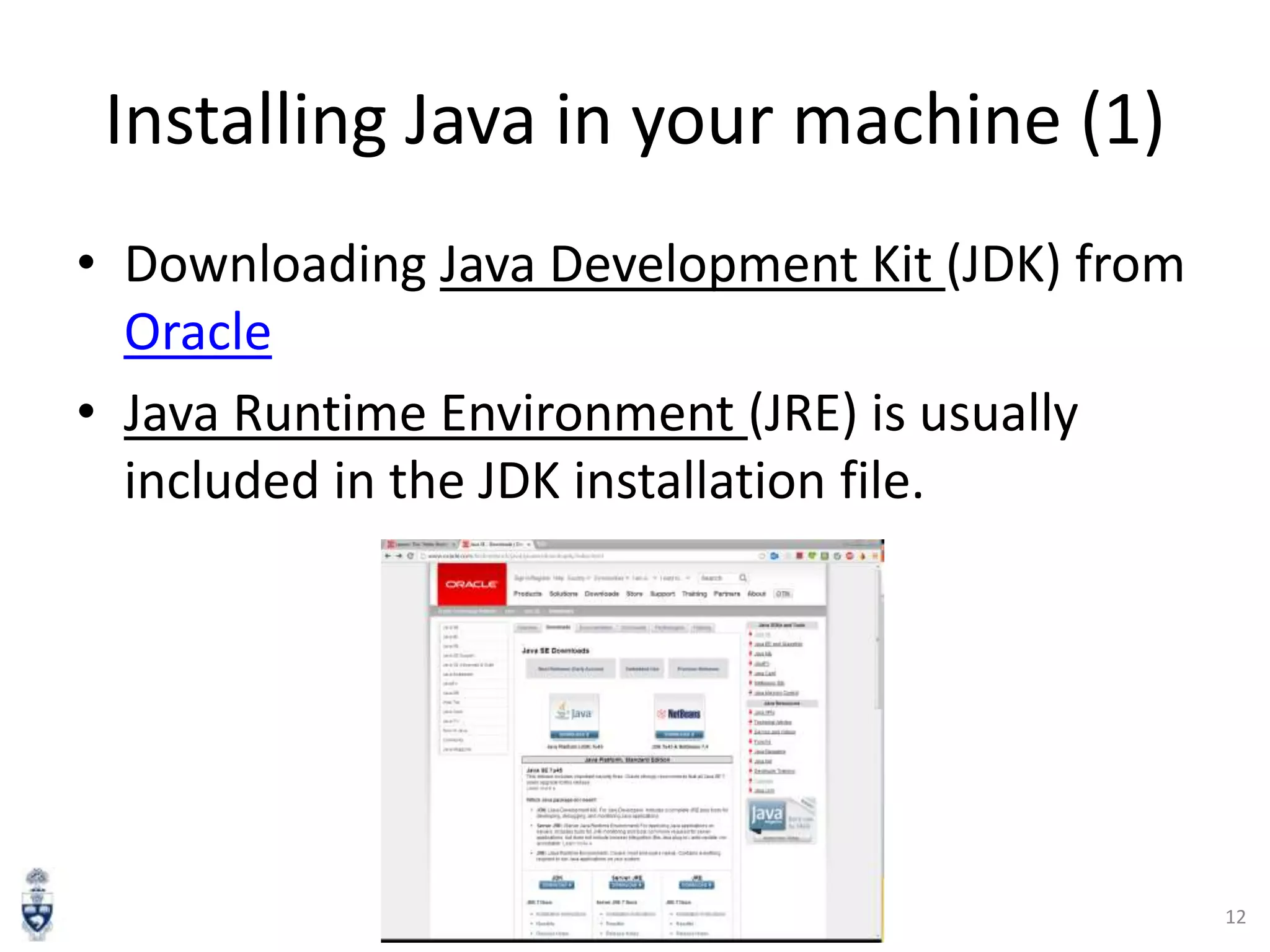
Installing Java in your machine (1)
• Downloading Java Development Kit (JDK) from
Oracle
• Java Runtime Environment (JRE) is usually
included in the JDK installation file.

12
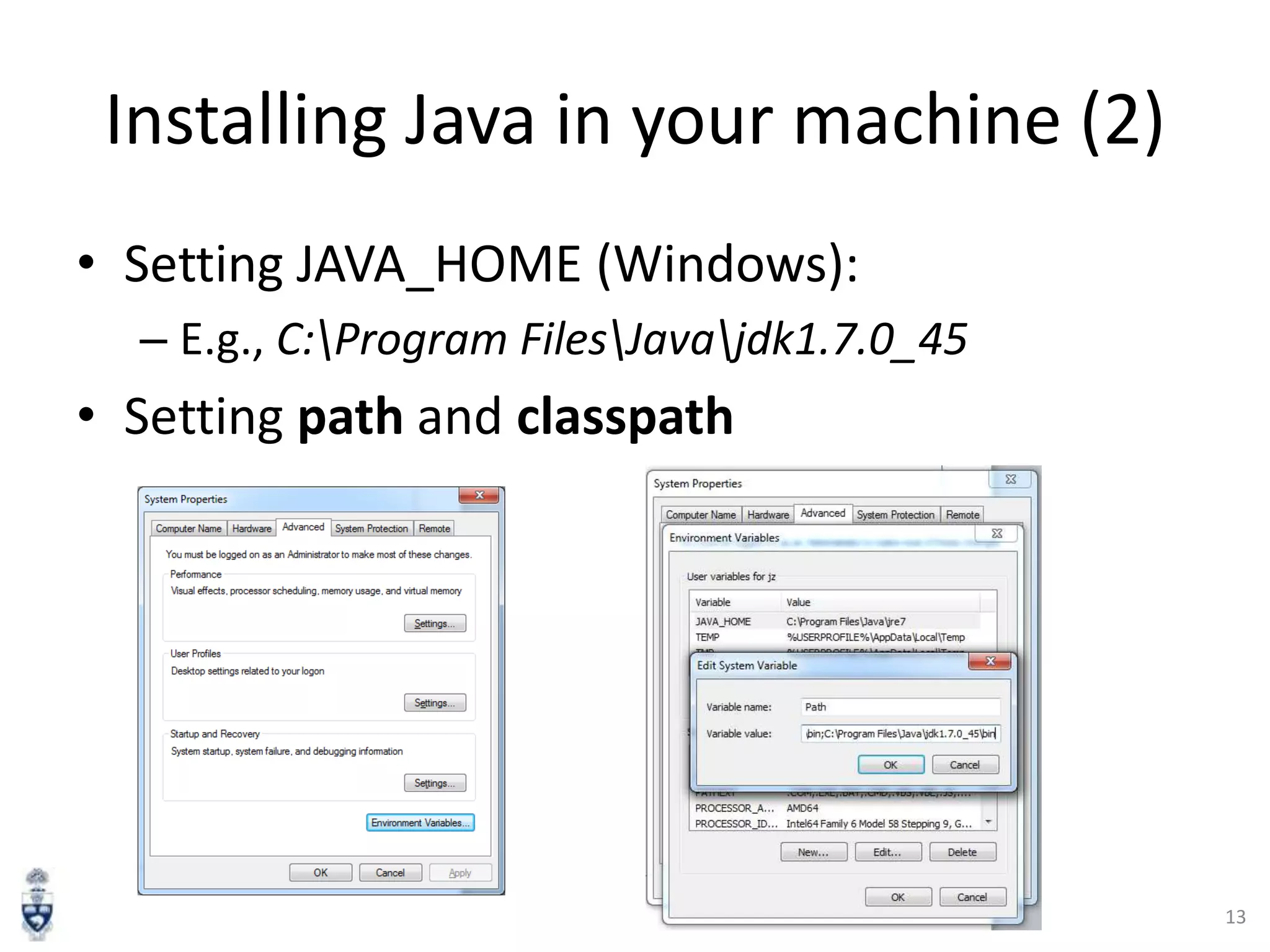
Installing Java in your machine (2)
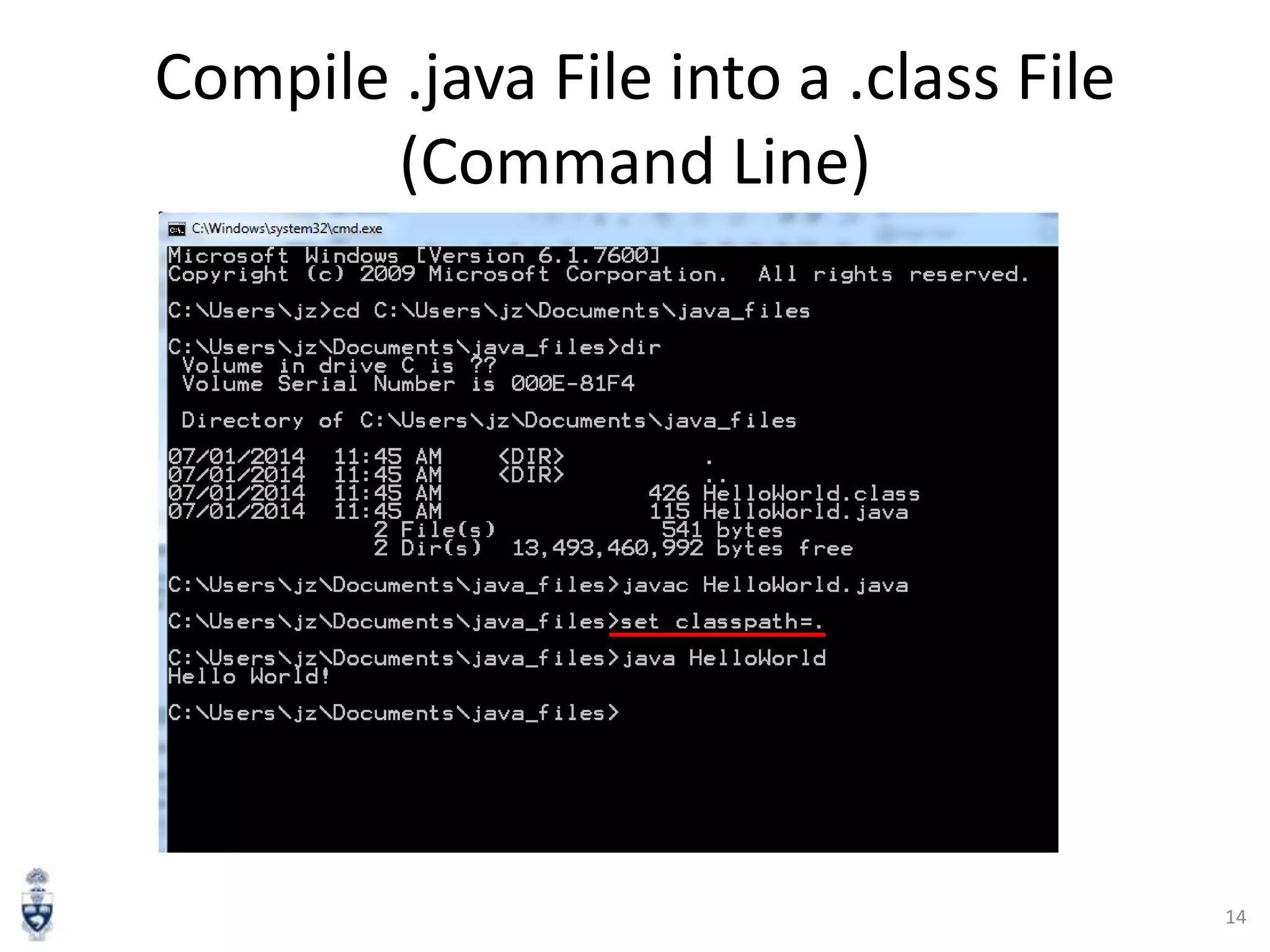
• Setting JAVA_HOME (Windows):
– E.g., C:Program FilesJavajdk1.7.0_45

• Setting path and classpath

13
Compile .java File into a .class File
(Command Line)

14
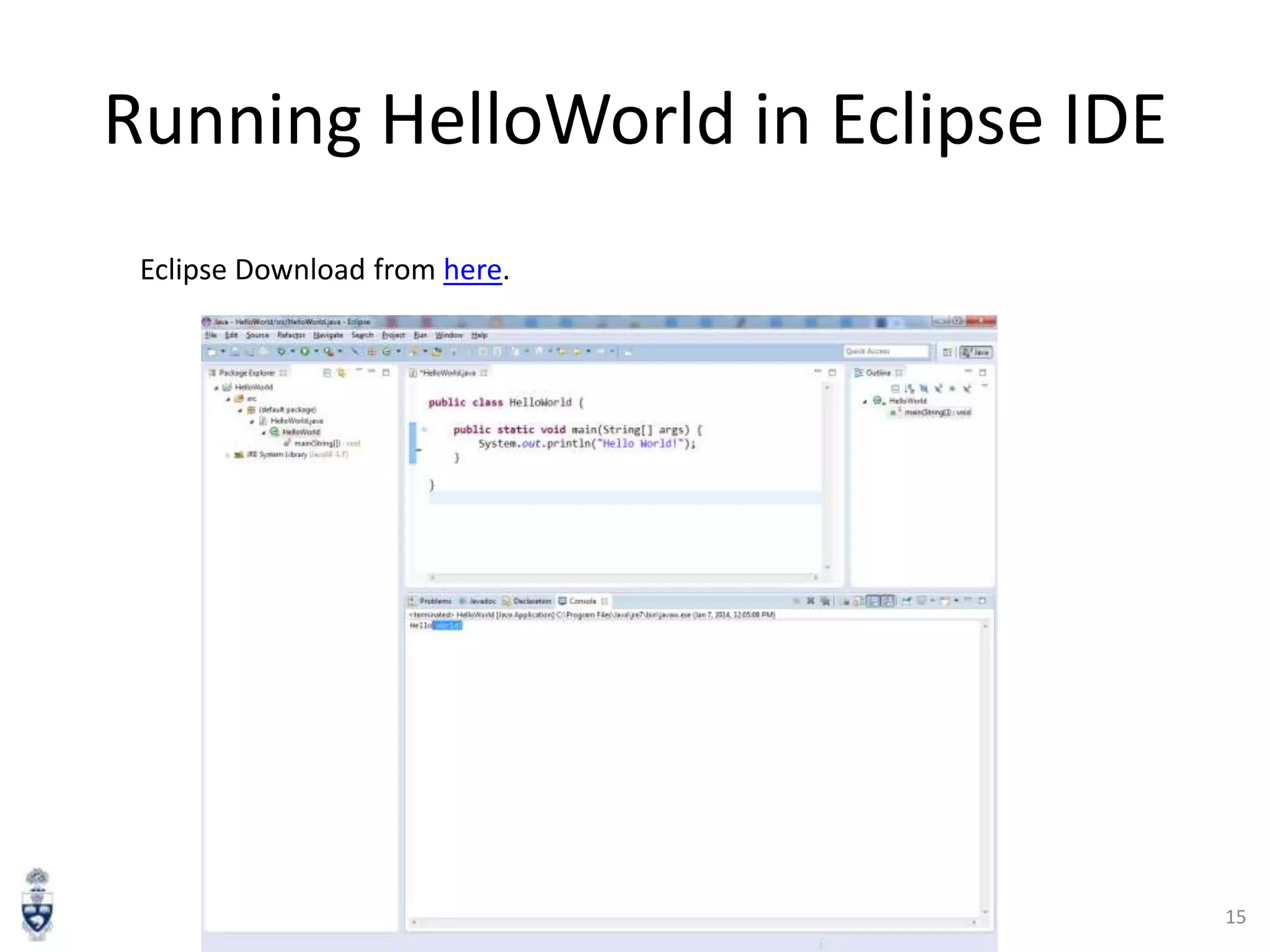
Running HelloWorld in Eclipse IDE
Eclipse Download from here.

15
Java platform

16
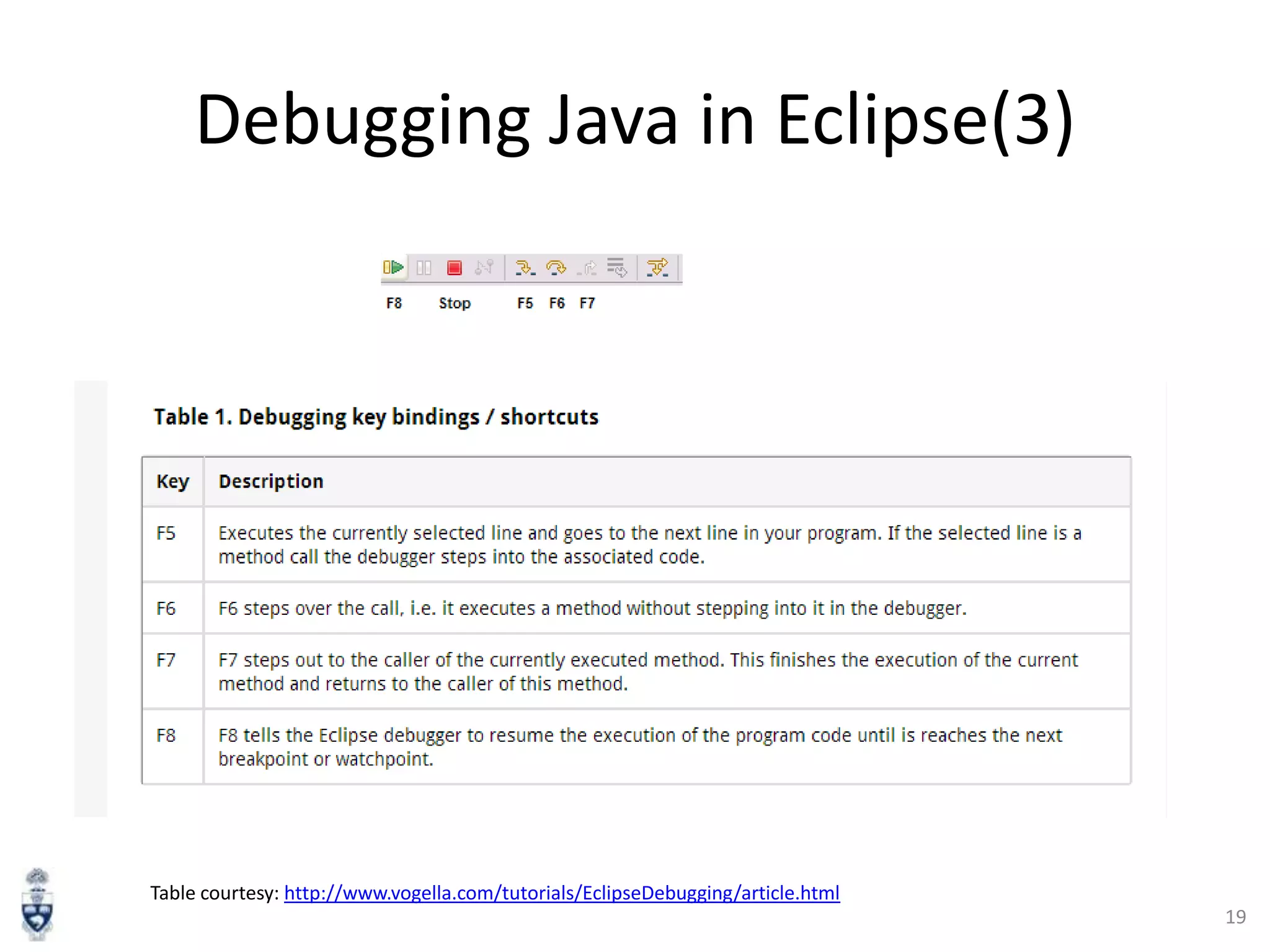
Debugging Java in Eclipse (1)
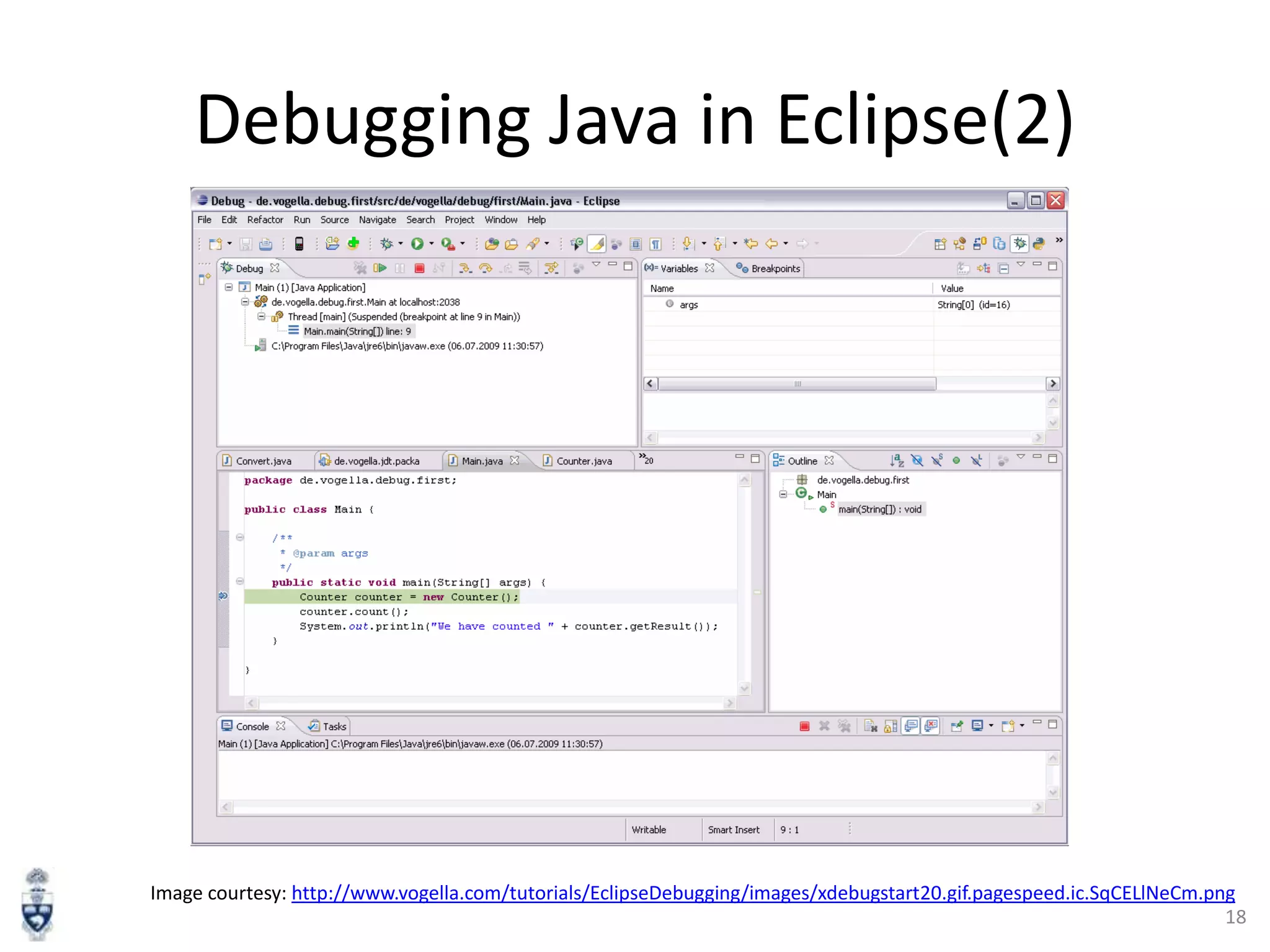
• Debugging means “run a program
interactively while watching the source code
and the variables during the execution.” [5]
• Set breakpoints to stop the program at the
middle of execution
• Eclipse has a Debug Mode

17
Debugging Java in Eclipse(2)

Image courtesy: http://www.vogella.com/tutorials/EclipseDebugging/images/xdebugstart20.gif.pagespeed.ic.SqCELlNeCm.png
18
Debugging Java in Eclipse(3)

Table courtesy: http://www.vogella.com/tutorials/EclipseDebugging/article.html
19
Java Inheritance

20
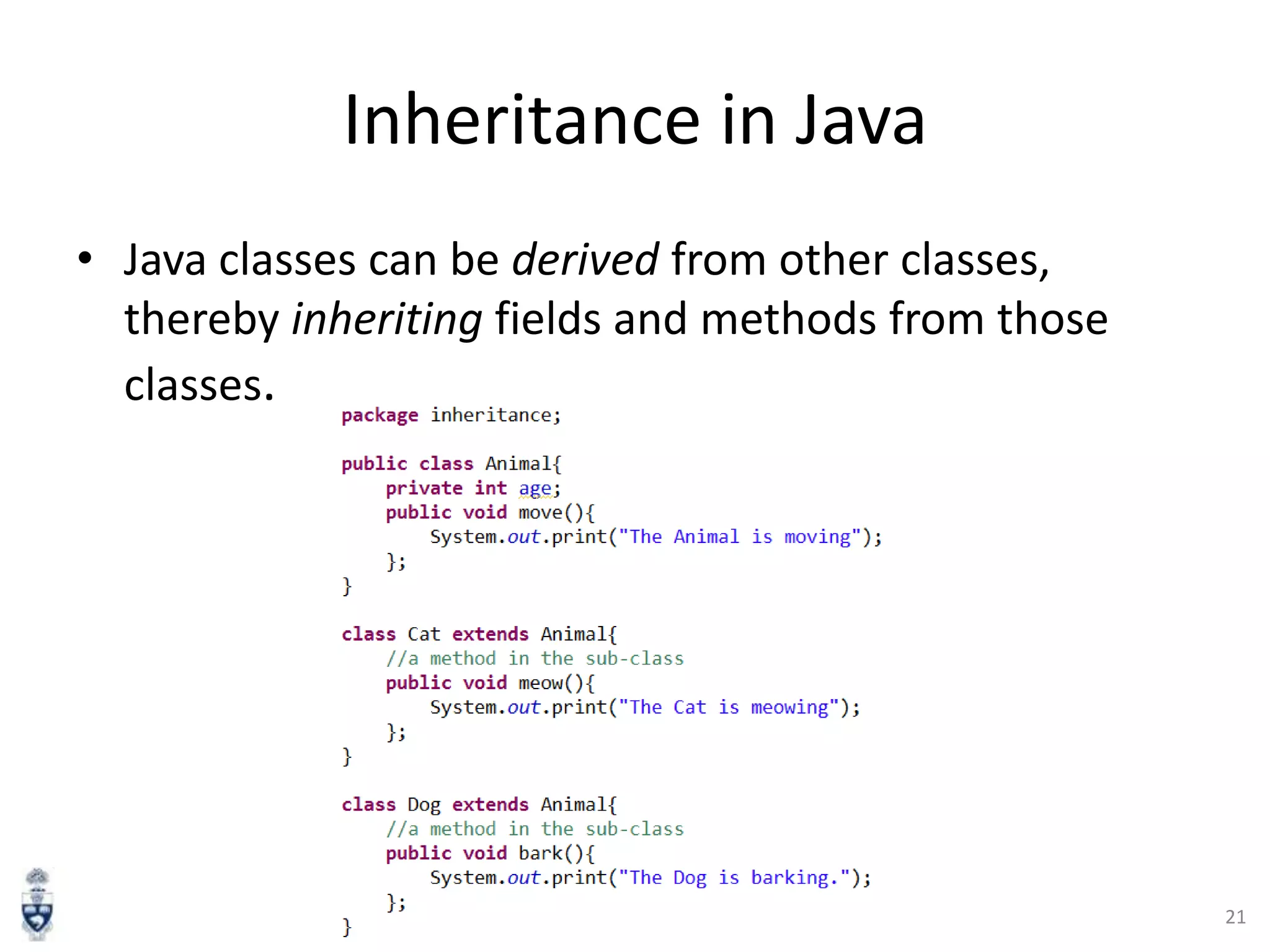
Inheritance in Java
• Java classes can be derived from other classes,
thereby inheriting fields and methods from those
classes.

21
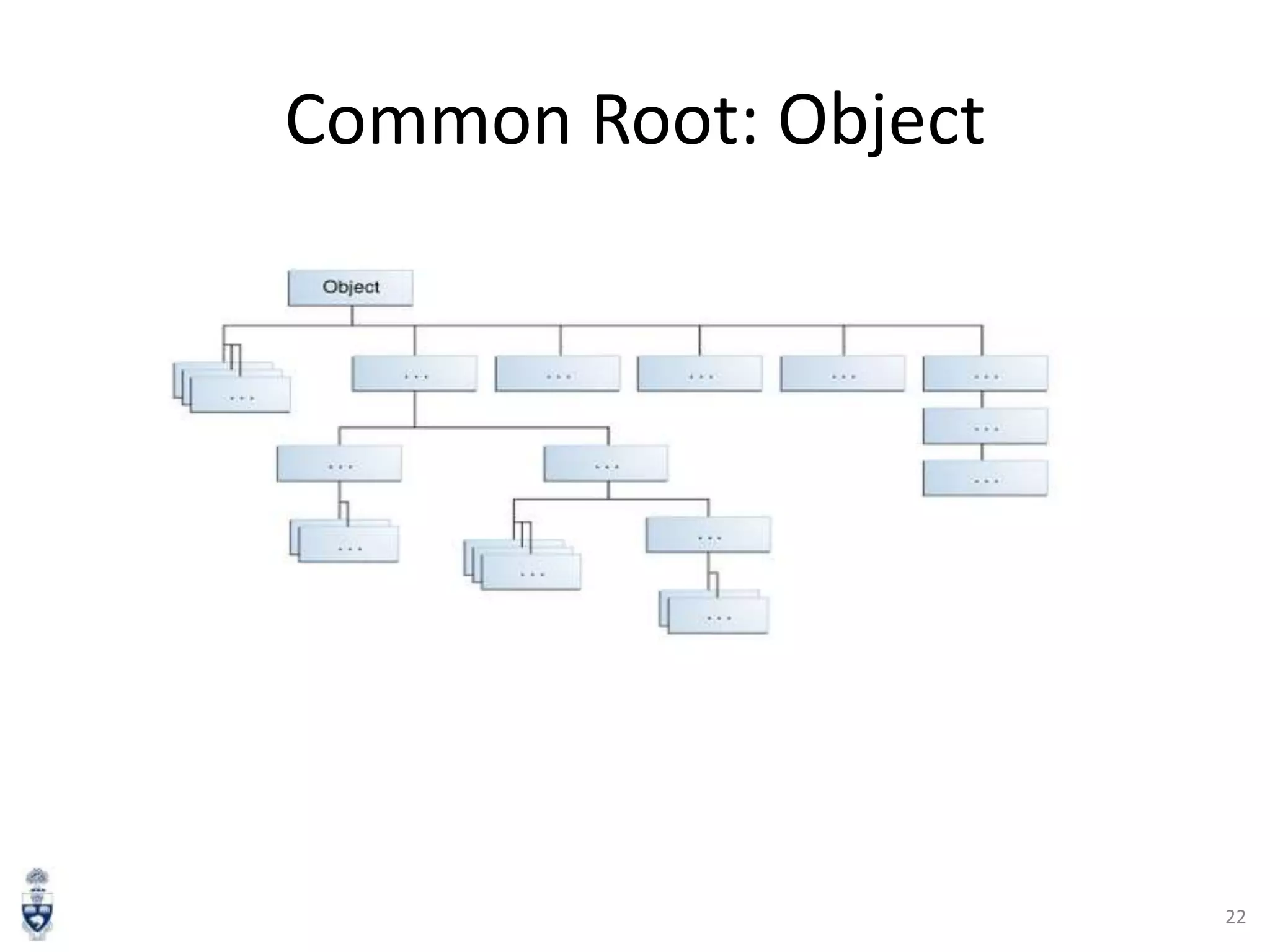
Common Root: Object

22
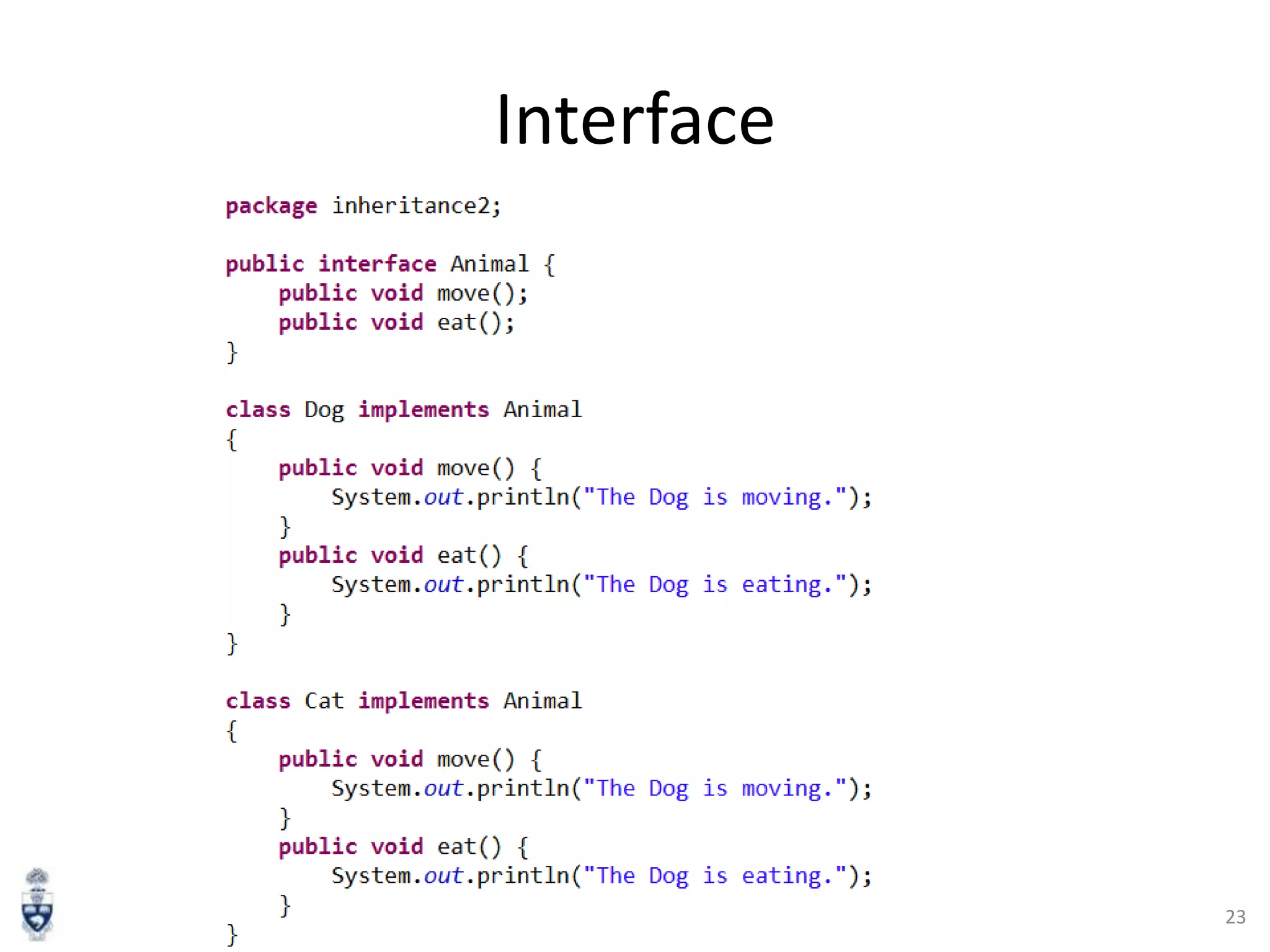
Interface

23
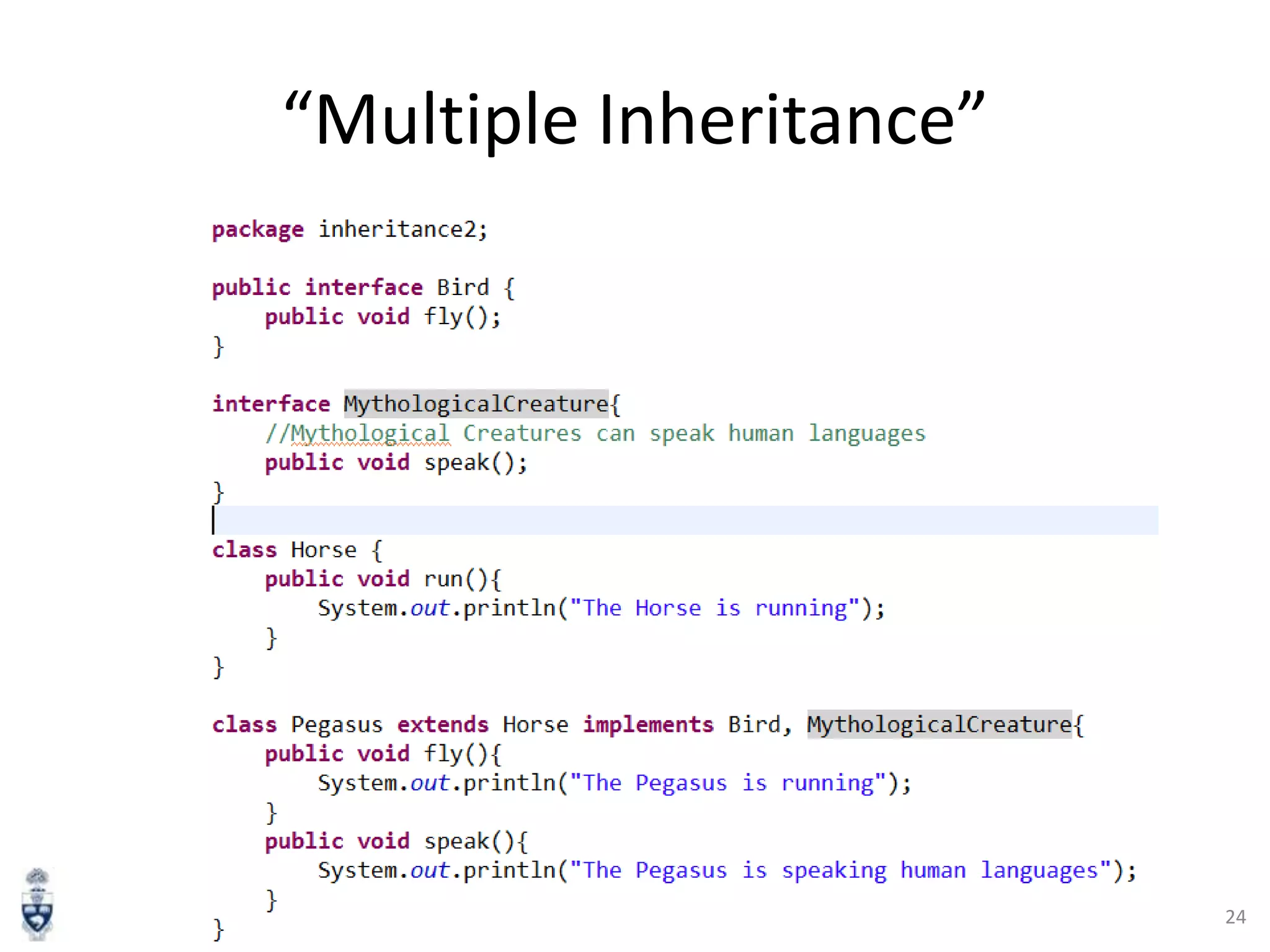
“Multiple Inheritance”

24
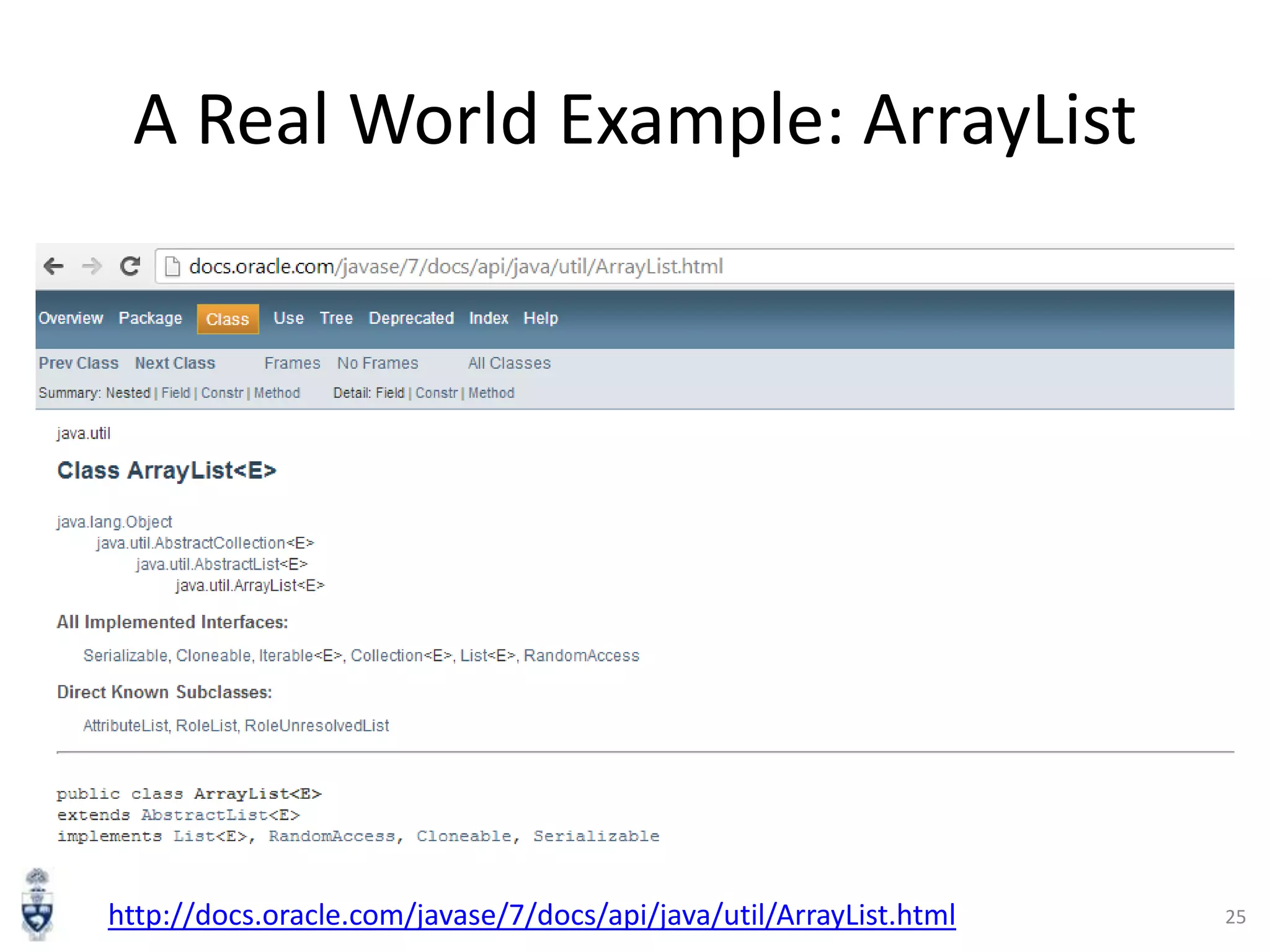
A Real World Example: ArrayList

http://docs.oracle.com/javase/7/docs/api/java/util/ArrayList.html

25
Java Threading

26
Java Threading
• A thread is a thread of execution in a program [6]
• JVM allows an application to have multiple threads running
concurrently.
• Apache Harmony example:

http://harmony.apache.org/subcomponents/drlvm/TM.html

27
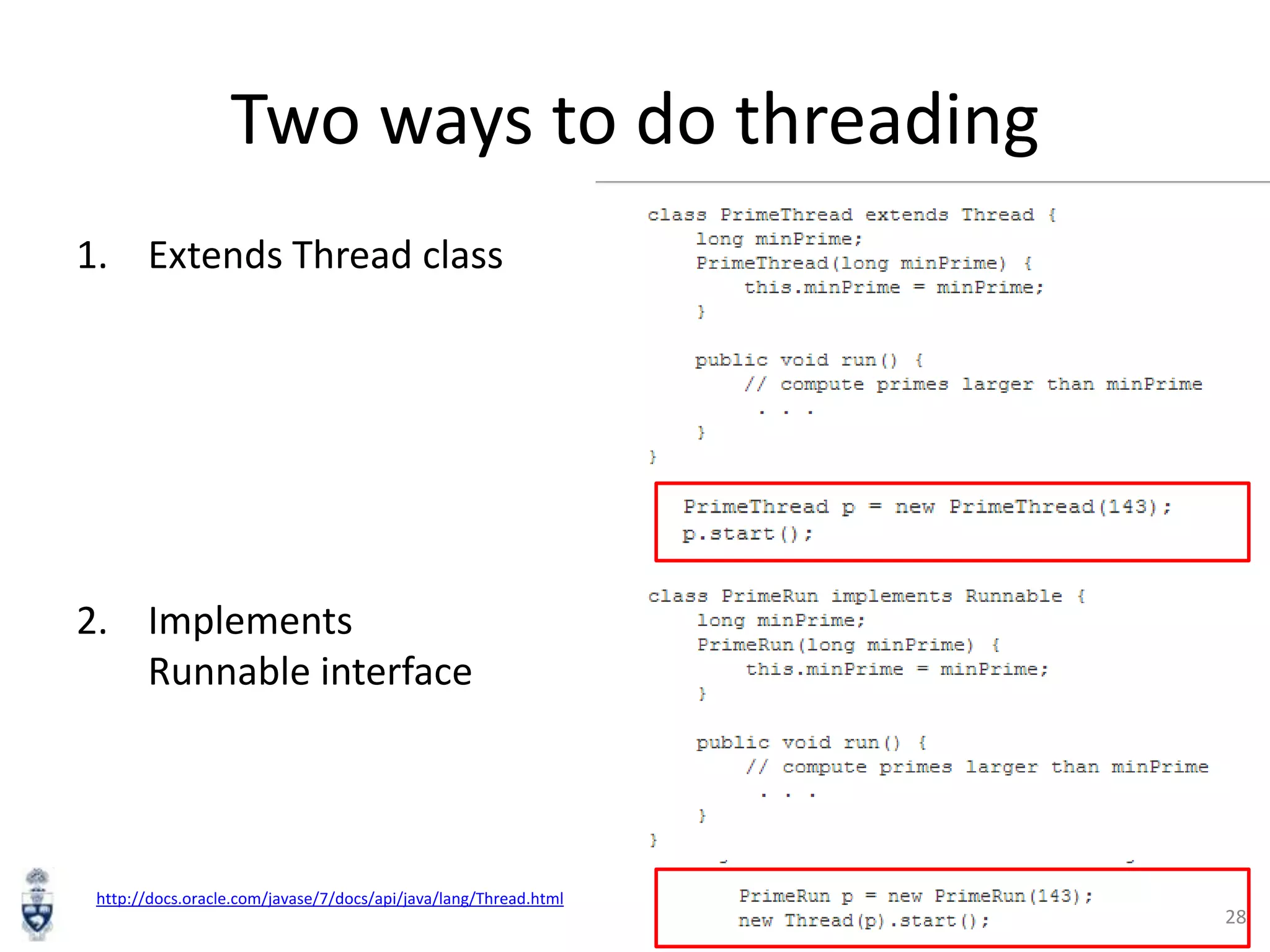
Two ways to do threading
1. Extends Thread class

2. Implements
Runnable interface

http://docs.oracle.com/javase/7/docs/api/java/lang/Thread.html

28
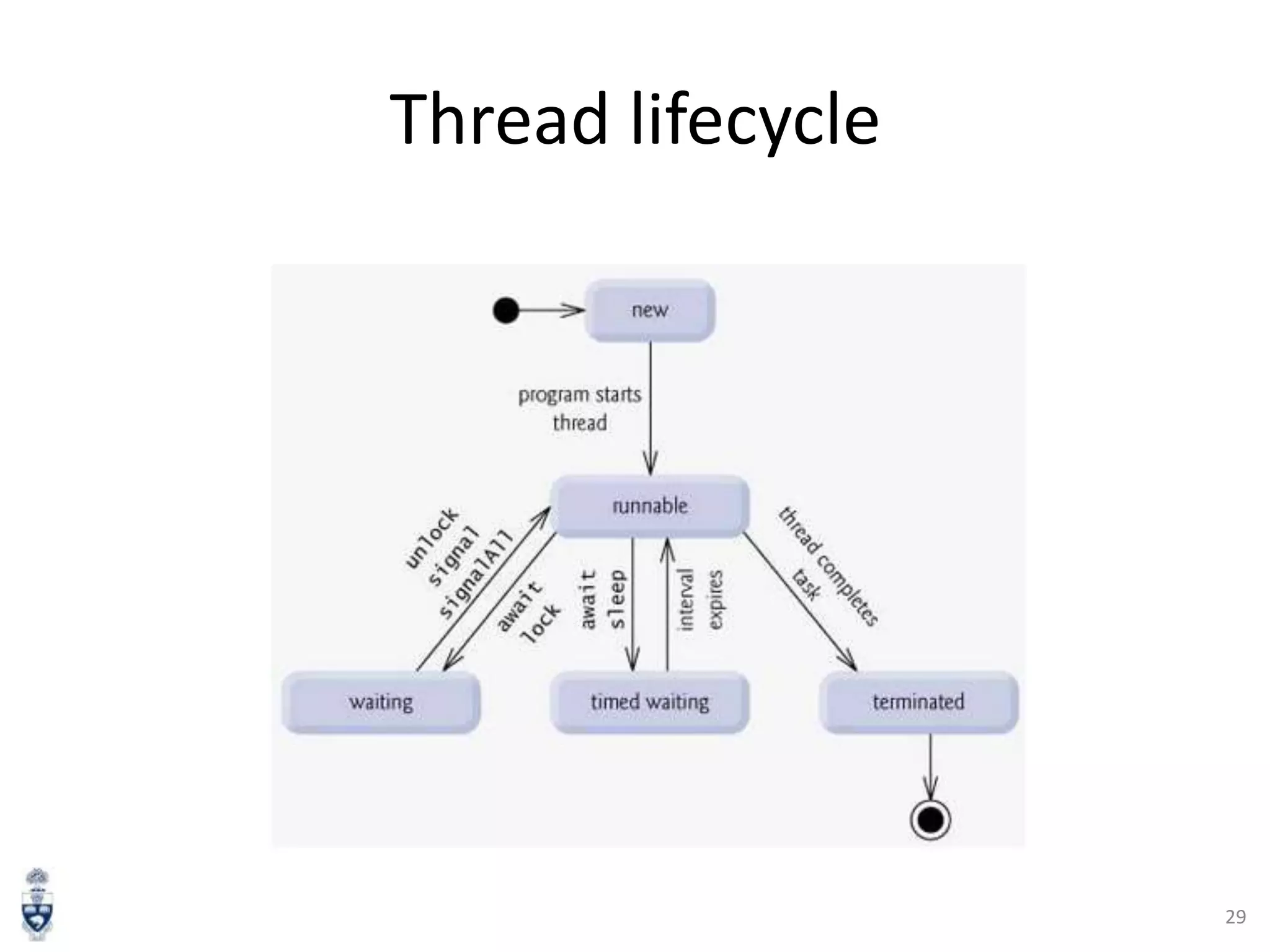
Thread lifecycle

29
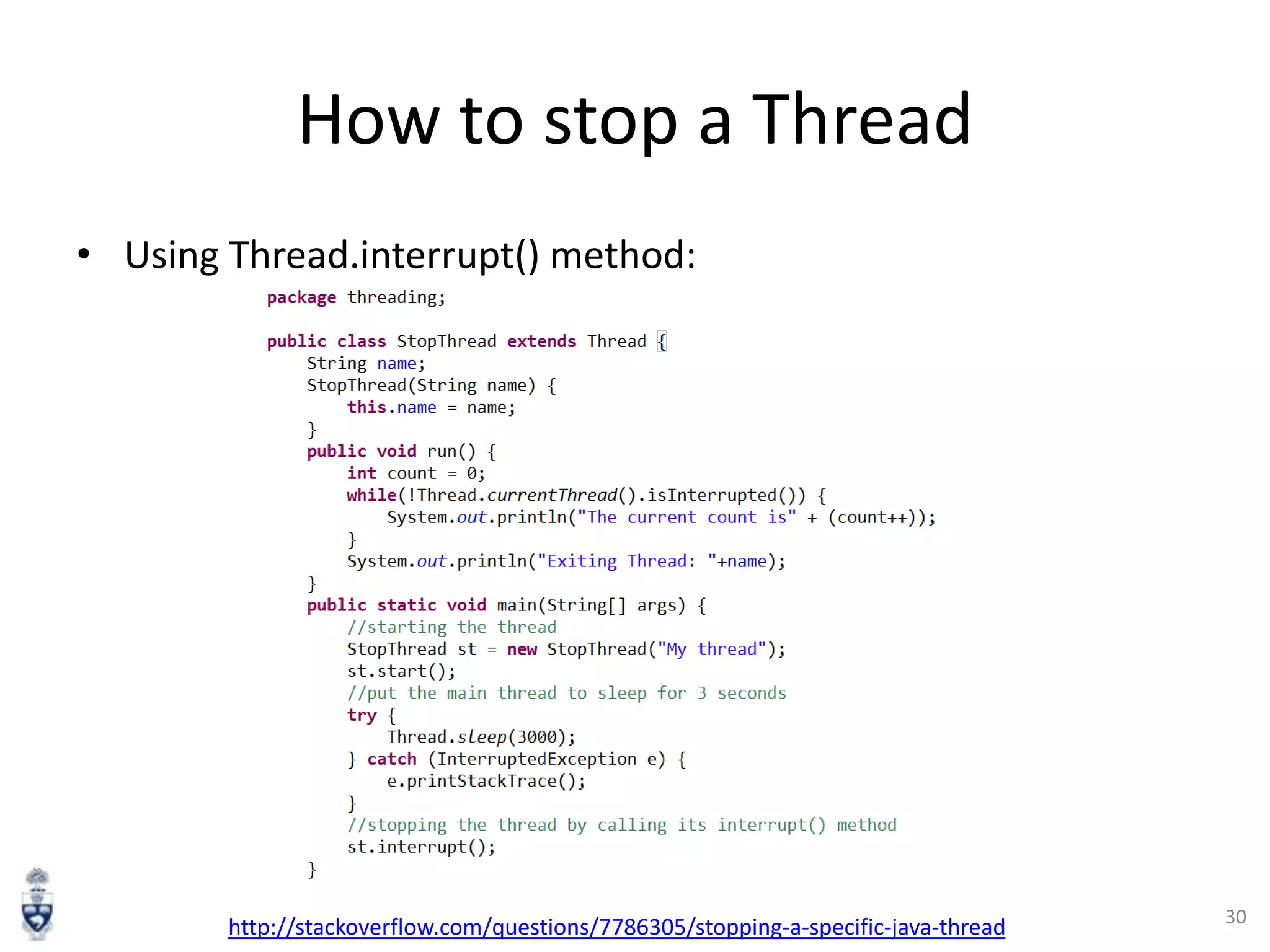
How to stop a Thread
• Using Thread.interrupt() method:

http://stackoverflow.com/questions/7786305/stopping-a-specific-java-thread

30
Java Synchronization

31
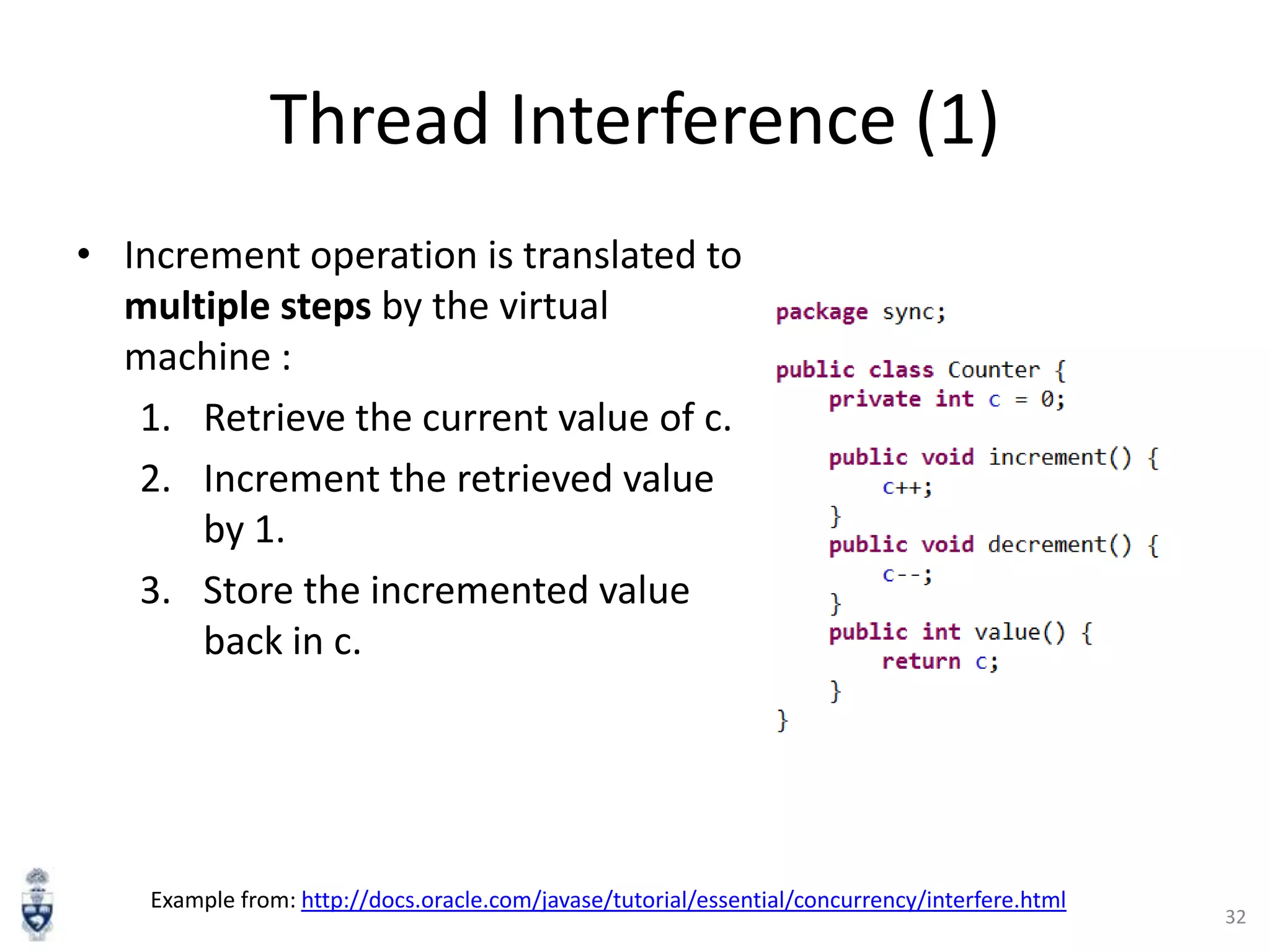
Thread Interference (1)
• Increment operation is translated to
multiple steps by the virtual
machine :
1. Retrieve the current value of c.
2. Increment the retrieved value
by 1.
3. Store the incremented value
back in c.

Example from: http://docs.oracle.com/javase/tutorial/essential/concurrency/interfere.html

32
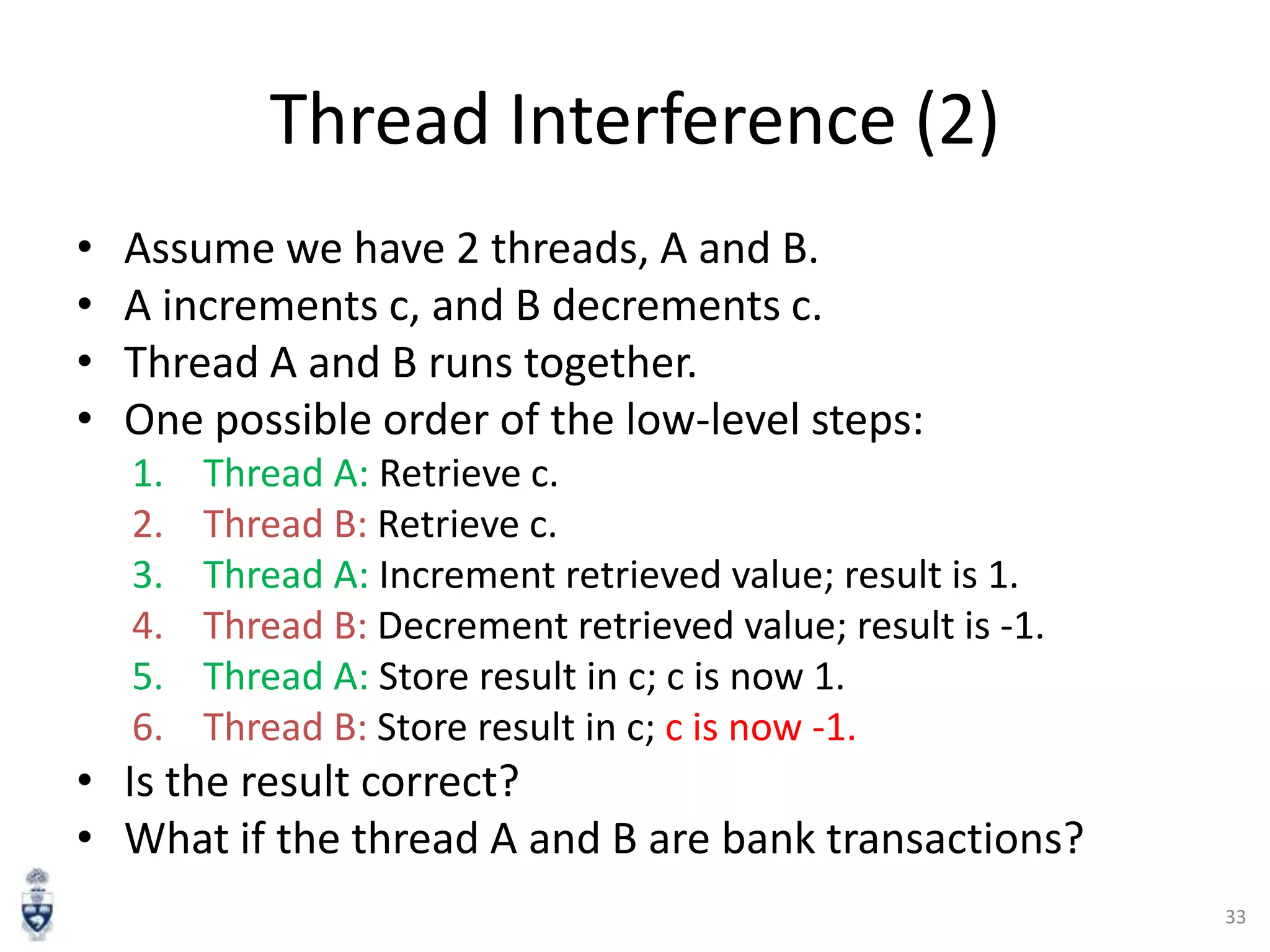
Thread Interference (2)
•
•
•
•

Assume we have 2 threads, A and B.
A increments c, and B decrements c.
Thread A and B runs together.
One possible order of the low-level steps:
1.
2.
3.
4.
5.
6.

Thread A: Retrieve c.
Thread B: Retrieve c.
Thread A: Increment retrieved value; result is 1.
Thread B: Decrement retrieved value; result is -1.
Thread A: Store result in c; c is now 1.
Thread B: Store result in c; c is now -1.

• Is the result correct?
• What if the thread A and B are bank transactions?
33
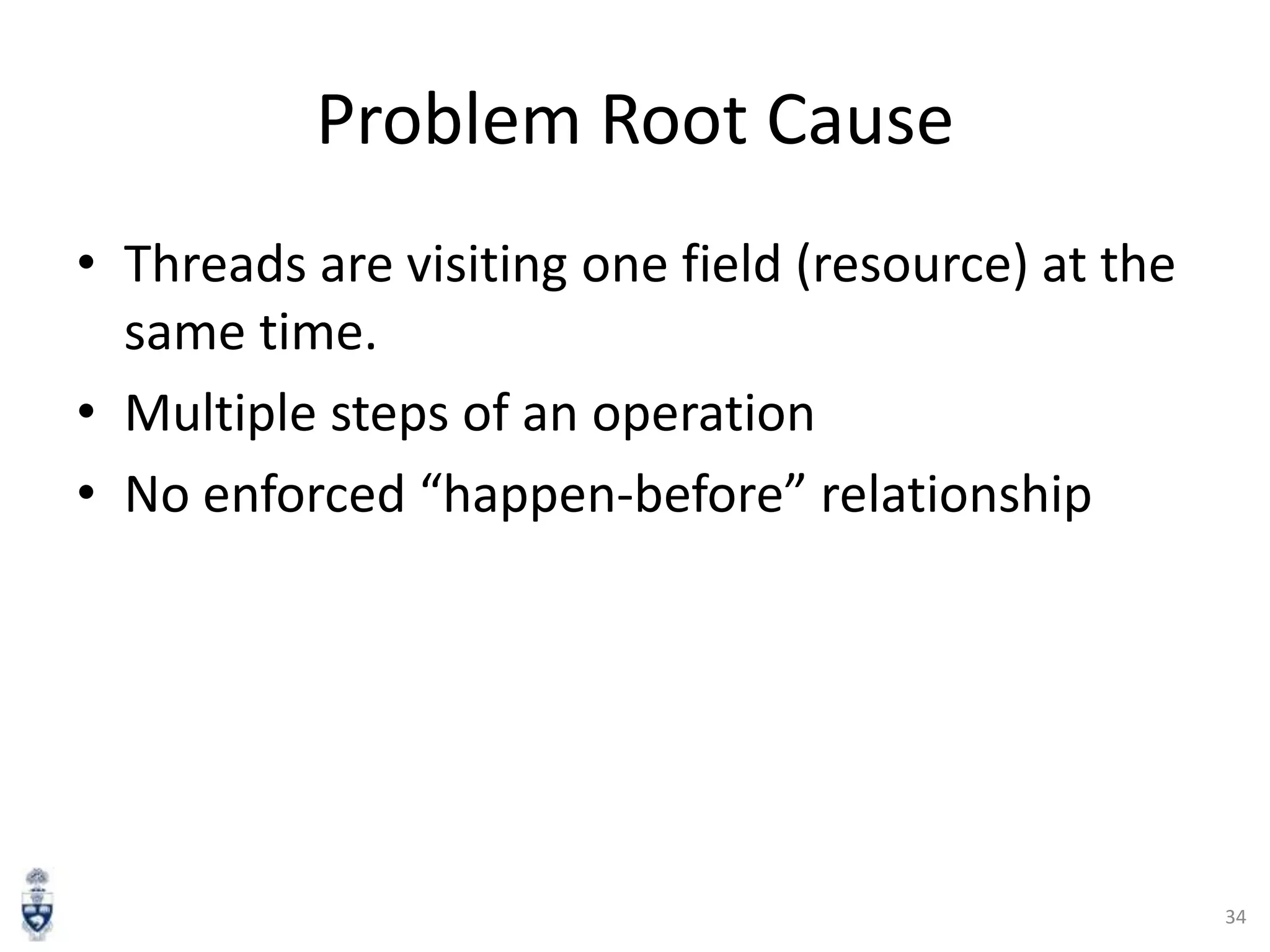
Problem Root Cause
• Threads are visiting one field (resource) at the
same time.
• Multiple steps of an operation
• No enforced “happen-before” relationship

34
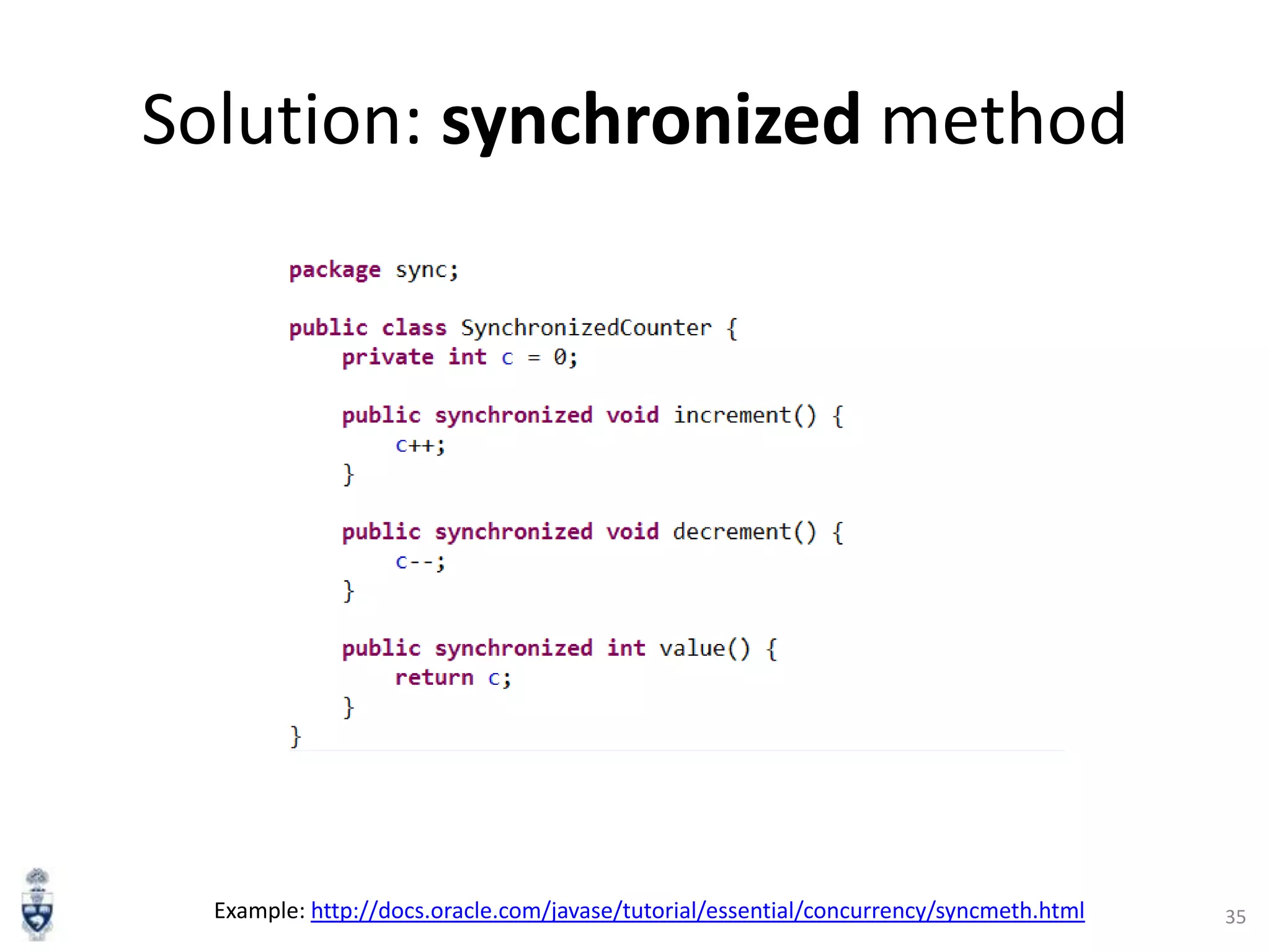
Solution: synchronized method

Example: http://docs.oracle.com/javase/tutorial/essential/concurrency/syncmeth.html

35
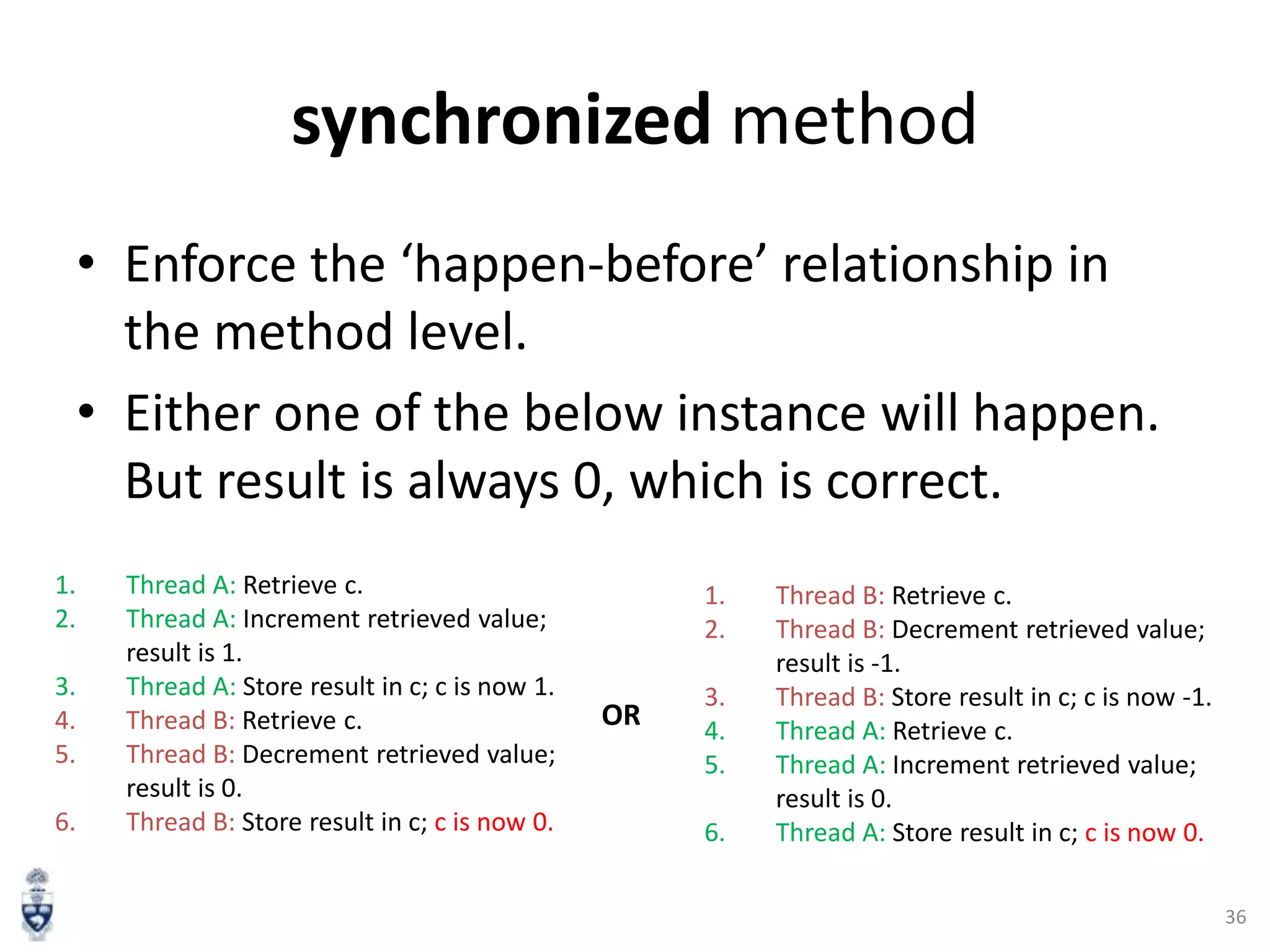
synchronized method
• Enforce the ‘happen-before’ relationship in
the method level.
• Either one of the below instance will happen.
But result is always 0, which is correct.
1.
2.
3.
4.
5.
6.

Thread A: Retrieve c.
Thread A: Increment retrieved value;
result is 1.
Thread A: Store result in c; c is now 1.
Thread B: Retrieve c.
Thread B: Decrement retrieved value;
result is 0.
Thread B: Store result in c; c is now 0.

1.
2.

OR

3.
4.
5.
6.

Thread B: Retrieve c.
Thread B: Decrement retrieved value;
result is -1.
Thread B: Store result in c; c is now -1.
Thread A: Retrieve c.
Thread A: Increment retrieved value;
result is 0.
Thread A: Store result in c; c is now 0.
36
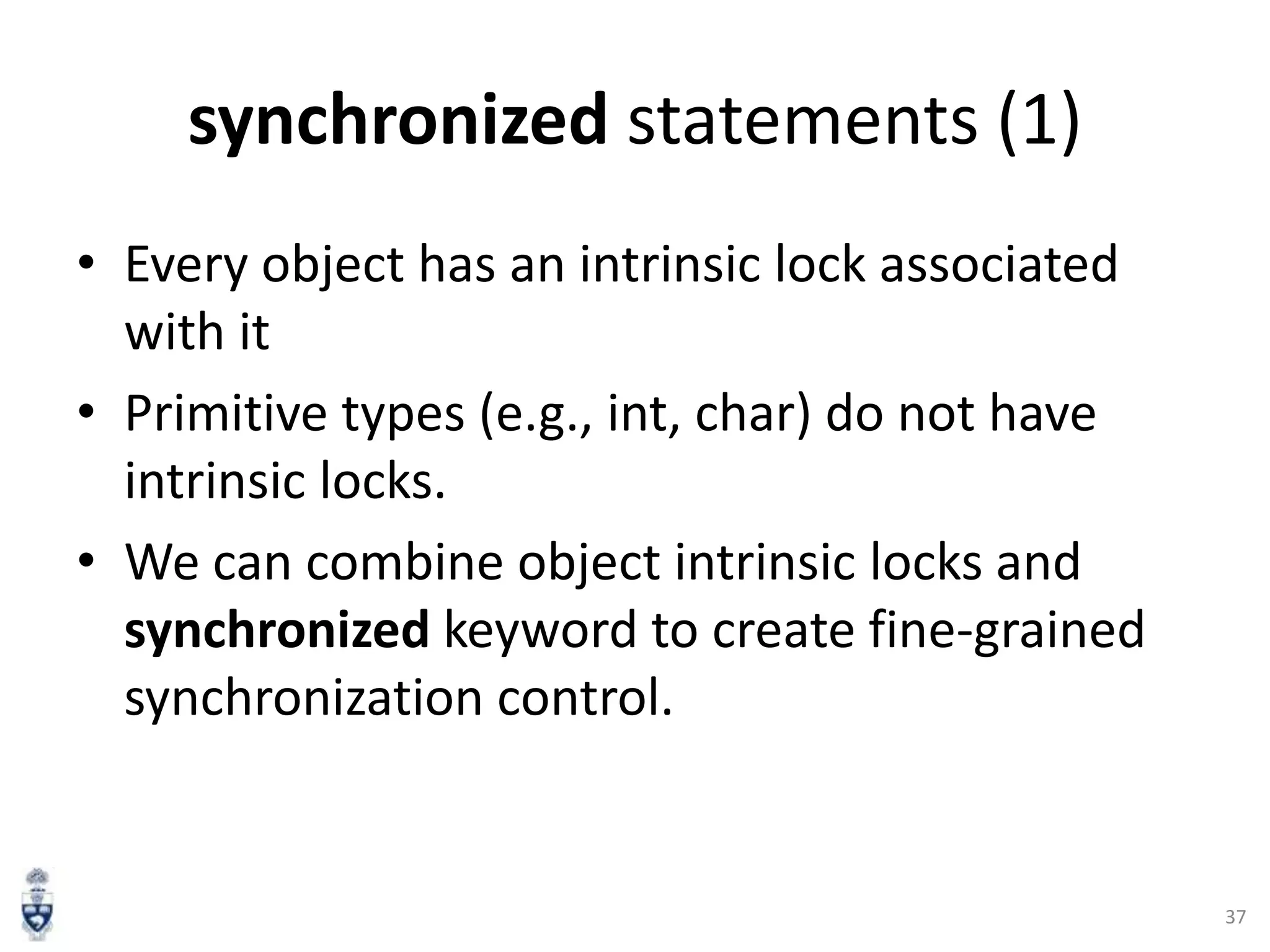
synchronized statements (1)
• Every object has an intrinsic lock associated
with it
• Primitive types (e.g., int, char) do not have
intrinsic locks.
• We can combine object intrinsic locks and
synchronized keyword to create fine-grained
synchronization control.

37
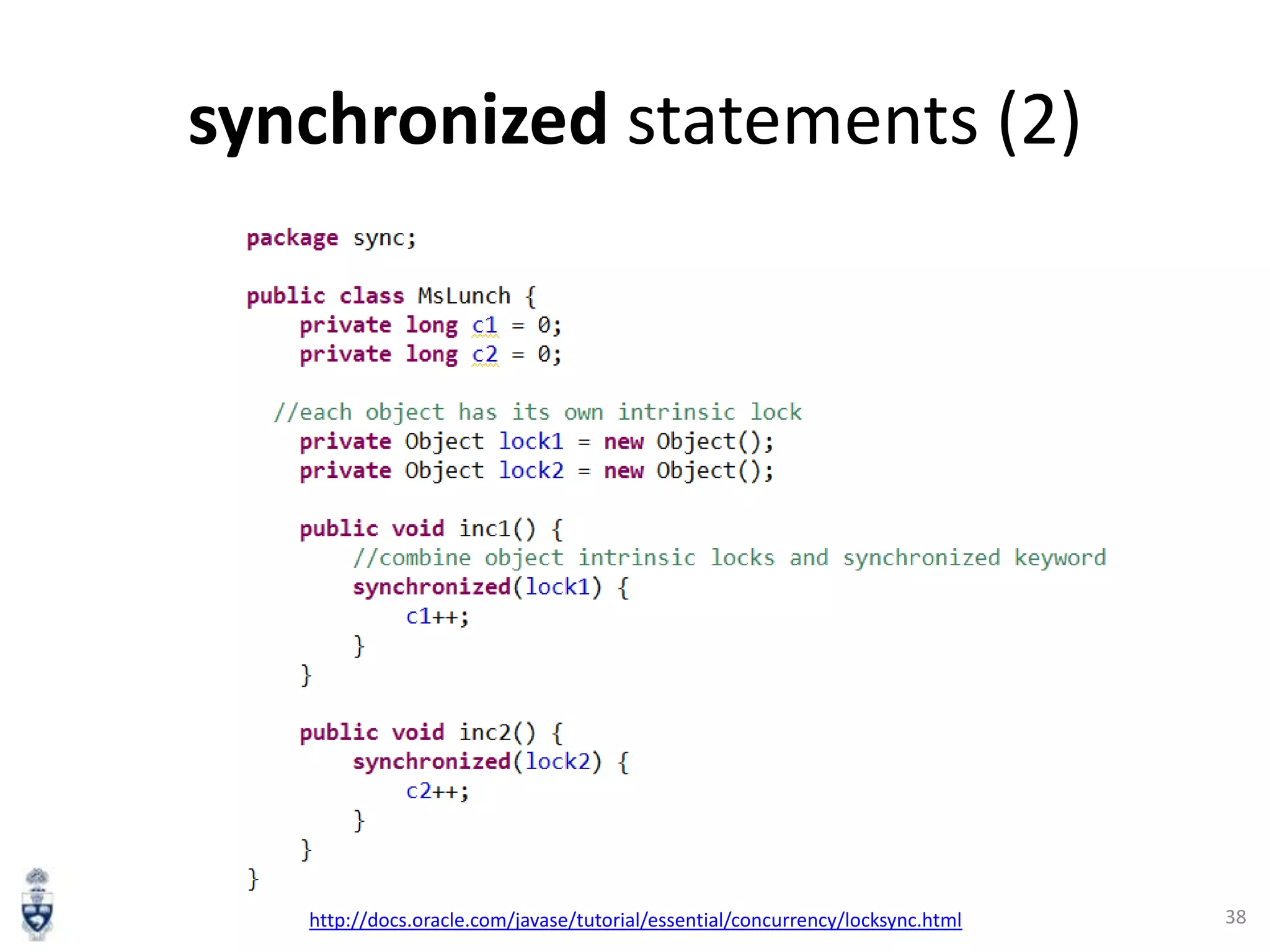
synchronized statements (2)

http://docs.oracle.com/javase/tutorial/essential/concurrency/locksync.html

38
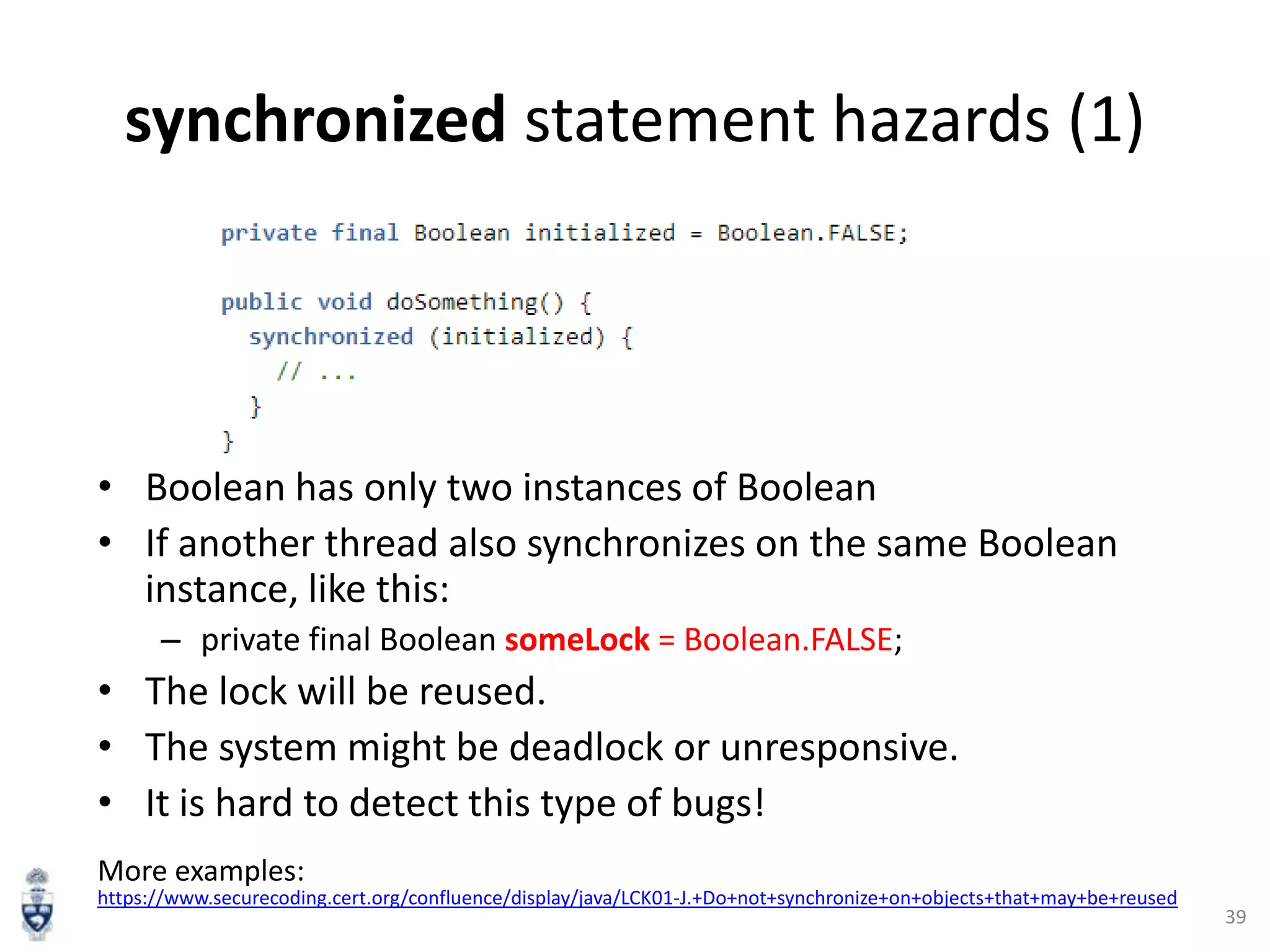
synchronized statement hazards (1)

• Boolean has only two instances of Boolean
• If another thread also synchronizes on the same Boolean
instance, like this:
– private final Boolean someLock = Boolean.FALSE;

• The lock will be reused.
• The system might be deadlock or unresponsive.
• It is hard to detect this type of bugs!
More examples:
https://www.securecoding.cert.org/confluence/display/java/LCK01-J.+Do+not+synchronize+on+objects+that+may+be+reused

39
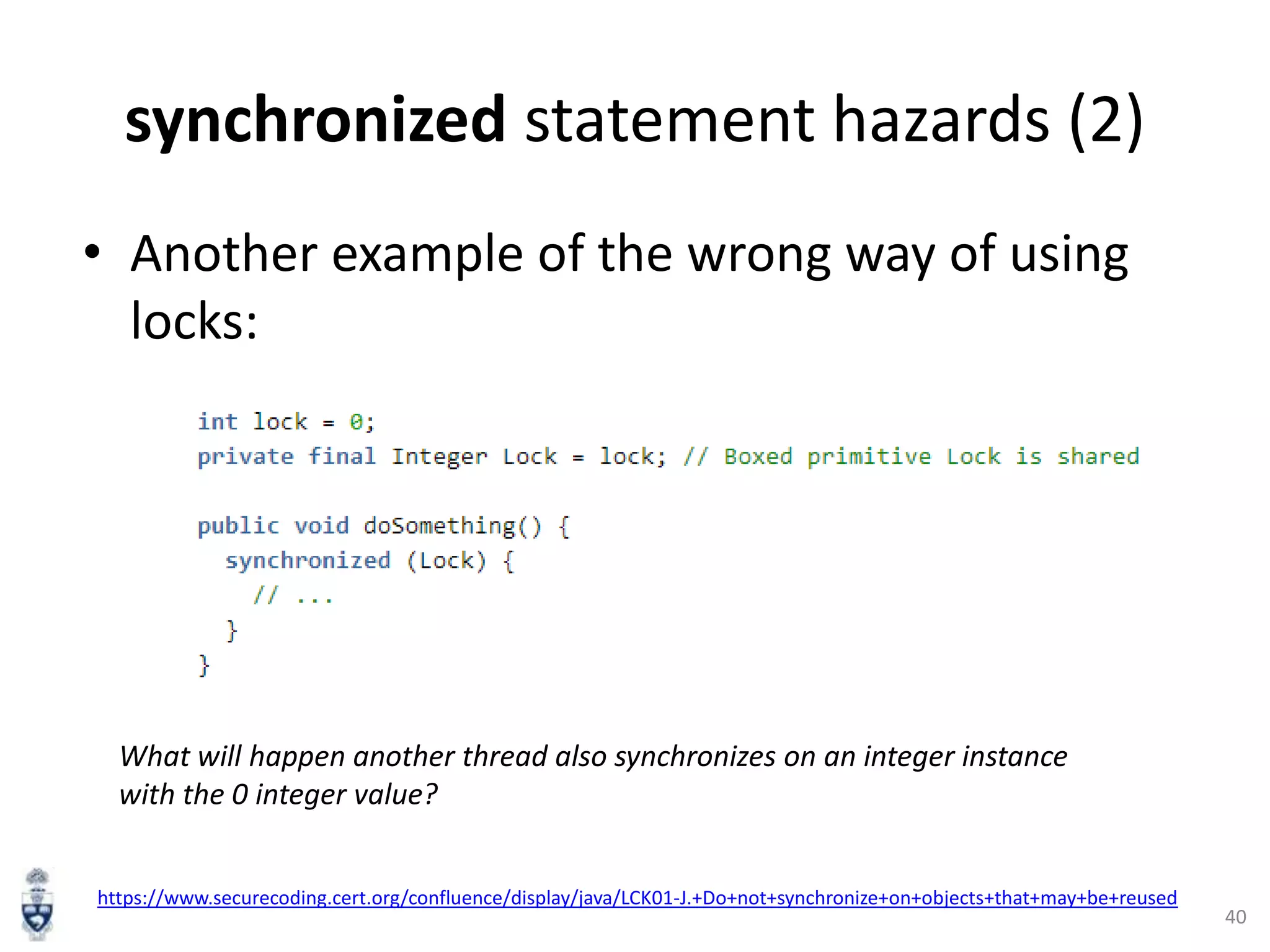
synchronized statement hazards (2)
• Another example of the wrong way of using
locks:

What will happen another thread also synchronizes on an integer instance
with the 0 integer value?
https://www.securecoding.cert.org/confluence/display/java/LCK01-J.+Do+not+synchronize+on+objects+that+may+be+reused

40
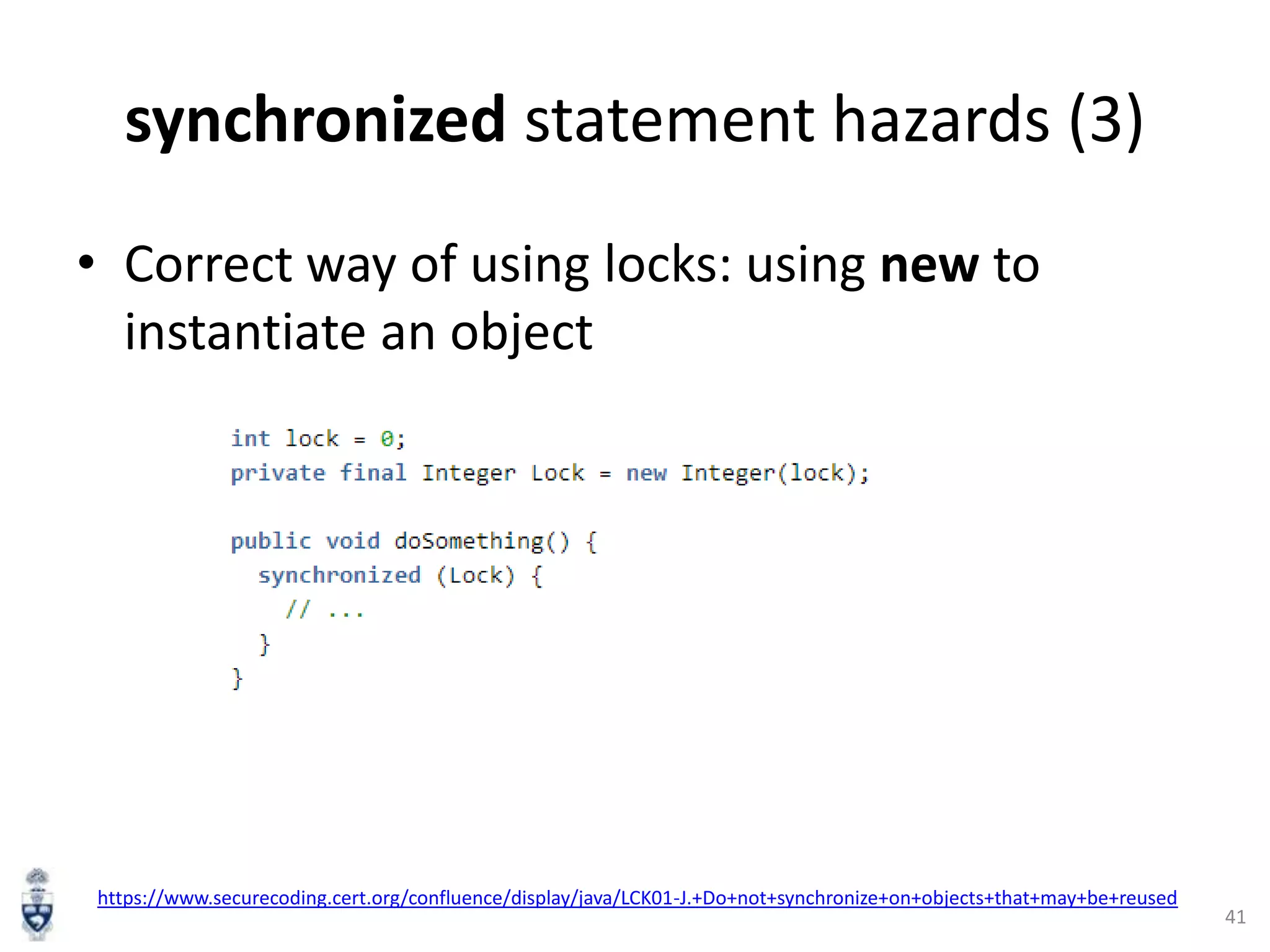
synchronized statement hazards (3)
• Correct way of using locks: using new to
instantiate an object

https://www.securecoding.cert.org/confluence/display/java/LCK01-J.+Do+not+synchronize+on+objects+that+may+be+reused

41
References
1. Thinking in Java 4th Ed, Bruce Eckel
2. Oracle Java tutorial
(http://docs.oracle.com/javase/tutorial/index.ht
ml)
3. www.cs.drexel.edu/~spiros/teaching/CS575/slid
es/java.ppt
4. http://eclipsetutorial.sourceforge.net/Total_Begi
nner_Companion_Document.pdf
5. http://www.vogella.com/tutorials/EclipseDebug
ging/article.html
42

Introduction to Java Programming Language

  • 1.
    Introduction to Java ProgrammingLanguage Junji Zhi University of Toronto 1
  • 2.
    Content • • • • • • Java language Syntax “HelloWorld” program example Compiling, Running and Debugging Java code Inheritance Threading Synchronization 2
  • 3.
    Java programming Language •Some buzzwords for Java – – – – – – – – – – – “Write Once, Run Anywhere” Simple Object oriented Distributed Multithreaded Dynamic Architecture neutral Portable High performance Robust Secure 3
  • 4.
    Example: Hello WorldProgram • Everything is in a class • One file, one public class • In the runnable public class: – public static void main(String [] args) 4
  • 5.
    Primitive Data Types •Primitive Data Types: byte, short, int, long, float, double, boolean, char • Arrays are also a class long [] a = new long[5]; – You can get the length by visiting the length field of array object a, like this: a.length • String class is very commonly used to represents character strings, for example String s1 = “Hello ”, s2 = “Wolrd!”; String s3 = s1 + s2; 5
  • 6.
    Operators (same asC/C++) [3] • • • • • ++,-- Auto increment/decrement +,- Unary plus/minus *,/ Multiplication/division % Modulus +,- Addition/subtraction 6
  • 7.
    Declaring Variables [3] intn = 1; char ch = „A‟; String s = “Hello”; Long L = new Long(100000); boolean done = false; final double pi = 3.14159265358979323846; Employee joe = new Employee(); char [] a = new char[3]; Vector v = new Vector(); 7
  • 8.
    Compared with C/C++[3] • Java has no: – – – – – – – – – – pointers typedef preprocessor struct unions multiple inheritance goto operator overloading malloc … 8
  • 9.
    Declaring a class • • • • • package Classname Constructor Fields methods 9
  • 10.
  • 11.
    Java Development Process .java=> .class => JVM execution 11
  • 12.
    Installing Java inyour machine (1) • Downloading Java Development Kit (JDK) from Oracle • Java Runtime Environment (JRE) is usually included in the JDK installation file. 12
  • 13.
    Installing Java inyour machine (2) • Setting JAVA_HOME (Windows): – E.g., C:Program FilesJavajdk1.7.0_45 • Setting path and classpath 13
  • 14.
    Compile .java Fileinto a .class File (Command Line) 14
  • 15.
    Running HelloWorld inEclipse IDE Eclipse Download from here. 15
  • 16.
  • 17.
    Debugging Java inEclipse (1) • Debugging means “run a program interactively while watching the source code and the variables during the execution.” [5] • Set breakpoints to stop the program at the middle of execution • Eclipse has a Debug Mode 17
  • 18.
    Debugging Java inEclipse(2) Image courtesy: http://www.vogella.com/tutorials/EclipseDebugging/images/xdebugstart20.gif.pagespeed.ic.SqCELlNeCm.png 18
  • 19.
    Debugging Java inEclipse(3) Table courtesy: http://www.vogella.com/tutorials/EclipseDebugging/article.html 19
  • 20.
  • 21.
    Inheritance in Java •Java classes can be derived from other classes, thereby inheriting fields and methods from those classes. 21
  • 22.
  • 23.
  • 24.
  • 25.
    A Real WorldExample: ArrayList http://docs.oracle.com/javase/7/docs/api/java/util/ArrayList.html 25
  • 26.
  • 27.
    Java Threading • Athread is a thread of execution in a program [6] • JVM allows an application to have multiple threads running concurrently. • Apache Harmony example: http://harmony.apache.org/subcomponents/drlvm/TM.html 27
  • 28.
    Two ways todo threading 1. Extends Thread class 2. Implements Runnable interface http://docs.oracle.com/javase/7/docs/api/java/lang/Thread.html 28
  • 29.
  • 30.
    How to stopa Thread • Using Thread.interrupt() method: http://stackoverflow.com/questions/7786305/stopping-a-specific-java-thread 30
  • 31.
  • 32.
    Thread Interference (1) •Increment operation is translated to multiple steps by the virtual machine : 1. Retrieve the current value of c. 2. Increment the retrieved value by 1. 3. Store the incremented value back in c. Example from: http://docs.oracle.com/javase/tutorial/essential/concurrency/interfere.html 32
  • 33.
    Thread Interference (2) • • • • Assumewe have 2 threads, A and B. A increments c, and B decrements c. Thread A and B runs together. One possible order of the low-level steps: 1. 2. 3. 4. 5. 6. Thread A: Retrieve c. Thread B: Retrieve c. Thread A: Increment retrieved value; result is 1. Thread B: Decrement retrieved value; result is -1. Thread A: Store result in c; c is now 1. Thread B: Store result in c; c is now -1. • Is the result correct? • What if the thread A and B are bank transactions? 33
  • 34.
    Problem Root Cause •Threads are visiting one field (resource) at the same time. • Multiple steps of an operation • No enforced “happen-before” relationship 34
  • 35.
    Solution: synchronized method Example:http://docs.oracle.com/javase/tutorial/essential/concurrency/syncmeth.html 35
  • 36.
    synchronized method • Enforcethe ‘happen-before’ relationship in the method level. • Either one of the below instance will happen. But result is always 0, which is correct. 1. 2. 3. 4. 5. 6. Thread A: Retrieve c. Thread A: Increment retrieved value; result is 1. Thread A: Store result in c; c is now 1. Thread B: Retrieve c. Thread B: Decrement retrieved value; result is 0. Thread B: Store result in c; c is now 0. 1. 2. OR 3. 4. 5. 6. Thread B: Retrieve c. Thread B: Decrement retrieved value; result is -1. Thread B: Store result in c; c is now -1. Thread A: Retrieve c. Thread A: Increment retrieved value; result is 0. Thread A: Store result in c; c is now 0. 36
  • 37.
    synchronized statements (1) •Every object has an intrinsic lock associated with it • Primitive types (e.g., int, char) do not have intrinsic locks. • We can combine object intrinsic locks and synchronized keyword to create fine-grained synchronization control. 37
  • 38.
  • 39.
    synchronized statement hazards(1) • Boolean has only two instances of Boolean • If another thread also synchronizes on the same Boolean instance, like this: – private final Boolean someLock = Boolean.FALSE; • The lock will be reused. • The system might be deadlock or unresponsive. • It is hard to detect this type of bugs! More examples: https://www.securecoding.cert.org/confluence/display/java/LCK01-J.+Do+not+synchronize+on+objects+that+may+be+reused 39
  • 40.
    synchronized statement hazards(2) • Another example of the wrong way of using locks: What will happen another thread also synchronizes on an integer instance with the 0 integer value? https://www.securecoding.cert.org/confluence/display/java/LCK01-J.+Do+not+synchronize+on+objects+that+may+be+reused 40
  • 41.
    synchronized statement hazards(3) • Correct way of using locks: using new to instantiate an object https://www.securecoding.cert.org/confluence/display/java/LCK01-J.+Do+not+synchronize+on+objects+that+may+be+reused 41
  • 42.
    References 1. Thinking inJava 4th Ed, Bruce Eckel 2. Oracle Java tutorial (http://docs.oracle.com/javase/tutorial/index.ht ml) 3. www.cs.drexel.edu/~spiros/teaching/CS575/slid es/java.ppt 4. http://eclipsetutorial.sourceforge.net/Total_Begi nner_Companion_Document.pdf 5. http://www.vogella.com/tutorials/EclipseDebug ging/article.html 42

Editor's Notes

  • #10 Package
  • #16 Eclipse is automatically compiling your code on the fly.
  • #41 JVM implementations are also permitted to reuse wrapper objects for larger ranges of values. While use of the intrinsic lock associated with the boxed Integer wrapper object is insecure; instances of theInteger object constructed using the new operator (new Integer(value)) are unique and not reused. In general, locks on any data type that contains a boxed value are insecure.