Introduction to CI/CD
Steve Mactaggart
State Manager - Victoria
Agenda
● What is CI and CD
● What makes good CI / CD
● How we get there
● Business benefits of it all….
What is CI and CD?
● Continuous Integration
○ An approach to be continually validating the state of a codebase
through automated testing.
○ Best achieved through integration with version control
● Continuous Delivery / Deployment
○ An approach to regularly deploying artifacts that successfully pass
the CI phase to ensure confidence around the deployment
Delivery vs Deployment
Continuous integration, continuous deployment,
and continuous delivery are like vectors that have the same
direction, but different magnitude.
Their goal is the same: make our software development and
release process faster and more robust.
The key difference between the three is in the scope of
automation applied.
Delivery vs Deployment
● Continuous Delivery
○ Automatically prepare and track a release to production
○ The desired outcome is that anyone with sufficient privileges to deploy a new
release can do so at any time in one or a few clicks. By eliminating nearly all
manual tasks, developers become more productive.
● Continuous Deployment
○ Every change in the source code is deployed to production automatically,
without explicit approval from a developer.
○ As long as it passes the quality controls
What does good look like?
What makes for good CI?
1. Decoupled stages
○ Each step in CI should do a single focused task
2. Repeatable
○ Automated in a way that is consistently repeatable
○ Tooling should work for local developers too – Local/Remote parity
3. Fail fast
○ Fail at the first sign of trouble
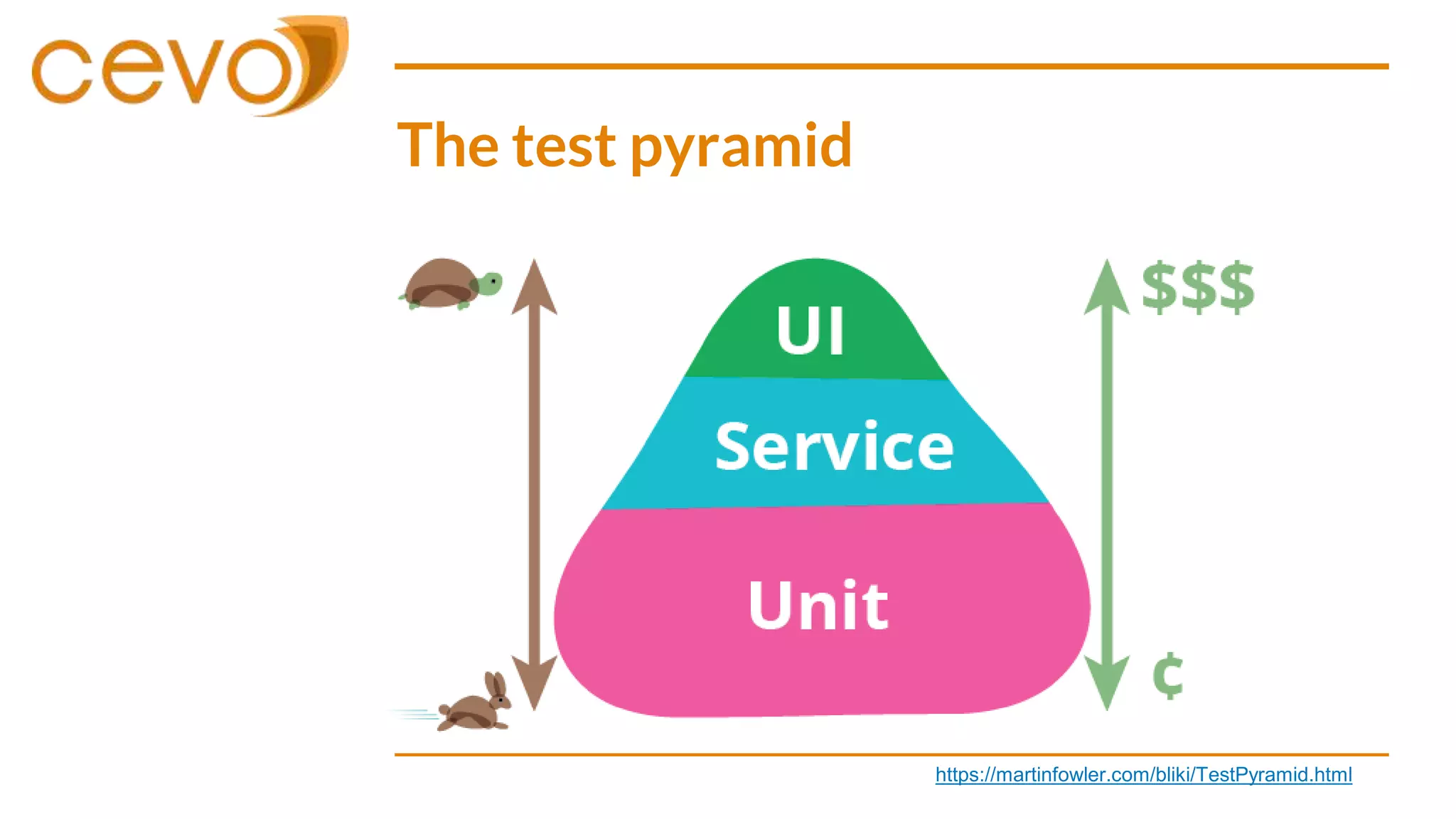
The test pyramid
https://martinfowler.com/bliki/TestPyramid.html
What makes for good CD?
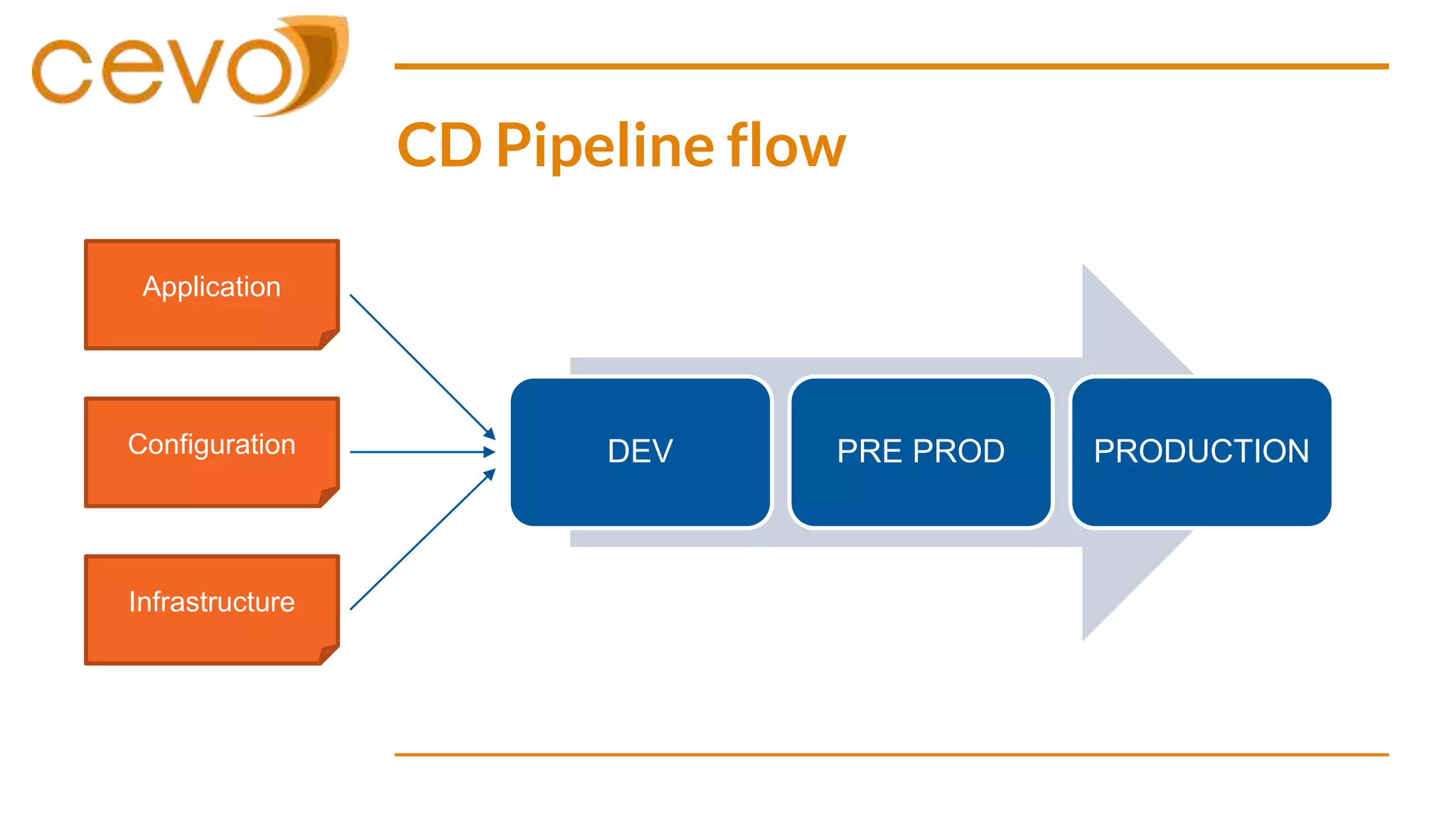
1. Design with the system in mind
○ Cover as many parts of a deployment as possible
○ Application | Infrastructure | Configuration | Data
2. Pipelines
○ Continually increase confidence as you move towards production
3. Globally unique versions
○ Know the state of the system at any time
○ Be able to demonstrate difference between current and future state
CD Pipeline flow
DEV PRE PROD PRODUCTIONConfiguration
Infrastructure
Application
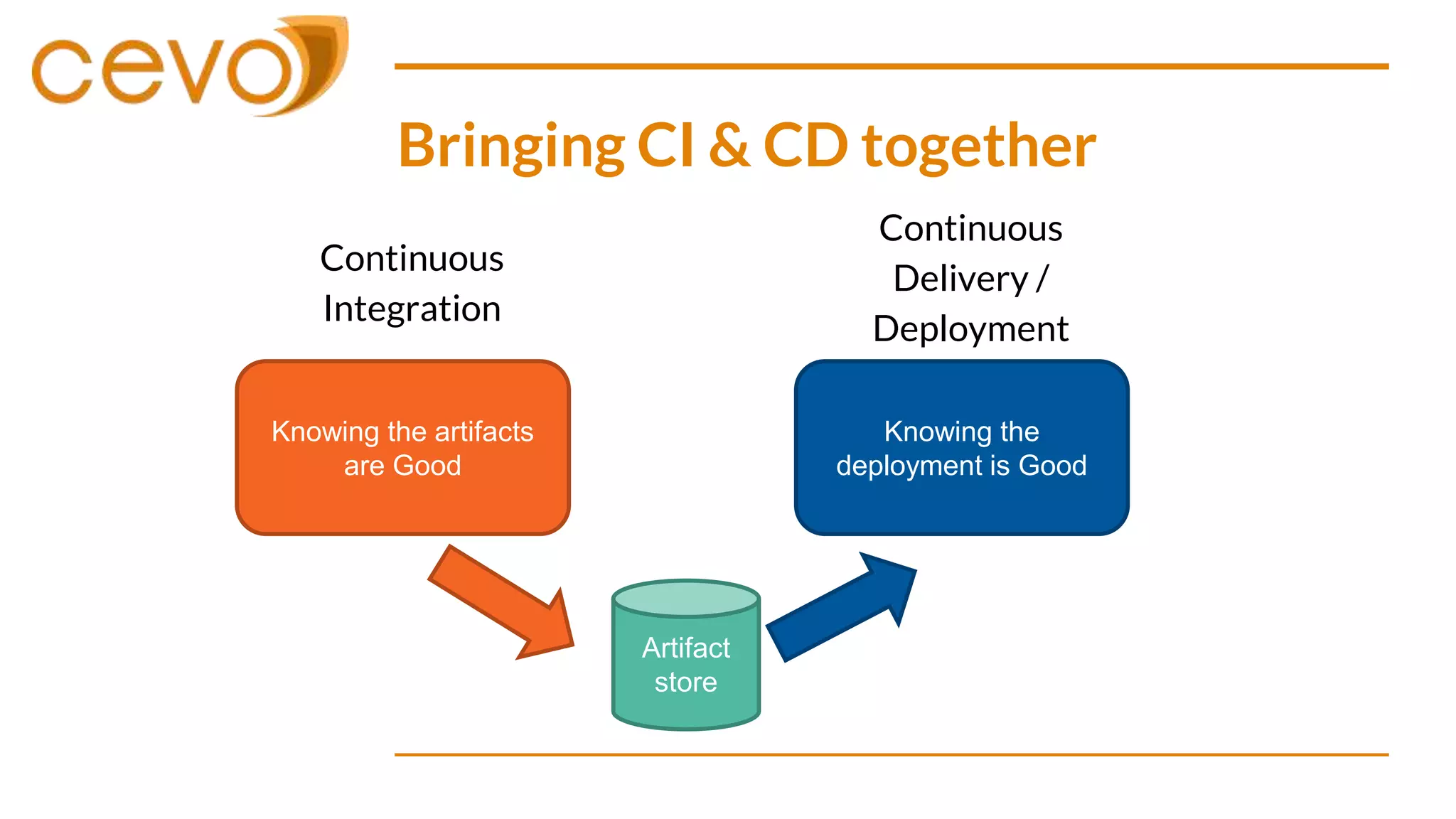
Bringing CI & CD together
Continuous
Integration
Knowing the artifacts
are Good
Knowing the
deployment is Good
Continuous
Delivery /
Deployment
Artifact
store
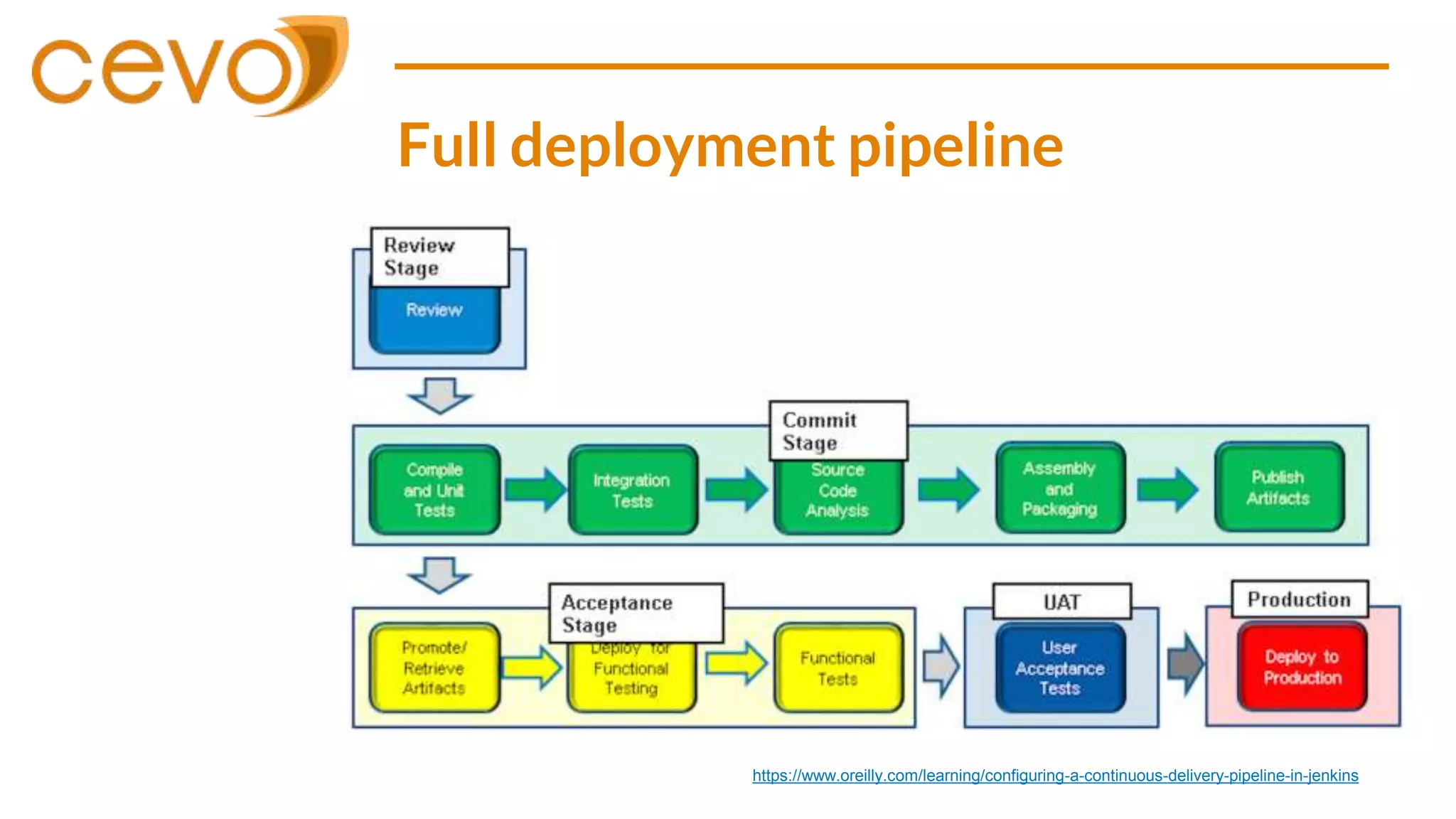
Full deployment pipeline
https://www.oreilly.com/learning/configuring-a-continuous-delivery-pipeline-in-jenkins
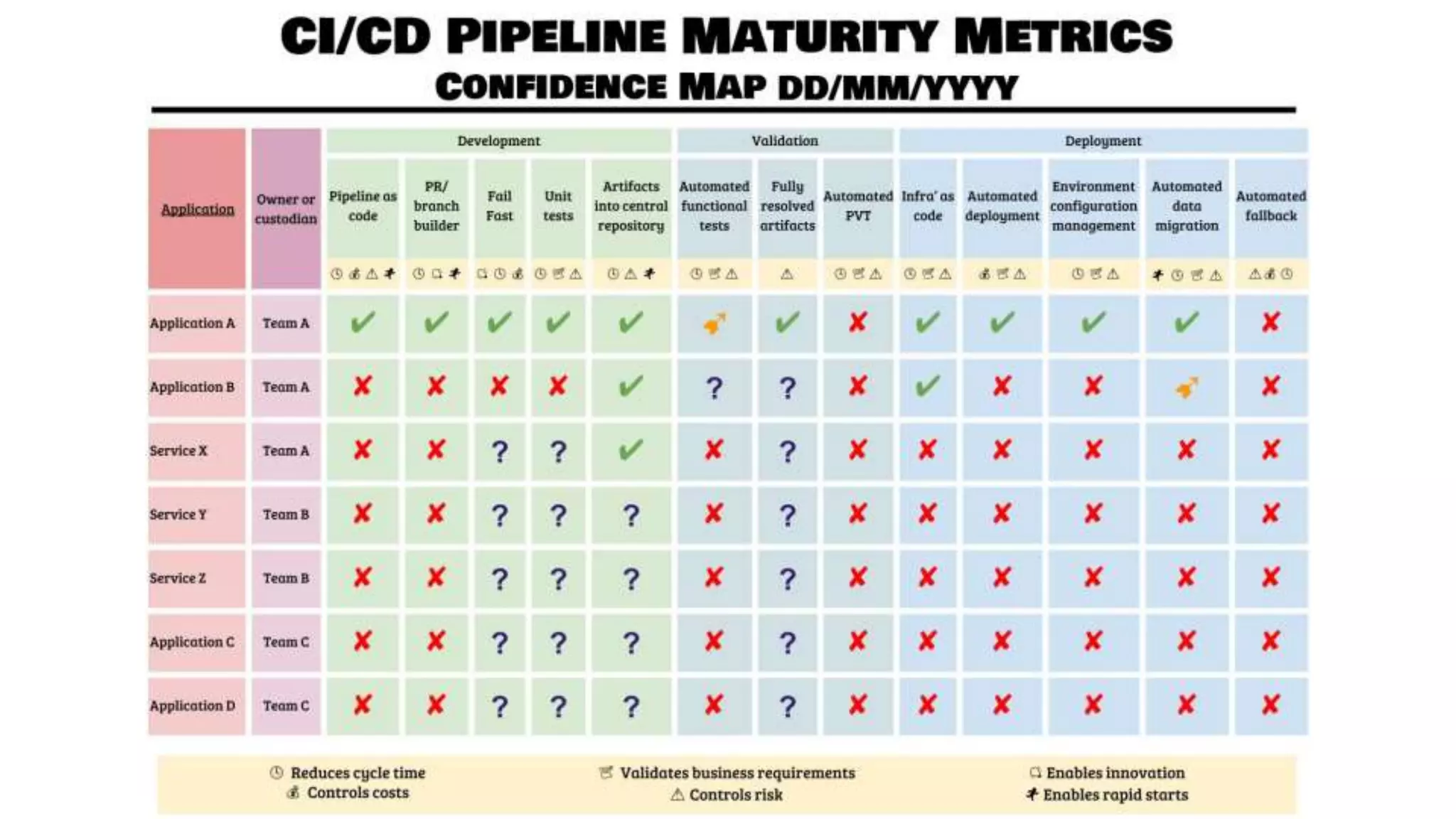
Tracking Confidence
Where do we start?
How do we know we are progressing?
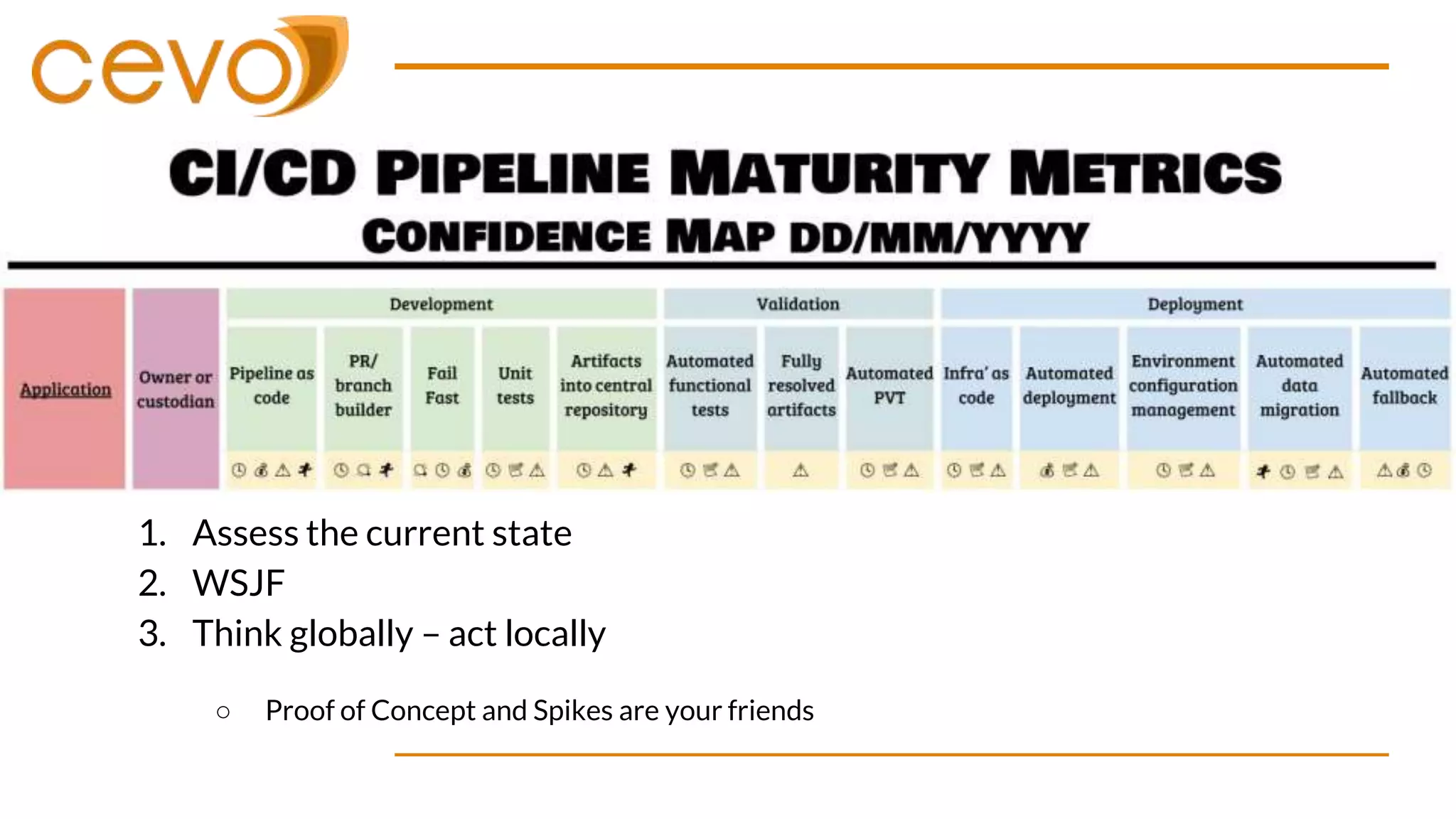
1. Assess the current state
2. WSJF
3. Think globally – act locally
○ Proof of Concept and Spikes are your friends
1. Assess the current state
2. WSJF
3. Think globally – act locally
○ Proof of Concept and Spikes are your friends
Unit testing and shifting left
● Make the tests easy to run
○ Run them locally
■ Invest in good quality IDE support
○ Consistent entrypoint - Abstract the complexity
■ Makefiles / Gradle
○ Pull request unit test execution
Failing fast
● Code inspection
○ Code linting
○ Security inspection
○ Code format
● Code coverage
○ Track coverage changes
Centralised artifacts
● Managing output from a CI process
○ Only the strong survive
○ Central common location
○ Clearly understood name and version approach
○ Build them only once
○ Make them timeless – externalise configuration
Business benefits of CI/CD
Why do this?
● Reduction of delivery risk
○ No longer do we need to rely on humans with specific knowledge as
the gate-keepers of quality
○ Reduced chance of humans not following the process
○ Reduced chance of mis-communication on executing the change
Why do this?
● To encode the process, we need to know the process
○ If we know all the tests pass,
○ If we know all the steps in deployment,
○ What is stopping us from releasing?
Why do this?
● Better visibility on change
○ As our systems and tools are version controlled
○ And we know what the current state of production is
○ And we can describe the process by which it will be changed
○ We can diff the system states with confidence
● Opens up more avenues for review and increased audit
compliance
Why do this?
● Increased efficiency and delivery options
○ Enables us to deliver things with reduced effort
○ This leads us to deploy change more frequently
○ Which leads to getting feedback faster
○ That enables us to experiment easier
○ This leads to smaller batch sizes
○ Which leads to and increased flow of the entire system
Why do this?
● Enhanced learning from failure
○ When we have an issue or failure, we write a test to cover it
○ This test gets added to our suite and executed every time
○ Decreases our risk of this issue occurring again
That’s all folks…
Steve Mactaggart
State Manager – Victoria
steve.mactaggart@cevo.com.au

Introduction to CI/CD

  • 2.
    Introduction to CI/CD SteveMactaggart State Manager - Victoria
  • 3.
    Agenda ● What isCI and CD ● What makes good CI / CD ● How we get there ● Business benefits of it all….
  • 4.
    What is CIand CD? ● Continuous Integration ○ An approach to be continually validating the state of a codebase through automated testing. ○ Best achieved through integration with version control ● Continuous Delivery / Deployment ○ An approach to regularly deploying artifacts that successfully pass the CI phase to ensure confidence around the deployment
  • 5.
    Delivery vs Deployment Continuousintegration, continuous deployment, and continuous delivery are like vectors that have the same direction, but different magnitude. Their goal is the same: make our software development and release process faster and more robust. The key difference between the three is in the scope of automation applied.
  • 6.
    Delivery vs Deployment ●Continuous Delivery ○ Automatically prepare and track a release to production ○ The desired outcome is that anyone with sufficient privileges to deploy a new release can do so at any time in one or a few clicks. By eliminating nearly all manual tasks, developers become more productive. ● Continuous Deployment ○ Every change in the source code is deployed to production automatically, without explicit approval from a developer. ○ As long as it passes the quality controls
  • 7.
    What does goodlook like?
  • 8.
    What makes forgood CI? 1. Decoupled stages ○ Each step in CI should do a single focused task 2. Repeatable ○ Automated in a way that is consistently repeatable ○ Tooling should work for local developers too – Local/Remote parity 3. Fail fast ○ Fail at the first sign of trouble
  • 9.
  • 10.
    What makes forgood CD? 1. Design with the system in mind ○ Cover as many parts of a deployment as possible ○ Application | Infrastructure | Configuration | Data 2. Pipelines ○ Continually increase confidence as you move towards production 3. Globally unique versions ○ Know the state of the system at any time ○ Be able to demonstrate difference between current and future state
  • 11.
    CD Pipeline flow DEVPRE PROD PRODUCTIONConfiguration Infrastructure Application
  • 12.
    Bringing CI &CD together Continuous Integration Knowing the artifacts are Good Knowing the deployment is Good Continuous Delivery / Deployment Artifact store
  • 13.
  • 14.
    Tracking Confidence Where dowe start? How do we know we are progressing?
  • 16.
    1. Assess thecurrent state 2. WSJF 3. Think globally – act locally ○ Proof of Concept and Spikes are your friends
  • 17.
    1. Assess thecurrent state 2. WSJF 3. Think globally – act locally ○ Proof of Concept and Spikes are your friends
  • 18.
    Unit testing andshifting left ● Make the tests easy to run ○ Run them locally ■ Invest in good quality IDE support ○ Consistent entrypoint - Abstract the complexity ■ Makefiles / Gradle ○ Pull request unit test execution
  • 19.
    Failing fast ● Codeinspection ○ Code linting ○ Security inspection ○ Code format ● Code coverage ○ Track coverage changes
  • 20.
    Centralised artifacts ● Managingoutput from a CI process ○ Only the strong survive ○ Central common location ○ Clearly understood name and version approach ○ Build them only once ○ Make them timeless – externalise configuration
  • 21.
  • 22.
    Why do this? ●Reduction of delivery risk ○ No longer do we need to rely on humans with specific knowledge as the gate-keepers of quality ○ Reduced chance of humans not following the process ○ Reduced chance of mis-communication on executing the change
  • 23.
    Why do this? ●To encode the process, we need to know the process ○ If we know all the tests pass, ○ If we know all the steps in deployment, ○ What is stopping us from releasing?
  • 24.
    Why do this? ●Better visibility on change ○ As our systems and tools are version controlled ○ And we know what the current state of production is ○ And we can describe the process by which it will be changed ○ We can diff the system states with confidence ● Opens up more avenues for review and increased audit compliance
  • 25.
    Why do this? ●Increased efficiency and delivery options ○ Enables us to deliver things with reduced effort ○ This leads us to deploy change more frequently ○ Which leads to getting feedback faster ○ That enables us to experiment easier ○ This leads to smaller batch sizes ○ Which leads to and increased flow of the entire system
  • 26.
    Why do this? ●Enhanced learning from failure ○ When we have an issue or failure, we write a test to cover it ○ This test gets added to our suite and executed every time ○ Decreases our risk of this issue occurring again
  • 27.
    That’s all folks… SteveMactaggart State Manager – Victoria steve.mactaggart@cevo.com.au

Editor's Notes

  • #5 Focus here is CONTINUOUS You'll see this reoccur through todays talk You could do CI without version control, but it would kinda be like cycling without wheels
  • #7 Give you an example During recent engagements - we were able to get to Delivery All changes ran through the same flow Sequence of the tasks were sometimes different Approval and validation still had manual steps Cevo Website - made it to Deployment Merge to master If it builds, and the tests pass then it is released
  • #9 Simple Like we are doing in the application space, moving away from monoliths - our CI should follow the same patterns Enables better troubleshooting Powers greater reuse Repeatable Where most of your time will end up being sunk This is the tools Environment isolaiton Dependancy isolation Version consistency Fail fast Lean in to the pain, better to have it earlier
  • #10 Simple Test a single function well at the unit level Repeatable Isolate from Data / Systems / Availability Fail Fast Time to fail in unit is super quick We should only be moving something forward if we know it is as good as it can possibly be. Lots of awesome tooling and prior art in this space, challenge is that not all code is testable in its current state - requires some investment in closing the gap (Tech Debt)
  • #11 Systems are no longer only the application Think network egress rules Encryption keys O/S packaging updates Even compute / memory requirements Pipelines Everything goes the same path, if it fail we throw it all out and look for the next item Visualise the pipeline Enable us to build in stage gates of quality along the way Like point #1 - a system is not one thing What is the version of the system 1/2/3? * as code enables a diff based review process
  • #14 Green = CI Yellow / Red = CD yellow may repeat in complex environments SIT / UAT / PRE environments But the process should be the same Focus on Pull based deployments, not push based workflows
  • #19 Channel the Repeatable focus Try hard to have the one process to run them all Common entry point Keep it simple Don't have lots of complex config Fail fast Run tests against branches to get confidence before merge Keep your tests versioned with your code
  • #21 Don't be re-building the artifact because you change passwords – inject this configuration