20CS001 – COMPUTER ORGANIZATION
AND ARCHITECTURE
COA PPT1 INTRODUCTION
1
Text Book:
David A. Patterson and John L. Hennessey, “Computer Organization and Design: The
Hardware / Software Interface”, Morgan Kaufman / Elsevier, ARM Edition, 2017.
Architecture: An Overview
Functional units of a Digital Computer – Translation from a High level
language to Hardware Language – Technology – Performance – Power wall –
Uniprocessor to multiprocessor - Instructions: Operations and Operands –
Instruction Set: RISC and CISC - Representing Instructions - Logical
Operations – ARM Addressing for 32-bit Immediate and more complex
addressing modes.
COA PPT1 INTRODUCTION
2
The Computer Revolution
 Progress in computer technology
Computers in automobiles
Cell phones
World Wide Web
Search Engines
Computers are pervasive.
COA PPT1 INTRODUCTION
3
Classes of Computers
 Personal computers
General purpose, variety of software
Subject to cost/performance tradeoff
 Server computers
Network based
High capacity, performance, reliability
Range from small servers to building sized
COA PPT1 INTRODUCTION
4
MIPS
Classes of Computers (Cont.)
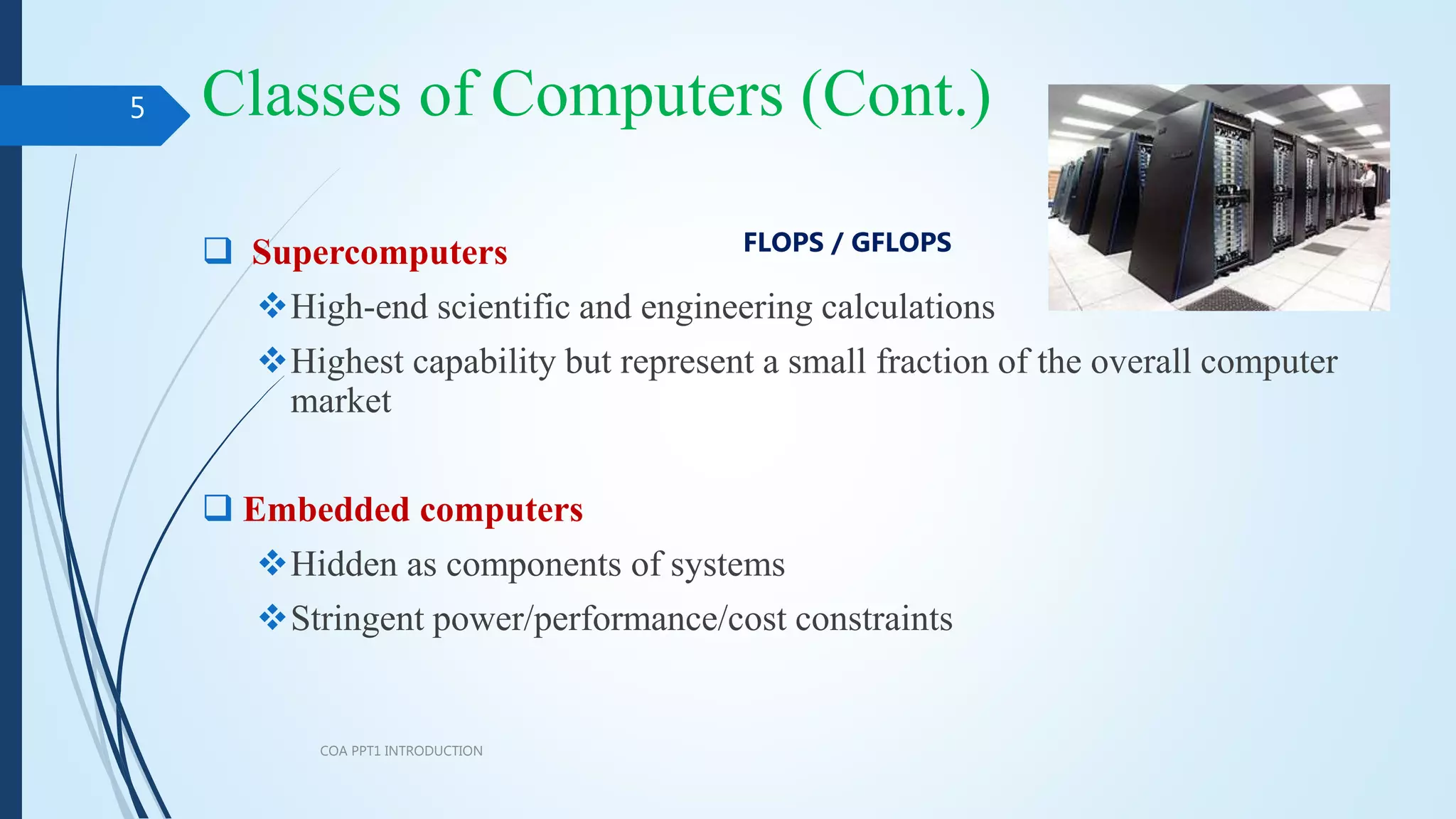
 Supercomputers
High-end scientific and engineering calculations
Highest capability but represent a small fraction of the overall computer
market
 Embedded computers
Hidden as components of systems
Stringent power/performance/cost constraints
COA PPT1 INTRODUCTION
5
FLOPS / GFLOPS
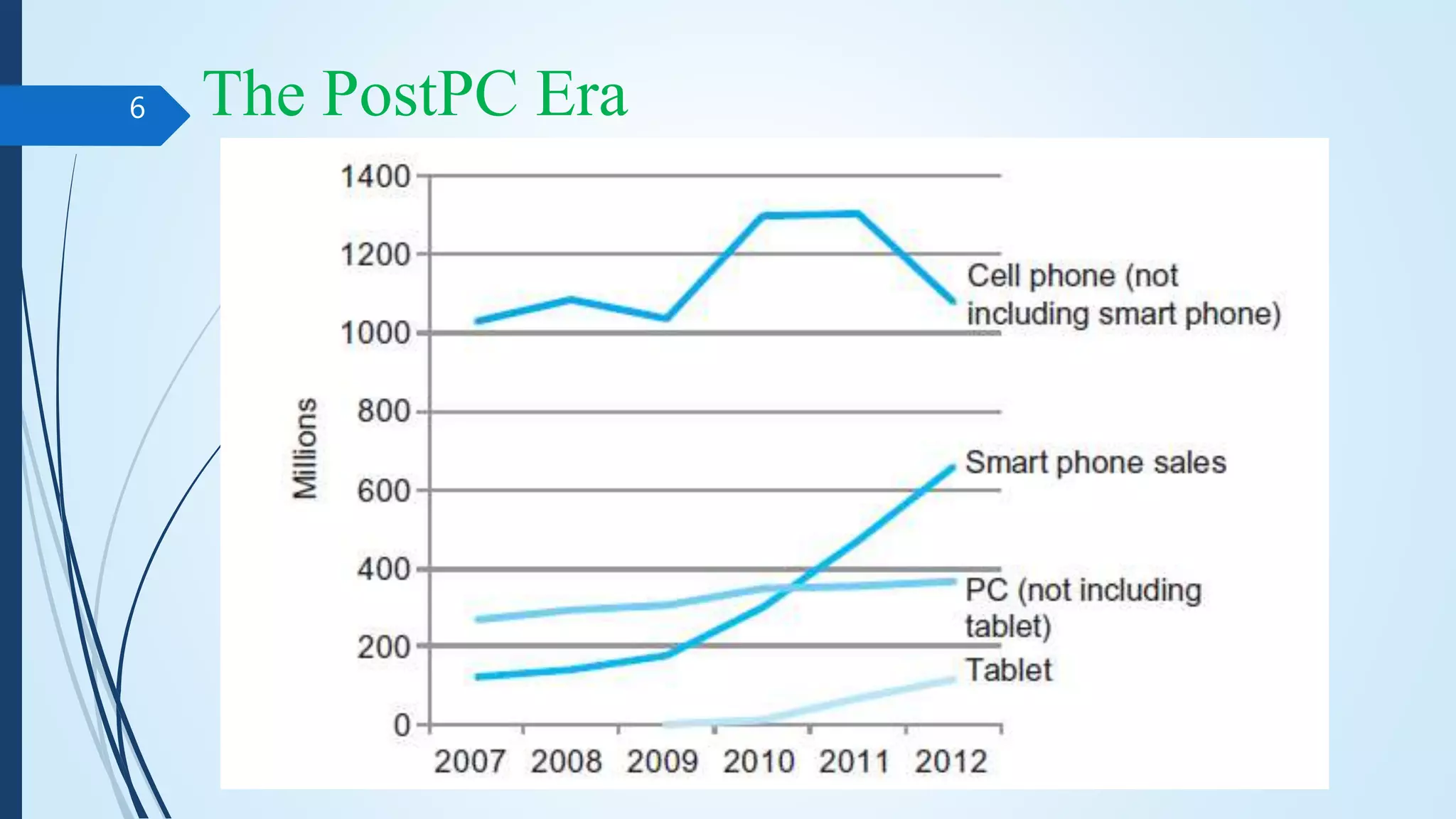
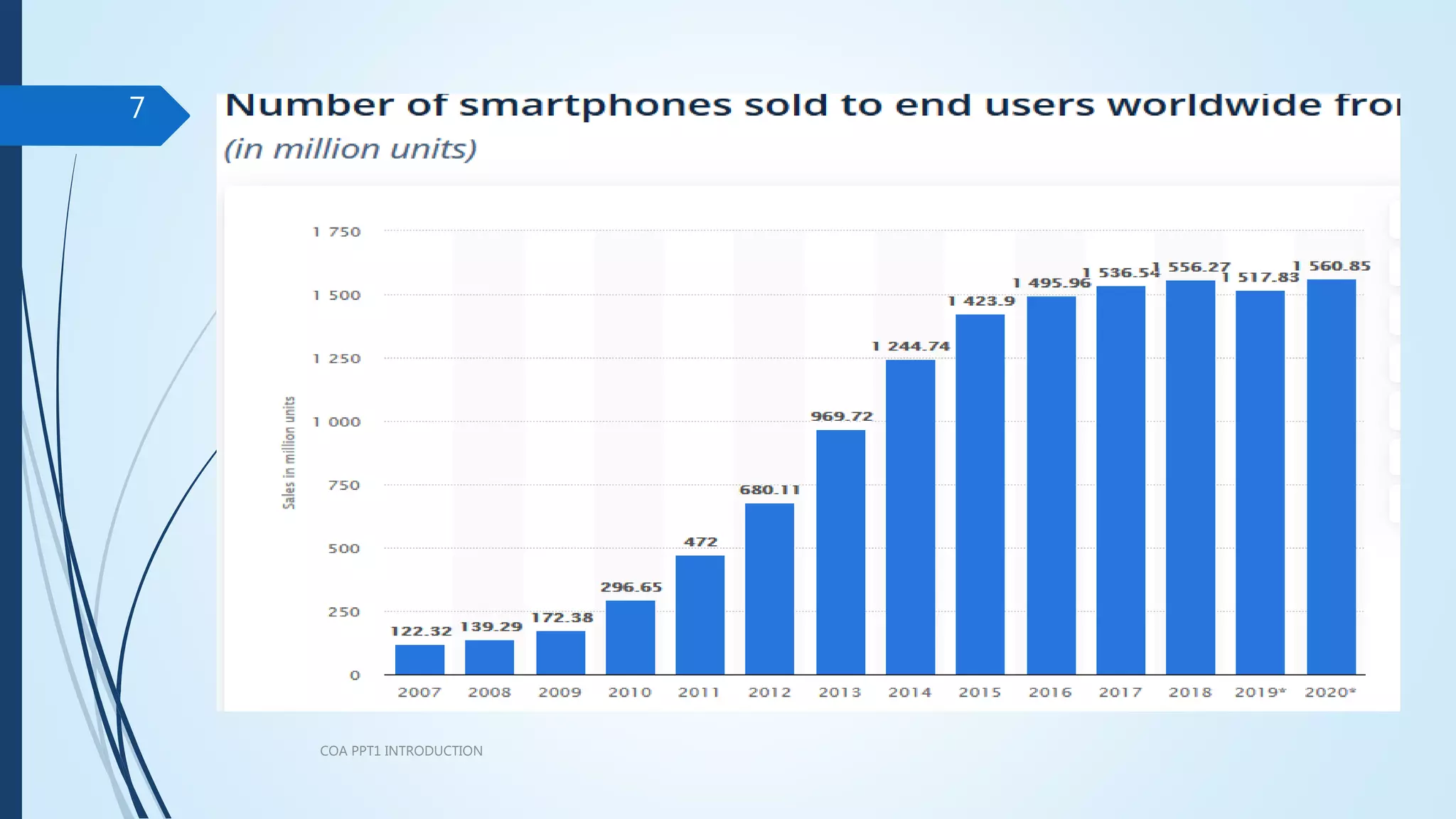
The PostPC Era
COA PPT1 INTRODUCTION
6
COA PPT1 INTRODUCTION
7
The PostPC Era
COA PPT1 INTRODUCTION
8
 Personal Mobile Device (PMD)
Battery operated
Connects to the Internet
Hundreds of dollars
Smart phones, tablets, electronic glasses
 Cloud computing
Warehouse Scale Computers (WSC)
Software as a Service (SaaS)
Portion of software run on a PMD and a portion run in the Cloud
Amazon and Google
Functional Units
COA PPT1 INTRODUCTION
9
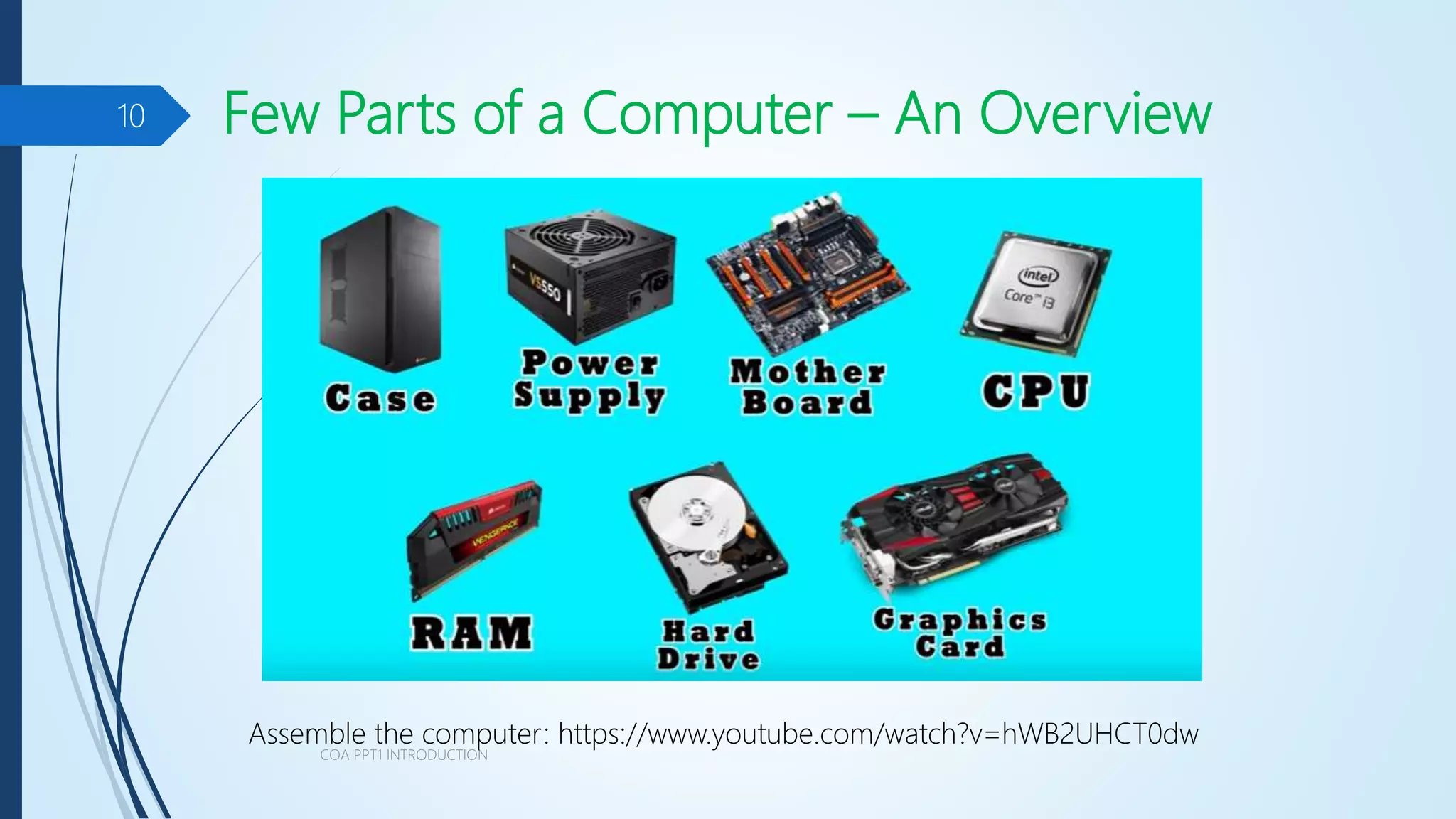
Few Parts of a Computer – An Overview
COA PPT1 INTRODUCTION
10
Assemble the computer: https://www.youtube.com/watch?v=hWB2UHCT0dw
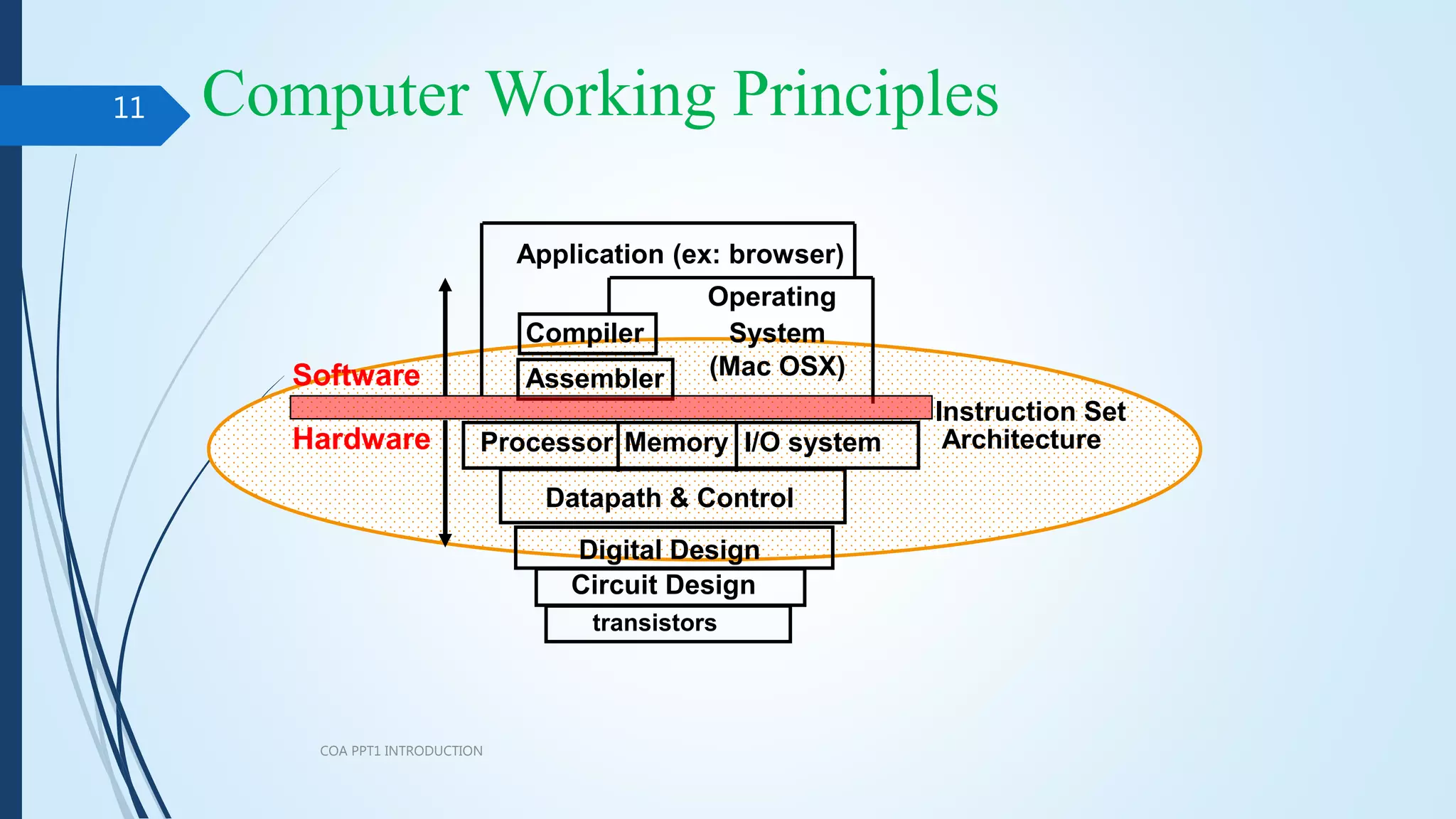
Computer Working Principles
COA PPT1 INTRODUCTION
11
I/O system
Processor
Compiler
Operating
System
(Mac OSX)
Application (ex: browser)
Digital Design
Circuit Design
Instruction Set
Architecture
Datapath & Control
transistors
Memory
Hardware
Software Assembler
What We Will Learn
 How programs are translated into the machine language
 How the hardware executes them
The hardware/software interface
What determines program performance
And how it can be improved
How hardware designers improve performance
What is parallel processing
COA PPT1 INTRODUCTION
12
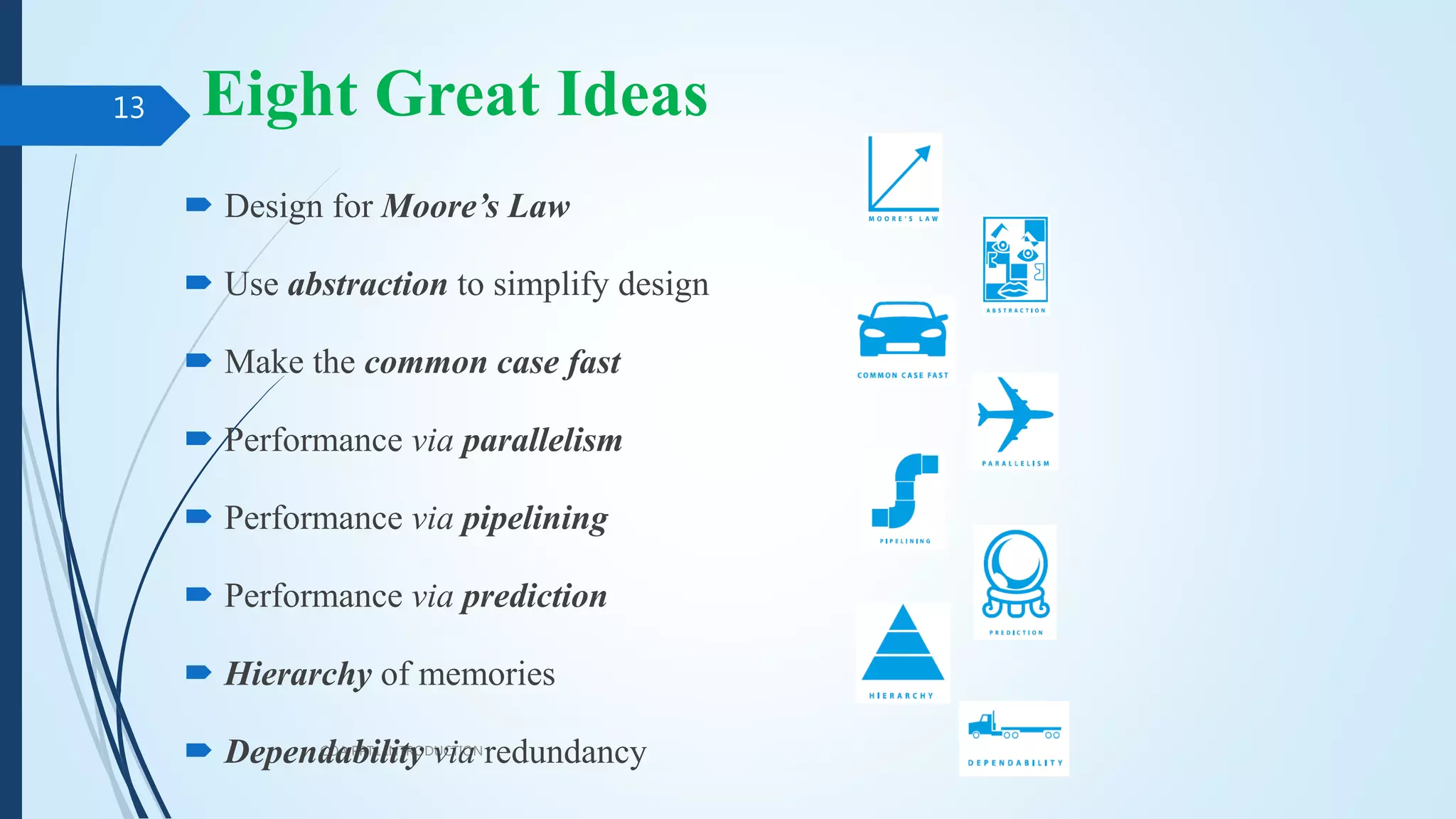
Eight Great Ideas
COA PPT1 INTRODUCTION
13
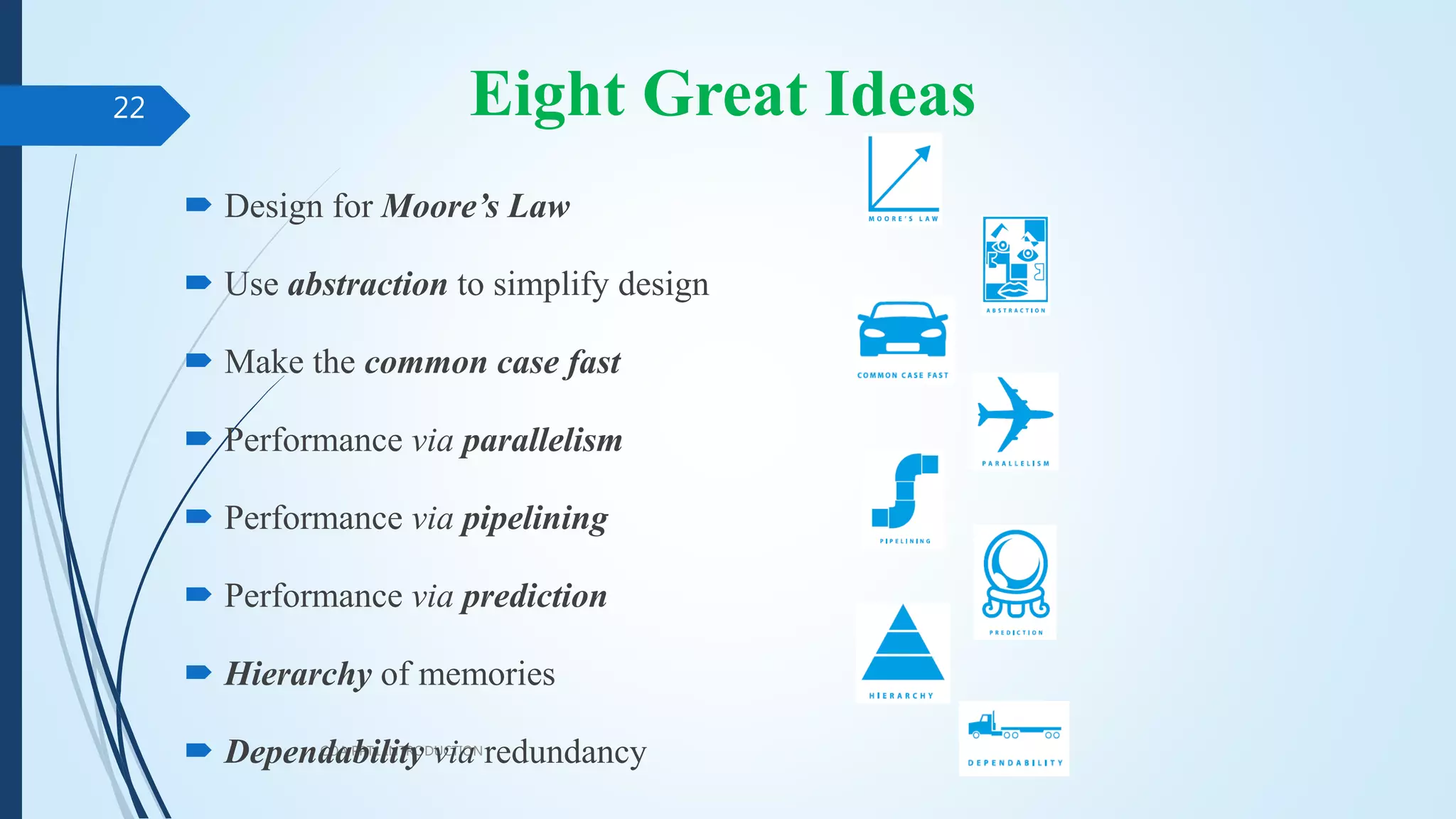
 Design for Moore’s Law
 Use abstraction to simplify design
 Make the common case fast
 Performance via parallelism
 Performance via pipelining
 Performance via prediction
 Hierarchy of memories
 Dependability via redundancy
1. Design for Moore’s Law
 Moore’s Law. It states that integrated circuit resources double every
18–24 months.
 Computer Architects must anticipate where the technology will be when the
design finishes rather than design for where it starts.
 The resources available per chip can easily double or quadruple between the
start and finish of the project.
COA PPT1 INTRODUCTION
14
2. Use Abstraction to Simplify Design
 A major productivity technique for hardware and software is to
use abstractions to represent the design at different levels of
representation.
 lower-level details are hidden to offer a simpler model at higher
levels.
COA PPT1 INTRODUCTION
15
3. Make the Common Case Fast
 Making the common case fast will tend to enhance performance
better than optimizing the rare case.
The common case is often simpler than the rare case and hence is
often easier to enhance.
COA PPT1 INTRODUCTION
16
4. Performance via Parallelism
 Computer architects have offered designs that get more
performance by performing operations in parallel.
COA PPT1 INTRODUCTION
17
5. Performance via Pipelining
 A particular pattern of parallelism performed in computer
architecture is named as “pipelining”.
Performance can be achieved by overlapping the execution of
successive instructions.
COA PPT1 INTRODUCTION
18
6. Performance via Prediction
 In some cases it can be faster on average to guess and start
working rather than wait until you know for sure.
Assuming that the mechanism to recover from a misprediction is
not too expensive and your prediction is relatively accurate
COA PPT1 INTRODUCTION
19
7. Hierarchy of Memories
 Programmers want memory to be fast, large, and cheap.
Hierarchy of Memories, with the fastest, smallest , and most
expensive memory per bit at the top of the hierarchy and the
slowest, largest, and cheapest per bit at the bottom.
COA PPT1 INTRODUCTION
20
8. Dependability via Redundancy
 Computers need to be dependable.
When any physical device fail, we make systems dependable by
including redundant components that can take over when a failure
occurs and to help detect failures.
COA PPT1 INTRODUCTION
21
Eight Great Ideas
COA PPT1 INTRODUCTION
22
 Design for Moore’s Law
 Use abstraction to simplify design
 Make the common case fast
 Performance via parallelism
 Performance via pipelining
 Performance via prediction
 Hierarchy of memories
 Dependability via redundancy
Below Your Program
 Application software
Written in high-level language
System software
Compiler: translates HLL code to machine code
Operating System: service code
Handling input/output
Managing memory and storage
Scheduling tasks & sharing resources
Hardware
Processor, memory, I/O controllers
COA PPT1 INTRODUCTION
23
Levels of Program Code
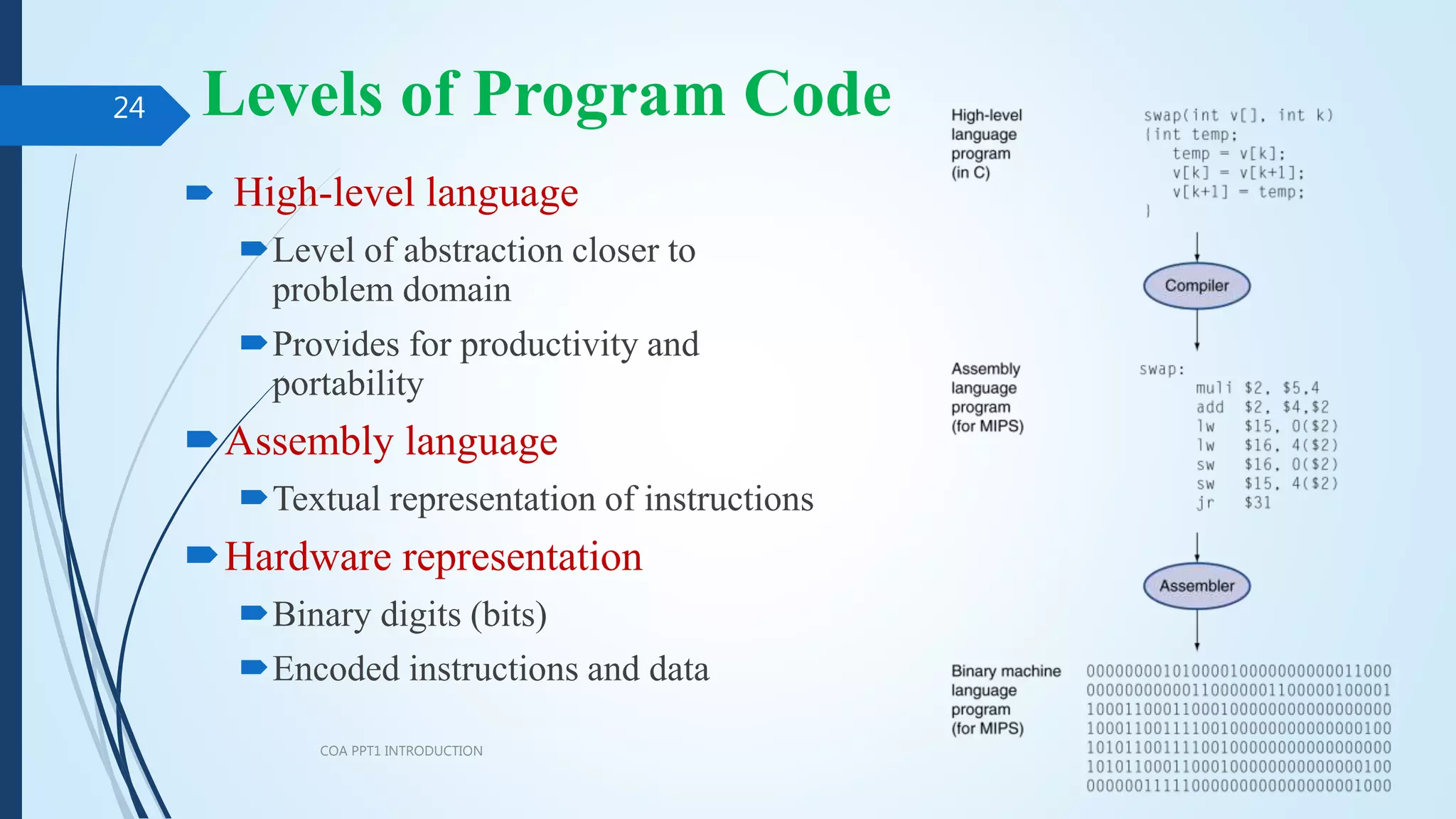
 High-level language
Level of abstraction closer to
problem domain
Provides for productivity and
portability
Assembly language
Textual representation of instructions
Hardware representation
Binary digits (bits)
Encoded instructions and data
COA PPT1 INTRODUCTION
24
Example
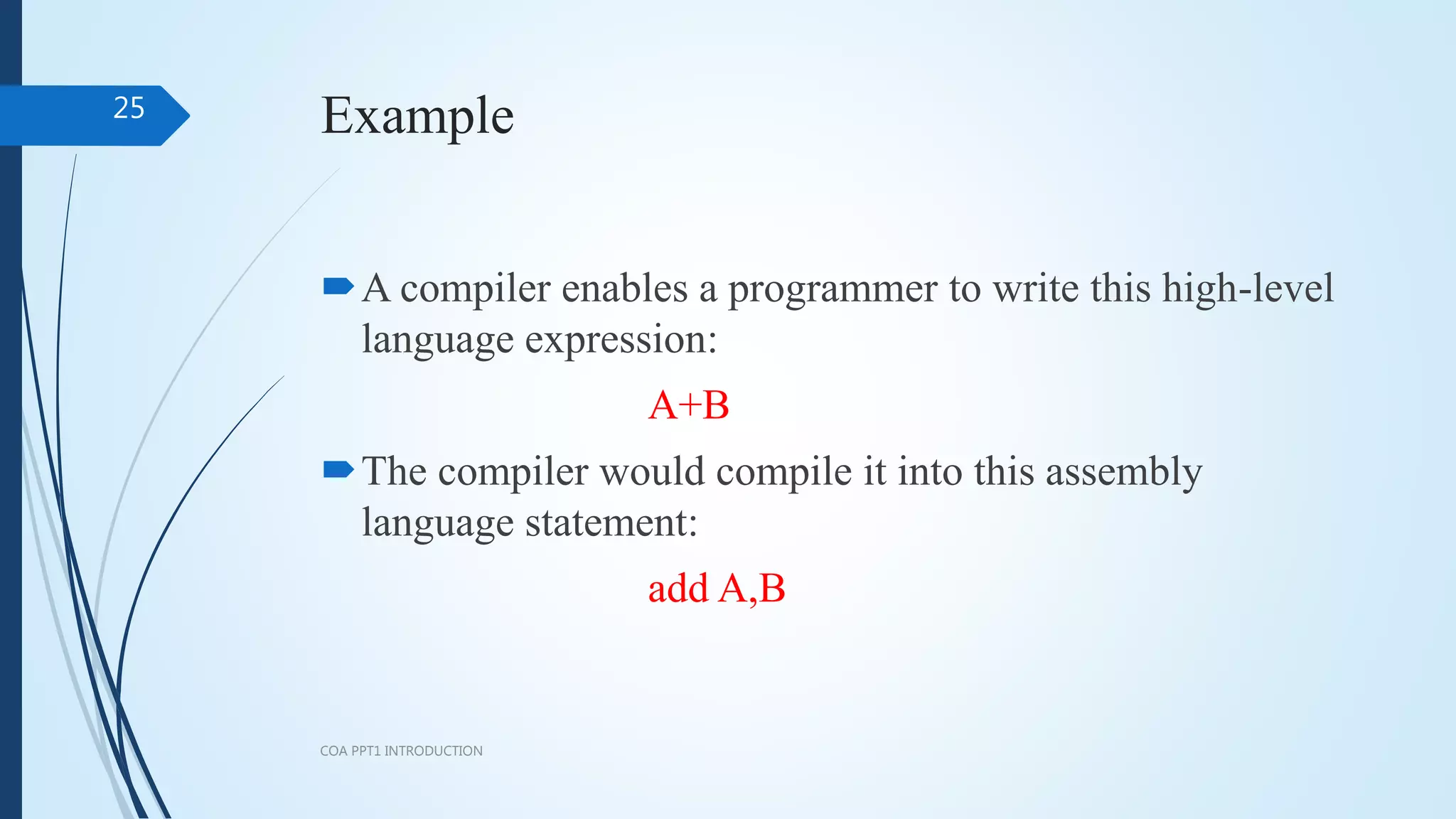
A compiler enables a programmer to write this high-level
language expression:
A+B
The compiler would compile it into this assembly
language statement:
add A,B
COA PPT1 INTRODUCTION
25
Components of a Computer
COA PPT1 INTRODUCTION
26
Same components for
all kinds of computer
Desktop, server,
embedded
Input/output includes
User-interface devices
Display, keyboard, mouse
Storage devices
Hard disk, CD/DVD, flash
Network adapters
For communicating with other
computers
Components of a Computer
COA PPT1 INTRODUCTION
27
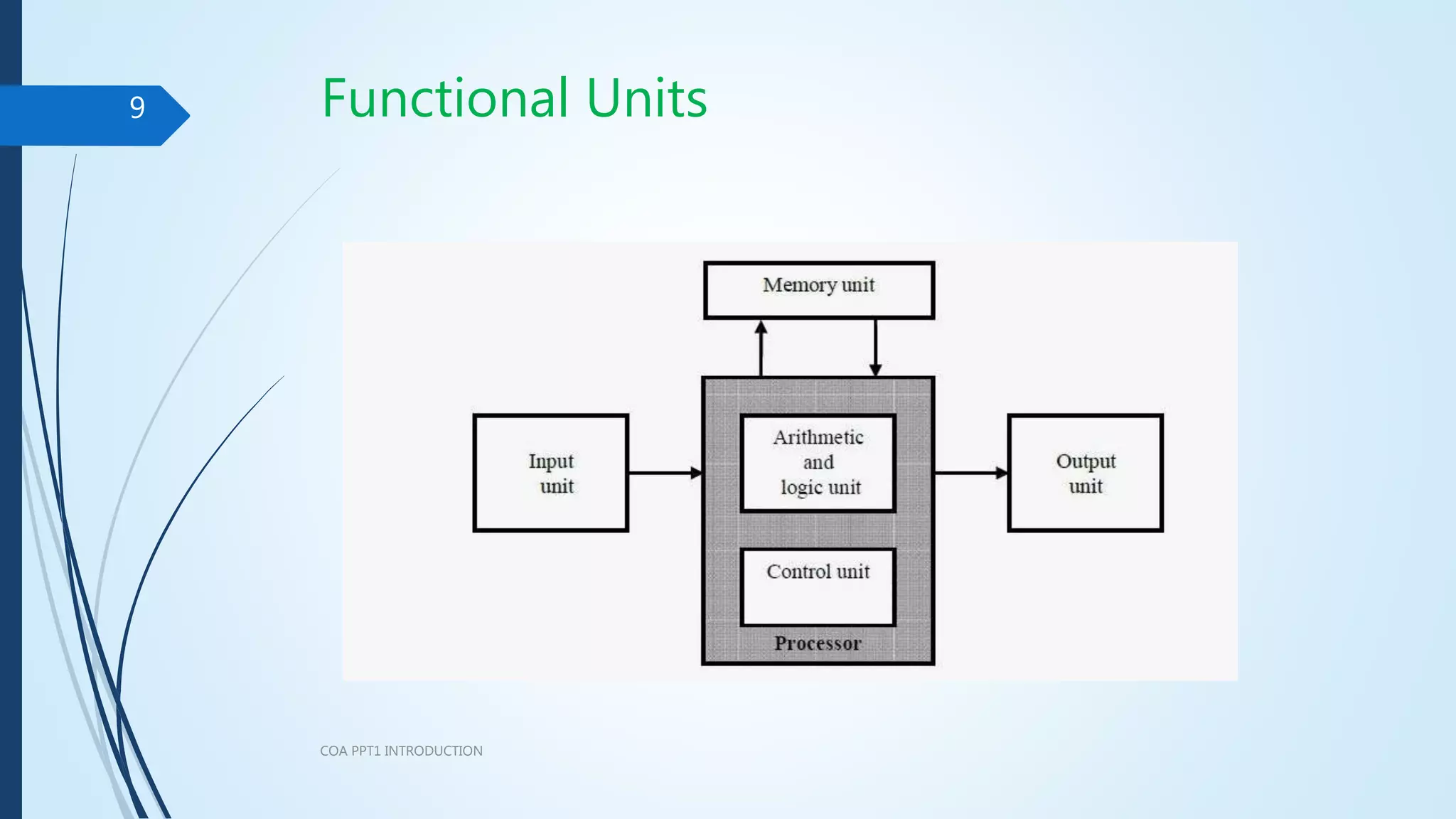
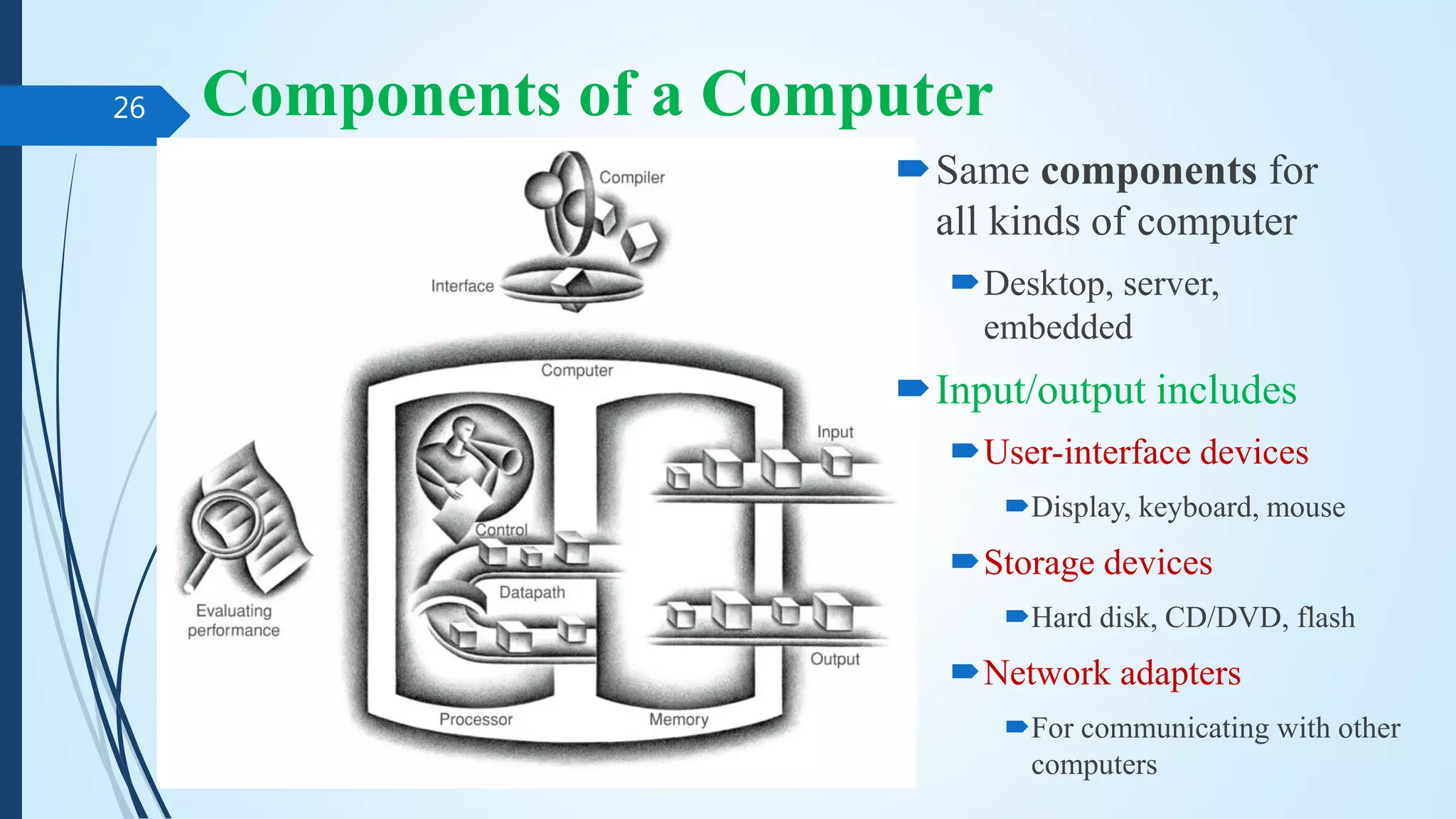
 Five Components
 Input writes data to memory
 Output reads data from memory
 Processor get instruction and
data from memory.
 Control sends the signals that
determine the operations of the
datapath, memory, input, and
output. Datapath performs
operations on data.
 Memory stores data
Computer Hardware in detail…
 Integrated circuit Also called a chip. A device combining dozens to
millions of transistors.
 Central Processor unit (CPU) Also called processor. The active part of
the computer, which contains the datapath and control and which adds
numbers, tests numbers, signals I/O devices to activate, and so on.
 Datapath The component of the processor that performs arithmetic operations
 Control The component of the processor that commands the datapath,
memory, and I/O devices according to the instructions of the program.
 Memory The storage area in which programs are kept when they are
running and that contains the data needed by the running programs.
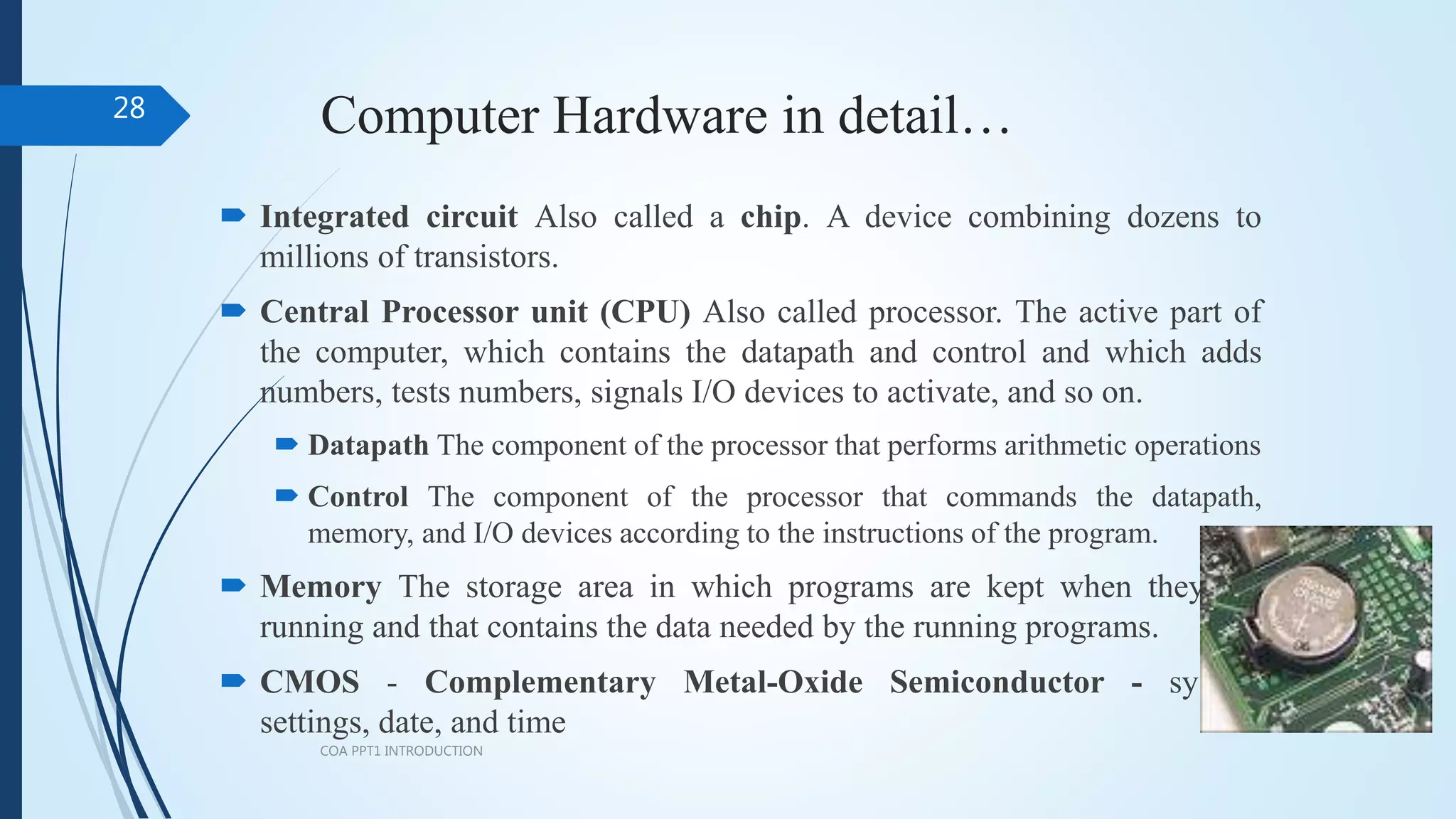
 CMOS - Complementary Metal-Oxide Semiconductor - system
settings, date, and time
COA PPT1 INTRODUCTION
28
Computer Hardware in detail…
 Volatile memory: when it loses power, it forgets. (retains data only if it is
receiving power)
 Nonvolatile memory: A form of memory that retains data even in the absence of
a power source and that is used to store programs between runs.
 Main memory (primary memory): Memory used to hold programs while they
are running (DRAM)
 Dynamic Random Access Memory (DRAM) Memory built as an integrated
circuit; it provides random access to any location. Access times are 50
nanoseconds and cost per gigabyte in 2012 was $5 to $10.
 Cache memory A small, fast memory that acts as a buffer for a slower, larger
memory.
 Static Random Access Memory (SRAM) Also memory built as an
integrated circuit, but faster and less dense than DRAM.
 Secondary memory: Nonvolatile memory used to store programs and data
between runs
 Magnetic disk/Hard disk: form of nonvolatile secondary memory composed
of rotating platters coated with a magnetic recording material.
COA PPT1 INTRODUCTION
29
Computer Hardware in detail…
 Local area network (LAN): A network designed to carry data
within a geographically confined area, typically within a single
building. (1 to 40 gigabits)
 Wide area network (WAN): A network extended over hundreds of
kilometers that can span a continent. Backbone of the Internet,
which supports the web - optical fibers.
COA PPT1 INTRODUCTION
30
Technologies for Building Processors
and Memory
COA PPT1 INTRODUCTION
31
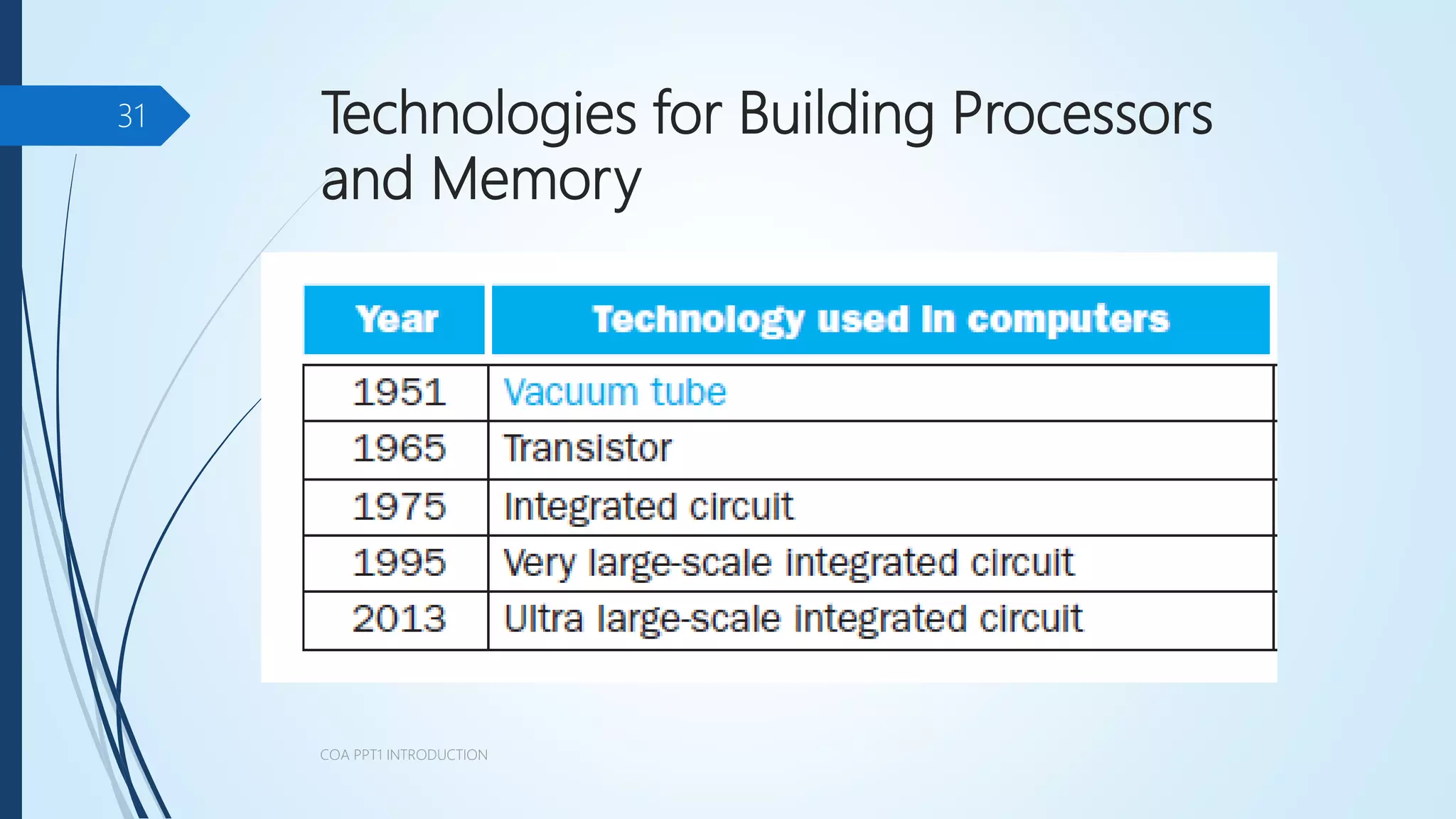
 Transistor An on/off switch controlled by an electric signal.
 Integrated circuit (IC) combined dozens to hundreds of transistors
into a single chip.
 Very large-scale integrated (VLSI) circuit A device containing
hundreds of thousands to millions of transistors.
 Ultra large-scale integrated (ULSI) circuit
COA PPT1 INTRODUCTION
32
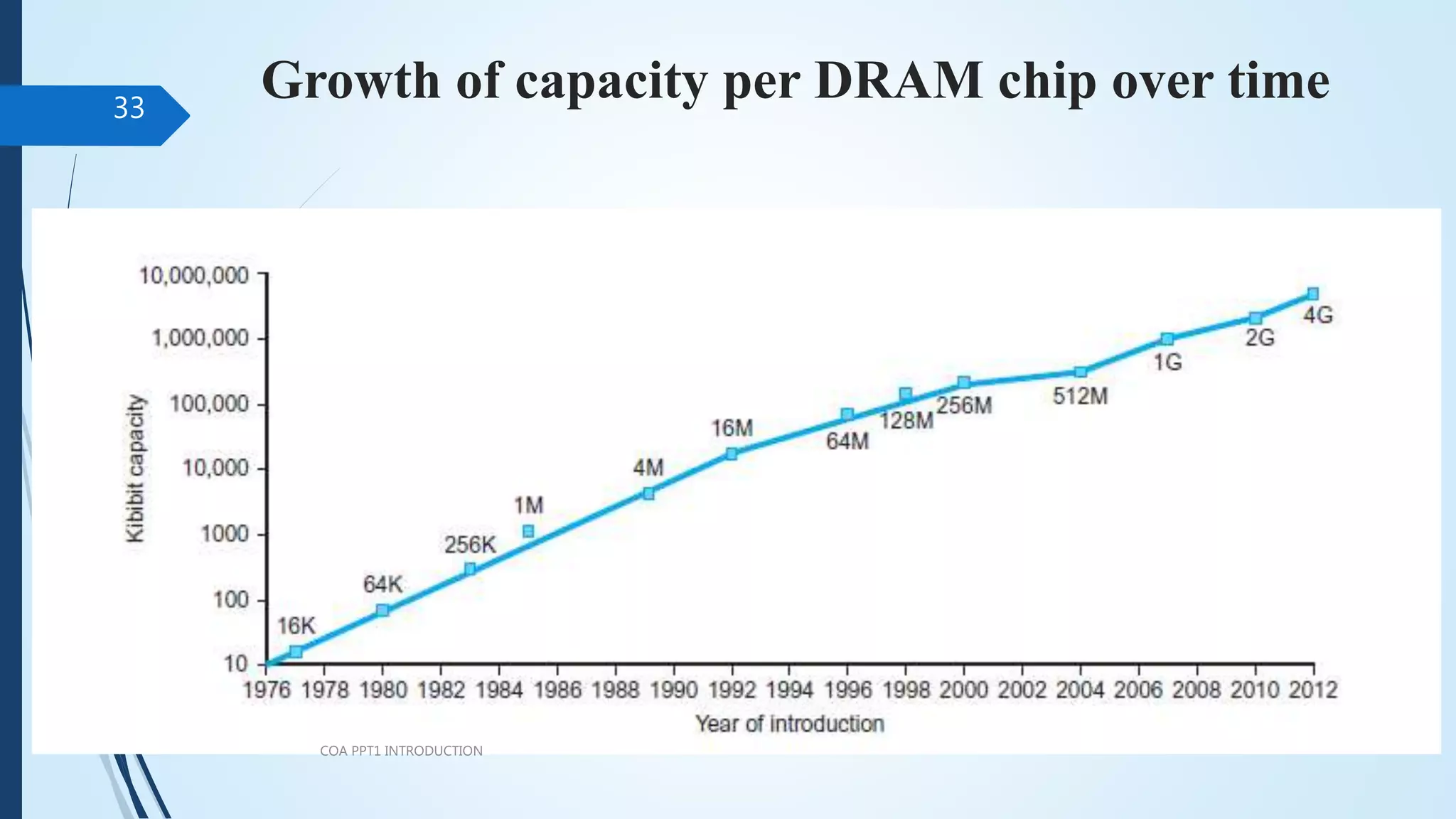
Growth of capacity per DRAM chip over time
COA PPT1 INTRODUCTION
33
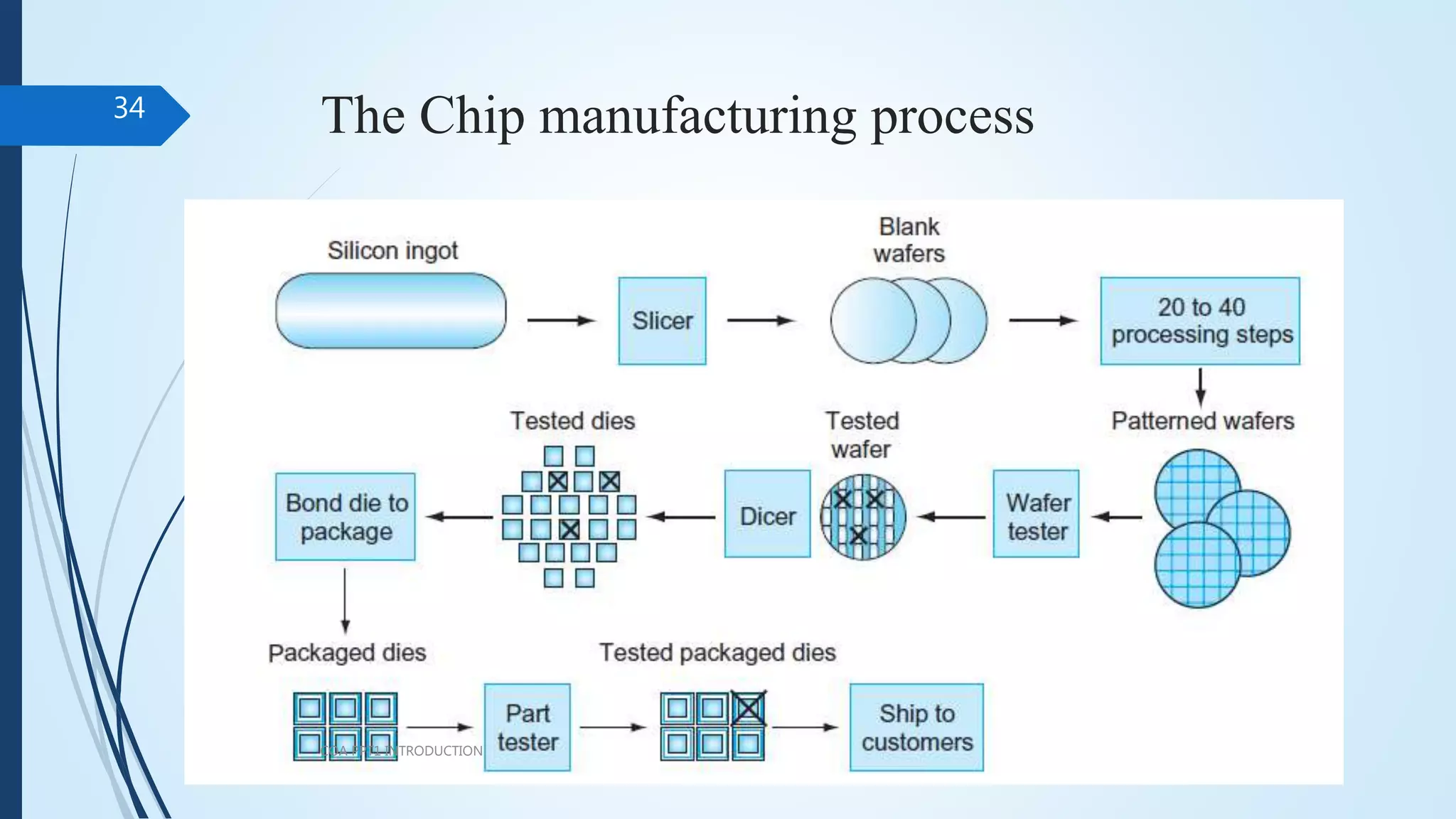
The Chip manufacturing process
COA PPT1 INTRODUCTION
34

COMPUTER ORGANIZATION AND ARCHITECTURE

  • 1.
    20CS001 – COMPUTERORGANIZATION AND ARCHITECTURE COA PPT1 INTRODUCTION 1 Text Book: David A. Patterson and John L. Hennessey, “Computer Organization and Design: The Hardware / Software Interface”, Morgan Kaufman / Elsevier, ARM Edition, 2017.
  • 2.
    Architecture: An Overview Functionalunits of a Digital Computer – Translation from a High level language to Hardware Language – Technology – Performance – Power wall – Uniprocessor to multiprocessor - Instructions: Operations and Operands – Instruction Set: RISC and CISC - Representing Instructions - Logical Operations – ARM Addressing for 32-bit Immediate and more complex addressing modes. COA PPT1 INTRODUCTION 2
  • 3.
    The Computer Revolution Progress in computer technology Computers in automobiles Cell phones World Wide Web Search Engines Computers are pervasive. COA PPT1 INTRODUCTION 3
  • 4.
    Classes of Computers Personal computers General purpose, variety of software Subject to cost/performance tradeoff  Server computers Network based High capacity, performance, reliability Range from small servers to building sized COA PPT1 INTRODUCTION 4 MIPS
  • 5.
    Classes of Computers(Cont.)  Supercomputers High-end scientific and engineering calculations Highest capability but represent a small fraction of the overall computer market  Embedded computers Hidden as components of systems Stringent power/performance/cost constraints COA PPT1 INTRODUCTION 5 FLOPS / GFLOPS
  • 6.
    The PostPC Era COAPPT1 INTRODUCTION 6
  • 7.
  • 8.
    The PostPC Era COAPPT1 INTRODUCTION 8  Personal Mobile Device (PMD) Battery operated Connects to the Internet Hundreds of dollars Smart phones, tablets, electronic glasses  Cloud computing Warehouse Scale Computers (WSC) Software as a Service (SaaS) Portion of software run on a PMD and a portion run in the Cloud Amazon and Google
  • 9.
  • 10.
    Few Parts ofa Computer – An Overview COA PPT1 INTRODUCTION 10 Assemble the computer: https://www.youtube.com/watch?v=hWB2UHCT0dw
  • 11.
    Computer Working Principles COAPPT1 INTRODUCTION 11 I/O system Processor Compiler Operating System (Mac OSX) Application (ex: browser) Digital Design Circuit Design Instruction Set Architecture Datapath & Control transistors Memory Hardware Software Assembler
  • 12.
    What We WillLearn  How programs are translated into the machine language  How the hardware executes them The hardware/software interface What determines program performance And how it can be improved How hardware designers improve performance What is parallel processing COA PPT1 INTRODUCTION 12
  • 13.
    Eight Great Ideas COAPPT1 INTRODUCTION 13  Design for Moore’s Law  Use abstraction to simplify design  Make the common case fast  Performance via parallelism  Performance via pipelining  Performance via prediction  Hierarchy of memories  Dependability via redundancy
  • 14.
    1. Design forMoore’s Law  Moore’s Law. It states that integrated circuit resources double every 18–24 months.  Computer Architects must anticipate where the technology will be when the design finishes rather than design for where it starts.  The resources available per chip can easily double or quadruple between the start and finish of the project. COA PPT1 INTRODUCTION 14
  • 15.
    2. Use Abstractionto Simplify Design  A major productivity technique for hardware and software is to use abstractions to represent the design at different levels of representation.  lower-level details are hidden to offer a simpler model at higher levels. COA PPT1 INTRODUCTION 15
  • 16.
    3. Make theCommon Case Fast  Making the common case fast will tend to enhance performance better than optimizing the rare case. The common case is often simpler than the rare case and hence is often easier to enhance. COA PPT1 INTRODUCTION 16
  • 17.
    4. Performance viaParallelism  Computer architects have offered designs that get more performance by performing operations in parallel. COA PPT1 INTRODUCTION 17
  • 18.
    5. Performance viaPipelining  A particular pattern of parallelism performed in computer architecture is named as “pipelining”. Performance can be achieved by overlapping the execution of successive instructions. COA PPT1 INTRODUCTION 18
  • 19.
    6. Performance viaPrediction  In some cases it can be faster on average to guess and start working rather than wait until you know for sure. Assuming that the mechanism to recover from a misprediction is not too expensive and your prediction is relatively accurate COA PPT1 INTRODUCTION 19
  • 20.
    7. Hierarchy ofMemories  Programmers want memory to be fast, large, and cheap. Hierarchy of Memories, with the fastest, smallest , and most expensive memory per bit at the top of the hierarchy and the slowest, largest, and cheapest per bit at the bottom. COA PPT1 INTRODUCTION 20
  • 21.
    8. Dependability viaRedundancy  Computers need to be dependable. When any physical device fail, we make systems dependable by including redundant components that can take over when a failure occurs and to help detect failures. COA PPT1 INTRODUCTION 21
  • 22.
    Eight Great Ideas COAPPT1 INTRODUCTION 22  Design for Moore’s Law  Use abstraction to simplify design  Make the common case fast  Performance via parallelism  Performance via pipelining  Performance via prediction  Hierarchy of memories  Dependability via redundancy
  • 23.
    Below Your Program Application software Written in high-level language System software Compiler: translates HLL code to machine code Operating System: service code Handling input/output Managing memory and storage Scheduling tasks & sharing resources Hardware Processor, memory, I/O controllers COA PPT1 INTRODUCTION 23
  • 24.
    Levels of ProgramCode  High-level language Level of abstraction closer to problem domain Provides for productivity and portability Assembly language Textual representation of instructions Hardware representation Binary digits (bits) Encoded instructions and data COA PPT1 INTRODUCTION 24
  • 25.
    Example A compiler enablesa programmer to write this high-level language expression: A+B The compiler would compile it into this assembly language statement: add A,B COA PPT1 INTRODUCTION 25
  • 26.
    Components of aComputer COA PPT1 INTRODUCTION 26 Same components for all kinds of computer Desktop, server, embedded Input/output includes User-interface devices Display, keyboard, mouse Storage devices Hard disk, CD/DVD, flash Network adapters For communicating with other computers
  • 27.
    Components of aComputer COA PPT1 INTRODUCTION 27  Five Components  Input writes data to memory  Output reads data from memory  Processor get instruction and data from memory.  Control sends the signals that determine the operations of the datapath, memory, input, and output. Datapath performs operations on data.  Memory stores data
  • 28.
    Computer Hardware indetail…  Integrated circuit Also called a chip. A device combining dozens to millions of transistors.  Central Processor unit (CPU) Also called processor. The active part of the computer, which contains the datapath and control and which adds numbers, tests numbers, signals I/O devices to activate, and so on.  Datapath The component of the processor that performs arithmetic operations  Control The component of the processor that commands the datapath, memory, and I/O devices according to the instructions of the program.  Memory The storage area in which programs are kept when they are running and that contains the data needed by the running programs.  CMOS - Complementary Metal-Oxide Semiconductor - system settings, date, and time COA PPT1 INTRODUCTION 28
  • 29.
    Computer Hardware indetail…  Volatile memory: when it loses power, it forgets. (retains data only if it is receiving power)  Nonvolatile memory: A form of memory that retains data even in the absence of a power source and that is used to store programs between runs.  Main memory (primary memory): Memory used to hold programs while they are running (DRAM)  Dynamic Random Access Memory (DRAM) Memory built as an integrated circuit; it provides random access to any location. Access times are 50 nanoseconds and cost per gigabyte in 2012 was $5 to $10.  Cache memory A small, fast memory that acts as a buffer for a slower, larger memory.  Static Random Access Memory (SRAM) Also memory built as an integrated circuit, but faster and less dense than DRAM.  Secondary memory: Nonvolatile memory used to store programs and data between runs  Magnetic disk/Hard disk: form of nonvolatile secondary memory composed of rotating platters coated with a magnetic recording material. COA PPT1 INTRODUCTION 29
  • 30.
    Computer Hardware indetail…  Local area network (LAN): A network designed to carry data within a geographically confined area, typically within a single building. (1 to 40 gigabits)  Wide area network (WAN): A network extended over hundreds of kilometers that can span a continent. Backbone of the Internet, which supports the web - optical fibers. COA PPT1 INTRODUCTION 30
  • 31.
    Technologies for BuildingProcessors and Memory COA PPT1 INTRODUCTION 31
  • 32.
     Transistor Anon/off switch controlled by an electric signal.  Integrated circuit (IC) combined dozens to hundreds of transistors into a single chip.  Very large-scale integrated (VLSI) circuit A device containing hundreds of thousands to millions of transistors.  Ultra large-scale integrated (ULSI) circuit COA PPT1 INTRODUCTION 32
  • 33.
    Growth of capacityper DRAM chip over time COA PPT1 INTRODUCTION 33
  • 34.
    The Chip manufacturingprocess COA PPT1 INTRODUCTION 34