Best Practices
  for Scaling Java
 Applications with
Distributed Caching

                Copyright © 2011 Cacheonix Systems
Introduction
Presenter: Slava Imeshev
  •  Founder at Cacheonix Systems developing
     reliable clustered cache Cacheonix
  •  Core expertise in reliable distributed systems
  •  simeshev@cacheonix.com


                                        Copyright © 2011 Cacheonix Systems
Copyright © 2011 Cacheonix Systems
Definitions


               Copyright © 2011 Cacheonix Systems
Performance
Number of operations per unit of time
•  Requests per second
•  Pages per second
•  Transactions per second

Performance is not scalability (is 200 pages/s
   more scalable than 150 pages/s?)


                                        Copyright © 2011 Cacheonix Systems
Scalability
  Ability to handle additional load by adding
           more computational resources
•  Vertical scalability
•  Horizontal scalability


                                       Copyright © 2011 Cacheonix Systems
Vertical Scalability
•  Vertical scalability is handling additional
   load by adding more power to a single
   machine
•  Vertical scalability is trivial to achieve. Just
   switch to a faster CPU, add more RAM or
   replace an HDD with an SSD
•  Vertical scalability has a hard limit (2-5
   times improvement in capacity)


                                          Copyright © 2011 Cacheonix Systems
Horizontal Scalability
•  Horizontal scalability is handling additional
   load by adding more servers
•  Horizontal scalability offers much greater
   benefit (2-1000 times improvement in
   capacity)
•  Horizontal scalability is much harder to
   achieve as adding servers requires
   ensuring data consistency and coherent
   view of cache updates.


                                        Copyright © 2011 Cacheonix Systems
Scalability Problem


                 Copyright © 2011 Cacheonix Systems
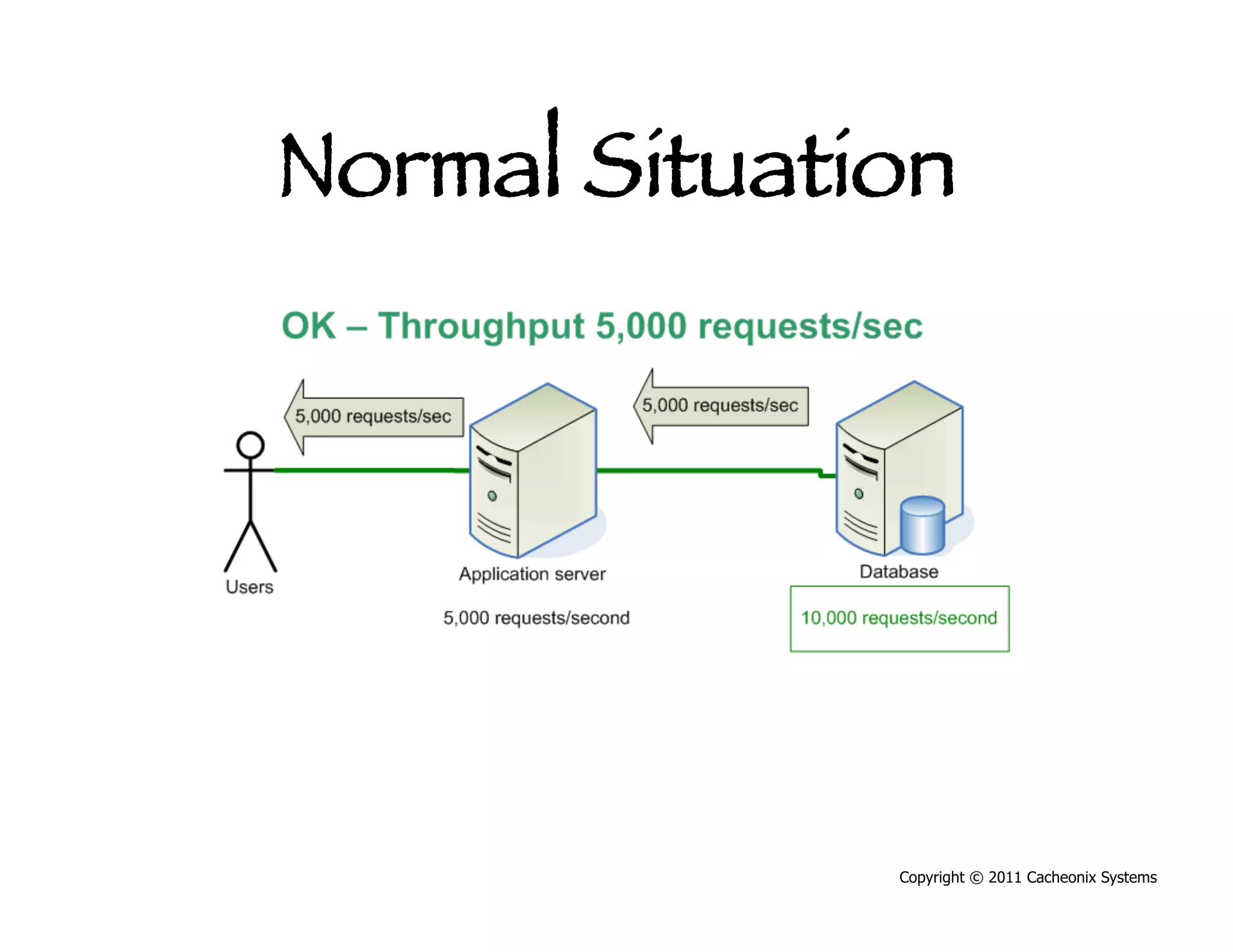
Normal Situation


               Copyright © 2011 Cacheonix Systems
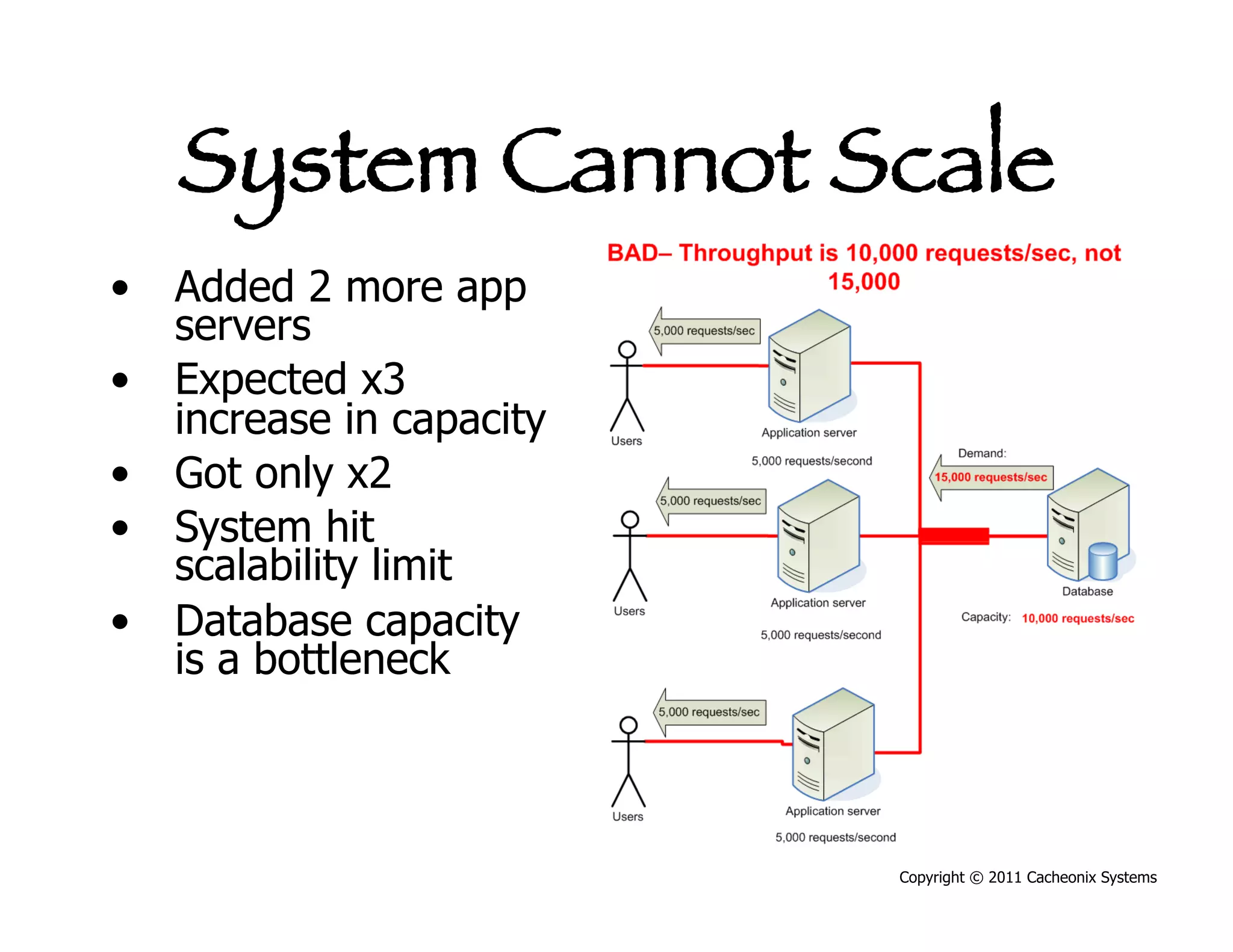
System Cannot Scale
•  Added 2 more app
   servers
•  Expected x3
   increase in capacity
•  Got only x2
•  System hit
   scalability limit
•  Database capacity
   is a bottleneck


                          Copyright © 2011 Cacheonix Systems
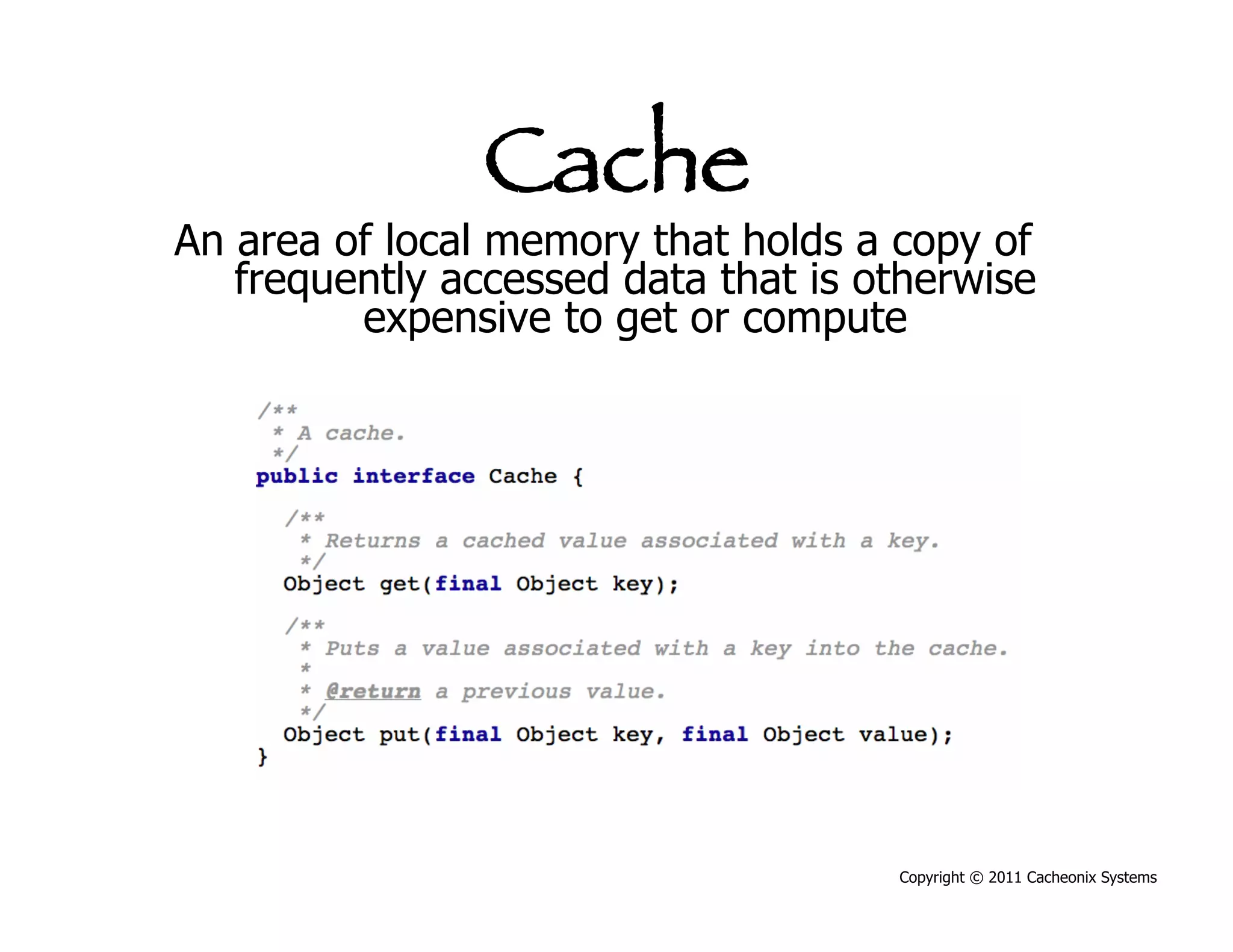
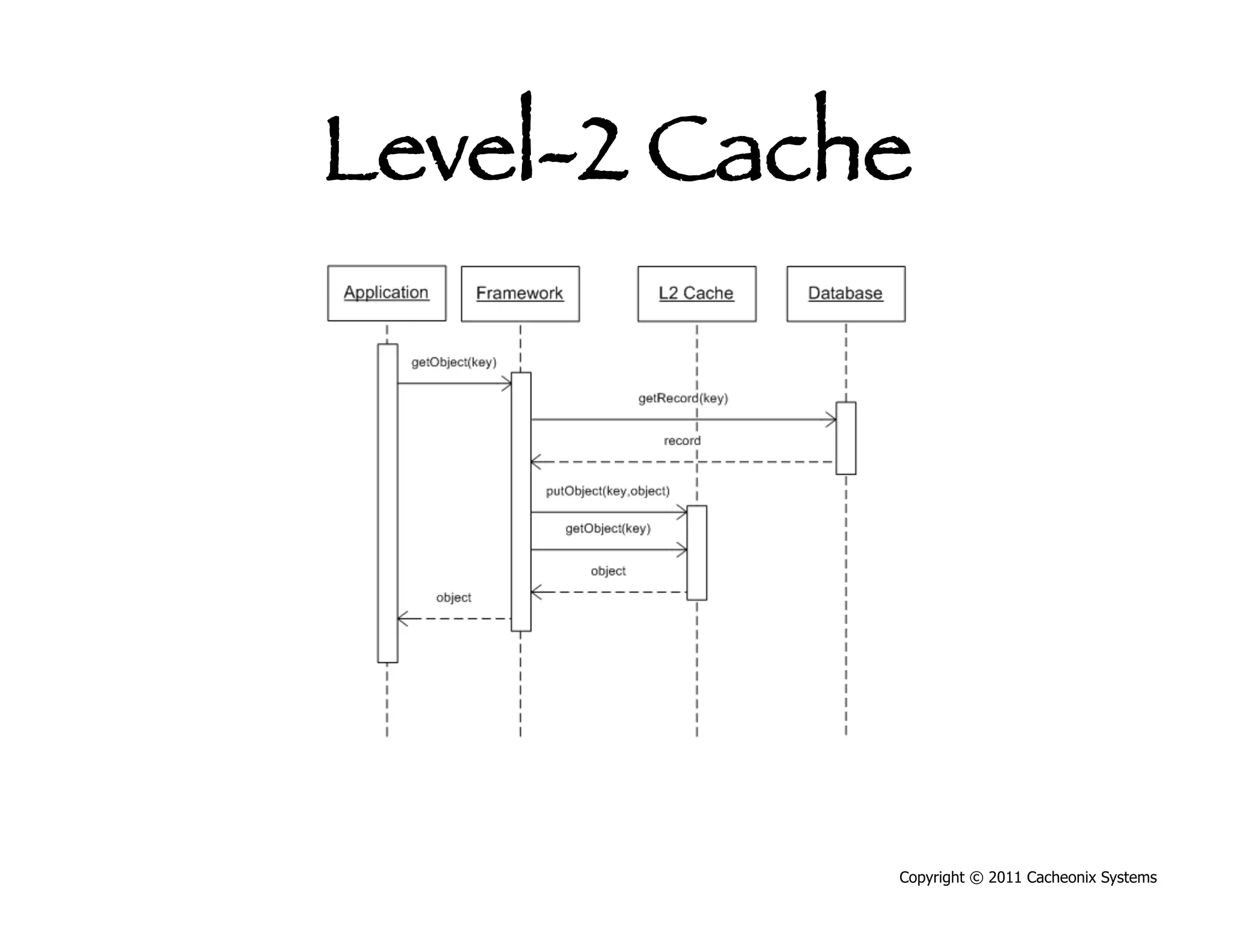
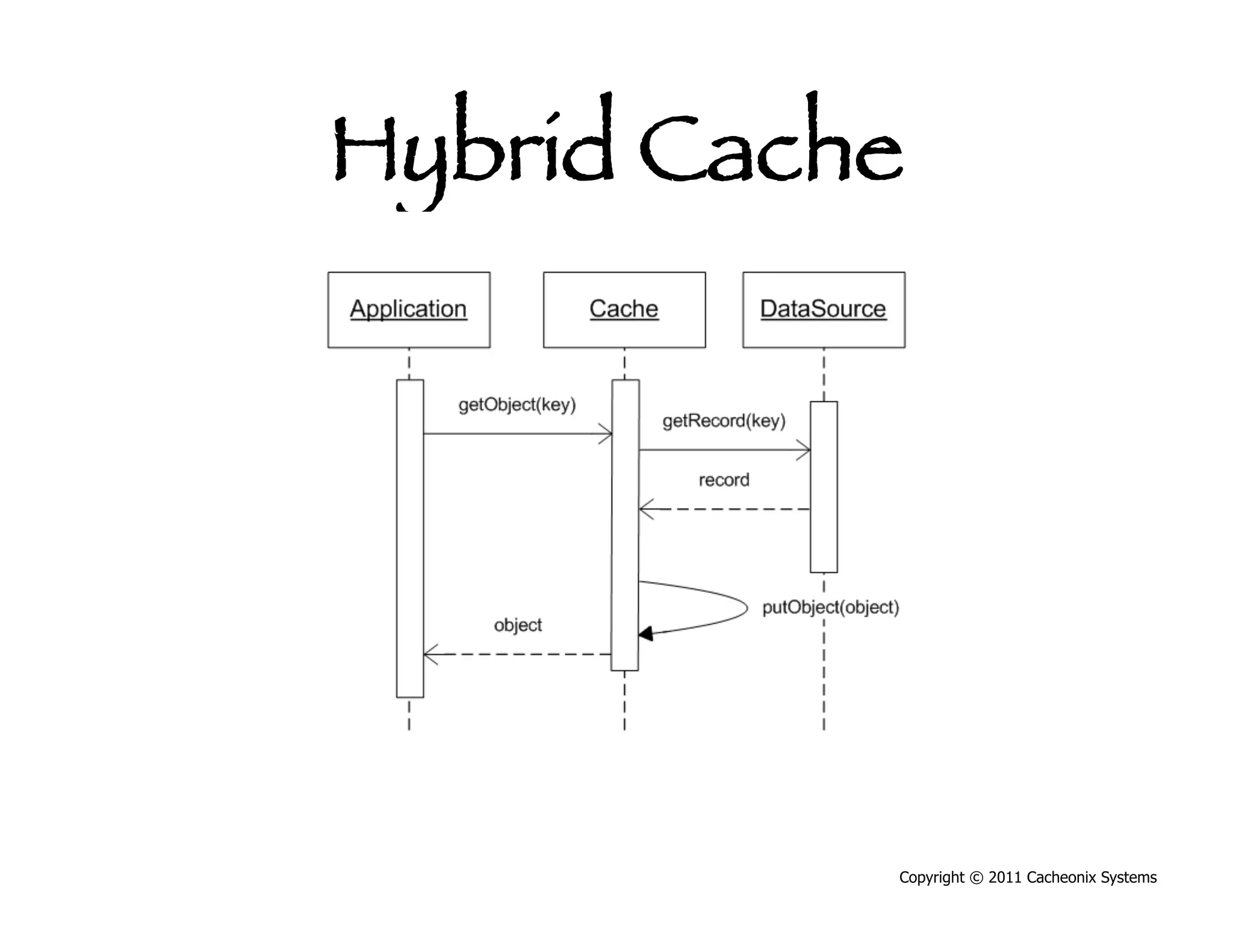
Cache
An area of local memory that holds a copy of
   frequently accessed data that is otherwise
         expensive to get or compute


                                     Copyright © 2011 Cacheonix Systems
Key Cache Parameters
•  Cache size defines how many elements a cache
   can hold


                                      Copyright © 2011 Cacheonix Systems
Key Cache Parameters
•  Cache size defines how many elements a cache
   can hold
•  Cache eviction algorithm defines what to do when
   the number of elements in cache exceeds the size


                                        Copyright © 2011 Cacheonix Systems
Key Cache Parameters
•  Cache size defines how many elements a cache
   can hold
•  Cache eviction algorithm defines what to do when
   the number of elements in cache exceeds the size
•  Time-to-live defines time after that a cache key
   should be remove from the cache (expired)


                                        Copyright © 2011 Cacheonix Systems
Cache Eviction Algorithm
Least Recently Used (LRU) works best
•  Catches temporal and spatial locality


                                           Copyright © 2011 Cacheonix Systems
Cache Eviction Algorithm
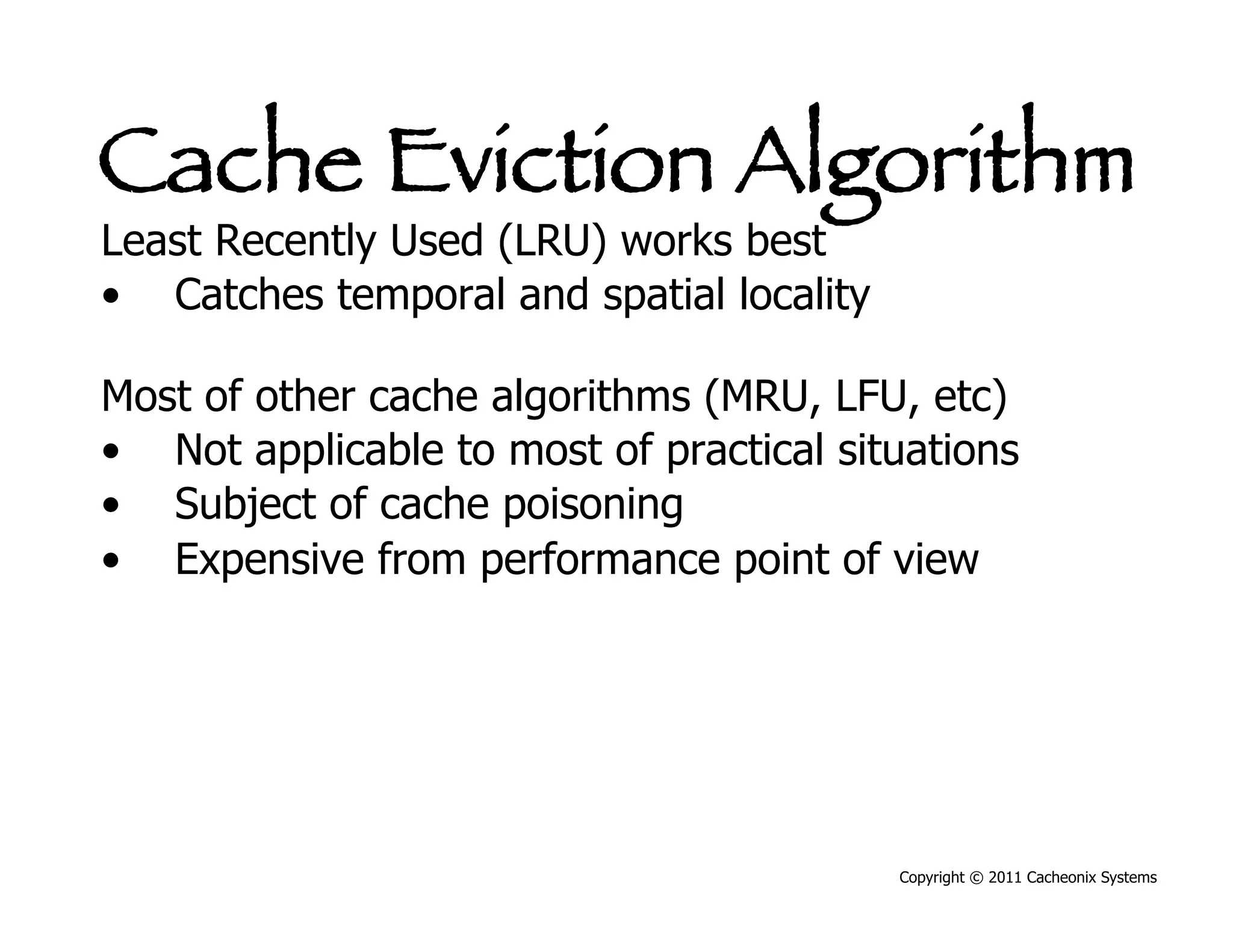
Least Recently Used (LRU) works best
•  Catches temporal and spatial locality

Most of other cache algorithms (MRU, LFU, etc)
•  Not applicable to most of practical situations
•  Subject of cache poisoning
•  Expensive from performance point of view


                                           Copyright © 2011 Cacheonix Systems
Cache Types
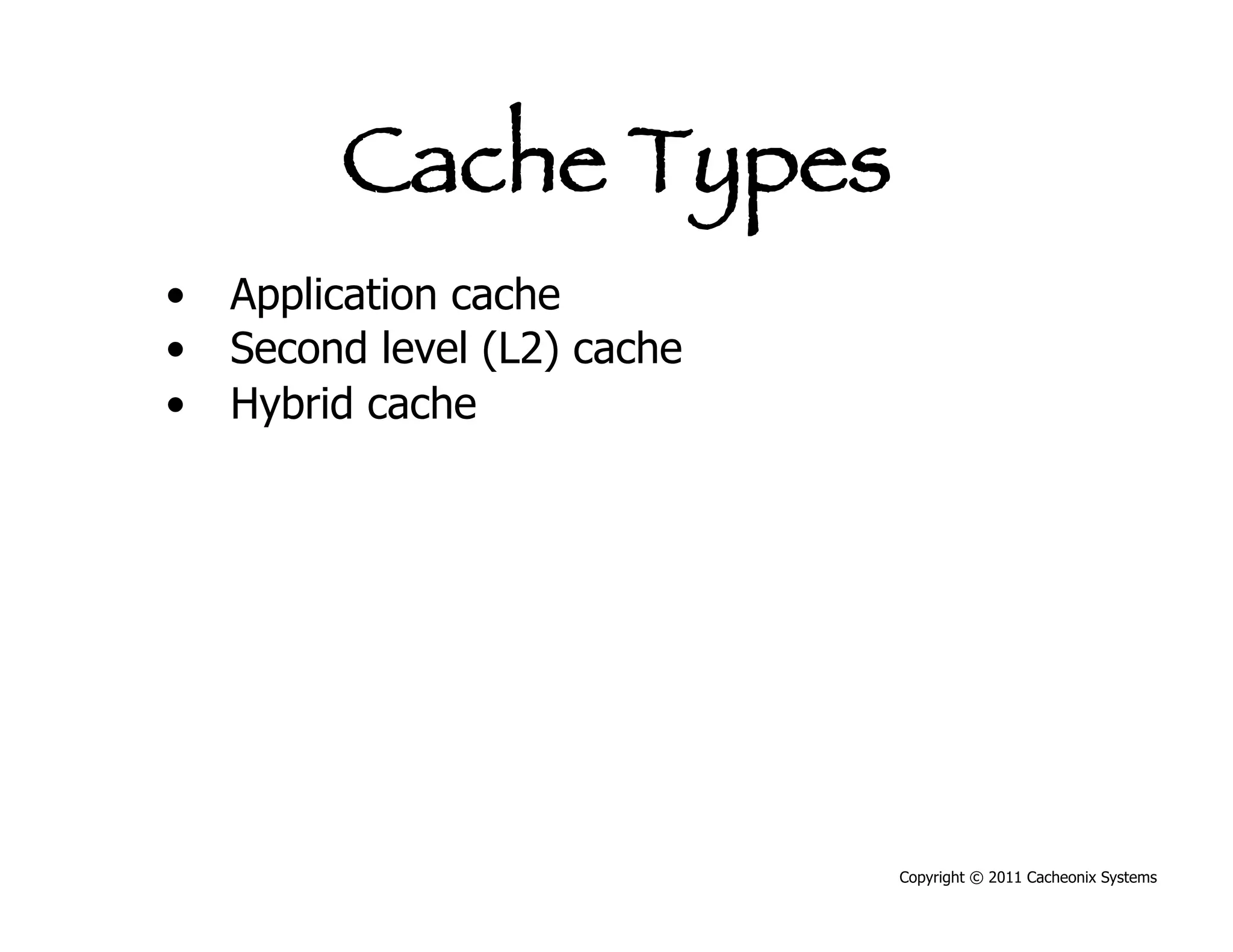
•  Application cache
•  Second level (L2) cache
•  Hybrid cache


                             Copyright © 2011 Cacheonix Systems
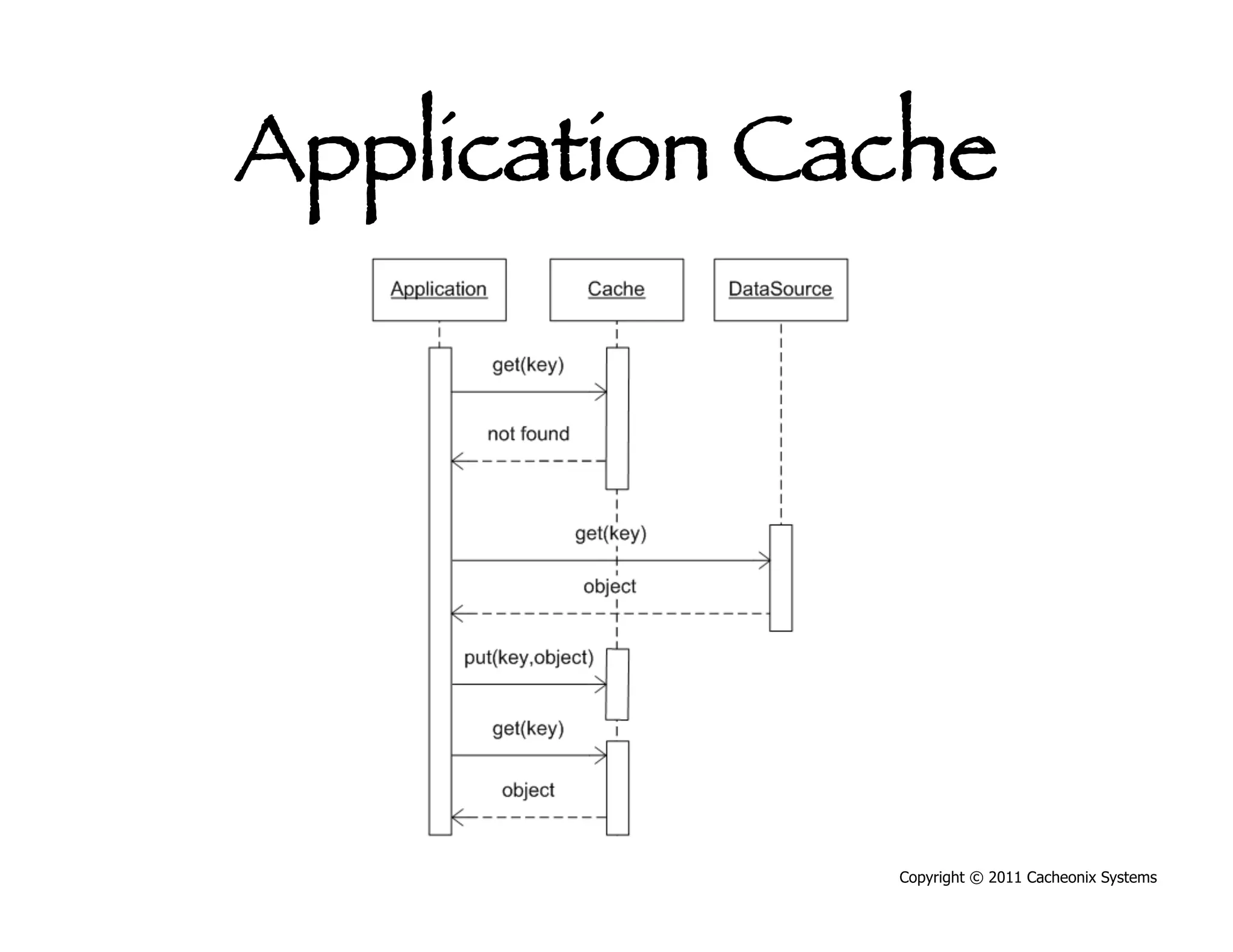
Application Cache


               Copyright © 2011 Cacheonix Systems
Level-2 Cache


             Copyright © 2011 Cacheonix Systems
Hybrid Cache


            Copyright © 2011 Cacheonix Systems
Cache Architectures
•  Local
•  Distributed


                 Copyright © 2011 Cacheonix Systems
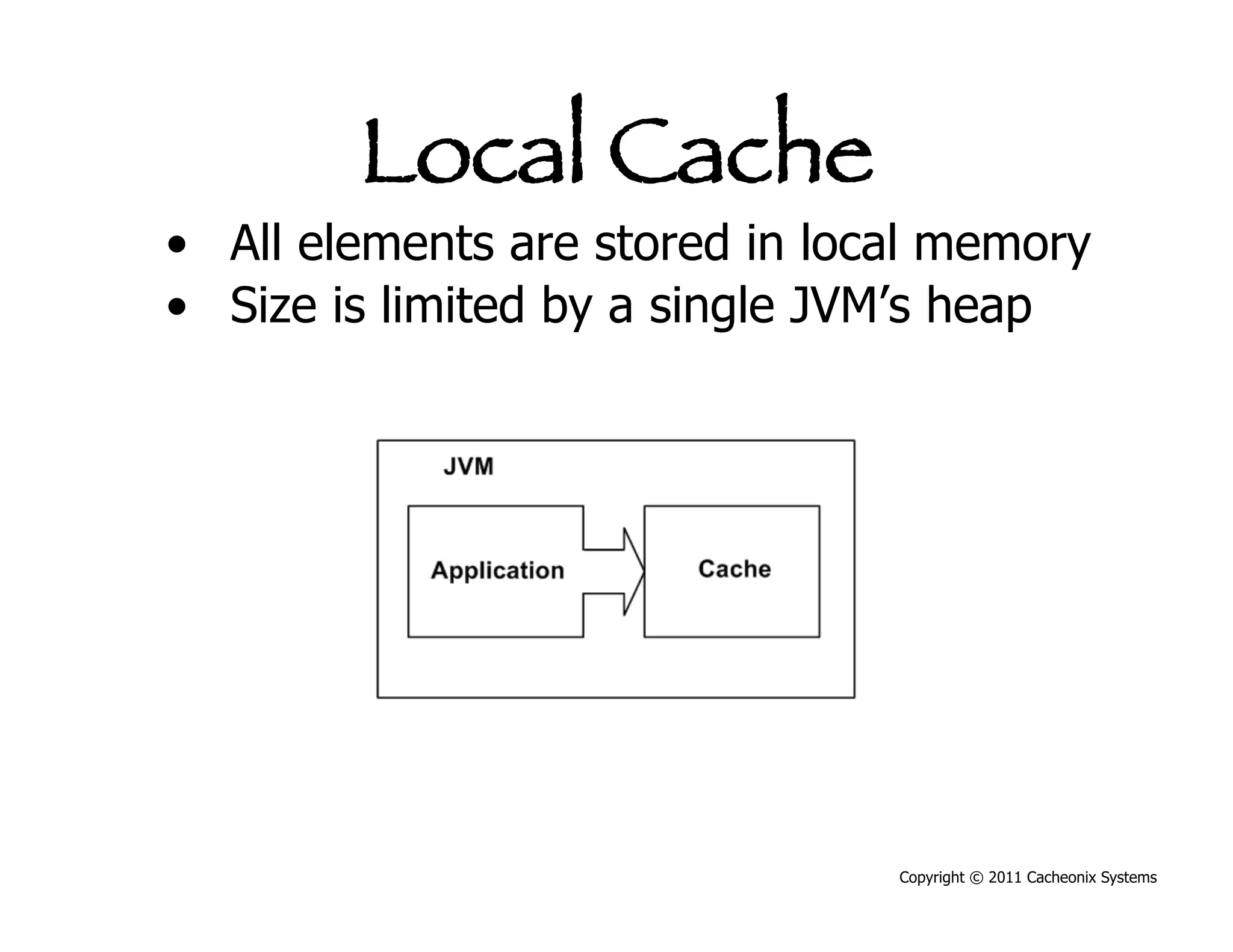
Local Cache
•  All elements are stored in local memory
•  Size is limited by a single JVM’s heap


                                 Copyright © 2011 Cacheonix Systems
Distributed Cache
•    Cache elements are distributed across a set
     servers (a cluster)
•    Cache size is a sum of cache partitions in case
     of a partitioned cache
•    Cache size can be much bigger than a single
     Java VM
•    Distributed cache can scale horizontally by
     adding more servers


                                        Copyright © 2011 Cacheonix Systems
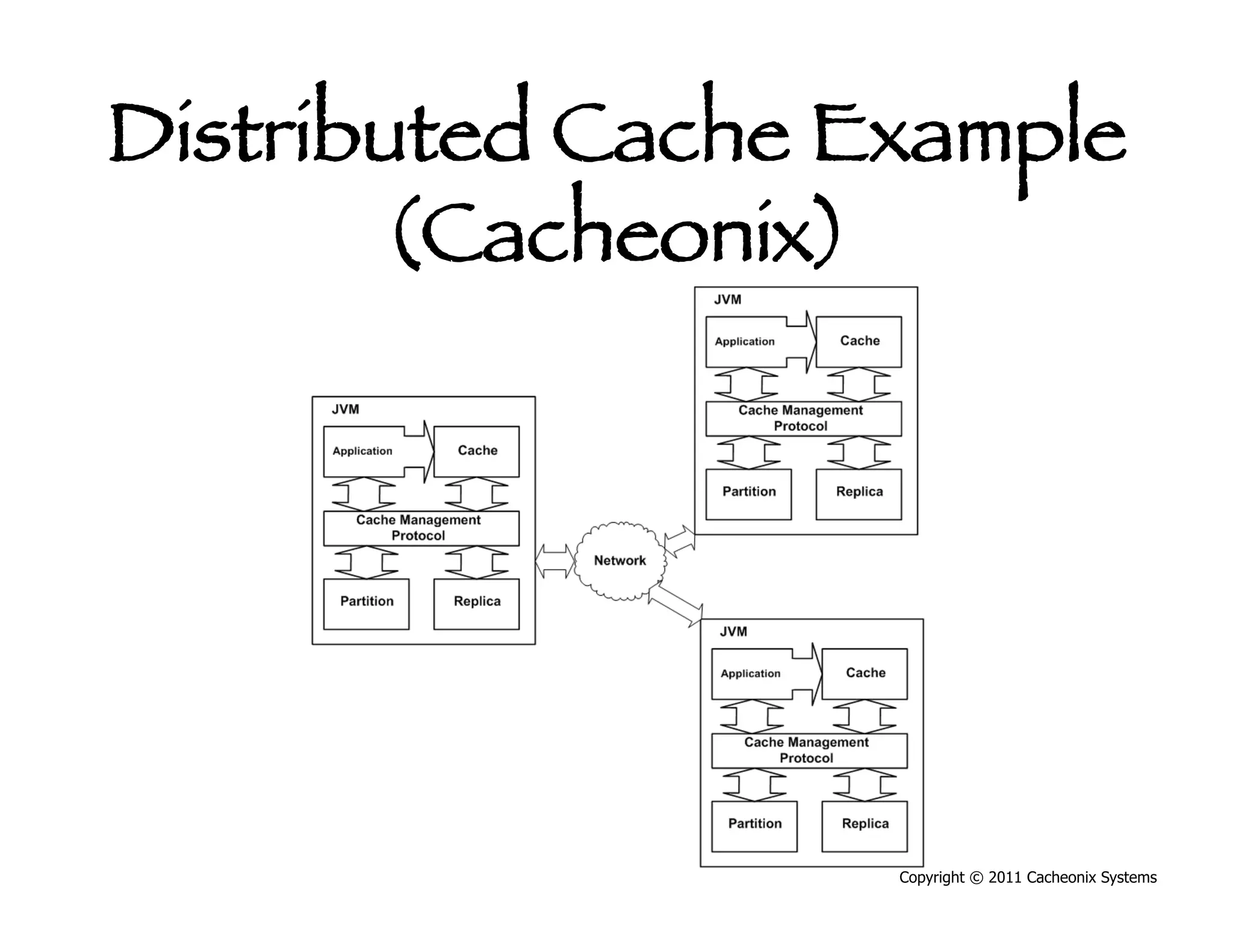
Distributed Cache Example
       (Cacheonix)


                   Copyright © 2011 Cacheonix Systems
Distributed Cache
Important characteristics:
•  Partitioning for load balancing


                                     Copyright © 2011 Cacheonix Systems
Distributed Cache
Important characteristics:
•  Partitioning for load balancing
•  Replication for high availability


                                       Copyright © 2011 Cacheonix Systems
Distributed Cache
Important characteristics:
•  Partitioning for load balancing
•  Replication for high availability
•  Cache coherence for data consistency


                                    Copyright © 2011 Cacheonix Systems
Distributed Cache
Important capabilities:
•  Partitioning for load balancing
•  Replication for high availability
•  Cache coherence for data consistency
•  Fault tolerance for high availability

Not all systems have these capabilities


                                          Copyright © 2011 Cacheonix Systems
Availability and Fault
      Tolerance
Ability to continue to operate despite of
    failure of members of the cluster
•  When applied to distributed caching, HA
    means an ability to provide uninterrupted,
    consistent data access


                                      Copyright © 2011 Cacheonix Systems
Copyright © 2011 Cacheonix Systems
Solution to Scalability
       Problem 


                  Copyright © 2011 Cacheonix Systems
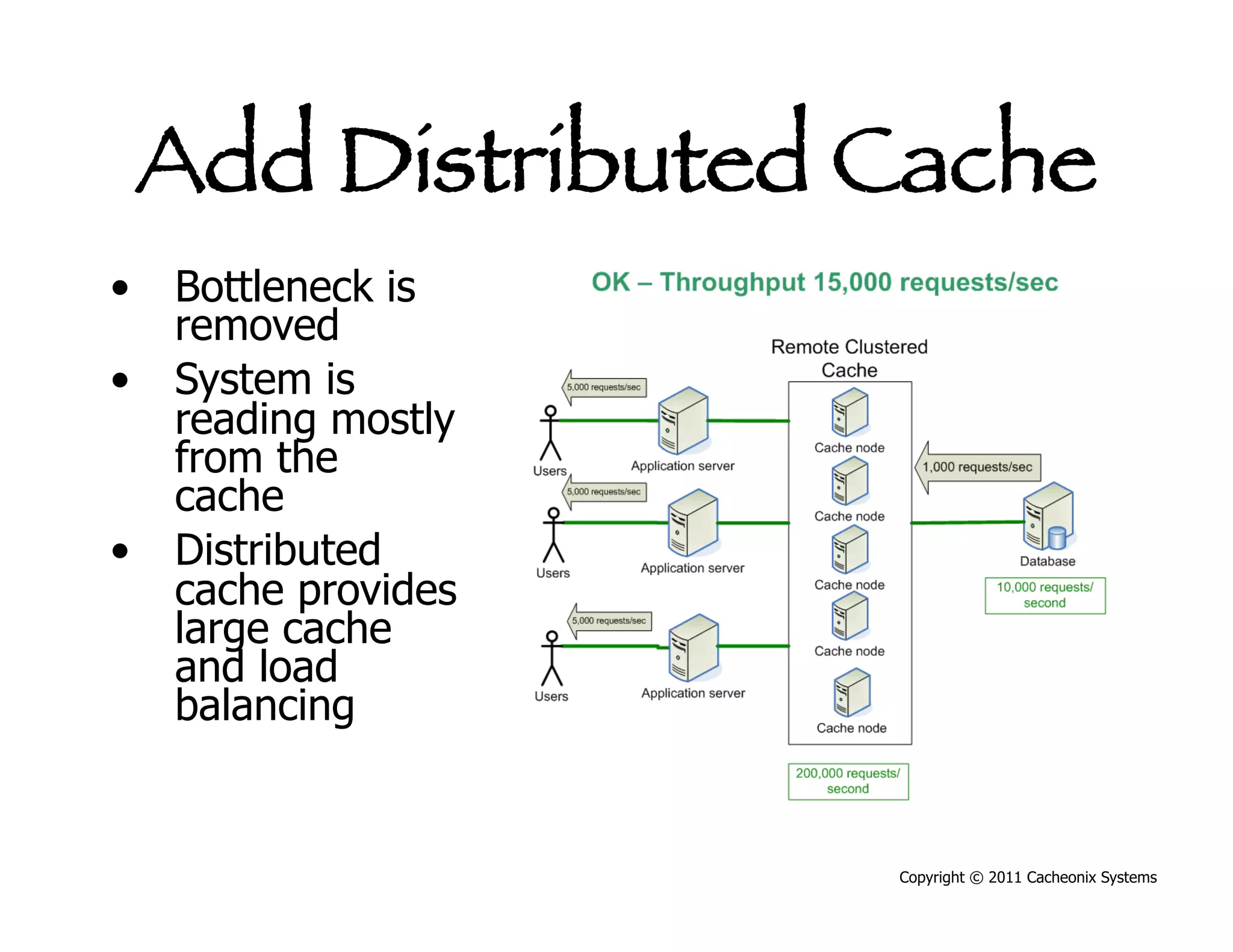
Add Distributed Cache
•  Bottleneck is
   removed
•  System is
   reading mostly
   from the
   cache
•  Distributed
   cache provides
   large cache
   and load
   balancing


                    Copyright © 2011 Cacheonix Systems
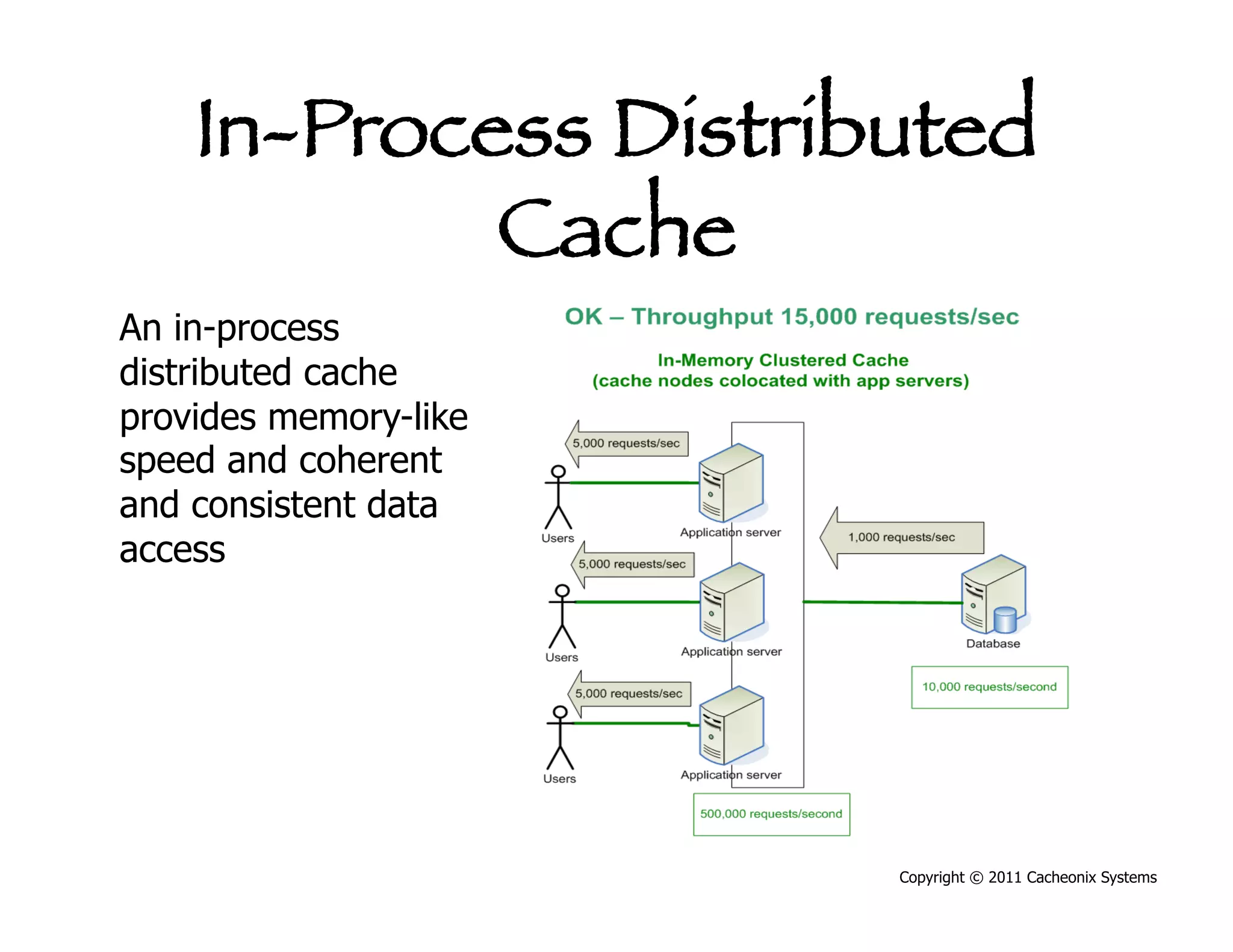
In-Process Distributed
            Cache
An in-process
distributed cache
provides memory-like
speed and coherent
and consistent data
access


                       Copyright © 2011 Cacheonix Systems
Copyright © 2011 Cacheonix Systems
Best Practices


              Copyright © 2011 Cacheonix Systems
Best Practice: Scale Out
by Adding More Servers
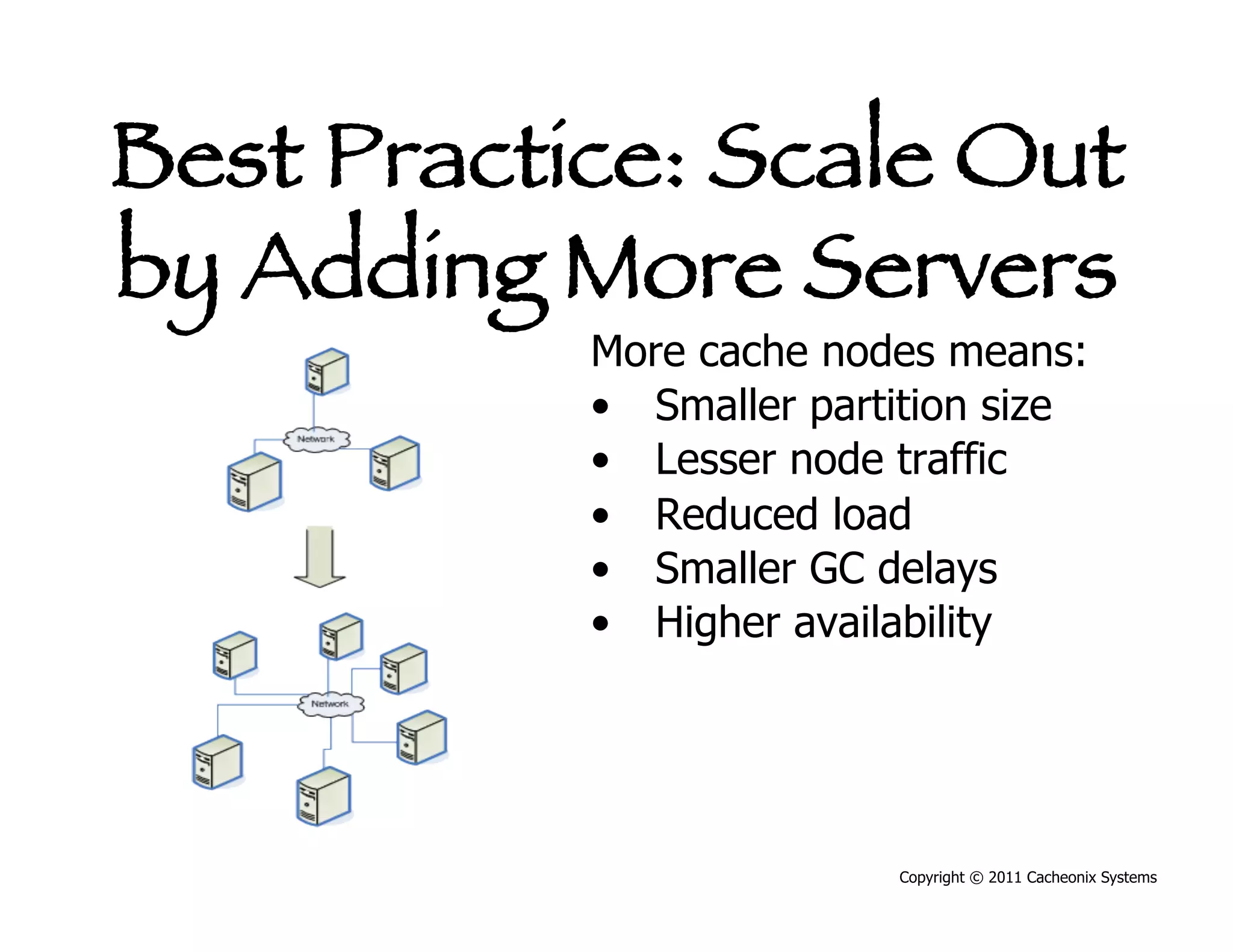
           More cache nodes means:
           •  Smaller partition size
           •  Lesser node traffic
           •  Reduced load
           •  Smaller GC delays
           •  Higher availability


                          Copyright © 2011 Cacheonix Systems
Best Practice: Scale Out
by Adding More Servers
           More cache nodes means:
           •  Bigger distributed cache
           •  Better performance


                          Copyright © 2011 Cacheonix Systems
Best Practice: Design for
  Scalability Upfront
 •    Design for scalability won’t emerge on its own
 •    Design for loads the worst case x10
 •    Accommodate going distributed
 •    Good designs are easy to optimize


                                         Copyright © 2011 Cacheonix Systems
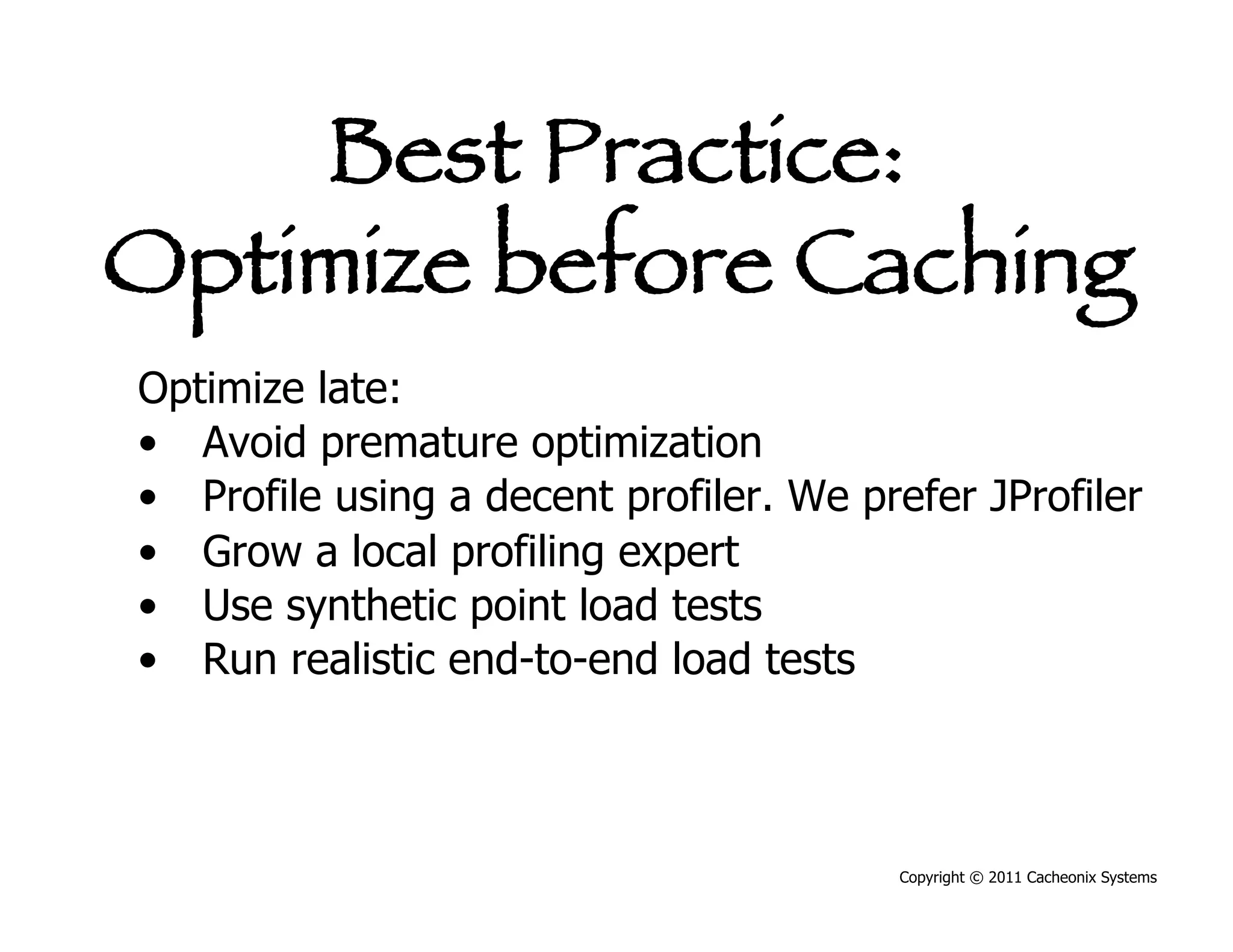
Best Practice:
Optimize before Caching
Optimize late:
•  Avoid premature optimization
•  Profile using a decent profiler. We prefer JProfiler
•  Grow a local profiling expert
•  Use synthetic point load tests
•  Run realistic end-to-end load tests


                                         Copyright © 2011 Cacheonix Systems
Best Practice: Automate
  Problem Detection
 Automate detection of performance problems:
 •  PMD
 •  FindBugs
 •  KlocWork


                                    Copyright © 2011 Cacheonix Systems
Best Practice: Stay Local
before Going Distributed
•  Scale vertically first (better CPU, more RAM)


                                          Copyright © 2011 Cacheonix Systems
Best Practice: Stay Local
before Going Distributed
•  Scale vertically first (better CPU, more RAM)
•  Go distributed only when opportunities for vertical
   scalability are completely exhausted


                                          Copyright © 2011 Cacheonix Systems
Best Practice: Stay Local
before Going Distributed
•  Scale vertically first (better CPU, more RAM)
•  Go distributed only when opportunities for vertical
   scalability are completely exhausted
•  A distributed cache is slower than a local one
   because it must use network I/O and more CPU to
   maintain coherence, partitioning and replication


                                          Copyright © 2011 Cacheonix Systems
Best Practice: Stay Local
before Going Distributed
•  Scale vertically first (better CPU, more RAM)
•  Go distributed only when opportunities for vertical
   scalability are completely exhausted
•  A distributed cache is slower than a local one
   because it must use network I/O and more CPU to
   maintain coherence, partitioning and replication
•  Distributed systems require additional
   configuration, testing and network infrastructure.


                                          Copyright © 2011 Cacheonix Systems
Best Practice: Stay Local
before Going Distributed
•  Scale vertically first (better CPU, more RAM)
•  Go distributed only when opportunities for vertical
   scalability are completely exhausted
•  A distributed cache is slower than a local one
   because it must use network I/O and more CPU to
   maintain coherence, partitioning and replication
•  Distributed systems require additional
   configuration, testing and network infrastructure.
•  There are some licensing costs associated with
   distributed caching solutions that work
                                          Copyright © 2011 Cacheonix Systems
Best Practice:
 Cache Right Objects
Cache objects that are expensive to get
•  Results of database queries
•  I/O
•  XML
•  XSL


                                      Copyright © 2011 Cacheonix Systems
Best Practice:
 Cache Right Objects
Cache objects that are expensive to get
•  Results of database queries
•  I/O
•  XML
•  XSL
Cache objects that are read-mostly
•  Guarantees high hit/miss ratio and
•  Low cache maintenance and
•  Low cache coherence and replication costs
                                     Copyright © 2011 Cacheonix Systems
Antipattern:
     “Cache Them All”
Don’t cache objects that are easy to get:
•  Caching makes them harder to get
•  Caching complicates design and
   implementation


                                       Copyright © 2011 Cacheonix Systems
Antipattern:
    “Cache Them All”
Don’t cache objects that are easy to get:
•  Caching makes them harder to get
•  Caching complicates design and
   implementation
Don’t cache write-mostly objects:
•  Little to no benefit
•  Cache maintenance becomes an expense


                                   Copyright © 2011 Cacheonix Systems
Copyright © 2011 Cacheonix Systems
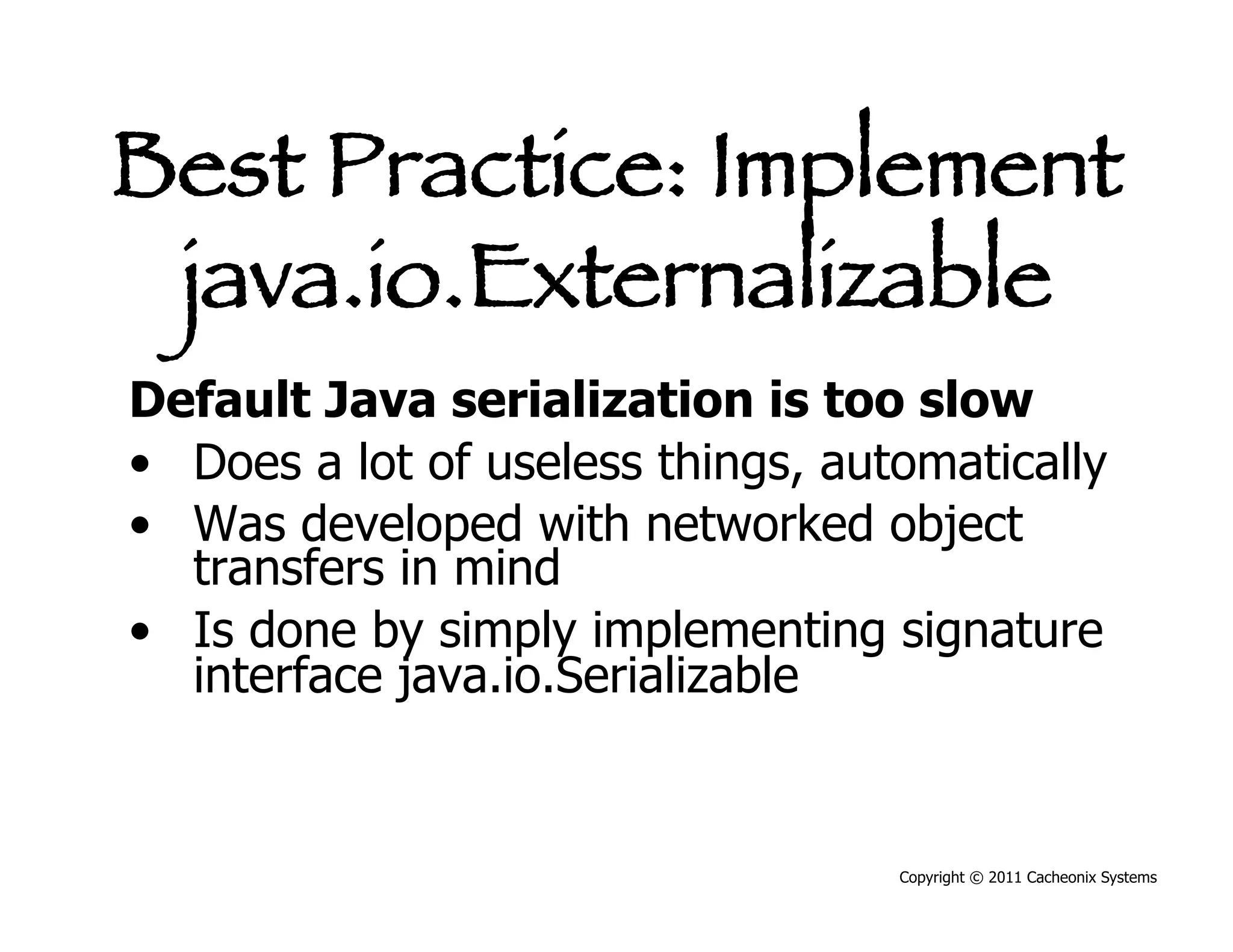
Best Practice: Implement
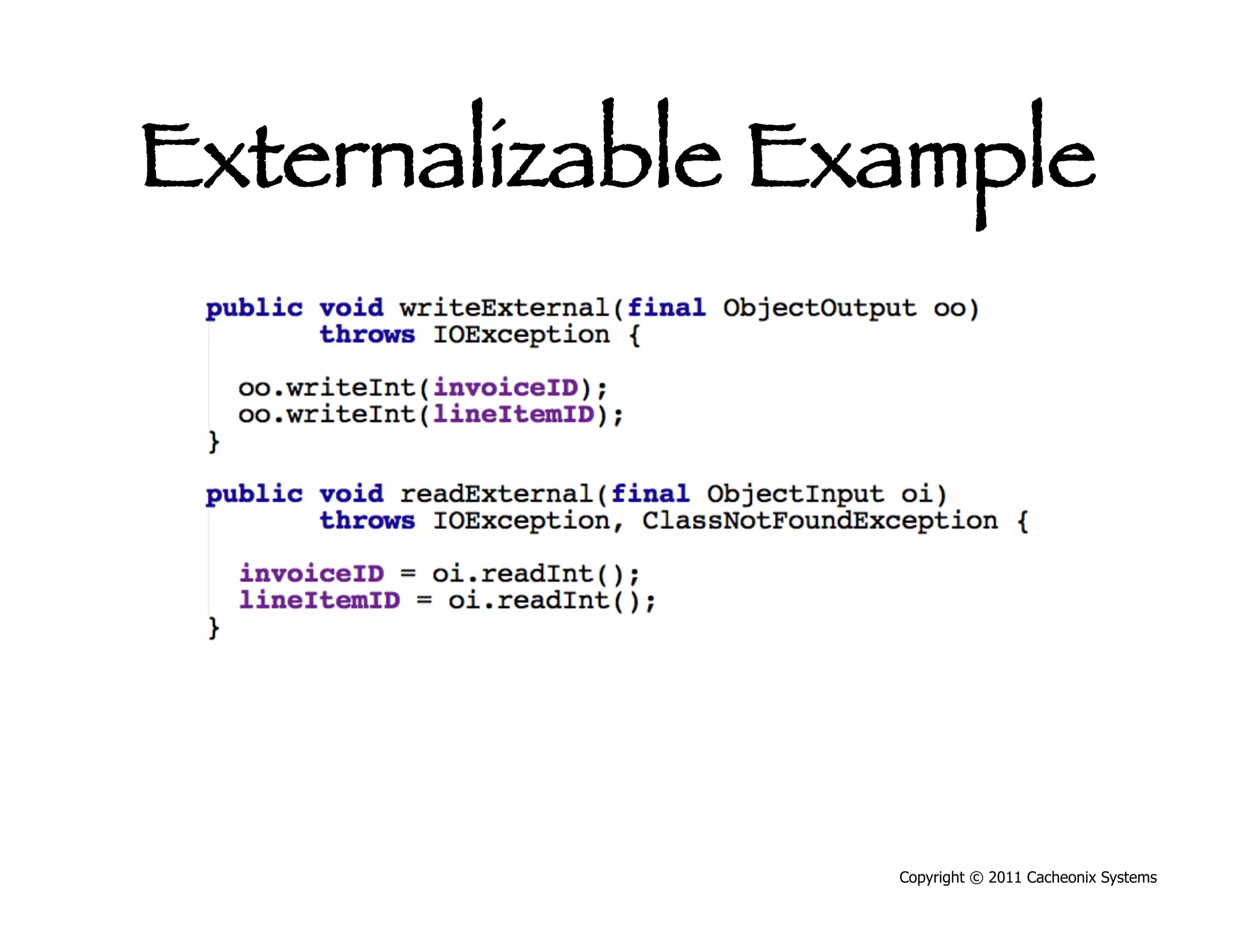
 java.io.Externalizable
Default Java serialization is too slow
•  Does a lot of useless things, automatically
•  Was developed with networked object
   transfers in mind
•  Is done by simply implementing signature
   interface java.io.Serializable


                                    Copyright © 2011 Cacheonix Systems
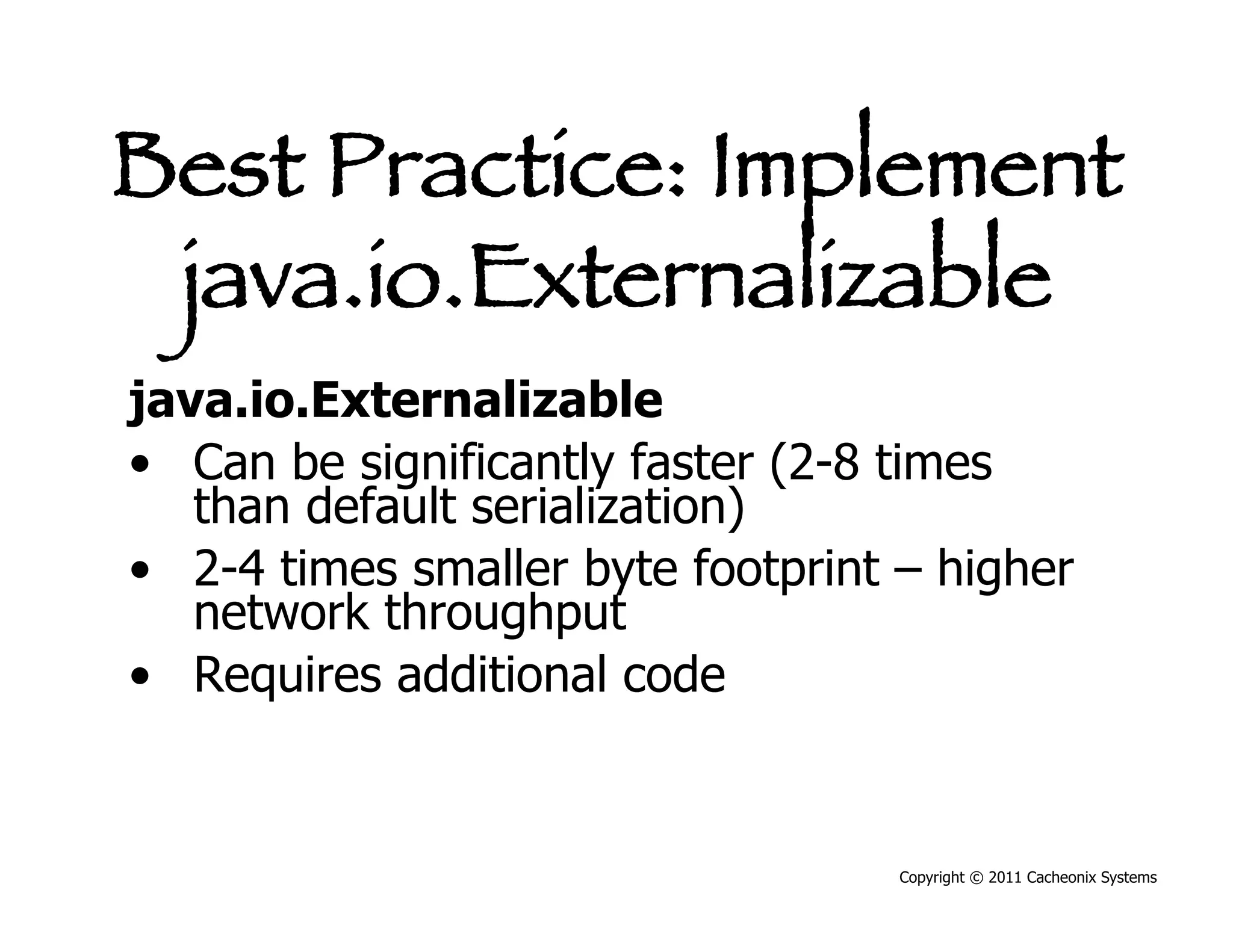
Best Practice: Implement
 java.io.Externalizable
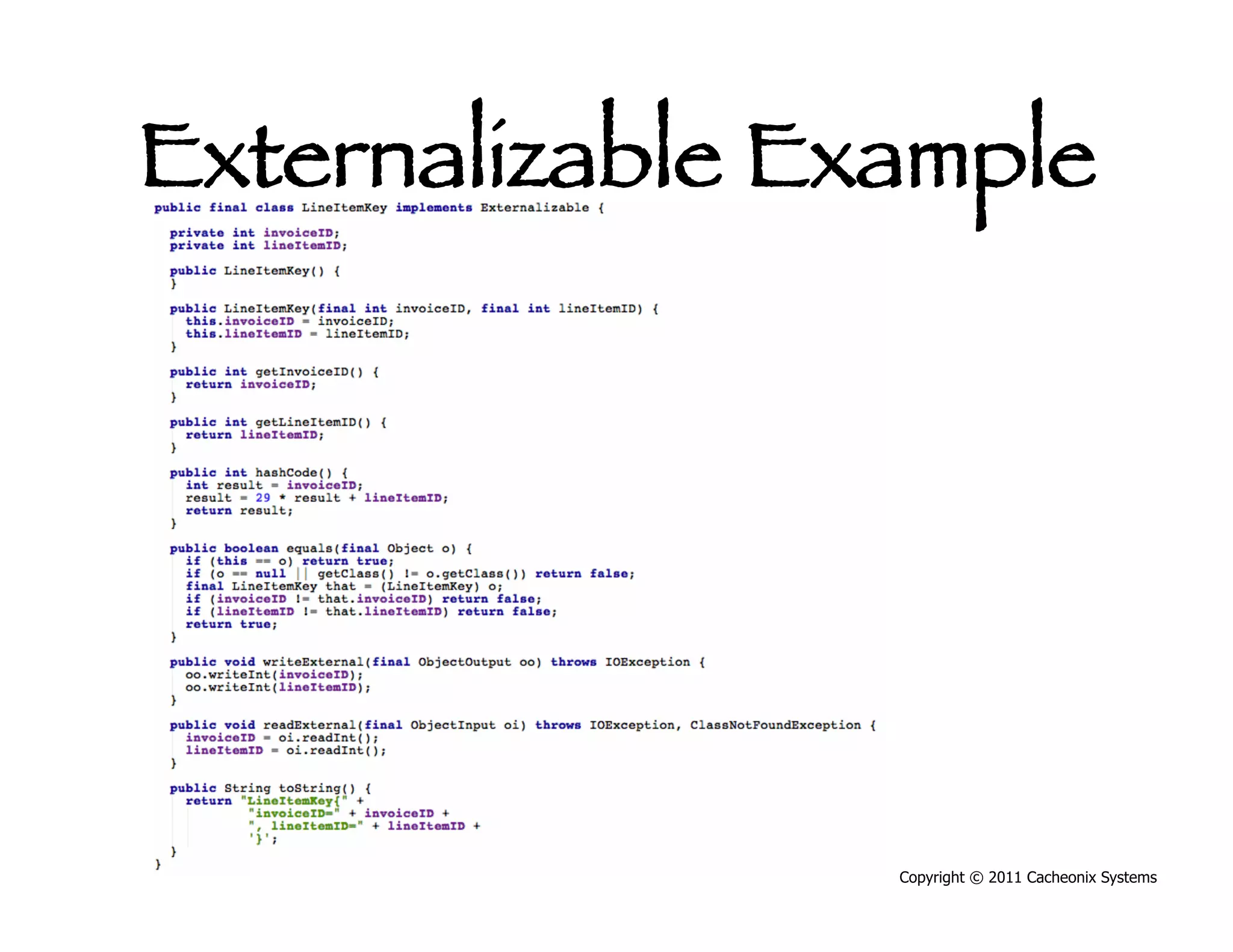
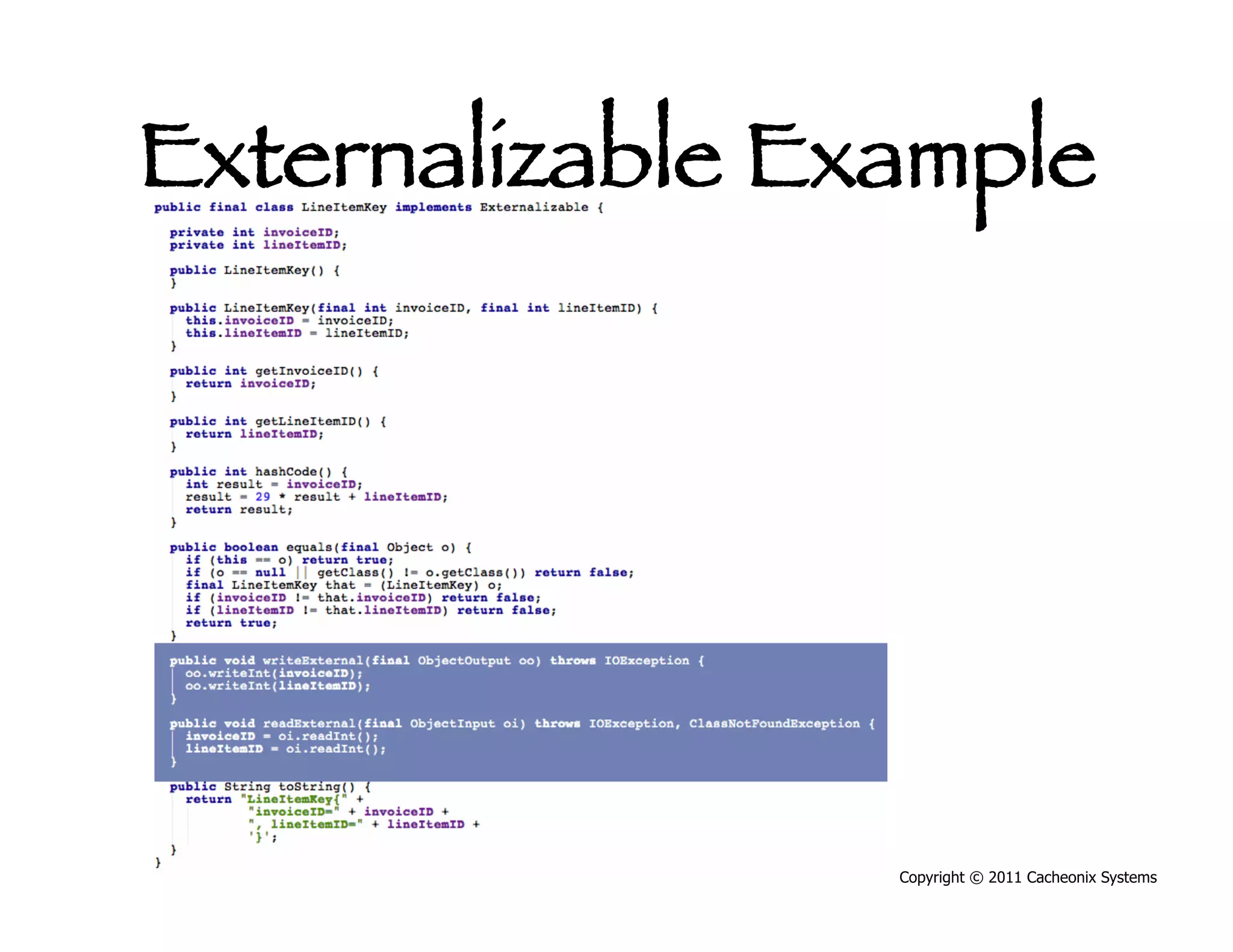
java.io.Externalizable
•  Can be significantly faster (2-8 times
   than default serialization)
•  2-4 times smaller byte footprint – higher
   network throughput
•  Requires additional code


                                   Copyright © 2011 Cacheonix Systems
Externalizable Example


                 Copyright © 2011 Cacheonix Systems
Externalizable Example


                 Copyright © 2011 Cacheonix Systems
Externalizable Example


                 Copyright © 2011 Cacheonix Systems
Best Practice: Test for
    Serializability
•  You must ensure that the object that was
   received at another end is the object that was
   sent
•  Cache keys AND cached values routinely travel
   across the network
•  It is critical to write proper serialization tests
   for keys and values


                                        Copyright © 2011 Cacheonix Systems
Best Practice: Test for
    Serializability
•  Test pattern: Serialize, deserialize, compare


                                       Copyright © 2011 Cacheonix Systems
Best Practice: Test for
    Serializability


                  Copyright © 2011 Cacheonix Systems
Best Practice: Test for
    Serializability


                  Copyright © 2011 Cacheonix Systems
Best Practice: Test for
    Serializability


                  Copyright © 2011 Cacheonix Systems
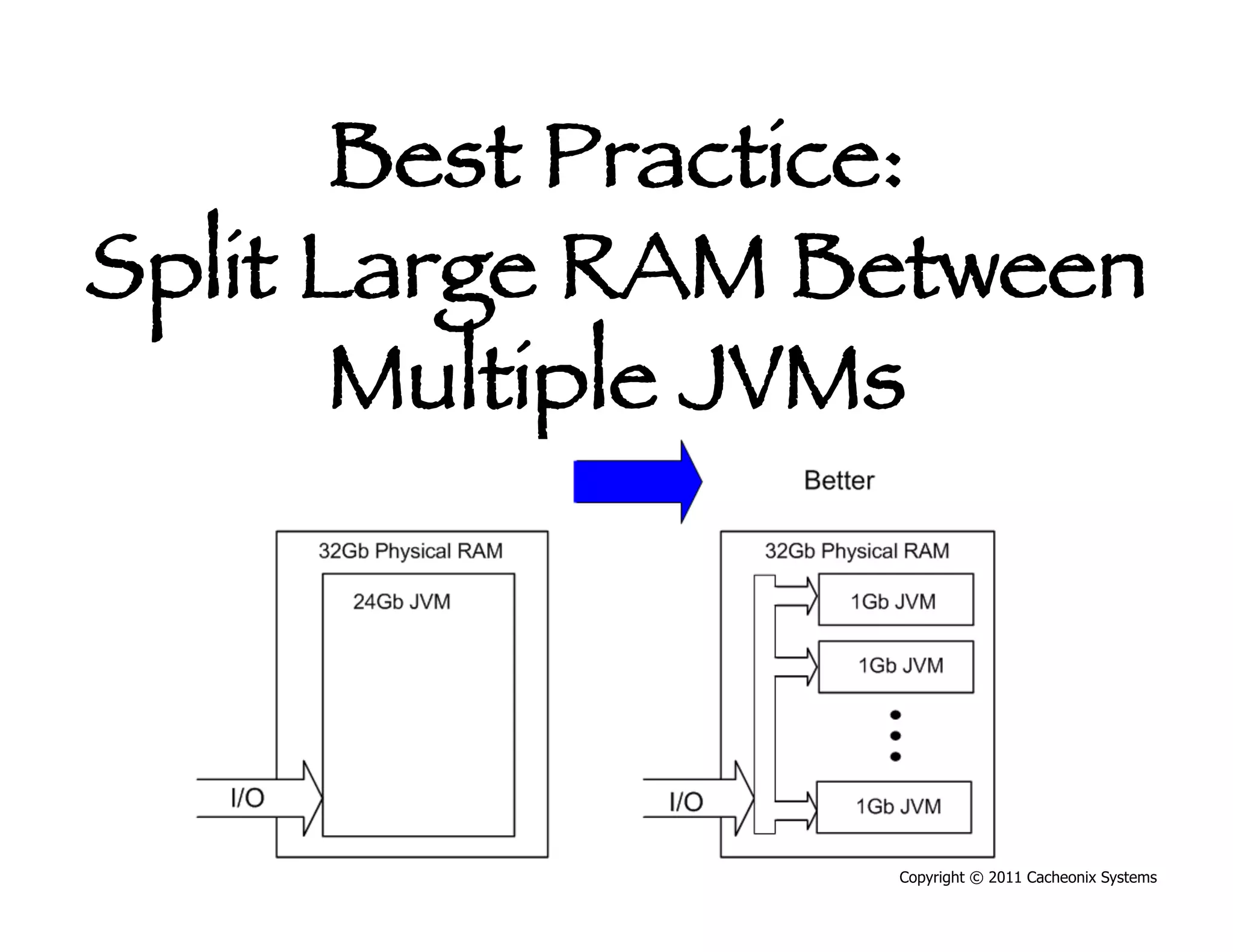
Best Practice:
   Split Large RAM
Between Multiple JVMs
Big fat boxes have become common:
•  8 CPU cores 32Gb RAM
•  All modern 64 bit JVMs support large heaps


                                      Copyright © 2011 Cacheonix Systems
Best Practice:
   Split Large RAM
Between Multiple JVMs
Big fat boxes have become common:
•  8 CPU cores 32Gb RAM
•  All modern 64 bit JVMs support large heaps
Problem:
•  Large heaps mean long major GCs (10s of
   seconds)
•  Cluster nodes seem to appear gone causing
   cluster configuration jitter
                                      Copyright © 2011 Cacheonix Systems
Best Practice:
   Split Large RAM
Between Multiple JVMs
Solution: Split large RAM into multiple 1-2Gb JVMs
•  Distributed caching allows to split data processing
   into many JVMs.
•  Shorter major GCs mean lesser latency and more
   stable cluster
•  Nice side effects such as higher availability, better
   load balancing and improved concurrency

                                         Copyright © 2011 Cacheonix Systems
Best Practice:
Split Large RAM Between
       Multiple JVMs


                 Copyright © 2011 Cacheonix Systems
Problem: Distributed
Caching Adds Network
       Traffic
•  Remote partition access
•  Cache coherency traffic
•  Replication traffic


                             Copyright © 2011 Cacheonix Systems
Problem: Distributed
Caching Adds Network
       Traffic
•  Remote partition access
•  Cache coherency traffic
•  Replication traffic
Cache being on the same network with the
   application leads to:
•  Increased cache access latency
•  Increased application response time

                                   Copyright © 2011 Cacheonix Systems
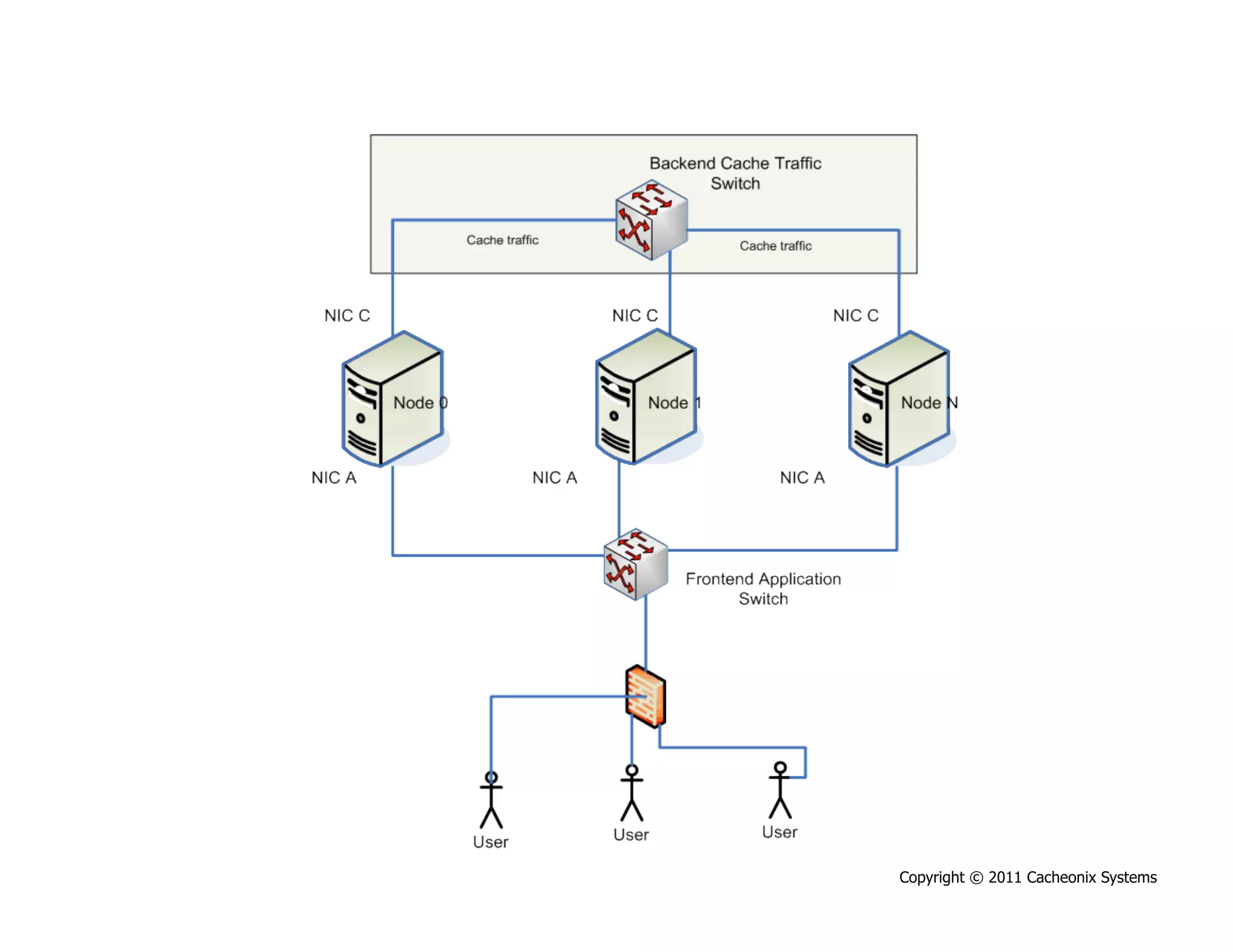
Best Practice:
 Provide Dedicated
Network Infrastructure
Solution: Dedicate separate network to
    distributed cache traffic:
1.  Add a network card. Most of the modern
    rackmount servers already have two NICs
2.  Add a separate switch to serve the
    distributed cache traffic


                                    Copyright © 2011 Cacheonix Systems
Copyright © 2011 Cacheonix Systems
Best Practice: Use
       Multicast
•  Most of modern caching solutions efficiently
   utilize multicast.
•  If done right, multicast provides significant
   reduction in network traffic (~100 of times)


                                       Copyright © 2011 Cacheonix Systems
“Best Practice is
    a technique or
  methodology that,
 through experience
  and research, has
proven to reliably lead
 to a desired result.”
                 Copyright © 2011 Cacheonix Systems
Copyright © 2011 Cacheonix Systems
Q&A
Q: How does replication work in
  Cacheonix? Is it master/slave?
A: Cacheonix replication protocol is more
  advanced then master/slave. In Cacheonix
  every cache node carries a partition that it
  owns, and a set of partition replicas. This
  allows Cacheonix restore operational partition
  from a replica automatically and
  instantaneously.


                                       Copyright © 2011 Cacheonix Systems
Q&A
Q: Does Cacheonix allow to access cached
  data so that some clients see updates in
  progress and some don’t
A: Cacheonix supports this scenario by
  providing distributed reliable read/write locks.
  If the code wants to be shielded from the
  transactions in progress it should access the
  cache inside a lock. Otherwise just read/write
  the data as usual.


                                        Copyright © 2011 Cacheonix Systems
Q&A
Q: So, Cacheonix provides strict data
  consistency when it comes to updates.
  How does it work?
A: Cacheonix builds its data access capability on
  its very sophisticated cluster management
  protocol that allows it to guarantee consistent
  data access even when servers fail, leave or
  join the cluster while keeping latency low.
  Cacheonix supports disabling strict
  consistency for situations when speed is more
  important.
                                       Copyright © 2011 Cacheonix Systems
Q&A
Q: Does Cacheonix provide data grid
  functionality?
A: Cacheonix fully supports operating as a data
  grid where a cache is the only source of
  application data. Cacheonix does so by
  providing DataSource and DataStore APIs
  that it uses as a backed data source for its
  read-through and write-through caches.


                                      Copyright © 2011 Cacheonix Systems
Q&A
Q: How does Cacheonix compare to other
  commercial data grid products?
A: Unlike other products Cacheonix allows to
  utilize multi-core machines fully by running
  each cache in a separate thread. Cacheonix
  offers least time for recovery from server
  failures by making all servers equal, by not
  having a single point of failure. Also,
  Cacheonix offers many unique features that
  are great for developing low-latency systems
  such as coherent local front caches and read-
  ahead caches.
                                      Copyright © 2011 Cacheonix Systems
Q&A
Q: Should I have a single cache or many
  caches?
A: A best practice is to have multiple caches
  that names reflect types values stored in
  them. Usually those are either per-object
  such as my.app.Invoice or per-query such as
  my.app.InoiceQueryResult. Hiberhate requres
  cache names match names of persistent
  objects. This practice provides best
  concurrency Cacheonix as it runs each cache
  in a separate thread.

                                    Copyright © 2011 Cacheonix Systems
Q&A
Q: Aren’t automatic serialization frameworks
   more convenient that implementing
   Externalizable, especially when it comes to
   versioning?
A: First, Externalizable is the closest to wire speed when
   it comes to serialization. Second, even if a
   serialization framework can enforce a cached object
   being a pure value object, there will be hard-to figure
   out production failures associated with different
   versions of the system expecting data and not finding
   it. On the contrary, implementing Externalizable and
   following best practices for production change
   management produces faster and more stable
   system.
                                              Copyright © 2011 Cacheonix Systems
Q&A
Q: I am deploying my application in a
  cloud. How do I know if my cloud
  provider follows best practices?
A: If you are a paying customer, the best way
  to find out is to ask them directly. E-mail, call
  them, or file a request through their web
  support.


                                         Copyright © 2011 Cacheonix Systems
Need help with scaling your application and
 improving its performance with distributed
                  caching?
     Visit us at www.cacheonix.com


                                   Copyright © 2011 Cacheonix Systems
Thank you!


             Copyright © 2011 Cacheonix Systems

Best practices for_scaling_java_applications_with_distributed_caching

  • 1.
    Best Practices for Scaling Java Applications with Distributed Caching Copyright © 2011 Cacheonix Systems
  • 2.
    Introduction Presenter: Slava Imeshev •  Founder at Cacheonix Systems developing reliable clustered cache Cacheonix •  Core expertise in reliable distributed systems •  simeshev@cacheonix.com Copyright © 2011 Cacheonix Systems
  • 3.
    Copyright © 2011Cacheonix Systems
  • 4.
    Definitions Copyright © 2011 Cacheonix Systems
  • 5.
    Performance Number of operationsper unit of time •  Requests per second •  Pages per second •  Transactions per second Performance is not scalability (is 200 pages/s more scalable than 150 pages/s?) Copyright © 2011 Cacheonix Systems
  • 6.
    Scalability Abilityto handle additional load by adding more computational resources •  Vertical scalability •  Horizontal scalability Copyright © 2011 Cacheonix Systems
  • 7.
    Vertical Scalability •  Verticalscalability is handling additional load by adding more power to a single machine •  Vertical scalability is trivial to achieve. Just switch to a faster CPU, add more RAM or replace an HDD with an SSD •  Vertical scalability has a hard limit (2-5 times improvement in capacity) Copyright © 2011 Cacheonix Systems
  • 8.
    Horizontal Scalability •  Horizontalscalability is handling additional load by adding more servers •  Horizontal scalability offers much greater benefit (2-1000 times improvement in capacity) •  Horizontal scalability is much harder to achieve as adding servers requires ensuring data consistency and coherent view of cache updates. Copyright © 2011 Cacheonix Systems
  • 9.
    Scalability Problem Copyright © 2011 Cacheonix Systems
  • 10.
    Normal Situation Copyright © 2011 Cacheonix Systems
  • 11.
    System Cannot Scale • Added 2 more app servers •  Expected x3 increase in capacity •  Got only x2 •  System hit scalability limit •  Database capacity is a bottleneck Copyright © 2011 Cacheonix Systems
  • 12.
    Cache An area oflocal memory that holds a copy of frequently accessed data that is otherwise expensive to get or compute Copyright © 2011 Cacheonix Systems
  • 13.
    Key Cache Parameters • Cache size defines how many elements a cache can hold Copyright © 2011 Cacheonix Systems
  • 14.
    Key Cache Parameters • Cache size defines how many elements a cache can hold •  Cache eviction algorithm defines what to do when the number of elements in cache exceeds the size Copyright © 2011 Cacheonix Systems
  • 15.
    Key Cache Parameters • Cache size defines how many elements a cache can hold •  Cache eviction algorithm defines what to do when the number of elements in cache exceeds the size •  Time-to-live defines time after that a cache key should be remove from the cache (expired) Copyright © 2011 Cacheonix Systems
  • 16.
    Cache Eviction Algorithm LeastRecently Used (LRU) works best •  Catches temporal and spatial locality Copyright © 2011 Cacheonix Systems
  • 17.
    Cache Eviction Algorithm LeastRecently Used (LRU) works best •  Catches temporal and spatial locality Most of other cache algorithms (MRU, LFU, etc) •  Not applicable to most of practical situations •  Subject of cache poisoning •  Expensive from performance point of view Copyright © 2011 Cacheonix Systems
  • 18.
    Cache Types •  Applicationcache •  Second level (L2) cache •  Hybrid cache Copyright © 2011 Cacheonix Systems
  • 19.
    Application Cache Copyright © 2011 Cacheonix Systems
  • 20.
    Level-2 Cache Copyright © 2011 Cacheonix Systems
  • 21.
    Hybrid Cache Copyright © 2011 Cacheonix Systems
  • 22.
    Cache Architectures •  Local • Distributed Copyright © 2011 Cacheonix Systems
  • 23.
    Local Cache •  Allelements are stored in local memory •  Size is limited by a single JVM’s heap Copyright © 2011 Cacheonix Systems
  • 24.
    Distributed Cache •  Cache elements are distributed across a set servers (a cluster) •  Cache size is a sum of cache partitions in case of a partitioned cache •  Cache size can be much bigger than a single Java VM •  Distributed cache can scale horizontally by adding more servers Copyright © 2011 Cacheonix Systems
  • 25.
    Distributed Cache Example (Cacheonix) Copyright © 2011 Cacheonix Systems
  • 26.
    Distributed Cache Important characteristics: • Partitioning for load balancing Copyright © 2011 Cacheonix Systems
  • 27.
    Distributed Cache Important characteristics: • Partitioning for load balancing •  Replication for high availability Copyright © 2011 Cacheonix Systems
  • 28.
    Distributed Cache Important characteristics: • Partitioning for load balancing •  Replication for high availability •  Cache coherence for data consistency Copyright © 2011 Cacheonix Systems
  • 29.
    Distributed Cache Important capabilities: • Partitioning for load balancing •  Replication for high availability •  Cache coherence for data consistency •  Fault tolerance for high availability Not all systems have these capabilities Copyright © 2011 Cacheonix Systems
  • 30.
    Availability and Fault Tolerance Ability to continue to operate despite of failure of members of the cluster •  When applied to distributed caching, HA means an ability to provide uninterrupted, consistent data access Copyright © 2011 Cacheonix Systems
  • 31.
    Copyright © 2011Cacheonix Systems
  • 32.
    Solution to Scalability Problem Copyright © 2011 Cacheonix Systems
  • 33.
    Add Distributed Cache • Bottleneck is removed •  System is reading mostly from the cache •  Distributed cache provides large cache and load balancing Copyright © 2011 Cacheonix Systems
  • 34.
    In-Process Distributed Cache An in-process distributed cache provides memory-like speed and coherent and consistent data access Copyright © 2011 Cacheonix Systems
  • 35.
    Copyright © 2011Cacheonix Systems
  • 36.
    Copyright © 2011Cacheonix Systems
  • 37.
    Best Practices Copyright © 2011 Cacheonix Systems
  • 38.
    Best Practice: ScaleOut by Adding More Servers More cache nodes means: •  Smaller partition size •  Lesser node traffic •  Reduced load •  Smaller GC delays •  Higher availability Copyright © 2011 Cacheonix Systems
  • 39.
    Best Practice: ScaleOut by Adding More Servers More cache nodes means: •  Bigger distributed cache •  Better performance Copyright © 2011 Cacheonix Systems
  • 40.
    Best Practice: Designfor Scalability Upfront •  Design for scalability won’t emerge on its own •  Design for loads the worst case x10 •  Accommodate going distributed •  Good designs are easy to optimize Copyright © 2011 Cacheonix Systems
  • 41.
    Best Practice: Optimize beforeCaching Optimize late: •  Avoid premature optimization •  Profile using a decent profiler. We prefer JProfiler •  Grow a local profiling expert •  Use synthetic point load tests •  Run realistic end-to-end load tests Copyright © 2011 Cacheonix Systems
  • 42.
    Best Practice: Automate Problem Detection Automate detection of performance problems: •  PMD •  FindBugs •  KlocWork Copyright © 2011 Cacheonix Systems
  • 43.
    Best Practice: StayLocal before Going Distributed •  Scale vertically first (better CPU, more RAM) Copyright © 2011 Cacheonix Systems
  • 44.
    Best Practice: StayLocal before Going Distributed •  Scale vertically first (better CPU, more RAM) •  Go distributed only when opportunities for vertical scalability are completely exhausted Copyright © 2011 Cacheonix Systems
  • 45.
    Best Practice: StayLocal before Going Distributed •  Scale vertically first (better CPU, more RAM) •  Go distributed only when opportunities for vertical scalability are completely exhausted •  A distributed cache is slower than a local one because it must use network I/O and more CPU to maintain coherence, partitioning and replication Copyright © 2011 Cacheonix Systems
  • 46.
    Best Practice: StayLocal before Going Distributed •  Scale vertically first (better CPU, more RAM) •  Go distributed only when opportunities for vertical scalability are completely exhausted •  A distributed cache is slower than a local one because it must use network I/O and more CPU to maintain coherence, partitioning and replication •  Distributed systems require additional configuration, testing and network infrastructure. Copyright © 2011 Cacheonix Systems
  • 47.
    Best Practice: StayLocal before Going Distributed •  Scale vertically first (better CPU, more RAM) •  Go distributed only when opportunities for vertical scalability are completely exhausted •  A distributed cache is slower than a local one because it must use network I/O and more CPU to maintain coherence, partitioning and replication •  Distributed systems require additional configuration, testing and network infrastructure. •  There are some licensing costs associated with distributed caching solutions that work Copyright © 2011 Cacheonix Systems
  • 48.
    Best Practice: CacheRight Objects Cache objects that are expensive to get •  Results of database queries •  I/O •  XML •  XSL Copyright © 2011 Cacheonix Systems
  • 49.
    Best Practice: CacheRight Objects Cache objects that are expensive to get •  Results of database queries •  I/O •  XML •  XSL Cache objects that are read-mostly •  Guarantees high hit/miss ratio and •  Low cache maintenance and •  Low cache coherence and replication costs Copyright © 2011 Cacheonix Systems
  • 50.
    Antipattern: “Cache Them All” Don’t cache objects that are easy to get: •  Caching makes them harder to get •  Caching complicates design and implementation Copyright © 2011 Cacheonix Systems
  • 51.
    Antipattern: “Cache Them All” Don’t cache objects that are easy to get: •  Caching makes them harder to get •  Caching complicates design and implementation Don’t cache write-mostly objects: •  Little to no benefit •  Cache maintenance becomes an expense Copyright © 2011 Cacheonix Systems
  • 52.
    Copyright © 2011Cacheonix Systems
  • 53.
    Copyright © 2011Cacheonix Systems
  • 54.
    Best Practice: Implement java.io.Externalizable Default Java serialization is too slow •  Does a lot of useless things, automatically •  Was developed with networked object transfers in mind •  Is done by simply implementing signature interface java.io.Serializable Copyright © 2011 Cacheonix Systems
  • 55.
    Best Practice: Implement java.io.Externalizable java.io.Externalizable •  Can be significantly faster (2-8 times than default serialization) •  2-4 times smaller byte footprint – higher network throughput •  Requires additional code Copyright © 2011 Cacheonix Systems
  • 56.
    Externalizable Example Copyright © 2011 Cacheonix Systems
  • 57.
    Externalizable Example Copyright © 2011 Cacheonix Systems
  • 58.
    Externalizable Example Copyright © 2011 Cacheonix Systems
  • 59.
    Best Practice: Testfor Serializability •  You must ensure that the object that was received at another end is the object that was sent •  Cache keys AND cached values routinely travel across the network •  It is critical to write proper serialization tests for keys and values Copyright © 2011 Cacheonix Systems
  • 60.
    Best Practice: Testfor Serializability •  Test pattern: Serialize, deserialize, compare Copyright © 2011 Cacheonix Systems
  • 61.
    Best Practice: Testfor Serializability Copyright © 2011 Cacheonix Systems
  • 62.
    Best Practice: Testfor Serializability Copyright © 2011 Cacheonix Systems
  • 63.
    Best Practice: Testfor Serializability Copyright © 2011 Cacheonix Systems
  • 64.
    Best Practice: Split Large RAM Between Multiple JVMs Big fat boxes have become common: •  8 CPU cores 32Gb RAM •  All modern 64 bit JVMs support large heaps Copyright © 2011 Cacheonix Systems
  • 65.
    Best Practice: Split Large RAM Between Multiple JVMs Big fat boxes have become common: •  8 CPU cores 32Gb RAM •  All modern 64 bit JVMs support large heaps Problem: •  Large heaps mean long major GCs (10s of seconds) •  Cluster nodes seem to appear gone causing cluster configuration jitter Copyright © 2011 Cacheonix Systems
  • 66.
    Best Practice: Split Large RAM Between Multiple JVMs Solution: Split large RAM into multiple 1-2Gb JVMs •  Distributed caching allows to split data processing into many JVMs. •  Shorter major GCs mean lesser latency and more stable cluster •  Nice side effects such as higher availability, better load balancing and improved concurrency Copyright © 2011 Cacheonix Systems
  • 67.
    Best Practice: Split LargeRAM Between Multiple JVMs Copyright © 2011 Cacheonix Systems
  • 68.
    Problem: Distributed Caching AddsNetwork Traffic •  Remote partition access •  Cache coherency traffic •  Replication traffic Copyright © 2011 Cacheonix Systems
  • 69.
    Problem: Distributed Caching AddsNetwork Traffic •  Remote partition access •  Cache coherency traffic •  Replication traffic Cache being on the same network with the application leads to: •  Increased cache access latency •  Increased application response time Copyright © 2011 Cacheonix Systems
  • 70.
    Best Practice: ProvideDedicated Network Infrastructure Solution: Dedicate separate network to distributed cache traffic: 1.  Add a network card. Most of the modern rackmount servers already have two NICs 2.  Add a separate switch to serve the distributed cache traffic Copyright © 2011 Cacheonix Systems
  • 71.
    Copyright © 2011Cacheonix Systems
  • 72.
    Best Practice: Use Multicast •  Most of modern caching solutions efficiently utilize multicast. •  If done right, multicast provides significant reduction in network traffic (~100 of times) Copyright © 2011 Cacheonix Systems
  • 73.
    “Best Practice is a technique or methodology that, through experience and research, has proven to reliably lead to a desired result.” Copyright © 2011 Cacheonix Systems
  • 74.
    Copyright © 2011Cacheonix Systems
  • 75.
    Q&A Q: How doesreplication work in Cacheonix? Is it master/slave? A: Cacheonix replication protocol is more advanced then master/slave. In Cacheonix every cache node carries a partition that it owns, and a set of partition replicas. This allows Cacheonix restore operational partition from a replica automatically and instantaneously. Copyright © 2011 Cacheonix Systems
  • 76.
    Q&A Q: Does Cacheonixallow to access cached data so that some clients see updates in progress and some don’t A: Cacheonix supports this scenario by providing distributed reliable read/write locks. If the code wants to be shielded from the transactions in progress it should access the cache inside a lock. Otherwise just read/write the data as usual. Copyright © 2011 Cacheonix Systems
  • 77.
    Q&A Q: So, Cacheonixprovides strict data consistency when it comes to updates. How does it work? A: Cacheonix builds its data access capability on its very sophisticated cluster management protocol that allows it to guarantee consistent data access even when servers fail, leave or join the cluster while keeping latency low. Cacheonix supports disabling strict consistency for situations when speed is more important. Copyright © 2011 Cacheonix Systems
  • 78.
    Q&A Q: Does Cacheonixprovide data grid functionality? A: Cacheonix fully supports operating as a data grid where a cache is the only source of application data. Cacheonix does so by providing DataSource and DataStore APIs that it uses as a backed data source for its read-through and write-through caches. Copyright © 2011 Cacheonix Systems
  • 79.
    Q&A Q: How doesCacheonix compare to other commercial data grid products? A: Unlike other products Cacheonix allows to utilize multi-core machines fully by running each cache in a separate thread. Cacheonix offers least time for recovery from server failures by making all servers equal, by not having a single point of failure. Also, Cacheonix offers many unique features that are great for developing low-latency systems such as coherent local front caches and read- ahead caches. Copyright © 2011 Cacheonix Systems
  • 80.
    Q&A Q: Should Ihave a single cache or many caches? A: A best practice is to have multiple caches that names reflect types values stored in them. Usually those are either per-object such as my.app.Invoice or per-query such as my.app.InoiceQueryResult. Hiberhate requres cache names match names of persistent objects. This practice provides best concurrency Cacheonix as it runs each cache in a separate thread. Copyright © 2011 Cacheonix Systems
  • 81.
    Q&A Q: Aren’t automaticserialization frameworks more convenient that implementing Externalizable, especially when it comes to versioning? A: First, Externalizable is the closest to wire speed when it comes to serialization. Second, even if a serialization framework can enforce a cached object being a pure value object, there will be hard-to figure out production failures associated with different versions of the system expecting data and not finding it. On the contrary, implementing Externalizable and following best practices for production change management produces faster and more stable system. Copyright © 2011 Cacheonix Systems
  • 82.
    Q&A Q: I amdeploying my application in a cloud. How do I know if my cloud provider follows best practices? A: If you are a paying customer, the best way to find out is to ask them directly. E-mail, call them, or file a request through their web support. Copyright © 2011 Cacheonix Systems
  • 83.
    Need help withscaling your application and improving its performance with distributed caching? Visit us at www.cacheonix.com Copyright © 2011 Cacheonix Systems
  • 84.
    Thank you! Copyright © 2011 Cacheonix Systems