WordPress Playground now loads GutenbergGutenbergThe Gutenberg project is the new Editor Interface for WordPress. The editor improves the process and experience of creating new content, making writing rich content much simpler. It uses ‘blocks’ to add richness rather than shortcodes, custom HTML etc. https://wordpress.org/gutenberg/ development branches directly in your browser. Test the latest trunk changes or explore feature branches without creating a pull request or setting up a local environment.
This solves a common challenge: testing bleeding-edge Gutenberg development typically requires cloning repositories, running build scripts, and managing local installations. Now you can skip all that.
Why does this matter?
New features land trunk daily, and experimental work occurs in feature branches before being merged into pull requests. Previously, you could only preview specific PRs in Playground, and now you can preview any branch.
This opens new possibilities:
Test the Gutenberg trunk branch to catch issues before they reach release.
Explore Gutenberg experimental features and fixes before they’re merged.
How do you preview branches?
Playground introduces two new Query API parameters gutenberg-branch. Add them to your Playground URLURLA specific web address of a website or web page on the Internet, such as a website’s URL www.wordpress.org to load specific branches.
Preview Gutenberg trunk or a specific feature branch:
Pull request previewing still works exactly as before for Gutenberg and WordPress coreCoreCore is the set of software required to run WordPress. The Core Development Team builds WordPress.. If you know the PR number, use:
When you preview a branch, Playground loads the latest available build artifact from GitHubGitHubGitHub is a website that offers online implementation of git repositories that can easily be shared, copied and modified by other developers. Public repositories are free to host, private repositories require a paid subscription. GitHub introduced the concept of the ‘pull request’ where code changes done in branches by contributors can be reviewed and discussed before being merged be the repository owner. https://github.com/ Actions. If GitHub Actions is still building the most recent commit, Playground uses the next available build. This means you might see changes from a few commits back, not the absolute latest code. This approach strikes a balance between freshness and reliability.
This feature works anywhere you use the Playground Query APIAPIAn API or Application Programming Interface is a software intermediary that allows programs to interact with each other and share data in limited, clearly defined ways., ideally, for testing and bug reporting. The playground can be embedded for educational purposes in future releases. For example, if you’re documenting a new Gutenberg feature still in trunk, link directly to a Playground instance that demonstrates it.
Start testing today
The WordPress and Gutenberg teams constantly ship improvements. With branch previewing, you can explore these changes the moment they merge, report issues early, and contribute to WordPress development—all from your browser.
The WordPress Playground CLICLICommand Line Interface. Terminal (Bash) in Mac, Command Prompt in Windows, or WP-CLI for WordPress. version 3.0.20 is live! This update introduces powerful new PHPPHPPHP (recursive acronym for PHP: Hypertext Preprocessor) is a widely-used open source general-purpose scripting language that is especially suited for web development and can be embedded into HTML. https://www.php.net/manual/en/preface.php. extensions (ImageMagick, SOAP, and AVIF GD Support) that enhance the capabilities of your in-browser WordPress instances, making the playground compatible with plugins and themes that utilize these extensions. Let’s dive into what’s new.
ImageMagick: Your All-in-One Image Processing
Many developers rely on ImageMagick for advanced image manipulation, and now you can use it directly within WordPress Playground. The new ImageMagick extension supports a wide range of formats, including: JPG, PNG, GIF, WEBP (for PHP 8.0 and newer).
This addition increases the PHP bundle size by approximately 4.39MB, a worthwhile trade-off for the power and flexibility it provides. We are also exploring the possibility of shipping ImageMagick in the browser in the future for even better performance.
SOAP Extension: Connecting to Web Services Made Easy
The SOAP extension now supports all PHP builds, allowing you to connect your Playground instances to SOAP-based web services.
Getting started is simple. Here’s a quick example of how you can use the SOAP client to convert temperatures:
<?php
try {
    // Create SOAP client that in theory Convert Celsius to Fahrenheit
    $client = new SoapClient('<your SOAP endpoint>');

    // Submit the values to the client
    $celsius = 25;
    $params = array('Celsius' => $celsius);
    $response = $client->CelsiusToFahrenheit($params);

    echo "Input: {$celsius}°C\n";
    echo "Result: {$response->CelsiusToFahrenheitResult}°F\n";

} catch (SoapFault $e) {
    echo "SOAP Error: " . $e->getMessage() . "\n";
} catch (Exception $e) {
    echo "Error: " . $e->getMessage() . "\n";
}
In the previous version of @wp-playground/cli, this code, it triggered a Fatal Error, and now it executes successfully.
AVIF Support in the GD Extension
The GD extension in WordPress Playground now supports AVIF (AV1 Image File Format) for PHP 8.1 and newer. This enables you to convert images to and from the AVIF format, which provides higher compression, smaller file sizes compared to JPEG, and also supports transparency.
Now WordPress Playground compiles the libaom (AV1 codec) and libavif libraries (version 0.8.2) to WebAssembly, this is a significant technical achievement that brings modern image processing directly to your browser.
Two new functions are available for builders on WordPress Playground from the GD extension:
imagecreatefromavif: Reads an AVIF image and returns a GdImage instance for manipulation.
imageavi:Outputs or saves an image in AVIF format. With the possibility of setting quality and speed compression as parameters.
<?php
// Load JPEG image
$image = imagecreatefromjpeg('photo.jpg');

// Save as AVIF with custom quality
imageavif($image, 'photo.avif', quality: 85);

// Clean up
imagedestroy($image);

echo "Converted photo.jpg to photo.avif\n";
Conclusion
These additions enhance the WordPress Playground’s compatibility with a broader range of plugins and themes. Is there another pluginPluginA plugin is a piece of software containing a group of functions that can be added to a WordPress website. They can extend functionality or add new features to your WordPress websites. WordPress plugins are written in the PHP programming language and integrate seamlessly with WordPress. These can be free in the WordPress.org Plugin Directory https://wordpress.org/plugins/ or can be cost-based plugin from a third-party you feel is essential to the WordPress ecosystem? Please let us know in the comments.
To use the WordPress Playground’s latest version, run the command:
The CoreCoreCore is the set of software required to run WordPress. The Core Development Team builds WordPress. Team will release WordPress 6.9 in early December. Before that happens, the project is in the testing phase, and the Core Team needs you! The #core-test team is currently focused on testing the latest Release Candidate (RC) version, and we encourage everyone in the community to jump in and contribute.
Sometimes, users think that to contribute to the WordPress Core, they need to be highly skilled developers. But the WordPress project also needs contributors for documentation, translation, design, and testing.
Why is this testing phase so important?
This is where we identify and resolve those final issues, uncover unexpected bugs, and refine new features before releasing them to millions of websites.
WordPress powers more than 40%, which requires extensive testing. Your testing helps millions of WordPress sites.
How You Can Contribute
You don’t need to be a technical person or a seasoned developer to help. We need people with diverse views and varying levels of experience to test the new UIUIUI is an acronym for User Interface - the layout of the page the user interacts with. Think ‘how are they doing that’ and less about what they are doing. and features, providing valuable real-world feedback.
To help, navigate to the WordPress Playground at https://playground.wordpress.net?wp=beta, which will open the latest release candidateRelease CandidateA beta version of software with the potential to be a final product, which is ready to release unless significant bugs emerge. version. WordPress Playground will provide a temporary environment in which you can test without fear of making mistakes.
WordPress 6.9 includes these features:
Notes: Add annotations within the editor
BlockBlockBlock is the abstract term used to describe units of markup that, composed together, form the content or layout of a webpage using the WordPress editor. The idea combines concepts of what in the past may have achieved with shortcodes, custom HTML, and embed discovery into a single consistent API and user experience. visibility controls: Hide specific blocks from the inserter
Command Palette: Keyboard shortcuts available everywhere
PluginPluginA plugin is a piece of software containing a group of functions that can be added to a WordPress website. They can extend functionality or add new features to your WordPress websites. WordPress plugins are written in the PHP programming language and integrate seamlessly with WordPress. These can be free in the WordPress.org Plugin Directory https://wordpress.org/plugins/ or can be cost-based plugin from a third-party and Themes Testing
If you are a site owner or plugin developer, this is an opportunity to test if your plugins and themes are compatible with the new version of WordPress. So, install your plugins and themes on the WordPress Playground by adding URLURLA specific web address of a website or web page on the Internet, such as a website’s URL www.wordpress.org parameters:
If you encounter any issues but aren’t sure if it’s a bug or where to report the problem, share them on the WordPress alpha/beta forums. If you are confident that you have found a bug in WordPress Alpha/BetaBetaA pre-release of software that is given out to a large group of users to trial under real conditions. Beta versions have gone through alpha testing in-house and are generally fairly close in look, feel and function to the final product; however, design changes often occur as part of the process./RCRelease CandidateA beta version of software with the potential to be a final product, which is ready to release unless significant bugs emerge., report it on Core Trac for rollback auto-updates and the Gutenberg GitHub repository for every other feature.
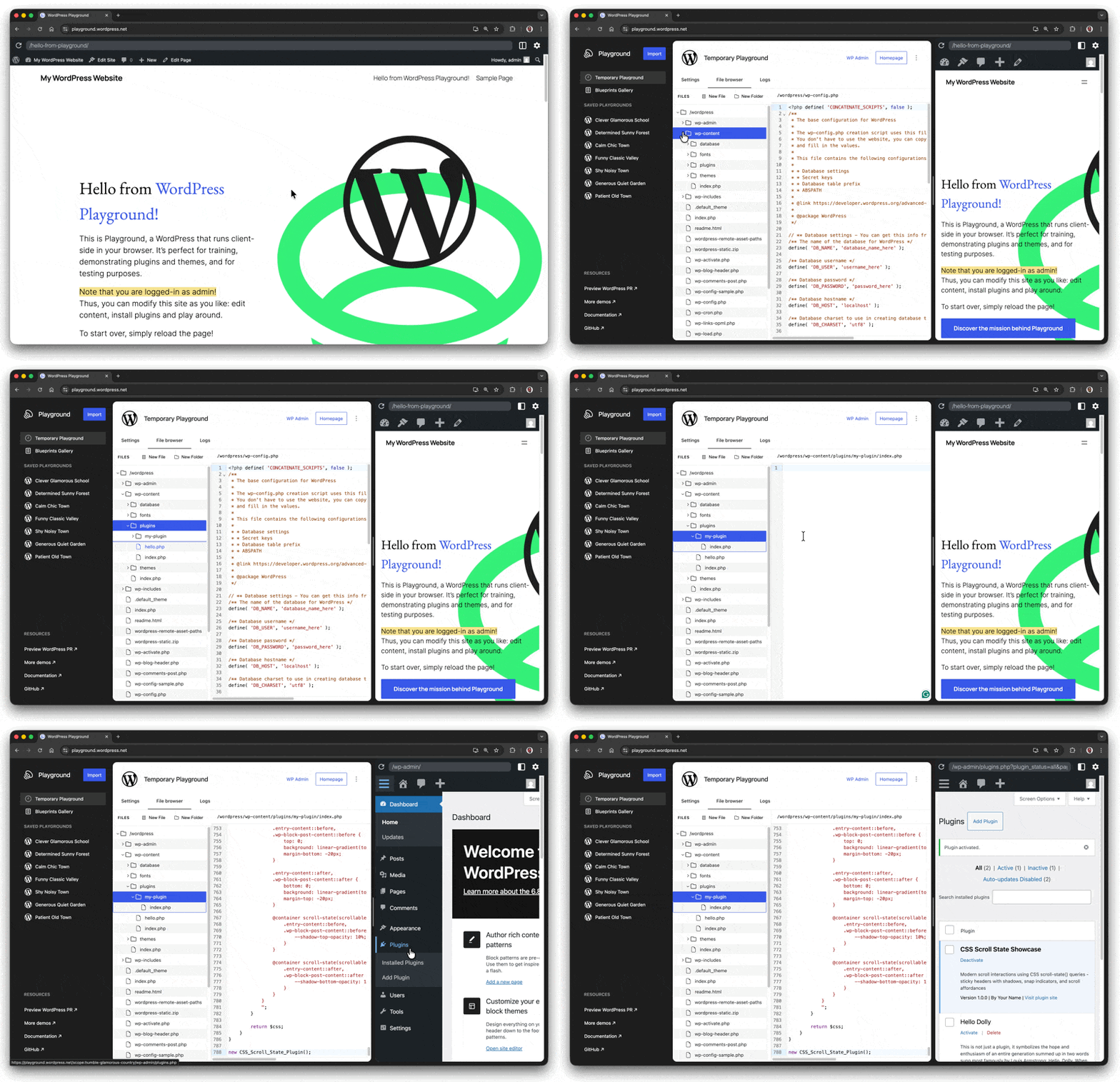
WordPress Playground now includes a File Browser that brings your entire development workflow into the browser. Create, edit, and test files directly from your browser, no more zipping and uploading. Additionally, UIUIUI is an acronym for User Interface - the layout of the page the user interacts with. Think ‘how are they doing that’ and less about what they are doing. improvements enable you to organize instances more efficiently and have a better experience when testing content and coding changes.
Coding directly from Playground with the File Browser
Access the File Browser from the Playground manager panel (top-right corner, next to Settings).
File Browser, which shows your complete WordPress file system. Files and folders appear on the left, with a code editor on the right.
Why does that matter? File Browser is a perfect tool for:
Working with plugins and themes
Testing WordPress coreCoreCore is the set of software required to run WordPress. The Core Development Team builds WordPress. PRs
Debugging Blueprints
Browsing and understanding the file structure
Right-click any folder to create, rename, or delete files and folders. Start projects from scratch or modify existing files. This simplifies the process of quickly testing small code snippets or debugging issues directly within the isolated Playground environment.
Enhanced Playground UI and Navigation
Three updates to the UI make Playground easier to use:
Playground Manager Panel Relocation
The Playground configuration panel (which allows you to manage your saved instances and change PHPPHPPHP (recursive acronym for PHP: Hypertext Preprocessor) is a widely-used open source general-purpose scripting language that is especially suited for web development and can be embedded into HTML. https://www.php.net/manual/en/preface.php. and WordPress versions) now appears at the right side of the screen, on the side of the gear icon.
Introducing the Dedicated Refresh Button
One of the key improvements is the addition of a dedicated Refresh button (a circular arrow icon) located near the address bar on the left side.
Why is this important? In a standard browser, clicking the reload button destroys the entire Playground instance and restarts WordPress from scratch. Sometimes you want to do that, but sometimes you just want to reload the page on the Playground instance. The new dedicated refresh button does that, only reloading the content inside the WordPress instance. This preserves your current PHP and WordPress state, allowing you to quickly refresh the page and see visual changes after editing code without needing to restart your environment.
Choosing the name of saved instances
Choose the name of WordPress instances when you save local instances in your browser. This is a useful feature to organize your saved Playground instances.
Try it Out and Give Us Your Feedback!
We encourage everyone to explore the updated WordPress Playground, test these new features, and share your thoughts with us. Your feedback is crucial for making the Playground a better tool for users and developers.
The project merged 30 pull requests covering documentation, translation, the Playground web instance, PHPPHPPHP (recursive acronym for PHP: Hypertext Preprocessor) is a widely-used open source general-purpose scripting language that is especially suited for web development and can be embedded into HTML. https://www.php.net/manual/en/preface.php. WASM, CLICLICommand Line Interface. Terminal (Bash) in Mac, Command Prompt in Windows, or WP-CLI for WordPress., SQLite, and Blueprints.
Recent Updates by Area
Translations: 10 pull requests added new pages in Japanese, French, Spanish, and Portuguese. Props to @shimomura tomoki, @Béryl, @amieiro, and @nilovelez.
Documentation: Deprecated references were removed, and new talks were added to resource pages. Thanks to @Yannick for reviews.
Web Instance: Several improvements shipped thanks to @zieladam and @bpayton:
Ability to define names for saved playgrounds
Improved deployment for self-hosted Playground
SidebarSidebarA sidebar in WordPress is referred to a widget-ready area used by WordPress themes to display information that is not a part of the main content. It is not always a vertical column on the side. It can be a horizontal rectangle below or above the content area, footer, header, or any where in the theme. icon moved to the right side with more meaningful iconography
CLI: Enhanced debug output – the --verbosity=debug flag now prints temporary directories and mount points for better troubleshooting.
PHP-WASM: Documentation added explaining the rationale for php.ini values in wordpress/src/boot.ts.
Increasing MySQLMySQLMySQL is a relational database management system. A database is a structured collection of data where content, configuration and other options are stored. https://www.mysql.com/. compatibility (CHECK constraints, dynamic DB_NAME, column info, INSERT INTO…SET syntax, INFORMATION_SCHEMA tables)
Adding support for MySQL admin tools like phpMyAdmin and Adminer
@fellyph worked on the project overview post, PHP-WASM documentation examples, Xdebug content, and CLI page updates.
@Yannick is implementing step debugging with PHP.wasm and Playground CLI in PHPStorm and VSCode, with support from @bpayton and @zieladam.
Open Floor
The team congratulated @Muryam Sultana on her talk at WordCampWordCampWordCamps are casual, locally-organized conferences covering everything related to WordPress. They're one of the places where the WordPress community comes together to teach one another what they’ve learned throughout the year and share the joy. Learn more. Islamabad and encouraged others interested in speaking at meetups or WordCamps to reach out.
WordPress Playground is more than just the web version—it’s an entire ecosystem spanning from browser-based instances to command-line tools. The challenge of running WordPress in a browser has led to significant improvements for the WordPress ecosystem and the open web itself.
The project includes several supporting tools: JavaScript API, Playground CLI,PHP WASM, SQLite Database Integration pluginPluginA plugin is a piece of software containing a group of functions that can be added to a WordPress website. They can extend functionality or add new features to your WordPress websites. WordPress plugins are written in the PHP programming language and integrate seamlessly with WordPress. These can be free in the WordPress.org Plugin Directory https://wordpress.org/plugins/ or can be cost-based plugin from a third-party, and MySQLMySQLMySQL is a relational database management system. A database is a structured collection of data where content, configuration and other options are stored. https://www.mysql.com/. Parser. These improvements extend beyond WordPress and benefit the broader PHPPHPPHP (recursive acronym for PHP: Hypertext Preprocessor) is a widely-used open source general-purpose scripting language that is especially suited for web development and can be embedded into HTML. https://www.php.net/manual/en/preface.php. ecosystem.
Recent additions like XDebug support for PHP WASM #2408 will help all PHP applications, not just WordPress. Over the past few months, the team has made significant progress in network improvements, performance enhancement, feature parity, and developer experience.
Some new features you may have missed over the past months will be listed in this post.
Growth of the support environment
Many users know the WordPress Playground web instance, but Playground supports many more environments. The project has different layers beyond the web instance. WordPress Studio and Telex are two examples of projects that take advantage of Playground.
Looking at this from a developer perspective, the project consists of several packages that empower developers to use Playground in many areas.
Run WordPress and PHP applications in a Node.js environment
With php-wasm, it is possible to run PHP on your Node.js applications. This opens the door to several applications. Here you can see a quick demo of how to run PHP via WASM:
import express from 'express';
import { PHP } from '@php-wasm/universal';
import { loadNodeRuntime } from '@php-wasm/node';

const app = express();
const php = new PHP(await loadNodeRuntime('8.3'));

// PHP execution middleware
app.use('/php', async (req, res, next) => {
  try {
    const phpScript = req.query.script || 'index.php';
    const result = await php.runStream({
      scriptPath: `/www/${phpScript}`,
      env: {
        REQUEST_METHOD: req.method,
        QUERY_STRING: new URLSearchParams(req.query as Record).toString(),
        REQUEST_URI: req.url,
      },
    });

    res.send(await result.stdoutText);
  } catch (error) {
    next(error);
  }
});

app.listen(3000, () => {
  console.log('Server with PHP support running on port 3000');
});
Run WordPress/PHP applications in the Terminal with Playground CLICLICommand Line Interface. Terminal (Bash) in Mac, Command Prompt in Windows, or WP-CLI for WordPress.
Playground CLI has reached a stable version. The CLI now contains a series of new features to help developers with testing and debugging. With this command, you can start a WordPress instance from the terminal:
cd my-plugin-or-theme-directory
npx @wp-playground/cli server --auto-mount
The --auto-mount parameter makes it operate like the deprecated wp-now, automatically mounting the current directory to the correct location: as a plugin, a theme, or a full WordPress install. That’s a convenient shortcut. Playground CLI also provides a comprehensive set of explicit configuration options for advanced development setups.,
Automated testing integration
PHP-WASM lets you run WordPress tests directly in Node.js. Without Docker, without VMs, without installing PHP, this provides developers with an alternative to traditional CI/CD workflows that require full server setups. By executing PHP directly in your JavaScriptJavaScriptJavaScript or JS is an object-oriented computer programming language commonly used to create interactive effects within web browsers. WordPress makes extensive use of JS for a better user experience. While PHP is executed on the server, JS executes within a user’s browser. https://www.javascript.com/. test environment, you can write faster, more isolated tests that integrate seamlessly with modern testing frameworks.
Here’s an example showing how to integrate PHP WASM with Playwright:
import { test, expect } from '@playwright/test';
import { runCLI, RunCLIArgs, RunCLIServer } from '@wp-playground/cli';

test.describe('set-wordpress-language', () => {
  let cliServer: RunCLIServer;

  test.afterEach(async () => {
    if (cliServer) {
      await cliServer.server.close();
    }
  });

  test('should set WordPress site language to Portuguese (Brazil)', async () => {
    const expectedLanguage = 'pt_BR';

    cliServer = await runCLI({
      command: 'server',
      blueprint: {
        steps: [
          {
            step: 'setSiteLanguage',
            language: 'pt_BR',
          },
        ],
      },
    } as RunCLIArgs);

    // Create a PHP file to check the site language
    await cliServer.playground.writeFile(
      '/wordpress/check-language.php',
      ``
    );

    const response = await cliServer.playground.request({
      url: '/check-language.php',
      method: 'GET',
    });

    expect(response.httpStatusCode).toBe(200);
    expect(response.text.trim()).toBe(expectedLanguage);
  });
});
Help AI agents build your application
Seth Rubenstein recently showcased how Playground enables AI-assisted WordPress development. By integrating WP Playground CLI with GitHubGitHubGitHub is a website that offers online implementation of git repositories that can easily be shared, copied and modified by other developers. Public repositories are free to host, private repositories require a paid subscription. GitHub introduced the concept of the ‘pull request’ where code changes done in branches by contributors can be reviewed and discussed before being merged be the repository owner. https://github.com/ Copilot, they completed four low-priority features in one week—work that would normally take months due to the low priority. The key was allowing the AI agent to test its own code changes using Playground’s auto-mounting feature. The setup includes configuring firewall rules, package.json commands, and a AGENTS.md guide file. This shows how Playground bridges AI code generation with practical WordPress development.
More features coming soon
Some new features are in experimental mode, such as XDebug support and Blueprints V2. You can already test them and share your feedback with the team. Some of that feedback helped to expand the Playground’s use to other areas; for example, recently, the PHP Playground now supports installing Composer packages.
Performance improvements
The versatility of running WordPress anywhere comes with some challenges: a native environment is specialized for the specific use case, while running PHP and the entire WordPress environment on WASM introduces a few additional challenges. Some of those challenges are related to how we need to manage the data on the user side. At the same time, we can also use this to our advantage since it makes fetching data faster because all the data is in RAM.
Support for multiple Workers
Support for multiple workers is now available in Node.js Asyncify builds, enabling network requests to be handled concurrently across multiple, coexisting worker threads. This architectural improvement allows Playground to handle asynchronous operations more efficiently without blocking PHP execution. The multi-worker implementation was delivered through PR #2231 and PR #2317, which added file locking to prevent SQLite database corruption when multiple workers access the duplicate files. The experimental --experimental-multi-worker flag enables this feature in Playground CLI, with the default worker count set to CPU count minus one. PR #2446 created shared filesystem support so workers can see changes made by other workers.
OpCache is enabled by default
The most significant performance enhancement came in July 2025 when OpCache was enabled by default across all Playground instances. OpCache stores compiled PHP code in memory, eliminating repeated file reading and compilation—crucial for closing the performance gap with native environments.
WordPress 6.8 benchmark Results
Testing across WordPress pages showed consistent improvements:
Average response time: 185ms → 108ms (42% faster)
Best improvements: Feed endpoints and REST APIREST APIThe REST API is an acronym for the RESTful Application Program Interface (API) that uses HTTP requests to GET, PUT, POST and DELETE data. It is how the front end of an application (think “phone app” or “website”) can communicate with the data store (think “database” or “file system”) https://developer.wordpress.org/rest-api/. calls (48-54%)
Homepage: 217ms → 148ms (33% improvement)
The OpCache implementation was achieved by adding the --enable-opcache argument to the PHP compilation process, enabled by default. The implementation includes shared-memory support via mmap() and forces Autoconf to recognize emulated shared anonymous memory. Tests show hit rates of approximately 90% or better after the cache warms up, significantly reducing the execution overhead that had been a major criticism of the WASM approach.
Networking Capabilities
In June 2025, Playground enabled network access by default, letting WordPress sites load data from other domains. While there are limitations around supported headers and file sizes, the update makes Playground far more practical for demos, plugin previews, and real-world testing scenarios.
Two major pull requests brought these improvements:
PR #2076 replaced regular fetch() calls with fetchWithCorsProxy(). It first tries a direct fetch; if the browser blocks it, it retries via the proxy.
PR #1926 added a custom TLS 1.2 layer that creates self-signed CA certificates trusted by PHP, runs full TLS handshakes, and uses window.crypto for encryption. This lets PHP functions like file_get_contents() and curl make HTTPSHTTPSHTTPS is an acronym for Hyper Text Transfer Protocol Secure. HTTPS is the secure version of HTTP, the protocol over which data is sent between your browser and the website that you are connected to. The 'S' at the end of HTTPS stands for 'Secure'. It means all communications between your browser and the website are encrypted. This is especially helpful for protecting sensitive data like banking information. requests by performing a controlled man-in-the-middle bridge between PHP’s sockets and browser security rules.
Feature parity
A common misunderstanding about WordPress Playground is that it lacks critical features available in traditional WordPress environments. While some gaps remain, the team has made significant progress over the past year, adding support for key features that developers rely on.
WP Cron support
It’s not widely known, but WP Cron has been supported in Playground since November 2024.
The fix was implemented in PR #2039, which simply removed the network bridge blockBlockBlock is the abstract term used to describe units of markup that, composed together, form the content or layout of a webpage using the WordPress editor. The idea combines concepts of what in the past may have achieved with shortcodes, custom HTML, and embed discovery into a single consistent API and user experience. that had been disabling wp-cron.php requests. The original code path that caused performance issues was no longer running in the problematic Node.js environment after months of architectural improvements. Testing with the WP-Crontrol plugin confirmed that schedules now run as expected in both the web version and CLI version of Playground, with no observable slowdown in request processing.
This improvement directly addresses concerns about plugin compatibility, particularly for plugins that depend on WordPress’s scheduling system. Users who dismissed Playground months ago due to WP Cron limitations will find that this critical feature now works seamlessly.
SQLite Compatibility Issues
SQLite development became a major focus in 2025, with 30 merged pull requests addressing SQL compatibility in WordPress Playground. The breakthrough came from replacing regex-based translation with a complete MySQL parser—one of the most comprehensive parsers outside of mysql-server itself—that generates an Abstract Syntax Tree (AST).
The new architecture includes a pure PHP MySQL lexer, a comprehensive SQL parser, a MySQL-to-SQLite translator with extensive dialect handling, and a MySQL Information Schema emulator. This enables support for complex features like UNION operators, SHOW and DESCRIBE statements, INFORMATION_SCHEMA tables, and table administration commands.
The next-generation SQLite Database Integration plugin demonstrates remarkable progress, passing 99% of WordPress unit tests. The Information Schema emulator plays a big role here, since it provides the MySQL metadata tables that many plugins need. Thanks to that, most WordPress plugins—and database tools such as phpMyAdmin and Adminer—work smoothly in Playground’s SQLite environment.
Additional Feature Parity Improvements
PHP 8.3 became the default version for playground.wordpress.net and Playground CLI in July 2025. This gives you access to the latest language features and performance improvements. XDebug support is now available experimentally, giving developers proper debugging tools for PHP applications running in WASM. We’re working on making this feature stable and will announce the official release soon.
Dynamic XDebug loading was introduced for PHP-wasm Node JSPI, followed by experimental devtools support in PHP-wasm CLI and Playground CLI. The XDebug bridge experience was improved in September 2025 with preloading of source files. We’re also working to integrate with Chrome DevTools, which will let you debug PHP in Playground using the same familiar tools you use for JavaScript—including breakpoints, step-through debugging, and variable inspection right in your browser.
Network access limitations have been greatly reduced. Previously, Playground instances required manual setup to access external resources. As of June 2025, networking is enabled by default on playground.wordpress.net, allowing plugins that fetch remote data, connect to APIs, or download assets to function without additional setup. Documentation was updated to reflect this change.
This improvement makes Playground suitable for showing e-commerce plugins, social media integrations, and other network-dependent functionality. Leave in the comments each feature you are excited about.
@fellyph added steps to translate docs using the GitHubGitHubGitHub is a website that offers online implementation of git repositories that can easily be shared, copied and modified by other developers. Public repositories are free to host, private repositories require a paid subscription. GitHub introduced the concept of the ‘pull request’ where code changes done in branches by contributors can be reviewed and discussed before being merged be the repository owner. https://github.com/UIUIUI is an acronym for User Interface - the layout of the page the user interacts with. Think ‘how are they doing that’ and less about what they are doing., making it easier for contributors to participate in the translation efforts.
Team Updates
@janjakes is attending a meetupMeetupAll local/regional gatherings that are officially a part of the WordPress world but are not WordCamps are organized through https://www.meetup.com/. A meetup is typically a chance for local WordPress users to get together and share new ideas and seek help from one another. Searching for ‘WordPress’ on meetup.com will help you find options in your area. and continuing work on a PHPPHPPHP (recursive acronym for PHP: Hypertext Preprocessor) is a widely-used open source general-purpose scripting language that is especially suited for web development and can be embedded into HTML. https://www.php.net/manual/en/preface.php. implementation of the MySQLMySQLMySQL is a relational database management system. A database is a structured collection of data where content, configuration and other options are stored. https://www.mysql.com/. protocol to enable tools like phpMyAdmin to run with SQLite. This requires completing column metadata implementation.
Assisting community members with creating pull requests
Creating a guide for translating with the GitHub UI
Planning for the upcoming Playground meetup
Open Floor
The team discussed several topics:
Documentation preferences: Team members shared documentation they admire from the PHP ecosystem, including Svelte tutorials, VueVueVue (pronounced /vjuː/, like view) is a progressive framework for building user interfaces. https://vuejs.org/. docs, Laravel documentation, and Symfony docs.
AI for PR triage: The team discussed using AI to perform initial triage on pull requests related to translations.
Use cases beyond WordPress: There was interest in showcasing more use cases in documentation that focus on PHP and Node outside the WordPress ecosystem.
Feature idea: @zieladam suggested that https://playground.wordpress.net/php-playground.html could include a file browser and terminal for simple commands like wp user list or composer require, providing a nice way to experiment with PHP packages.
Next Steps
The conversation continues in the #playground Slack Channel. Community members interested in contributing to WordPress Playground can join the discussion there.
The WordPress Playground team held its regular meeting on August 22, 2025, to share project updates, highlight recent contributions, and discuss ongoing work.
Project Updates
Pull Requests: Since the last meeting, 31 pull requests have been closed, with several first-time contributors joining in. Special thanks to @mukesh27, @ravigadhiyawp, and @shailu25 for their first contributions. 🎉
Playground Contributor Badge: So far, 30 members have earned the Playground Contributor Badge. The most recent badge was awarded to @janw.oostendorp. If you have contributed in the past, please submit a request with the related PR link. A dedicated Contributor Badge page is now available.
Documentation assets were reorganized into a unique location to minimize duplication (#2521).
Updates were made to the Playground page (#2504), Blueprints page (#2524), and Translation instructions (#2534).
The Playground landing page has been refreshed with updated information. Feedback is welcome.
Contributor Updates
@rollybueno continued translation work on the Blueprints page, completing four pages with more in progress.
@nikunj8866 is reviewing the Gujarati translation and plans to contribute more soon.
@bpayton worked on improvements and fixes related to PHPPHPPHP (recursive acronym for PHP: Hypertext Preprocessor) is a widely-used open source general-purpose scripting language that is especially suited for web development and can be embedded into HTML. https://www.php.net/manual/en/preface.php. WASM and Playground CLICLICommand Line Interface. Terminal (Bash) in Mac, Command Prompt in Windows, or WP-CLI for WordPress., including the experimental multi-worker feature.
@beryldlg is working on French translations and reviewing previous work for updates.
@Fellyph focused on restructuring documentation, updating metaMetaMeta is a term that refers to the inside workings of a group. For us, this is the team that works on internal WordPress sites like WordCamp Central and Make WordPress. descriptions, and preparing a blog post about E2E testing with Playground.
Open Floor
The team discussed how to improve the translation process.
@aslamdoctor shared that he uses a structured prompt for preparing translations and will share it with the group.
Ideas were raised around documenting translation tips and exploring AI-assisted pre-reviews for translations.
For more information, join our #playground Slack Channel, and see you in our next chat, which is scheduled for September 12th.
The Playground team met on August 8, 2025, to discuss recent updates, ongoing work, and ideas for future improvements.
Announcements
New Contributor Badge – A new Playground Contributor badge is available. Contributors from the Playground or Blueprints repositories can request it via the contributor form. If you have contributed in the past, you’re encouraged to claim your badge.
Translations – Over 40 pages have been translated into Japanese, Tagalog, Portuguese, Gujarati, and Spanish in the last two weeks. Thanks to @shimomura tomoki, @rollybueno, and @nikunj8866 for their efforts.
Community Feedback – Appreciation was shared for everyone reporting issues and contributing to the project’s improvement.
New Features
PHPPHPPHP (recursive acronym for PHP: Hypertext Preprocessor) is a widely-used open source general-purpose scripting language that is especially suited for web development and can be embedded into HTML. https://www.php.net/manual/en/preface.php. Playground – A new PHP Playground is available at playground.wordpress.net/php-playground.html.
Debugging with Xdebug – Bridge DBGP session with CDP server (#2402) allows debugging via DevTools.
Query Monitor PluginPluginA plugin is a piece of software containing a group of functions that can be added to a WordPress website. They can extend functionality or add new features to your WordPress websites. WordPress plugins are written in the PHP programming language and integrate seamlessly with WordPress. These can be free in the WordPress.org Plugin Directory https://wordpress.org/plugins/ or can be cost-based plugin from a third-party Support – Added in #2415.
New Homepage – The Playground web instance now has a new homepage to better guide first-time visitors (#2412). Thanks to @zaerl for the work on this.
External Links Behavior – External URLs now open in a new tab by default (#2468).
Bug Fixes
Highlighted fixes from the past two weeks include:
Fallback to URLURLA specific web address of a website or web page on the Internet, such as a website’s URL www.wordpress.org-based file names when fetching remote ZIP files (#2470).
Updated WordPress old version demo to 6.2.1 (#2460).
Fixed resolving mounted symlinks in secondary PHP instances (#2444).
What We’re Working On
@zieladam – Improving the WordPress importer, addressing Playground bug fixes, and enhancing SQLite/MySQLMySQLMySQL is a relational database management system. A database is a structured collection of data where content, configuration and other options are stored. https://www.mysql.com/. compatibility.
@zaerl – Working on locale-related issues and code cleanup.
@fellyph – Developed the Playground landing page blueprint, worked on badge documentation, cleaned and updated project documentation, and upgraded Docusaurus.
Playground for Testing – The team discussed how Playground could be used to support WordPress coreCoreCore is the set of software required to run WordPress. The Core Development Team builds WordPress. testing and E2E test scenarios. Ideas included CLICLICommand Line Interface. Terminal (Bash) in Mac, Command Prompt in Windows, or WP-CLI for WordPress. commands to test plugins across multiple PHP and WordPress versions, and exploring integration with Playwright.
Playground CLI – Feedback was requested on the transition from wp-now to @wp-playground, including default behavior and flag usage.
For more information, join our #playground Slack Channel, and see you in our next chat, which is scheduled for August 22nd.
The bi-weekly WordPress Playground team meeting on July 25, 2025, focused on recent developments and project updates. A significant number of new features and improvements were announced. The meeting was held on the #playground channel at wordpress.slack.com. Several improvements were implemented on the WordPress Playground Project.
Key Highlights
Performance Improvements: OPCache is now enabled by default. This is a significant change that will significantly improve performance.
Xdebug Support: A lot of work has been done to improve Xdebug support, including a new —experimental-devtools option in the Playground CLICLICommand Line Interface. Terminal (Bash) in Mac, Command Prompt in Windows, or WP-CLI for WordPress. and a mock @php-wasm/xdebug-bridge package. #2411, #2408 and #2402.
Blueprint v2: The team is getting Blueprint v2 ready, with a focus on improving error messages and handling relative paths and Blueprints v2 support was added to Playground CLI via the --experimental-blueprints-v2-runner flag.
CLI Enhancements: New flags have been added to the Playground CLI, along with better error reporting.
PHP 8.3:PHPPHPPHP (recursive acronym for PHP: Hypertext Preprocessor) is a widely-used open source general-purpose scripting language that is especially suited for web development and can be embedded into HTML. https://www.php.net/manual/en/preface.php. 8.3 is now the default version for playground.wordpress.net and Playground CLI.
Localization: Translations have been added for Brazilian Portuguese and Japanese.
Contributor Badge: The team is discussing criteria for earning a contributor badge.
Recent Contributions
bpayton has been working on fixes for mounted symlinks in the CLI, multi-worker performance testing, and other small fixes.
zaerl will be working on a pull request to address issue #2124.
Fellyph Cintra is developing a new landing page for the web instance, documenting new features, and addressing PWA configuration issues.
For more information, join our #playground Slack Channel, and see you in our next chat, which is scheduled for August 8th.